
- Dataflowはフルマネージドのデータ処理サービスで、Apache Beamパイプラインをストリーミング・バッチの両方で実行できる
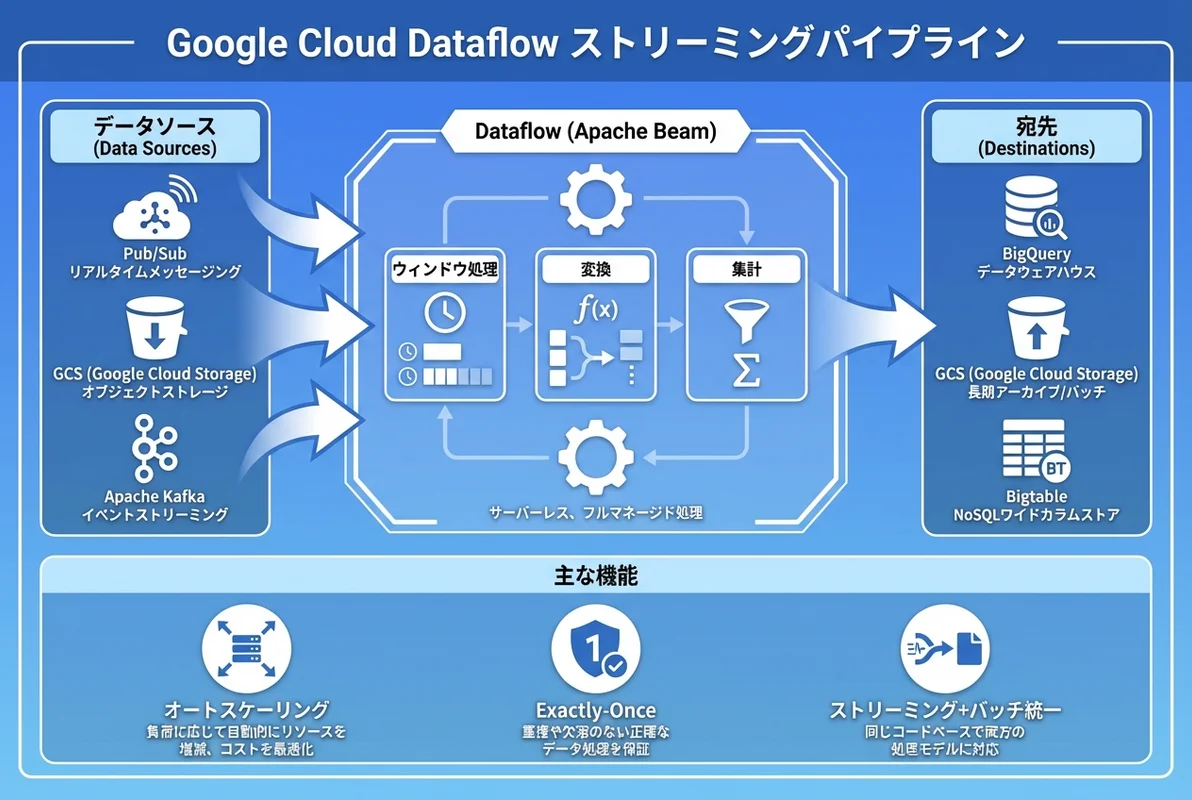
- Pub/Sub→Dataflow→BigQuery のリアルタイムデータパイプラインが代表的なユースケースで、オートスケーリングでインフラ管理不要
- SES市場ではデータエンジニアリングスキルの需要が急増しており、Dataflow経験は月額単価80〜100万円の案件につながる
「リアルタイムデータ処理を実装したいけど、KafkaやSparkの構築・運用が大変すぎる…」 「バッチ処理とストリーミング処理で別々のシステムを作るのは非効率…」
データ量の爆発的な増加に伴い、リアルタイムデータ処理の需要は年々高まっています。Google Cloud Dataflowは、Apache Beamをベースとしたフルマネージドなデータ処理サービスで、同じコードでバッチとストリーミングの両方を処理できます。インフラ管理なしにスケーラブルなデータパイプラインを構築でき、SES現場でのデータエンジニアリング案件で特に重宝されています。
この記事では、Dataflowの基本概念から実践的なパイプライン構築まで、SESエンジニアが現場で即活用できるレベルで解説します。
- Dataflow / Apache Beamの基本概念とアーキテクチャ
- ストリーミング・バッチパイプラインの設計と実装方法
- Pub/Sub→Dataflow→BigQueryのリアルタイムパイプライン構築
- パフォーマンスチューニングとコスト最適化
- SES現場でのデータエンジニアリングスキルの市場価値
Dataflowとは — Apache Beamの実行エンジン
Apache Beamとの関係
Dataflowを理解するには、まずApache Beamとの関係を把握する必要があります。
- Apache Beam: データ処理パイプラインを定義するための統一プログラミングモデル(SDK)
- Dataflow: Apache Beamパイプラインを実行するGoogle Cloudのマネージドランナー
この関係は、SQLとデータベースエンジンの関係に似ています。Apache Beamで書いたパイプラインコードは、Dataflow以外にもApache Spark、Apache Flink、Samza等の別のランナーでも実行できます。ただし、Dataflowとの組み合わせが最もシームレスに動作します。
Dataflowの主な特徴
| 特徴 | 説明 |
|---|---|
| フルマネージド | クラスタ管理不要、ワーカーの起動・停止を自動管理 |
| オートスケーリング | データ量に応じてワーカー数を自動調整 |
| 統一モデル | 同じコードでバッチ・ストリーミングの両方に対応 |
| Exactly-Once処理 | ストリーミングでの重複排除を保証 |
| 動的ワーク再バランシング | 処理の偏りを検出し自動で再分配 |
| Google Cloud連携 | BigQuery, Pub/Sub, GCS, Bigtable等とネイティブ連携 |
他のデータ処理サービスとの比較
| サービス | 種別 | ストリーミング | バッチ | マネージド度 |
|---|---|---|---|---|
| Dataflow | フルマネージド | ◎ | ◎ | ◎ |
| Dataproc(Spark) | セミマネージド | ○ | ◎ | ○ |
| BigQuery | サーバーレス | △(制限あり) | ◎ | ◎ |
| Cloud Composer(Airflow) | ワークフロー管理 | × | ○(オーケストレーション) | ○ |
| AWS Kinesis + EMR | AWS相当 | ○ | ◎ | △ |
Apache Beamの基本概念
パイプラインの構成要素
Apache Beamパイプラインは、以下の4つの基本概念で構成されます。
1. Pipeline(パイプライン): データ処理の全体的なワークフロー
2. PCollection(コレクション): パイプライン内を流れるデータの集合。不変(immutable)で、分散処理される。
3. PTransform(トランスフォーム): PCollectionに対する処理操作。Map, Filter, GroupByKey, Combine等。
4. I/O Transform(入出力): 外部システムとのデータ読み書き。Pub/Sub, BigQuery, GCS等。
データソース → [Read] → PCollection → [Transform] → PCollection → [Write] → 出力先基本パイプラインの実装(Python)
import apache_beam as beam
from apache_beam.options.pipeline_options import PipelineOptions

# パイプラインオプションの設定
options = PipelineOptions([
    '--project=my-project',
    '--region=asia-northeast1',
    '--runner=DataflowRunner',
    '--temp_location=gs://my-bucket/temp',
    '--staging_location=gs://my-bucket/staging',
])

# パイプラインの定義
with beam.Pipeline(options=options) as pipeline:
    (
        pipeline
        | 'Read' >> beam.io.ReadFromText('gs://my-bucket/input/*.csv')
        | 'Parse' >> beam.Map(parse_csv_line)
        | 'Filter' >> beam.Filter(lambda x: x['amount'] > 0)
        | 'Transform' >> beam.Map(enrich_data)
        | 'Write' >> beam.io.WriteToBigQuery(
            'my-project:dataset.table',
            schema='name:STRING,amount:FLOAT,timestamp:TIMESTAMP',
            write_disposition=beam.io.BigQueryDisposition.WRITE_APPEND,
        )
    )
ストリーミングパイプラインの構築
Pub/Sub → Dataflow → BigQuery
最も一般的なストリーミングパイプラインのパターンを実装します。
#!/usr/bin/env python3
"""
リアルタイムイベント処理パイプライン
Pub/Subからイベントを受信 → 変換・集計 → BigQueryに書き込み
"""

import json
import logging
from datetime import datetime

import apache_beam as beam
from apache_beam.options.pipeline_options import PipelineOptions, StandardOptions
from apache_beam.transforms.window import FixedWindows, SlidingWindows
from apache_beam.transforms.trigger import AfterWatermark, AfterProcessingTime, AccumulationMode

logging.basicConfig(level=logging.INFO)


class ParseEventFn(beam.DoFn):
    """Pub/Subメッセージをパースしてイベントオブジェクトに変換"""

    def process(self, element):
        try:
            data = json.loads(element.decode('utf-8'))

            yield {
                'event_id': data['event_id'],
                'user_id': data['user_id'],
                'event_type': data['event_type'],
                'amount': float(data.get('amount', 0)),
                'timestamp': data['timestamp'],
                'properties': json.dumps(data.get('properties', {})),
                'processed_at': datetime.utcnow().isoformat(),
            }
        except (json.JSONDecodeError, KeyError) as e:
            logging.warning(f"Failed to parse event: {e}")
            # デッドレターキューに送信
            yield beam.pvalue.TaggedOutput('dead_letter', {
                'raw': element.decode('utf-8', errors='replace'),
                'error': str(e),
                'timestamp': datetime.utcnow().isoformat(),
            })


class CalculateMetricsFn(beam.DoFn):
    """ウィンドウ内のイベントからメトリクスを計算"""

    def process(self, element, window=beam.DoFn.WindowParam):
        key, events = element
        events_list = list(events)

        total_amount = sum(e['amount'] for e in events_list)
        event_count = len(events_list)

        yield {
            'window_start': window.start.to_utc_datetime().isoformat(),
            'window_end': window.end.to_utc_datetime().isoformat(),
            'event_type': key,
            'event_count': event_count,
            'total_amount': total_amount,
            'avg_amount': total_amount / event_count if event_count > 0 else 0,
        }


def run_streaming_pipeline():
    """ストリーミングパイプラインのメイン処理"""

    options = PipelineOptions([
        '--project=my-project',
        '--region=asia-northeast1',
        '--runner=DataflowRunner',
        '--temp_location=gs://my-bucket/temp',
        '--staging_location=gs://my-bucket/staging',
        '--job_name=event-streaming-pipeline',
        '--max_num_workers=10',
        '--autoscaling_algorithm=THROUGHPUT_BASED',
        '--experiments=enable_streaming_engine',
    ])
    options.view_as(StandardOptions).streaming = True

    with beam.Pipeline(options=options) as pipeline:
        # 1. Pub/Subからイベントを読み込み
        raw_events = (
            pipeline
            | 'ReadPubSub' >> beam.io.ReadFromPubSub(
                topic='projects/my-project/topics/events',
                timestamp_attribute='timestamp',
            )
        )

        # 2. パースと変換(デッドレター付き)
        parsed = (
            raw_events
            | 'ParseEvents' >> beam.ParDo(ParseEventFn())
                .with_outputs('dead_letter', main='events')
        )

        # 3. メインイベントをBigQueryに書き込み(生データ)
        (
            parsed.events
            | 'WriteRawEvents' >> beam.io.WriteToBigQuery(
                'my-project:analytics.raw_events',
                schema={
                    'fields': [
                        {'name': 'event_id', 'type': 'STRING'},
                        {'name': 'user_id', 'type': 'STRING'},
                        {'name': 'event_type', 'type': 'STRING'},
                        {'name': 'amount', 'type': 'FLOAT'},
                        {'name': 'timestamp', 'type': 'TIMESTAMP'},
                        {'name': 'properties', 'type': 'STRING'},
                        {'name': 'processed_at', 'type': 'TIMESTAMP'},
                    ]
                },
                write_disposition=beam.io.BigQueryDisposition.WRITE_APPEND,
                create_disposition=beam.io.BigQueryDisposition.CREATE_IF_NEEDED,
                method='STREAMING_INSERTS',
            )
        )

        # 4. 5分ウィンドウで集計
        (
            parsed.events
            | 'AddTimestamp' >> beam.Map(
                lambda x: beam.window.TimestampedValue(x, x['timestamp'])
            )
            | 'Window5Min' >> beam.WindowInto(
                FixedWindows(5 * 60),  # 5分の固定ウィンドウ
                trigger=AfterWatermark(
                    early=AfterProcessingTime(60),  # 1分ごとに早期発火
                ),
                accumulation_mode=AccumulationMode.ACCUMULATING,
            )
            | 'KeyByEventType' >> beam.Map(lambda x: (x['event_type'], x))
            | 'GroupByKey' >> beam.GroupByKey()
            | 'CalculateMetrics' >> beam.ParDo(CalculateMetricsFn())
            | 'WriteMetrics' >> beam.io.WriteToBigQuery(
                'my-project:analytics.event_metrics_5min',
                schema={
                    'fields': [
                        {'name': 'window_start', 'type': 'TIMESTAMP'},
                        {'name': 'window_end', 'type': 'TIMESTAMP'},
                        {'name': 'event_type', 'type': 'STRING'},
                        {'name': 'event_count', 'type': 'INTEGER'},
                        {'name': 'total_amount', 'type': 'FLOAT'},
                        {'name': 'avg_amount', 'type': 'FLOAT'},
                    ]
                },
                method='STREAMING_INSERTS',
            )
        )

        # 5. デッドレターをGCSに書き出し
        (
            parsed.dead_letter
            | 'WriteDeadLetter' >> beam.io.WriteToText(
                'gs://my-bucket/dead-letter/events',
                file_name_suffix='.json',
            )
        )


if __name__ == '__main__':
    run_streaming_pipeline()
ウィンドウ戦略の選択
ストリーミング処理では、ウィンドウの設計が重要です。
| ウィンドウ種類 | 説明 | ユースケース |
|---|---|---|
| Fixed(固定) | 一定時間ごとに区切る(5分、1時間等) | 定期的な集計レポート |
| Sliding(スライディング) | 重複するウィンドウ(5分幅、1分スライド) | 移動平均、トレンド検出 |
| Session | アクティビティに基づく動的ウィンドウ | ユーザーセッション分析 |
| Global | 全データを1つのウィンドウ | バッチ処理(ストリーミング不向き) |
# スライディングウィンドウ: 5分幅、1分スライド
from apache_beam.transforms.window import SlidingWindows

events | 'SlidingWindow' >> beam.WindowInto(
    SlidingWindows(size=5*60, period=60)
)

# セッションウィンドウ: 30分のギャップでセッション区切り
from apache_beam.transforms.window import Sessions

events | 'SessionWindow' >> beam.WindowInto(
    Sessions(gap_size=30*60)
)
バッチパイプラインの構築
GCS → Dataflow → BigQuery(ETL)
バッチ処理の代表的なパターンとして、CSVファイルのETLパイプラインを実装します。
#!/usr/bin/env python3
"""
日次バッチETLパイプライン
GCSのCSVファイル → 変換・クレンジング → BigQueryにロード
"""

import csv
import io
import logging
from datetime import datetime

import apache_beam as beam
from apache_beam.options.pipeline_options import PipelineOptions

logging.basicConfig(level=logging.INFO)


class ParseCSVFn(beam.DoFn):
    """CSVの各行をパースして辞書に変換"""

    def __init__(self, headers):
        self.headers = headers

    def process(self, element):
        try:
            reader = csv.reader(io.StringIO(element))
            for row in reader:
                if len(row) == len(self.headers):
                    yield dict(zip(self.headers, row))
                else:
                    logging.warning(f"Column count mismatch: {len(row)} vs {len(self.headers)}")
        except Exception as e:
            logging.error(f"CSV parse error: {e}")


class CleanseDataFn(beam.DoFn):
    """データクレンジング"""

    def process(self, element):
        # 必須フィールドの存在チェック
        required = ['user_id', 'event_type', 'timestamp']
        if not all(element.get(f) for f in required):
            return

        # タイムスタンプの正規化
        try:
            ts = datetime.fromisoformat(element['timestamp'].replace('Z', '+00:00'))
            element['timestamp'] = ts.isoformat()
        except ValueError:
            return

        # 金額フィールドの型変換
        if 'amount' in element:
            try:
                element['amount'] = float(element['amount'])
            except (ValueError, TypeError):
                element['amount'] = 0.0

        # 文字列のトリミング
        for key in element:
            if isinstance(element[key], str):
                element[key] = element[key].strip()

        yield element


class EnrichDataFn(beam.DoFn):
    """データエンリッチメント(サイドインプット使用)"""

    def process(self, element, user_master):
        user_id = element['user_id']

        # ユーザーマスターと結合
        if user_id in user_master:
            user = user_master[user_id]
            element['user_name'] = user.get('name', '')
            element['user_segment'] = user.get('segment', 'unknown')
            element['user_region'] = user.get('region', 'unknown')
        else:
            element['user_name'] = ''
            element['user_segment'] = 'unknown'
            element['user_region'] = 'unknown'

        # 処理メタデータ追加
        element['etl_timestamp'] = datetime.utcnow().isoformat()
        element['etl_version'] = '1.0.0'

        yield element


def run_batch_pipeline():
    """バッチETLパイプライン"""

    today = datetime.now().strftime('%Y-%m-%d')

    options = PipelineOptions([
        '--project=my-project',
        '--region=asia-northeast1',
        '--runner=DataflowRunner',
        '--temp_location=gs://my-bucket/temp',
        '--staging_location=gs://my-bucket/staging',
        f'--job_name=daily-etl-{today}',
        '--machine_type=n2-standard-4',
        '--max_num_workers=20',
        '--disk_size_gb=50',
    ])

    headers = ['user_id', 'event_type', 'amount', 'timestamp', 'properties']

    with beam.Pipeline(options=options) as pipeline:
        # サイドインプット: ユーザーマスター
        user_master = (
            pipeline
            | 'ReadUserMaster' >> beam.io.ReadFromBigQuery(
                query='SELECT user_id, name, segment, region FROM `my-project.master.users`',
                use_standard_sql=True,
            )
            | 'ToDict' >> beam.Map(lambda x: (x['user_id'], x))
        )
        user_dict = beam.pvalue.AsDict(user_master)

        # メインパイプライン
        (
            pipeline
            | 'ReadCSV' >> beam.io.ReadFromText(
                f'gs://my-bucket/raw/{today}/*.csv',
                skip_header_lines=1,
            )
            | 'ParseCSV' >> beam.ParDo(ParseCSVFn(headers))
            | 'Cleanse' >> beam.ParDo(CleanseDataFn())
            | 'Enrich' >> beam.ParDo(EnrichDataFn(), user_master=user_dict)
            | 'WriteBigQuery' >> beam.io.WriteToBigQuery(
                f'my-project:analytics.events${today.replace("-", "")}',
                schema={
                    'fields': [
                        {'name': 'user_id', 'type': 'STRING'},
                        {'name': 'event_type', 'type': 'STRING'},
                        {'name': 'amount', 'type': 'FLOAT'},
                        {'name': 'timestamp', 'type': 'TIMESTAMP'},
                        {'name': 'properties', 'type': 'STRING'},
                        {'name': 'user_name', 'type': 'STRING'},
                        {'name': 'user_segment', 'type': 'STRING'},
                        {'name': 'user_region', 'type': 'STRING'},
                        {'name': 'etl_timestamp', 'type': 'TIMESTAMP'},
                        {'name': 'etl_version', 'type': 'STRING'},
                    ]
                },
                write_disposition=beam.io.BigQueryDisposition.WRITE_TRUNCATE,
                create_disposition=beam.io.BigQueryDisposition.CREATE_IF_NEEDED,
            )
        )


if __name__ == '__main__':
    run_batch_pipeline()
パフォーマンスチューニング
ワーカー設定の最適化
| パラメータ | 説明 | 推奨値 |
|---|---|---|
max_num_workers | 最大ワーカー数 | データ量に応じて(通常5〜50) |
machine_type | ワーカーのマシンタイプ | n2-standard-4(一般)、n2-highmem-4(メモリ集約) |
disk_size_gb | ワーカーのディスクサイズ | 50GB(デフォルト)、大規模シャッフル時は増量 |
num_workers | 初期ワーカー数 | オートスケーリング時は設定不要 |
autoscaling_algorithm | スケーリング方式 | THROUGHPUT_BASED(ストリーミング推奨) |
Streaming Engine の有効化
# Streaming Engineを有効化(ストリーミングジョブで推奨)
python pipeline.py \
  --experiments=enable_streaming_engine \
  --streaming
Streaming Engineを有効にすると、シャッフルや状態管理がDataflowサービス側で処理され、ワーカーのCPU・メモリ消費を大幅に削減できます。
よくあるボトルネックと対策
| ボトルネック | 症状 | 対策 |
|---|---|---|
| データの偏り | 一部のワーカーだけ高負荷 | Combineの前にリシャード、Hotキーの分散 |
| BigQuery書き込み | ストリーミング挿入がスロットリング | バッチ書き込みに切り替え、書き込み頻度を下げる |
| Pub/Sub読み込み | バックログが溜まる | ワーカー数増加、処理の軽量化 |
| メモリ不足 | OOM、ワーカー再起動 | マシンタイプ変更、GroupByKeyの回避 |
| シャッフル | ステージ間のデータ転送が遅い | Streaming Engine有効化、データ量の削減 |
コスト最適化
料金体系の理解
Dataflowの料金は、ワーカーの使用リソース(vCPU・メモリ・ディスク)× 実行時間で計算されます。
| リソース | バッチ | ストリーミング |
|---|---|---|
| vCPU(1時間あたり) | $0.056 | $0.069 |
| メモリ1GB(1時間あたり) | $0.003557 | $0.003557 |
| SSD 1GB(1時間あたり) | $0.000054 | $0.000054 |
| Streaming Engine(1時間あたり) | — | $0.018/DCU |
コスト最適化テクニック
1. FlexRSを活用(バッチジョブ向け)
# FlexRS(Flexible Resource Scheduling)で最大40%コスト削減
python pipeline.py \
  --flexrs_goal=COST_OPTIMIZED \
  --runner=DataflowRunner
FlexRSは、スポットインスタンスのように余剰リソースを活用し、最大40%のコスト削減を実現します。ただし、ジョブの開始が最大6時間遅延する可能性があります。
2. 適切なマシンタイプの選択
# CPU集約的な処理 → 標準タイプ
options = PipelineOptions(['--machine_type=n2-standard-4'])

# メモリ集約的な処理 → ハイメモリタイプ
options = PipelineOptions(['--machine_type=n2-highmem-4'])

# 軽量な処理 → 小さいタイプ
options = PipelineOptions(['--machine_type=n2-standard-2'])
月間コスト試算
| 構成 | ワーカー | 実行時間 | 月額コスト |
|---|---|---|---|
| 小規模バッチ | n2-standard-2 × 5 | 2時間/日 | 約$50/月 |
| 中規模ストリーミング | n2-standard-4 × 3(常時) | 24/7 | 約$800/月 |
| 大規模ストリーミング | n2-standard-8 × 10(オートスケール) | 24/7 | 約$4,000/月 |
デプロイと運用
CI/CDでのパイプラインデプロイ
# .github/workflows/deploy-dataflow.yaml
name: Deploy Dataflow Pipeline

on:
  push:
    branches: [main]
    paths:
      - 'pipelines/**'

jobs:
  deploy:
    runs-on: ubuntu-latest
    permissions:
      id-token: write
      contents: read

    steps:
      - uses: actions/checkout@v4

      - uses: google-github-actions/auth@v2
        with:
          workload_identity_provider: ${{ secrets.WIF_PROVIDER }}
          service_account: ${{ secrets.SA_EMAIL }}

      - uses: actions/setup-python@v5
        with:
          python-version: '3.12'

      - name: Install dependencies
        run: pip install -r pipelines/requirements.txt

      - name: Build Flex Template
        run: |
          gcloud dataflow flex-template build \
            gs://my-bucket/templates/event-pipeline.json \
            --image-gcr-path=gcr.io/my-project/event-pipeline:${{ github.sha }} \
            --sdk-language=PYTHON \
            --flex-template-base-image=PYTHON3 \
            --py-path=pipelines/event_pipeline.py \
            --env=FLEX_TEMPLATE_PYTHON_PY_FILE=pipelines/event_pipeline.py \
            --env=FLEX_TEMPLATE_PYTHON_REQUIREMENTS_FILE=pipelines/requirements.txt

      - name: Launch Pipeline
        run: |
          gcloud dataflow flex-template run "event-pipeline-$(date +%Y%m%d)" \
            --template-file-gcs-location=gs://my-bucket/templates/event-pipeline.json \
            --region=asia-northeast1 \
            --parameters project=my-project \
            --parameters region=asia-northeast1
監視とアラート
# Dataflowジョブのメトリクスをモニタリング
gcloud monitoring dashboards create \
  --config-from-file=monitoring/dataflow-dashboard.json

# アラートポリシーの設定
gcloud alpha monitoring policies create \
  --display-name="Dataflow System Lag Alert" \
  --condition-display-name="System lag > 5 min" \
  --condition-filter='resource.type="dataflow_job" AND metric.type="dataflow.googleapis.com/job/system_lag"' \
  --condition-threshold-value=300 \
  --condition-threshold-comparison=COMPARISON_GT \
  --notification-channels=projects/my-project/notificationChannels/xxx
SES現場でのDataflowスキル
データエンジニア案件の需要
データエンジニアリングスキルは、SES市場で急速に需要が拡大しています。
| スキルセット | 月額単価相場(2026年) |
|---|---|
| SQL・データ分析(基本) | 50〜65万円 |
| ETL・データパイプライン経験 | 65〜80万円 |
| Dataflow / Apache Beam | 75〜95万円 |
| ストリーミング処理 + BigQuery | 80〜100万円 |
| データ基盤設計・運用 | 90〜110万円 |
学習ロードマップ
- Apache Beamの基本: PCollection, PTransform, I/Oの理解
- ローカル開発: DirectRunnerでのパイプライン開発・テスト
- Dataflowデプロイ: DataflowRunnerでのジョブ実行
- ストリーミング: Pub/Sub連携、ウィンドウ、トリガー
- 本番運用: 監視、パフォーマンスチューニング、コスト最適化
まとめ — リアルタイムデータ処理をマスターする
Google Cloud Dataflowは、バッチとストリーミングの統一処理を実現するデータエンジニアリングの強力なツールです。
- フルマネージド: クラスタ管理不要、オートスケーリングでインフラを自動調整
- 統一モデル: Apache Beamで書いたコードがバッチ・ストリーミングの両方で動作
- Google Cloud連携: Pub/Sub→Dataflow→BigQueryの黄金パイプラインが簡単に構築可能
- コスト効率: FlexRSやオートスケーリングで無駄なリソース消費を削減
BigQuery入門ガイドでデータ分析の基本を押さえ、Pub/Subメッセージングガイドと合わせて学習を進めてください。Cloud Functionsとの使い分けや、GKEでのカスタムランナー運用も参考にすることで、データエンジニアリングのスキルセットを体系的に構築できます。