📚 この記事は「Google Cloud 完全攻略シリーズ」の Episode 11 です。
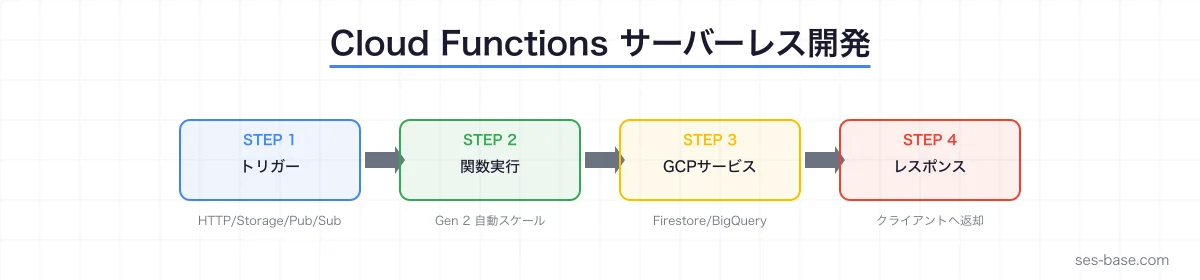
Google Cloud Functions は、Google Cloudが提供するサーバーレスコンピューティングサービスです。AWSのLambdaに相当するサービスで、サーバー管理なしでコードを実行できます。
SESエンジニアにとって、Google Cloudのサーバーレス技術を習得することは案件の幅を大きく広げる武器になります。本記事では、Cloud Functionsの基礎から実践的な開発パターンまでを解説します。
Cloud Functionsとは
第2世代(Gen 2)の特徴
Cloud Functionsは2024年以降、**第2世代(Gen 2)**が標準になりました。Gen 2はCloud Runの基盤上に構築されており、従来のGen 1に比べて多くの改善があります。
| 項目 | Gen 1 | Gen 2 |
|---|---|---|
| 基盤 | 独自基盤 | Cloud Run |
| 最大実行時間 | 9分 | 60分 |
| メモリ | 最大8GB | 最大32GB |
| 同時接続 | 1リクエスト/インスタンス | 最大1000リクエスト/インスタンス |
| トラフィック分割 | 非対応 | 対応(カナリアデプロイ) |
| イベントソース | 限定的 | Eventarc(90+ソース) |
| 最小インスタンス | 非対応 | 対応(コールドスタート回避) |
Gen 2の最大の利点は同時接続数の向上です。1つのインスタンスで最大1000リクエストを処理できるため、コスト効率が大幅に改善されます。
Cloud Functions vs Cloud Run vs App Engine
Google Cloudには複数のサーバーレス/マネージドサービスがあります。
| サービス | 用途 | デプロイ単位 | スケール |
|---|---|---|---|
| Cloud Functions | 単機能のAPI・イベント処理 | 関数 | 0からスケール |
| Cloud Run | コンテナベースのアプリ | コンテナ | 0からスケール |
| App Engine | フルスタックWebアプリ | アプリケーション | 自動スケール |
選定基準: 単機能のAPIやイベントハンドラならCloud Functions。複雑なAPIやカスタムランタイムが必要ならCloud Run。フルスタックWebアプリならApp Engineが適しています。
Cloud Functions開発:ハンズオン
HTTP関数の作成(Node.js)
// index.js
const functions = require('@google-cloud/functions-framework');

functions.http('helloWorld', (req, res) => {
  const name = req.query.name || req.body.name || 'World';

  res.json({
    message: `Hello, ${name}!`,
    timestamp: new Date().toISOString(),
    region: process.env.FUNCTION_REGION || 'unknown',
  });
});
// package.json
{
"name": "hello-world",
"version": "1.0.0",
"main": "index.js",
"dependencies": {
"@google-cloud/functions-framework": "^3.0.0"
}
}HTTP関数の作成(Python)
# main.py
import functions_framework
from datetime import datetime
import json

@functions_framework.http
def hello_world(request):
    name = request.args.get('name', 'World')

    return json.dumps({
        'message': f'Hello, {name}!',
        'timestamp': datetime.now().isoformat(),
    }), 200, {'Content-Type': 'application/json'}
gcloud CLI でのデプロイ
# Gen 2 HTTP関数のデプロイ
gcloud functions deploy hello-world \
  --gen2 \
  --runtime nodejs22 \
  --trigger-http \
  --allow-unauthenticated \
  --region asia-northeast1 \
  --memory 256MB \
  --timeout 60s

# デプロイ後のURL確認
gcloud functions describe hello-world \
  --gen2 \
  --region asia-northeast1 \
  --format='value(serviceConfig.uri)'

# 関数のテスト
curl "https://hello-world-xxxxx-an.a.run.app?name=SES"
イベント駆動型関数
Cloud Storageトリガー
ファイルアップロード時に自動処理を実行します。
const functions = require('@google-cloud/functions-framework');
const { Storage } = require('@google-cloud/storage');
const sharp = require('sharp');

const storage = new Storage();

functions.cloudEvent('processImage', async (cloudEvent) => {
  const file = cloudEvent.data;
  const bucket = storage.bucket(file.bucket);
  const srcFile = bucket.file(file.name);

  // 画像ファイルのみ処理
  if (!file.contentType?.startsWith('image/')) {
    console.log(`Skipping non-image: ${file.name}`);
    return;
  }

  // 画像を読み込んでリサイズ
  const [buffer] = await srcFile.download();
  const resized = await sharp(buffer)
    .resize(800, 600, { fit: 'inside' })
    .webp({ quality: 80 })
    .toBuffer();

  // リサイズ後の画像を保存
  const destName = `resized/${file.name.replace(/\.[^.]+$/, '.webp')}`;
  await bucket.file(destName).save(resized, {
    metadata: { contentType: 'image/webp' },
  });

  console.log(`Resized: ${file.name} -> ${destName}`);
});
# Cloud Storageトリガーでデプロイ
gcloud functions deploy process-image \
--gen2 \
--runtime nodejs22 \
--trigger-event-filters="type=google.cloud.storage.object.v1.finalized" \
--trigger-event-filters="bucket=my-images-bucket" \
--region asia-northeast1Firestoreトリガー
Firestoreのドキュメント変更時に関数を実行します。
const functions = require('@google-cloud/functions-framework');
const { Firestore } = require('@google-cloud/firestore');

const db = new Firestore();

functions.cloudEvent('onUserCreated', async (cloudEvent) => {
  const data = cloudEvent.data;
  const userId = data.value.name.split('/').pop();
  const userData = data.value.fields;

  console.log(`New user created: ${userId}`);

  // ウェルカムメール送信のキューに追加
  await db.collection('emailQueue').add({
    to: userData.email.stringValue,
    template: 'welcome',
    userId: userId,
    createdAt: Firestore.Timestamp.now(),
  });
});
Pub/Subトリガー
非同期メッセージ処理に最適です。
const functions = require('@google-cloud/functions-framework');

functions.cloudEvent('processPubSubMessage', (cloudEvent) => {
  const message = cloudEvent.data.message;
  const data = JSON.parse(
    Buffer.from(message.data, 'base64').toString()
  );

  console.log('Received message:', data);

  // メッセージの処理
  switch (data.type) {
    case 'ORDER_CREATED':
      handleNewOrder(data.payload);
      break;
    case 'PAYMENT_RECEIVED':
      handlePayment(data.payload);
      break;
    default:
      console.log(`Unknown message type: ${data.type}`);
  }
});
Firestore連携のCRUD API
実践的なREST API構築
const functions = require('@google-cloud/functions-framework');
const { Firestore } = require('@google-cloud/firestore');

const db = new Firestore();

functions.http('usersApi', async (req, res) => {
  // CORS設定
  res.set('Access-Control-Allow-Origin', '*');
  if (req.method === 'OPTIONS') {
    res.set('Access-Control-Allow-Methods', 'GET, POST, PUT, DELETE');
    res.set('Access-Control-Allow-Headers', 'Content-Type, Authorization');
    return res.status(204).send('');
  }

  const pathParts = req.path.split('/').filter(Boolean);
  const userId = pathParts[1]; // /users/:id

  try {
    switch (req.method) {
      case 'GET':
        if (userId) {
          const doc = await db.collection('users').doc(userId).get();
          if (!doc.exists) {
            return res.status(404).json({ error: 'User not found' });
          }
          return res.json({ id: doc.id, ...doc.data() });
        }

        const snapshot = await db.collection('users')
          .orderBy('createdAt', 'desc')
          .limit(50)
          .get();

        const users = snapshot.docs.map(doc => ({
          id: doc.id,
          ...doc.data(),
        }));
        return res.json(users);

      case 'POST': {
        const newUser = {
          ...req.body,
          createdAt: Firestore.Timestamp.now(),
          updatedAt: Firestore.Timestamp.now(),
        };
        const ref = await db.collection('users').add(newUser);
        return res.status(201).json({ id: ref.id, ...newUser });
      }

      case 'PUT': {
        if (!userId) return res.status(400).json({ error: 'User ID required' });

        await db.collection('users').doc(userId).update({
          ...req.body,
          updatedAt: Firestore.Timestamp.now(),
        });
        return res.json({ id: userId, updated: true });
      }

      case 'DELETE': {
        if (!userId) return res.status(400).json({ error: 'User ID required' });
        await db.collection('users').doc(userId).delete();
        return res.status(204).send('');
      }

      default:
        return res.status(405).json({ error: 'Method not allowed' });
    }
  } catch (error) {
    console.error('Error:', error);
    return res.status(500).json({ error: 'Internal server error' });
  }
});
Cloud Functionsのコスト最適化
料金体系
Cloud Functions Gen 2 の料金構成は以下の通りです。
- 呼び出し回数: 200万回/月まで無料、以降100万回あたり $0.40
- コンピューティング時間: GB-秒 $0.0000025、GHz-秒 $0.0000100
- ネットワーク: 受信無料、送信 $0.12/GB(5GBまで無料)
コスト削減テクニック
1. 適切なメモリ設定
# メモリを必要最小限に設定
gcloud functions deploy my-function \
  --memory 128MB  # 軽量処理なら128MBで十分
2. 最小インスタンス数の調整
# コールドスタート回避が不要なら0に設定
gcloud functions deploy my-function \
  --min-instances 0  # デフォルト
3. 同時実行数の活用(Gen 2)
# 1インスタンスで複数リクエストを処理
gcloud functions deploy my-function \
  --concurrency 100  # 同時に100リクエストまで
ローカル開発環境
Functions Frameworkでのローカル実行
# Node.js
npx @google-cloud/functions-framework --target=helloWorld --port=8080

# Python
functions-framework --target=hello_world --port=8080

# テスト
curl http://localhost:8080?name=test
エミュレータの活用
# Firebase Emulatorでローカル開発
firebase emulators:start --only functions,firestore

# Firestore + Functionsの統合テスト
npm test  # ローカルエミュレータに接続してテスト
セキュリティベストプラクティス
認証の設定
# 認証必須(デフォルト)
gcloud functions deploy my-function --no-allow-unauthenticated

# 認証トークンの取得
TOKEN=$(gcloud auth print-identity-token)
curl -H "Authorization: Bearer $TOKEN" https://my-function-xxx.a.run.app
Secret Managerとの連携
const { SecretManagerServiceClient } = require('@google-cloud/secret-manager');

const client = new SecretManagerServiceClient();
let cachedApiKey;

async function getApiKey() {
  if (!cachedApiKey) {
    const [version] = await client.accessSecretVersion({
      name: `projects/${process.env.PROJECT_ID}/secrets/api-key/versions/latest`,
    });
    cachedApiKey = version.payload.data.toString();
  }
  return cachedApiKey;
}
IAMの最小権限
# サービスアカウントに必要最小限の権限を付与
gcloud projects add-iam-policy-binding my-project \
  --member="serviceAccount:[email protected]" \
  --role="roles/datastore.user"
SES現場での活用パターン
パターン1:Webhook処理サーバー
外部サービスからのWebhookを受信して処理する、SES案件で頻出のパターンです。
functions.http('webhookHandler', async (req, res) => {
  // 署名検証
  const signature = req.headers['x-webhook-signature'];
  if (!verifySignature(req.body, signature)) {
    return res.status(401).json({ error: 'Invalid signature' });
  }

  // 非同期処理のためPub/Subに投入
  const { PubSub } = require('@google-cloud/pubsub');
  const pubsub = new PubSub();

  await pubsub.topic('webhook-events').publish(
    Buffer.from(JSON.stringify(req.body))
  );

  return res.status(200).json({ received: true });
});
パターン2:定期バッチ処理
Cloud SchedulerとCloud Functionsを組み合わせた定期バッチ処理です。
# Cloud Schedulerジョブの作成
gcloud scheduler jobs create http daily-report \
  --schedule="0 9 * * *" \
  --uri="https://my-function-xxx.a.run.app" \
  --http-method=POST \
  --time-zone="Asia/Tokyo" \
  --oidc-service-account-email="[email protected]"
パターン3:リアルタイムデータパイプライン
// Pub/Subからデータを受信し、BigQueryに書き込む
const { BigQuery } = require('@google-cloud/bigquery');

const bigquery = new BigQuery();

functions.cloudEvent('streamToBigQuery', async (cloudEvent) => {
  const data = JSON.parse(
    Buffer.from(cloudEvent.data.message.data, 'base64').toString()
  );

  await bigquery
    .dataset('analytics')
    .table('events')
    .insert([{
      ...data,
      ingested_at: new Date().toISOString(),
    }]);
});
AWS Lambda との比較
SES案件ではAWSとGoogle Cloudの両方に対応できると有利です。
| 項目 | AWS Lambda | Cloud Functions Gen 2 |
|---|---|---|
| ランタイム | Node.js, Python, Java, etc. | Node.js, Python, Java, Go, etc. |
| 最大実行時間 | 15分 | 60分 |
| 同時接続 | 1/インスタンス | 最大1000/インスタンス |
| API連携 | API Gateway | 直接HTTP or API Gateway |
| IaC | SAM / CDK | Terraform / Deployment Manager |
| 無料枠 | 100万回/月 | 200万回/月 |
SESエンジニアとしてのGoogle Cloudスキルの価値
Google Cloud関連のSES案件は増加傾向にあり、特に以下の領域で需要があります。
- データ分析基盤: BigQuery + Cloud Functions
- モバイルバックエンド: Firebase + Cloud Functions
- AI/ML: Vertex AI + Cloud Functions
- Kubernetes: GKE + Cloud Run + Cloud Functions
関連Google Cloud認定資格
- Cloud Digital Leader: クラウドの基礎概念
- Associate Cloud Engineer: 実装・運用スキル
- Professional Cloud Developer: 開発者向け上級
まとめ
Cloud Functionsは、Google Cloudでサーバーレス開発を始めるための最も手軽なエントリーポイントです。
学習ロードマップ
- 基礎: HTTP関数の作成・デプロイ(本記事)
- イベント駆動: Cloud Storage・Firestore・Pub/Subトリガー
- API構築: Firestore連携のREST API
- 運用: Cloud Logging・Cloud Monitoringでの監視
- 応用: Cloud Run との使い分け、マイクロサービス設計
関連記事
Google Cloud 完全攻略シリーズ一覧はこちら