- Pub/Subはフルマネージドのリアルタイムメッセージングサービス
- マイクロサービス間の非同期連携に最適で大規模処理に強い
- イベント駆動アーキテクチャの実装スキルは高単価案件で必須
「マイクロサービス間の通信をどう設計すればいいかわからない…」「同期処理だとスケーリングに限界がある」「イベント駆動アーキテクチャの実装経験を積みたい」
Google Cloud Pub/Subは、フルマネージドの非同期メッセージングサービスです。サービス間の疎結合を実現し、大規模なイベント駆動アーキテクチャの基盤として利用されています。
この記事では、Google Cloud完全攻略シリーズEp.12として、Pub/Subの基礎から実践的なメッセージングパターンまで、SESエンジニアが現場で即活用できる知識を解説します。
- Pub/Subの基本概念とアーキテクチャ
- トピック・サブスクリプションの設計
- メッセージングパターンの実装
- デッドレターキューとエラーハンドリング
- マイクロサービス連携の設計
Google Cloud Pub/Subとは
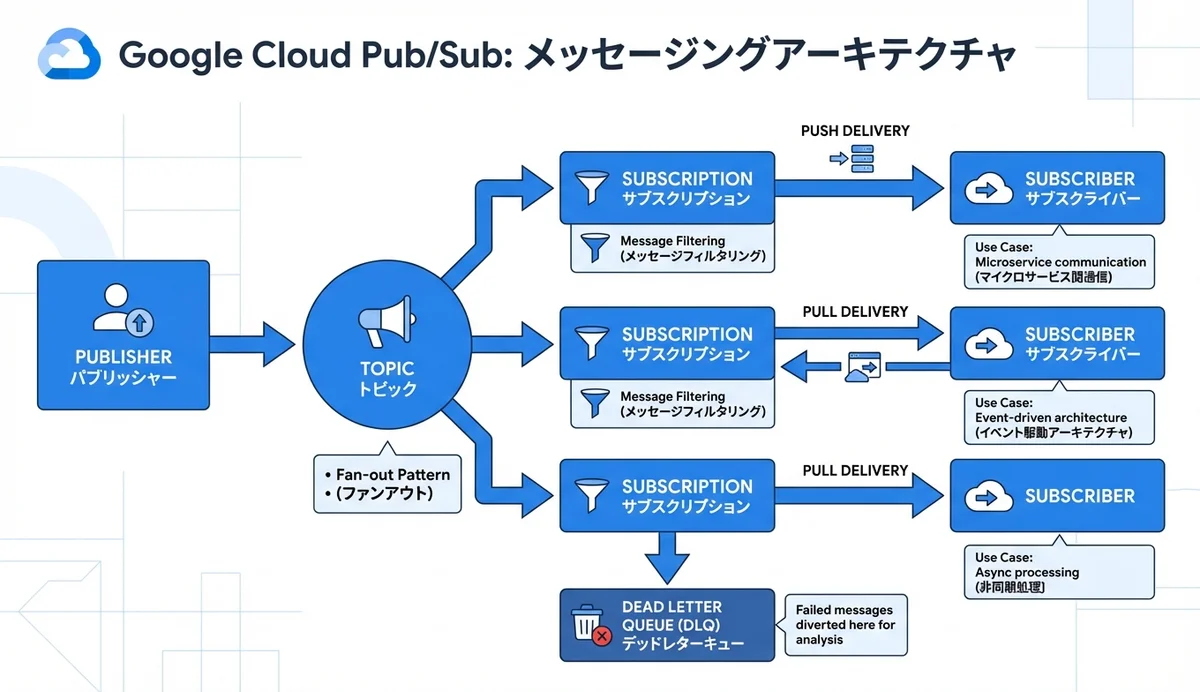
Pub/Sub(Publish/Subscribe)は、Publisher(発行者)がメッセージを送信し、Subscriber(購読者)がそのメッセージを受信する非同期メッセージングモデルです。PublisherとSubscriberは互いを知らなくても通信でき、これが疎結合の実現に繋がります。
Pub/Subの主な特徴
| 特徴 | 内容 |
|---|---|
| フルマネージド | インフラ管理不要、自動スケーリング |
| グローバル | 世界中のリージョンで低レイテンシ配信 |
| 高スループット | 毎秒数百万メッセージを処理可能 |
| At-least-once | メッセージの確実な配信保証 |
| メッセージ保持 | 最大31日間のメッセージ保持 |
| Push/Pull | 両方の配信モードに対応 |
基本コンポーネント
Publisher → Topic → Subscription → Subscriber

Publisher: メッセージを送信する側
Topic: メッセージのカテゴリ(チャネル)
Subscription: Topicに対する購読設定
Subscriber: メッセージを受信・処理する側
Pub/Subの基本操作
トピックとサブスクリプションの作成
# gcloud CLIでの操作

# トピック作成
gcloud pubsub topics create order-events

# サブスクリプション作成(Pull型)
gcloud pubsub subscriptions create order-processor \
  --topic=order-events \
  --ack-deadline=60 \
  --message-retention-duration=7d

# サブスクリプション作成(Push型)
gcloud pubsub subscriptions create order-webhook \
  --topic=order-events \
  --push-endpoint=https://api.example.com/webhook/orders \
  --ack-deadline=30
メッセージの発行と受信
# メッセージ発行
gcloud pubsub topics publish order-events \
  --message='{"orderId": "12345", "event": "created", "amount": 5000}' \
  --attribute=event_type=order_created,priority=high

# メッセージ受信(Pull)
gcloud pubsub subscriptions pull order-processor --limit=10 --auto-ack
Node.js SDKでの実装
// Publisher(メッセージ発行側)
import { PubSub } from '@google-cloud/pubsub';

const pubsub = new PubSub({ projectId: 'my-project' });

async function publishOrderEvent(order: Order) {
  const topic = pubsub.topic('order-events');

  const message = {
    data: Buffer.from(JSON.stringify({
      orderId: order.id,
      event: 'created',
      amount: order.amount,
      customerId: order.customerId,
      items: order.items,
      timestamp: new Date().toISOString(),
    })),
    attributes: {
      event_type: 'order_created',
      priority: order.amount > 100000 ? 'high' : 'normal',
    },
  };

  const messageId = await topic.publishMessage(message);
  console.log(`Message published: ${messageId}`);
  return messageId;
}
// Subscriber(メッセージ受信側)
import { PubSub, Message } from '@google-cloud/pubsub';
const pubsub = new PubSub({ projectId: 'my-project' });
async function startOrderProcessor() {
const subscription = pubsub.subscription('order-processor');
subscription.on('message', async (message: Message) => {
try {
const data = JSON.parse(message.data.toString());
console.log(`Processing order: ${data.orderId}`);
// 注文処理ロジック
await processOrder(data);
// 処理成功 → ACK
message.ack();
console.log(`Order ${data.orderId} processed successfully`);
} catch (error) {
console.error(`Error processing order: ${error.message}`);
// 処理失敗 → NACK(リトライ)
message.nack();
}
});
subscription.on('error', (error) => {
console.error('Subscription error:', error);
});
console.log('Order processor started, waiting for messages...');
}メッセージングパターン
ファンアウト(Fan-out)
1つのメッセージを複数のサービスに同時配信:
                  ┌─ Sub A → メール送信サービス
                  │
Topic: orders ──┼─ Sub B → 在庫管理サービス
                  │
                  └─ Sub C → 分析サービス
// 注文イベントを1回publishするだけで、3つのサービスが独立して処理
async function onOrderCreated(order: Order) {
// 1つのTopicにpublish
await publishOrderEvent(order);
// Sub A: メール送信サービスが自動受信 → 確認メール送信
// Sub B: 在庫管理サービスが自動受信 → 在庫引き当て
// Sub C: 分析サービスが自動受信 → データ記録
}負荷分散(Load Balancing)
複数のワーカーで1つのサブスクリプションを共有し、メッセージを分散処理:
// ワーカー1, 2, 3 が同じサブスクリプションをpull
// Pub/Subが自動的にメッセージを分散
async function startWorker(workerId: number) {
  const subscription = pubsub.subscription('heavy-processing', {
    flowControl: {
      maxMessages: 10, // 同時処理数を制限
      allowExcessMessages: false,
    },
  });

  subscription.on('message', async (message: Message) => {
    console.log(`Worker ${workerId} processing: ${message.id}`);
    await processHeavyTask(JSON.parse(message.data.toString()));
    message.ack();
  });
}

// 3つのワーカーを起動
for (let i = 1; i <= 3; i++) {
  startWorker(i);
}
メッセージフィルタリング
属性に基づいてメッセージをフィルタリング:
# 高優先度メッセージのみ受信するサブスクリプション
gcloud pubsub subscriptions create high-priority-orders \
  --topic=order-events \
  --message-filter='attributes.priority = "high"'

# 特定イベントタイプのみ受信
gcloud pubsub subscriptions create order-cancellations \
  --topic=order-events \
  --message-filter='attributes.event_type = "order_cancelled"'
デッドレターキュー(DLQ)
DLQの設計
処理失敗したメッセージを隔離するDLQの設定:
# デッドレタートピック作成
gcloud pubsub topics create order-events-dlq

# DLQ付きサブスクリプション
gcloud pubsub subscriptions create order-processor \
  --topic=order-events \
  --dead-letter-topic=order-events-dlq \
  --max-delivery-attempts=5 \
  --ack-deadline=60
DLQ処理の実装
// DLQモニタリング
async function monitorDeadLetters() {
  const dlqSubscription = pubsub.subscription('order-events-dlq-sub');

  dlqSubscription.on('message', async (message: Message) => {
    const deliveryAttempt = message.deliveryAttempt;
    const data = JSON.parse(message.data.toString());

    console.error(`Dead letter received (attempts: ${deliveryAttempt}):`, data);

    // アラート送信
    await sendAlert({
      severity: 'warning',
      title: 'メッセージ処理失敗',
      details: `注文 ${data.orderId} の処理が${deliveryAttempt}回失敗しました`,
    });

    // 手動確認用にDBに保存
    await saveToFailedMessages({
      messageId: message.id,
      data,
      error: message.attributes?.error_reason,
      deliveryAttempt,
    });

    message.ack();
  });
}
Terraformでのインフラ構築
# Terraformによるフル構成

# メイントピック
resource "google_pubsub_topic" "order_events" {
  name = "order-events"

  message_retention_duration = "604800s" # 7日

  schema_settings {
    schema   = google_pubsub_schema.order_event.id
    encoding = "JSON"
  }
}

# スキーマ定義(メッセージ検証)
resource "google_pubsub_schema" "order_event" {
  name       = "order-event-schema"
  type       = "AVRO"
  definition = jsonencode({
    type = "record"
    name = "OrderEvent"
    fields = [
      { name = "orderId", type = "string" },
      { name = "event", type = "string" },
      { name = "amount", type = "int" },
      { name = "timestamp", type = "string" },
    ]
  })
}

# Pullサブスクリプション
resource "google_pubsub_subscription" "order_processor" {
  name  = "order-processor"
  topic = google_pubsub_topic.order_events.id

  ack_deadline_seconds       = 60
  message_retention_duration = "604800s"

  retry_policy {
    minimum_backoff = "10s"
    maximum_backoff = "600s"
  }

  dead_letter_policy {
    dead_letter_topic     = google_pubsub_topic.order_events_dlq.id
    max_delivery_attempts = 5
  }

  expiration_policy {
    ttl = "" # 無期限
  }
}

# デッドレタートピック
resource "google_pubsub_topic" "order_events_dlq" {
  name = "order-events-dlq"
}

# Pushサブスクリプション(Cloud Run向け)
resource "google_pubsub_subscription" "order_webhook" {
  name  = "order-webhook"
  topic = google_pubsub_topic.order_events.id

  push_config {
    push_endpoint = google_cloud_run_service.order_handler.status[0].url
    oidc_token {
      service_account_email = google_service_account.pubsub_invoker.email
    }
  }
}
Cloud Functionsとの連携
イベントトリガー関数
// Cloud Functions(第2世代)でのPub/Subトリガー
import { CloudEvent } from '@google-cloud/functions-framework';

interface OrderEventData {
  orderId: string;
  event: string;
  amount: number;
  customerId: string;
}

export async function processOrderEvent(cloudEvent: CloudEvent<{ message: { data: string } }>) {
  const base64Data = cloudEvent.data.message.data;
  const data: OrderEventData = JSON.parse(
    Buffer.from(base64Data, 'base64').toString()
  );

  console.log(`Processing ${data.event} for order ${data.orderId}`);

  switch (data.event) {
    case 'created':
      await handleOrderCreated(data);
      break;
    case 'paid':
      await handleOrderPaid(data);
      break;
    case 'shipped':
      await handleOrderShipped(data);
      break;
    case 'cancelled':
      await handleOrderCancelled(data);
      break;
    default:
      console.warn(`Unknown event type: ${data.event}`);
  }
}
デプロイ
gcloud functions deploy processOrderEvent \
  --gen2 \
  --runtime=nodejs20 \
  --region=asia-northeast1 \
  --trigger-topic=order-events \
  --entry-point=processOrderEvent \
  --memory=256MB \
  --timeout=60s
マイクロサービス設計パターン
Sagaパターン(分散トランザクション)
注文サービス → [order-events] → 在庫サービス → [inventory-events] → 決済サービス
                                      │                                    │
                                      ↓                                    ↓
                               在庫不足 → [compensation-events] → 注文キャンセル
                                                決済失敗 → [compensation-events] → 在庫戻し
// Sagaオーケストレーター
class OrderSaga {
async execute(order: Order) {
try {
// Step 1: 在庫引き当て
await publishMessage('inventory-commands', {
action: 'reserve',
orderId: order.id,
items: order.items,
});
// Step 2: 決済処理
await publishMessage('payment-commands', {
action: 'charge',
orderId: order.id,
amount: order.amount,
});
// Step 3: 配送手配
await publishMessage('shipping-commands', {
action: 'schedule',
orderId: order.id,
address: order.shippingAddress,
});
} catch (error) {
// 補償トランザクション
await this.compensate(order, error);
}
}
private async compensate(order: Order, error: Error) {
await publishMessage('compensation-events', {
orderId: order.id,
reason: error.message,
rollbackSteps: ['inventory', 'payment'],
});
}
}監視とデバッグ
Cloud Monitoringとの連携
# 未確認メッセージ数の監視アラート
gcloud monitoring policies create \
  --display-name="Pub/Sub 未処理メッセージ急増" \
  --condition-display-name="num_undelivered > 1000" \
  --condition-filter='resource.type="pubsub_subscription" AND metric.type="pubsub.googleapis.com/subscription/num_undelivered_messages"' \
  --condition-threshold-value=1000 \
  --condition-threshold-duration=300s
重要メトリクス
| メトリクス | 意味 | 閾値目安 |
|---|---|---|
| num_undelivered_messages | 未配信メッセージ数 | < 100 |
| oldest_unacked_message_age | 最古の未確認メッセージ経過時間 | < 300秒 |
| push_request_latencies | Push配信のレイテンシ | < 1秒 |
| dead_letter_message_count | DLQ送信数 | 0が理想 |
コスト最適化
料金体系
| 項目 | 料金 |
|---|---|
| メッセージ発行 | $40 / TB |
| メッセージ配信 | $40 / TB |
| メッセージ保持(7日超) | $0.27 / GB / 月 |
| 無料枠 | 毎月10GB |
コスト削減のポイント
- メッセージサイズを最小限に — 大容量データはCloud Storage経由で参照
- バッチ発行で1回のリクエストで複数メッセージ送信
- 不要なサブスクリプションを削除 — 配信分だけ課金される
- メッセージ保持期間の適正化 — 必要以上に長くしない
SES現場で求められるスキル
必須スキルレベル
レベル1: Pub/Subの概念理解、gcloudコマンド操作
レベル2: Pull/Pushの実装、エラーハンドリング
レベル3: DLQ設計、フィルタリング、監視設定
レベル4: マイクロサービス設計、Sagaパターン実装
単価への影響
- メッセージング基盤の経験あり → 月額5〜10万円アップ
- マイクロサービス設計スキル → 月額70〜95万円の案件に対応可能
- イベント駆動アーキテクチャの構築経験 → アーキテクト案件で重宝される
よくある質問
Q: Pub/SubとAWS SQS/SNSの違いは?
| 比較項目 | Cloud Pub/Sub | AWS SQS + SNS |
|---|---|---|
| モデル | Pub/Sub統合 | キュー(SQS) + 通知(SNS) |
| スケーリング | 自動 | 設定が必要な場合あり |
| メッセージ順序 | Ordering Key対応 | FIFO Queue |
| グローバル | デフォルトでグローバル | リージョン単位 |
Q: メッセージの順序保証は?
デフォルトではメッセージの順序は保証されません。順序が必要な場合はOrdering Keyを使用します:
const topic = pubsub.topic('order-events', {
  enableMessageOrdering: true,
});

await topic.publishMessage({
  data: Buffer.from(JSON.stringify(event)),
  orderingKey: `customer-${customerId}`, // 同じ顧客の注文は順序保証
});
Q: Exactly-onceは実現できる?
Pub/Subのデフォルトはat-least-once配信ですが、Exactly-once delivery機能をサブスクリプション単位で有効化できます:
gcloud pubsub subscriptions create order-processor \
  --topic=order-events \
  --enable-exactly-once-delivery
ただし、パフォーマンスへの影響があるため、冪等性を持たせる設計が推奨されます。
まとめ
Google Cloud Pub/Subは、マイクロサービス間の非同期通信基盤として不可欠なサービスです。
- Pub/Subはフルマネージドの非同期メッセージングサービス
- Fan-out・負荷分散・フィルタリングなど多彩なパターン
- DLQとリトライ戦略で信頼性の高いメッセージ処理
- Cloud Functions連携でサーバーレスなイベント駆動処理
- マイクロサービス設計スキルはSES高単価案件で必須
Google Cloud完全攻略シリーズの他の記事も合わせてご覧ください: