⚡ 3秒でわかる!この記事のポイント
- OpenClawのAIエージェントでPDF・ドキュメント処理を完全自動化する方法を解説
- 請求書・レポート・契約書の自動生成から承認フロー連携まで網羅
- SES企業の業務効率化と、ドキュメント自動化エンジニアとしてのキャリアパスを紹介
「毎月の請求書作成に半日かかっている」「レポートのフォーマットを整えるだけで2時間」——SES企業の管理部門やプロジェクトマネージャーなら、こうしたドキュメント業務の負担を感じているはずです。
2026年現在、ビジネスで扱うPDFやドキュメントの量は増え続けていますが、その処理の多くは依然として手作業です。請求書の発行、月次レポートの作成、契約書のレビュー——これらの定型業務はOpenClawのAIエージェントで自動化できます。
この記事では、OpenClawを使ったPDF・ドキュメント処理の自動化について、設計から実装まで実践的に解説します。
この記事でわかること
- OpenClawでPDFの読み取り・解析・データ抽出を自動化する方法
- 請求書・レポートのテンプレートベース自動生成
- 契約書のAIレビューと要約自動化
- Google Drive・Slackとの連携ワークフロー
- 承認フローの自動化とステータス管理
- SES企業向けドキュメント自動化の導入事例
ドキュメント自動化の全体設計|OpenClawの強み
なぜOpenClawがドキュメント自動化に適しているか
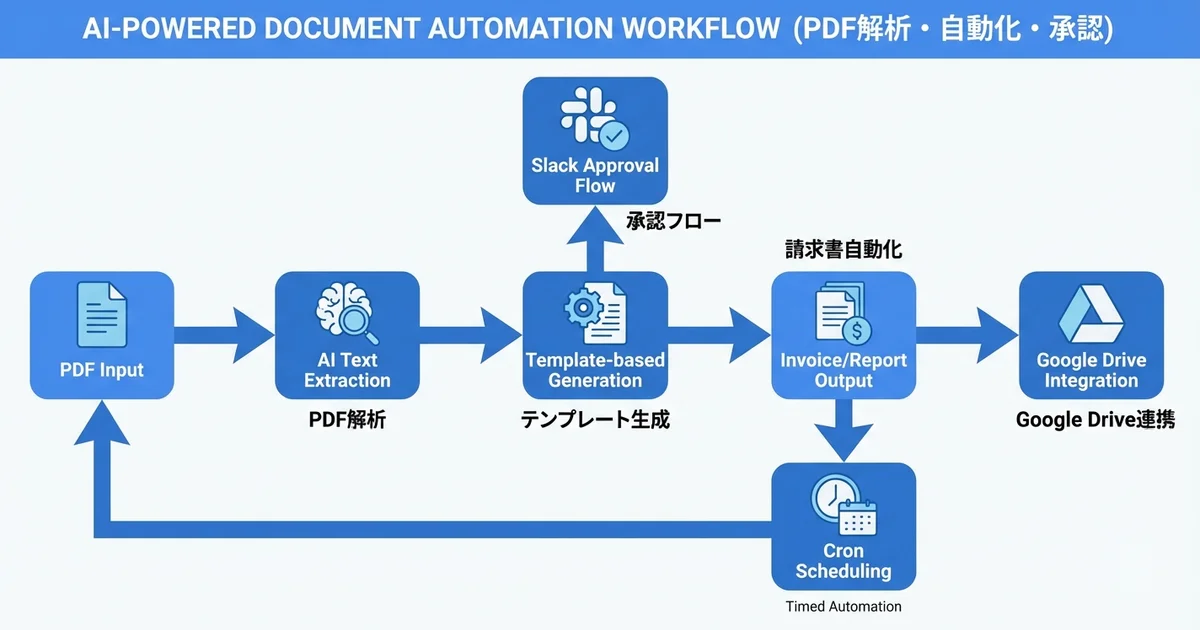
OpenClawは、複数のツールを組み合わせたマルチステップのワークフロー実行に優れています:
OpenClawのドキュメント自動化の特徴:

1. マルチツール統合
   └ PDF解析 + Google Drive + Slack + メール を1つのワークフローで実行

2. スケジュール実行
   └ cronジョブで月次レポートや請求書を定期生成

3. AI解析能力
   └ PDFの内容をLLMで理解し、データ抽出・要約・レビューを実行

4. 承認フロー
   └ Slack連携でドキュメントの確認・承認をワークフロー化

5. テンプレート管理
   └ スキルとして定義し、再利用可能なテンプレートを管理
ドキュメント処理パイプラインの設計
入力              → 処理               → 出力
───────────────────────────────────────────────────────
PDF受信           → テキスト抽出       → 構造化データ
Excelデータ       → テンプレート適用   → PDF生成
スキャン画像      → OCR + AI解析      → データベース登録
契約書ドラフト    → AIレビュー        → レビュー結果レポート
勤怠データ        → 計算 + フォーマット → 請求書PDF
PDF読み取り・データ抽出の自動化
OpenClawスキルの設計
OpenClawのスキルとして、PDF処理ワークフローを定義します:
# SKILL.md - PDF文書処理スキル

## 概要
PDF文書の読み取り・解析・データ抽出を行うスキル。

## トリガー
- Slackでの `/pdf-extract` コマンド
- Google Driveの特定フォルダへのPDFアップロード
- cronによる定期実行

## ワークフロー
1. PDFファイルの取得(Google Drive / ローカル / URL)
2. pdf ツールでテキスト・構造を抽出
3. AIでデータを構造化(JSON形式)
4. 結果をSlackに通知 / スプレッドシートに記録
PDF読み取りの実装
OpenClawのpdfツールを使ったデータ抽出のパターン:
# OpenClawのワークスペースで実行される処理フロー

# 1. Google DriveからPDFをダウンロード
gog drive download --file-id "1BxiMVs0XRA5nFMdKvBdBZjgmUUqptlbs74OgVE2upms" \
  --output /tmp/invoice.pdf

# 2. PDFの内容を解析
# OpenClawのpdfツールが自動的に内容を読み取り、構造化データとして返す
OpenClawエージェントでのPDF解析コード例:
// スキル内でのPDF処理ロジック
interface InvoiceData {
  invoiceNumber: string;
  date: string;
  vendor: string;
  items: {
    description: string;
    quantity: number;
    unitPrice: number;
    amount: number;
  }[];
  subtotal: number;
  tax: number;
  total: number;
}

// PDFから請求書データを抽出するプロンプト
const extractionPrompt = `
以下のPDFの内容から請求書データを抽出してJSON形式で返してください:

必要なフィールド:
- invoiceNumber: 請求書番号
- date: 発行日(YYYY-MM-DD形式)
- vendor: 発行者名
- items: 明細(description, quantity, unitPrice, amount)
- subtotal: 小計
- tax: 消費税
- total: 合計金額

数値は全て数値型で返してください。
`;

// 抽出結果の検証
function validateInvoiceData(data: InvoiceData): string[] {
  const errors: string[] = [];

  if (!data.invoiceNumber) errors.push('請求書番号が欠落');
  if (!data.date?.match(/^\d{4}-\d{2}-\d{2}$/)) errors.push('日付形式が不正');
  if (data.items.length === 0) errors.push('明細が空');

  // 計算チェック
  const calculatedSubtotal = data.items.reduce((sum, item) => sum + item.amount, 0);
  if (Math.abs(calculatedSubtotal - data.subtotal) > 1) {
    errors.push(`小計の不一致: 計算値=${calculatedSubtotal}, 記載値=${data.subtotal}`);
  }

  const calculatedTotal = data.subtotal + data.tax;
  if (Math.abs(calculatedTotal - data.total) > 1) {
    errors.push(`合計の不一致: 計算値=${calculatedTotal}, 記載値=${data.total}`);
  }

  return errors;
}
請求書の自動生成
テンプレートベースのPDF生成
OpenClawのcronジョブで月次請求書を自動生成する設計:
// 請求書生成のワークフロー
interface InvoiceTemplate {
  companyName: string;
  companyAddress: string;
  bankInfo: {
    bankName: string;
    branchName: string;
    accountType: string;
    accountNumber: string;
    accountHolder: string;
  };
  logo?: string;
}

interface InvoiceGenerationInput {
  clientName: string;
  clientAddress: string;
  invoiceNumber: string;
  issueDate: string;
  dueDate: string;
  items: {
    description: string;
    hours: number;
    rate: number;
  }[];
  taxRate: number;
  notes?: string;
}

function generateInvoiceHTML(
  template: InvoiceTemplate,
  input: InvoiceGenerationInput
): string {
  const items = input.items.map((item) => ({
    ...item,
    amount: item.hours * item.rate,
  }));
  const subtotal = items.reduce((sum, item) => sum + item.amount, 0);
  const tax = Math.floor(subtotal * input.taxRate);
  const total = subtotal + tax;

  return `
<!DOCTYPE html>
<html lang="ja">
<head>
  <meta charset="UTF-8">
  <style>
    body { font-family: 'Noto Sans JP', sans-serif; padding: 40px; }
    .header { display: flex; justify-content: space-between; margin-bottom: 40px; }
    .invoice-title { font-size: 28px; font-weight: bold; color: #333; }
    table { width: 100%; border-collapse: collapse; margin: 20px 0; }
    th, td { padding: 12px; text-align: left; border-bottom: 1px solid #ddd; }
    th { background-color: #4A90D9; color: white; }
    .total-row { font-weight: bold; font-size: 18px; }
    .bank-info { margin-top: 40px; padding: 20px; background: #f8f9fa; border-radius: 8px; }
    .footer { margin-top: 40px; text-align: center; color: #666; font-size: 12px; }
  </style>
</head>
<body>
  <div class="header">
    <div>
      <div class="invoice-title">請求書</div>
      <p>請求書番号: ${input.invoiceNumber}</p>
      <p>発行日: ${input.issueDate}</p>
      <p>お支払い期限: ${input.dueDate}</p>
    </div>
    <div>
      <h3>${template.companyName}</h3>
      <p>${template.companyAddress}</p>
    </div>
  </div>

  <div class="client-info">
    <h3>${input.clientName} 御中</h3>
    <p>${input.clientAddress}</p>
  </div>

  <table>
    <thead>
      <tr>
        <th>項目</th>
        <th>時間</th>
        <th>単価</th>
        <th>金額</th>
      </tr>
    </thead>
    <tbody>
      ${items.map((item) => `
        <tr>
          <td>${item.description}</td>
          <td>${item.hours}h</td>
          <td>¥${item.rate.toLocaleString()}</td>
          <td>¥${item.amount.toLocaleString()}</td>
        </tr>
      `).join('')}
    </tbody>
    <tfoot>
      <tr>
        <td colspan="3">小計</td>
        <td>¥${subtotal.toLocaleString()}</td>
      </tr>
      <tr>
        <td colspan="3">消費税(${input.taxRate * 100}%)</td>
        <td>¥${tax.toLocaleString()}</td>
      </tr>
      <tr class="total-row">
        <td colspan="3">合計</td>
        <td>¥${total.toLocaleString()}</td>
      </tr>
    </tfoot>
  </table>

  <div class="bank-info">
    <h4>お振込先</h4>
    <p>${template.bankInfo.bankName} ${template.bankInfo.branchName}</p>
    <p>${template.bankInfo.accountType} ${template.bankInfo.accountNumber}</p>
    <p>口座名義: ${template.bankInfo.accountHolder}</p>
  </div>

  ${input.notes ? `<p class="notes">${input.notes}</p>` : ''}

  <div class="footer">
    <p>${template.companyName}</p>
  </div>
</body>
</html>`;
}
cron連携による定期生成
OpenClawのcronジョブで毎月の請求書を自動生成する設定:
{
  "cron": {
    "invoice-generation": {
      "schedule": "0 9 1 * *",
      "prompt": "先月の稼働データをGoogle Sheetsから取得し、全クライアント分の請求書PDFを生成してください。生成した請求書はGoogle Driveの「請求書/2026」フォルダにアップロードし、Slackで承認依頼を送ってください。",
      "model": "claude-sonnet-4-20250514",
      "channel": "slack"
    }
  }
}
月次レポートの自動生成
データ収集からレポート作成まで
// 月次レポート生成のワークフロー
interface MonthlyReportData {
  period: string;
  metrics: {
    totalRevenue: number;
    totalHours: number;
    activeProjects: number;
    newClients: number;
    avgUtilization: number;
  };
  projectSummaries: {
    projectName: string;
    client: string;
    hours: number;
    revenue: number;
    engineers: number;
    status: string;
  }[];
  engineerPerformance: {
    name: string;
    billableHours: number;
    utilization: number;
    projects: string[];
  }[];
}

function generateMonthlyReport(data: MonthlyReportData): string {
  return `
# SES BASE 月次レポート - ${data.period}

## エグゼクティブサマリー

| 指標 | 値 |
|------|-----|
| 総売上 | ¥${data.metrics.totalRevenue.toLocaleString()} |
| 総稼働時間 | ${data.metrics.totalHours}h |
| アクティブプロジェクト | ${data.metrics.activeProjects}件 |
| 新規クライアント | ${data.metrics.newClients}社 |
| 平均稼働率 | ${data.metrics.avgUtilization}% |

## プロジェクト別実績

${data.projectSummaries.map((p) => `
### ${p.projectName}(${p.client})
- 稼働時間: ${p.hours}h
- 売上: ¥${p.revenue.toLocaleString()}
- 参画エンジニア: ${p.engineers}名
- ステータス: ${p.status}
`).join('')}

## エンジニア稼働状況

| 名前 | 稼働時間 | 稼働率 | 参画プロジェクト |
|------|---------|--------|----------------|
${data.engineerPerformance.map((e) =>
  `| ${e.name} | ${e.billableHours}h | ${e.utilization}% | ${e.projects.join(', ')} |`
).join('\n')}

---
*本レポートはOpenClawにより自動生成されました*
`;
}
契約書のAIレビュー
契約書解析スキル
# contract-review/SKILL.md

## 概要
契約書PDFをAIでレビューし、リスクポイントを抽出するスキル。

## 入力
- 契約書PDF(Google Drive URL またはファイルパス)
- 契約タイプ: SES基本契約 / 業務委託契約 / NDA / 準委任契約

## 処理フロー
1. PDFからテキストを抽出
2. 契約タイプに基づくチェックリストでレビュー
3. リスクポイントの洗い出しと重大度分類
4. レビュー結果レポートの生成
5. Slackでレビュー結果を通知

## チェック項目(SES基本契約)
- 契約期間と更新条件
- 料金と支払い条件
- 瑕疵担保責任の範囲
- 秘密保持義務の範囲
- 競業避止義務の有無
- 損害賠償の上限
- 解約条件と猶予期間
- 知的財産権の帰属
- 再委託の可否
// 契約書レビューの実装
interface ContractReviewResult {
documentTitle: string;
contractType: string;
parties: string[];
keyTerms: {
contractPeriod: string;
paymentTerms: string;
terminationClause: string;
};
riskPoints: {
severity: 'high' | 'medium' | 'low';
clause: string;
issue: string;
recommendation: string;
}[];
missingClauses: string[];
overallRisk: 'high' | 'medium' | 'low';
summary: string;
}
const contractReviewPrompt = `
以下の契約書の内容をレビューし、JSON形式で結果を返してください。
契約タイプ: SES基本契約
チェック項目:
1. 契約期間と自動更新条件
2. 料金の明確性(単価、支払いサイクル、超過料金)
3. 瑕疵担保責任(期間と範囲の妥当性)
4. 秘密保持義務(範囲と期間の妥当性)
5. 競業避止義務(期間と範囲 - 過度に広くないか)
6. 損害賠償の上限(契約金額に対して妥当か)
7. 解約条件(一方的な即時解約条項がないか)
8. 知的財産権の帰属(成果物の権利が適切か)
9. 再委託の条件(事前承認が必要か)
10. 準拠法と管轄裁判所
各リスクポイントには severity(high/medium/low)、
該当条項、問題点、推奨対応を含めてください。
`;
// レビュー結果をSlackに通知するフォーマット
function formatReviewForSlack(review: ContractReviewResult): string {
const riskEmoji = {
high: '🔴',
medium: '🟡',
low: '🟢',
};
let message = `📋 *契約書レビュー結果*\n`;
message += `文書: ${review.documentTitle}\n`;
message += `種別: ${review.contractType}\n`;
message += `総合リスク: ${riskEmoji[review.overallRisk]} ${review.overallRisk.toUpperCase()}\n\n`;
if (review.riskPoints.length > 0) {
message += `*リスクポイント(${review.riskPoints.length}件):*\n`;
review.riskPoints.forEach((risk, i) => {
message += `${riskEmoji[risk.severity]} ${i + 1}. ${risk.issue}\n`;
message += ` 条項: ${risk.clause}\n`;
message += ` 推奨: ${risk.recommendation}\n\n`;
});
}
if (review.missingClauses.length > 0) {
message += `*⚠️ 不足している条項:*\n`;
review.missingClauses.forEach((clause) => {
message += `- ${clause}\n`;
});
}
message += `\n*サマリー:* ${review.summary}`;
return message;
}Google Drive・Slack連携ワークフロー
Google Driveとの連携
// Google Driveのフォルダ監視とドキュメント処理
interface DriveWatchConfig {
  folderId: string;
  fileTypes: string[];
  processAction: 'extract' | 'review' | 'convert';
  notifyChannel: string;
}

// OpenClawのcronジョブでGoogle Driveのフォルダを定期チェック
const driveWatchConfig: DriveWatchConfig = {
  folderId: '1BxiMVs0XRA5nFMdKvBdBZjgmUUqptlbs74OgVE2upms',
  fileTypes: ['application/pdf', 'application/vnd.openxmlformats-officedocument.wordprocessingml.document'],
  processAction: 'extract',
  notifyChannel: '#documents',
};

// gogコマンドでGoogle Driveを操作
const driveCommands = {
  // フォルダ内のファイル一覧を取得
  listFiles: `gog drive list --folder-id ${driveWatchConfig.folderId} --type pdf`,

  // ファイルをダウンロード
  downloadFile: (fileId: string, output: string) =>
    `gog drive download --file-id ${fileId} --output ${output}`,

  // 処理結果をアップロード
  uploadResult: (filePath: string, folderId: string) =>
    `gog drive upload --file ${filePath} --folder-id ${folderId}`,
};
Slack承認フローの実装
// Slack Interactive Messages を使った承認フロー
interface ApprovalRequest {
  documentId: string;
  documentName: string;
  documentType: string;
  requestedBy: string;
  approvers: string[];
  deadline: string;
}

function createApprovalMessage(request: ApprovalRequest): object {
  return {
    blocks: [
      {
        type: 'header',
        text: {
          type: 'plain_text',
          text: '📋 ドキュメント承認依頼',
        },
      },
      {
        type: 'section',
        fields: [
          { type: 'mrkdwn', text: `*文書名:*\n${request.documentName}` },
          { type: 'mrkdwn', text: `*種別:*\n${request.documentType}` },
          { type: 'mrkdwn', text: `*依頼者:*\n${request.requestedBy}` },
          { type: 'mrkdwn', text: `*期限:*\n${request.deadline}` },
        ],
      },
      {
        type: 'actions',
        elements: [
          {
            type: 'button',
            text: { type: 'plain_text', text: '✅ 承認' },
            style: 'primary',
            action_id: `approve_${request.documentId}`,
          },
          {
            type: 'button',
            text: { type: 'plain_text', text: '❌ 差し戻し' },
            style: 'danger',
            action_id: `reject_${request.documentId}`,
          },
          {
            type: 'button',
            text: { type: 'plain_text', text: '📄 文書を確認' },
            action_id: `view_${request.documentId}`,
            url: `https://drive.google.com/file/d/${request.documentId}`,
          },
        ],
      },
    ],
  };
}
バッチ処理による大量ドキュメント処理
複数PDFの一括処理
// 大量のPDFを効率的に処理するバッチプロセッサ
interface BatchProcessConfig {
  inputFolder: string;
  outputFolder: string;
  concurrency: number;
  retryAttempts: number;
  processType: 'extract' | 'convert' | 'review';
}

class DocumentBatchProcessor {
  private config: BatchProcessConfig;
  private results: Map<string, { status: string; data?: any; error?: string }> = new Map();

  constructor(config: BatchProcessConfig) {
    this.config = config;
  }

  async processAll(files: string[]): Promise<void> {
    console.log(`📁 ${files.length}件のドキュメントをバッチ処理開始`);

    // 並列度を制限して処理
    const chunks = this.chunkArray(files, this.config.concurrency);

    for (const chunk of chunks) {
      await Promise.all(chunk.map((file) => this.processFile(file)));
    }

    this.printSummary();
  }

  private async processFile(filePath: string): Promise<void> {
    const fileName = filePath.split('/').pop() || filePath;

    for (let attempt = 1; attempt <= this.config.retryAttempts; attempt++) {
      try {
        console.log(`  処理中: ${fileName} (試行 ${attempt}/${this.config.retryAttempts})`);

        // ファイルタイプに応じた処理
        const result = await this.executeProcess(filePath);
        this.results.set(fileName, { status: 'success', data: result });
        return;
      } catch (error) {
        if (attempt === this.config.retryAttempts) {
          this.results.set(fileName, {
            status: 'failed',
            error: error instanceof Error ? error.message : String(error),
          });
        }
      }
    }
  }

  private async executeProcess(filePath: string): Promise<any> {
    switch (this.config.processType) {
      case 'extract':
        // PDFからテキスト抽出
        return { text: 'extracted content', pages: 5 };
      case 'convert':
        // PDF → 他フォーマット変換
        return { outputPath: filePath.replace('.pdf', '.docx') };
      case 'review':
        // AI レビュー
        return { riskLevel: 'low', issues: 0 };
      default:
        throw new Error(`Unknown process type: ${this.config.processType}`);
    }
  }

  private chunkArray<T>(array: T[], size: number): T[][] {
    const chunks: T[][] = [];
    for (let i = 0; i < array.length; i += size) {
      chunks.push(array.slice(i, i + size));
    }
    return chunks;
  }

  private printSummary(): void {
    const success = Array.from(this.results.values()).filter((r) => r.status === 'success').length;
    const failed = Array.from(this.results.values()).filter((r) => r.status === 'failed').length;

    console.log(`\n📊 バッチ処理結果:`);
    console.log(`  ✅ 成功: ${success}件`);
    console.log(`  ❌ 失敗: ${failed}件`);
    console.log(`  合計: ${this.results.size}件`);
  }
}
セキュリティとコンプライアンス
ドキュメント処理のセキュリティ対策
SES企業が扱う契約書や請求書には機密情報が含まれるため、セキュリティは最重要事項です:
// ドキュメント処理のセキュリティ設定
interface SecurityConfig {
  // ファイルの暗号化
  encryption: {
    atRest: boolean;       // 保管時暗号化
    inTransit: boolean;    // 転送時暗号化
    algorithm: string;     // 暗号化アルゴリズム
  };
  // アクセス制御
  accessControl: {
    allowedUsers: string[];
    allowedRoles: string[];
    requireMFA: boolean;
  };
  // 監査ログ
  auditLog: {
    enabled: boolean;
    retentionDays: number;
    logAccess: boolean;
    logModification: boolean;
  };
  // データ保持
  retention: {
    maxDays: number;
    autoDelete: boolean;
    archiveBeforeDelete: boolean;
  };
}

const securityConfig: SecurityConfig = {
  encryption: {
    atRest: true,
    inTransit: true,
    algorithm: 'AES-256-GCM',
  },
  accessControl: {
    allowedUsers: ['admin', 'accounting'],
    allowedRoles: ['document-manager', 'reviewer'],
    requireMFA: true,
  },
  auditLog: {
    enabled: true,
    retentionDays: 365,
    logAccess: true,
    logModification: true,
  },
  retention: {
    maxDays: 2555, // 7年(法定保存期間)
    autoDelete: false,
    archiveBeforeDelete: true,
  },
};
SES現場でのドキュメント自動化の効果
導入効果の試算
| 業務 | 手動作業時間 | 自動化後 | 削減率 |
|---|---|---|---|
| 請求書作成(月次) | 4時間/月 | 15分/月 | 94% |
| 月次レポート | 3時間/月 | 10分/月 | 94% |
| 契約書レビュー | 2時間/件 | 20分/件 | 83% |
| 経費精算書処理 | 2時間/月 | 10分/月 | 92% |
| 勤怠集計レポート | 3時間/月 | 5分/月 | 97% |
ドキュメント自動化エンジニアのキャリア
STEP 1: OpenClaw基礎(1-2週間)
├── スキル開発の基礎
├── cronジョブ設定
└── Slack・Google Drive連携

STEP 2: PDF処理の実践(2-3週間)
├── テキスト抽出・OCR
├── テンプレートベースの生成
└── バッチ処理の構築

STEP 3: ワークフロー設計(3-4週間)
├── 承認フローの実装
├── マルチチャネル連携
└── エラーハンドリングとリトライ

STEP 4: エンタープライズ対応(継続的)
├── セキュリティ・コンプライアンス
├── 大規模バッチ処理
└── 監査ログとレポーティング
まとめ|OpenClawでドキュメント処理を自動化する
OpenClawを活用することで、PDF・ドキュメント処理の自動化を実現し、SES企業の業務効率を劇的に改善できます。
この記事で紹介した主なポイント:
- PDF解析: AIによるテキスト抽出・データ構造化・内容理解
- 請求書自動生成: テンプレートベースのPDF生成とcron連携
- 契約書レビュー: AIによるリスクポイント抽出と重大度分類
- ワークフロー連携: Google Drive・Slackとの統合と承認フロー
- バッチ処理: 大量ドキュメントの効率的な一括処理
- セキュリティ: 暗号化・アクセス制御・監査ログの実装
ドキュメント自動化は、SES企業の管理業務コストを大幅に削減し、エンジニアがより価値の高い業務に集中できる環境を実現します。
💡 SES BASEでドキュメント自動化案件を探す
RPA・ドキュメント自動化・業務効率化のスキルを活かせるSES案件をお探しなら、SES BASEで最新案件をチェックしましょう。