- Codex CLIでGraphQLスキーマ設計からリゾルバ・DataLoader実装まで一気通貫で自動化
- N+1問題の検出と修正、認証・認可ディレクティブの実装もプロンプト一発で対応
- SES案件で増加するGraphQL案件に即戦力で参画できるスキルセットが身につく
「REST APIの設計に限界を感じている」「フロントエンドから必要なデータだけを取得したい」「BFF(Backend for Frontend)パターンをもっと効率的に実装したい」——こうした課題に対する解として、GraphQLの採用が2026年のSES案件で加速しています。
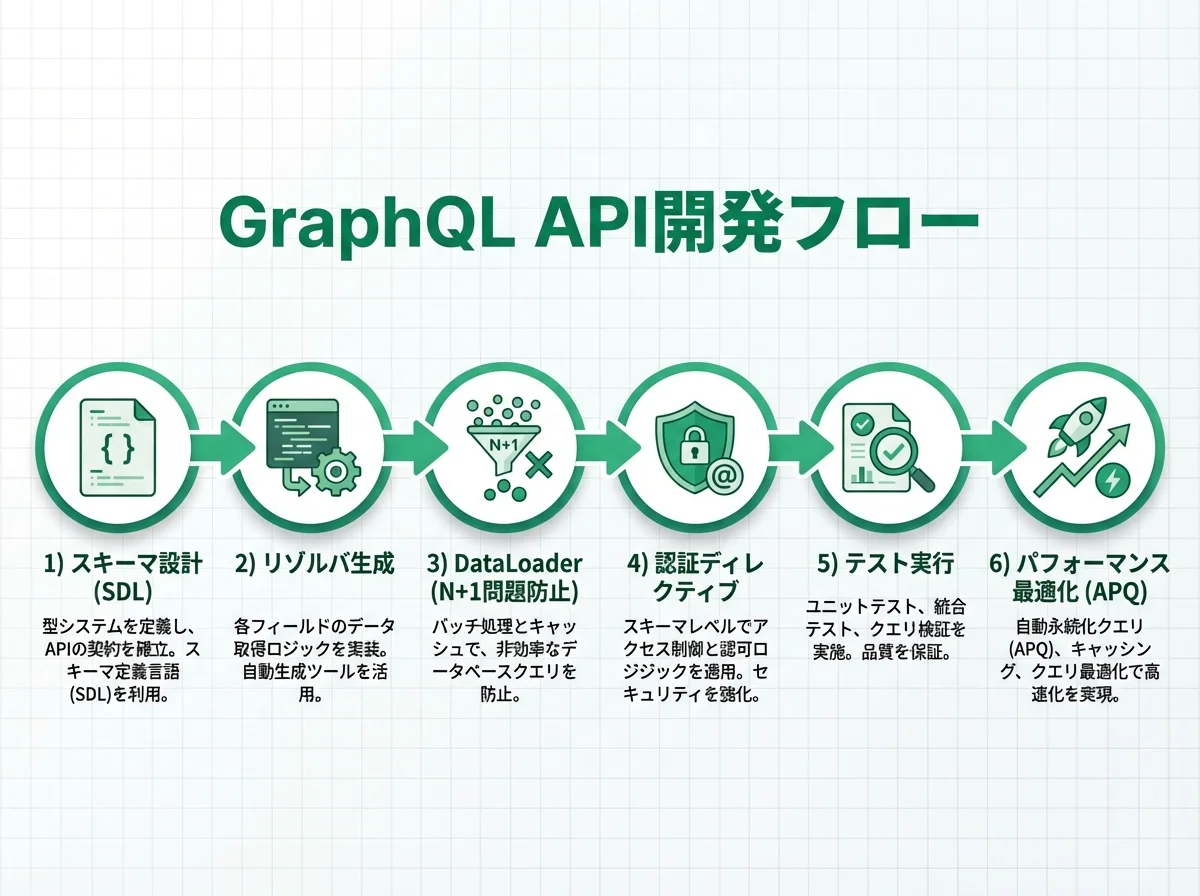
本記事では、OpenAI Codex CLIを活用してGraphQL API開発を効率的に進める方法を、スキーマ設計からリゾルバ実装、パフォーマンス最適化まで体系的に解説します。
GraphQL案件の市場動向
2026年のSES市場では、GraphQL関連スキルの需要が前年比で約40%増加しています。特に以下の業界で採用が進んでいます:
| 業界 | ユースケース | 月単価目安 |
|---|---|---|
| EC・マーケットプレイス | 商品検索・レコメンドAPI | 70〜85万円 |
| フィンテック | リアルタイム資産情報API | 75〜90万円 |
| SaaS | マルチテナントダッシュボード | 70〜80万円 |
| メディア | コンテンツ配信・パーソナライズ | 65〜80万円 |
| ヘルスケア | 患者データ統合API | 75〜90万円 |
GraphQLの経験があるエンジニアは、REST API専門のエンジニアと比較して月単価が10〜15万円高い傾向にあります。
Codex CLIでGraphQLが効率化できる理由
Codex CLIのサンドボックス環境は、GraphQL開発と非常に相性が良い特徴があります:
- 型安全な定義の自動生成:スキーマからTypeScript型・リゾルバの型を自動生成
- テスト自動生成:クエリ・ミューテーションのテストをスキーマから自動推定
- パフォーマンス分析:N+1問題の検出とDataLoaderによる最適化提案
- セキュリティチェック:認証・認可ディレクティブの漏れを検出
実践①:GraphQLスキーマ設計
初期スキーマの自動生成
既存のデータベーススキーマやREST APIからGraphQLスキーマを自動生成できます:
codex "prisma/schema.prisma を読み取って、GraphQL SDL形式のスキーマを生成してください。
要件:
- 全モデルをGraphQL型に変換
- リレーションはネストしたオブジェクト型で表現
- ページネーションはRelay Cursor Connection仕様に準拠
- 入力型(input)はCreate/Update用に分離
- カスタムスカラー(DateTime, URL, Email)を定義
- @deprecated ディレクティブでバージョニング対応"
Codex CLIが生成するスキーマ例:
"""
カスタムスカラー型
"""
scalar DateTime
scalar URL
scalar Email

"""
ユーザー型
"""
type User {
  id: ID!
  email: Email!
  name: String!
  avatar: URL
  role: UserRole!
  posts(first: Int, after: String, last: Int, before: String): PostConnection!
  createdAt: DateTime!
  updatedAt: DateTime!
}

enum UserRole {
  ADMIN
  EDITOR
  VIEWER
}

"""
投稿型
"""
type Post {
  id: ID!
  title: String!
  content: String!
  status: PostStatus!
  author: User!
  tags: [Tag!]!
  comments(first: Int, after: String): CommentConnection!
  publishedAt: DateTime
  createdAt: DateTime!
  updatedAt: DateTime!
}

enum PostStatus {
  DRAFT
  PUBLISHED
  ARCHIVED
}

"""
Relay Cursor Connection
"""
type PostConnection {
  edges: [PostEdge!]!
  pageInfo: PageInfo!
  totalCount: Int!
}

type PostEdge {
  node: Post!
  cursor: String!
}

type PageInfo {
  hasNextPage: Boolean!
  hasPreviousPage: Boolean!
  startCursor: String
  endCursor: String
}

"""
クエリ
"""
type Query {
  user(id: ID!): User
  users(first: Int, after: String, filter: UserFilter): UserConnection!
  post(id: ID!): Post
  posts(first: Int, after: String, filter: PostFilter, sort: PostSort): PostConnection!
  me: User!
}

"""
ミューテーション
"""
type Mutation {
  createUser(input: CreateUserInput!): User!
  updateUser(id: ID!, input: UpdateUserInput!): User!
  deleteUser(id: ID!): Boolean!
  createPost(input: CreatePostInput!): Post!
  updatePost(id: ID!, input: UpdatePostInput!): Post!
  publishPost(id: ID!): Post!
  deletePost(id: ID!): Boolean!
}

"""
サブスクリプション
"""
type Subscription {
  postPublished: Post!
  commentAdded(postId: ID!): Comment!
}

input CreateUserInput {
  email: Email!
  name: String!
  role: UserRole = VIEWER
}

input UpdateUserInput {
  name: String
  avatar: URL
  role: UserRole
}
スキーマ分割と管理
大規模プロジェクトでは、スキーマをドメインごとに分割します:
codex "GraphQLスキーマをドメインごとに分割してください。
構成:
- schema/user.graphql: ユーザー関連
- schema/post.graphql: 投稿関連
- schema/comment.graphql: コメント関連
- schema/common.graphql: 共通型(PageInfo, カスタムスカラー)
- schema/directives.graphql: カスタムディレクティブ
merge用のcodegen.ymlも生成してください。"
実践②:リゾルバの自動生成
基本リゾルバの実装
codex "schema/post.graphql のリゾルバをTypeScript + Apollo Server v4で
実装してください。
要件:
- Prisma Clientを使ったデータベースアクセス
- DataLoaderでN+1問題を防止
- 入力バリデーション(zod使用)
- エラーハンドリング(GraphQL Error Extensions対応)
- ロギング(winston)"
Codex CLIが生成するリゾルバ:
import { Resolvers } from '../generated/graphql';
import { GraphQLError } from 'graphql';
import DataLoader from 'dataloader';
import { z } from 'zod';
import { Context } from '../context';

const CreatePostSchema = z.object({
  title: z.string().min(1).max(200),
  content: z.string().min(1),
  tags: z.array(z.string()).optional(),
});

export const postResolvers: Resolvers<Context> = {
  Query: {
    post: async (_, { id }, { prisma, logger }) => {
      logger.info('Fetching post', { postId: id });
      const post = await prisma.post.findUnique({ where: { id } });
      if (!post) {
        throw new GraphQLError('Post not found', {
          extensions: { code: 'NOT_FOUND', postId: id },
        });
      }
      return post;
    },

    posts: async (_, { first = 20, after, filter, sort }, { prisma }) => {
      const where = buildPostFilter(filter);
      const orderBy = buildPostSort(sort);

      const cursor = after ? { id: decodeCursor(after) } : undefined;
      const posts = await prisma.post.findMany({
        where,
        orderBy,
        take: first + 1,
        cursor,
        skip: cursor ? 1 : 0,
      });

      const hasNextPage = posts.length > first;
      const edges = posts.slice(0, first).map((post) => ({
        node: post,
        cursor: encodeCursor(post.id),
      }));

      const totalCount = await prisma.post.count({ where });

      return {
        edges,
        pageInfo: {
          hasNextPage,
          hasPreviousPage: !!after,
          startCursor: edges[0]?.cursor ?? null,
          endCursor: edges[edges.length - 1]?.cursor ?? null,
        },
        totalCount,
      };
    },
  },

  Mutation: {
    createPost: async (_, { input }, { prisma, user, logger }) => {
      if (!user) {
        throw new GraphQLError('Authentication required', {
          extensions: { code: 'UNAUTHENTICATED' },
        });
      }

      const validated = CreatePostSchema.parse(input);
      logger.info('Creating post', { userId: user.id, title: validated.title });

      return prisma.post.create({
        data: {
          ...validated,
          authorId: user.id,
          status: 'DRAFT',
          tags: validated.tags
            ? { connectOrCreate: validated.tags.map((tag) => ({
                where: { name: tag },
                create: { name: tag },
              }))}
            : undefined,
        },
      });
    },

    publishPost: async (_, { id }, { prisma, user, pubsub }) => {
      const post = await prisma.post.update({
        where: { id, authorId: user!.id },
        data: {
          status: 'PUBLISHED',
          publishedAt: new Date(),
        },
      });

      await pubsub.publish('POST_PUBLISHED', { postPublished: post });
      return post;
    },
  },

  Post: {
    author: (post, _, { userLoader }) => {
      return userLoader.load(post.authorId);
    },

    tags: async (post, _, { prisma }) => {
      return prisma.tag.findMany({
        where: { posts: { some: { id: post.id } } },
      });
    },

    comments: async (post, { first = 20, after }, { prisma }) => {
      // Relay cursor pagination for comments
      const cursor = after ? { id: decodeCursor(after) } : undefined;
      const comments = await prisma.comment.findMany({
        where: { postId: post.id },
        take: first + 1,
        cursor,
        skip: cursor ? 1 : 0,
        orderBy: { createdAt: 'desc' },
      });

      const hasNextPage = comments.length > first;
      const edges = comments.slice(0, first).map((c) => ({
        node: c,
        cursor: encodeCursor(c.id),
      }));

      return {
        edges,
        pageInfo: {
          hasNextPage,
          hasPreviousPage: !!after,
          startCursor: edges[0]?.cursor ?? null,
          endCursor: edges[edges.length - 1]?.cursor ?? null,
        },
        totalCount: await prisma.comment.count({ where: { postId: post.id } }),
      };
    },
  },

  Subscription: {
    postPublished: {
      subscribe: (_, __, { pubsub }) => pubsub.asyncIterator(['POST_PUBLISHED']),
    },
  },
};
DataLoaderの最適化
N+1問題はGraphQL開発の最大の落とし穴です。Codex CLIで効率的にDataLoaderを実装します:
codex "現在のリゾルバのN+1問題を検出し、DataLoaderで最適化してください。
検出対象:
- ネストしたリレーションの解決
- ループ内のデータベースクエリ
- 重複する同一IDの取得
最適化後のバッチクエリも実装してください。"
// DataLoaderファクトリ
export function createLoaders(prisma: PrismaClient) {
return {
userLoader: new DataLoader<string, User>(async (ids) => {
const users = await prisma.user.findMany({
where: { id: { in: [...ids] } },
});
const userMap = new Map(users.map((u) => [u.id, u]));
return ids.map((id) => userMap.get(id)!);
}),
postsByAuthorLoader: new DataLoader<string, Post[]>(async (authorIds) => {
const posts = await prisma.post.findMany({
where: { authorId: { in: [...authorIds] } },
});
const grouped = new Map<string, Post[]>();
posts.forEach((post) => {
const existing = grouped.get(post.authorId) || [];
existing.push(post);
grouped.set(post.authorId, existing);
});
return authorIds.map((id) => grouped.get(id) || []);
}),
};
}
実践③:認証・認可の実装
カスタムディレクティブ
codex "GraphQLのカスタムディレクティブで認証・認可を実装してください。
要件:
- @auth: 認証必須
- @hasRole(role: [ADMIN]): ロールベースアクセス制御
- @rateLimit(max: 100, window: '1h'): レート制限
- @cacheControl(maxAge: 300): キャッシュ制御
Apollo Server v4 + TypeScript で実装"
directive @auth on FIELD_DEFINITION
directive @hasRole(roles: [UserRole!]!) on FIELD_DEFINITION
directive @rateLimit(max: Int!, window: String!) on FIELD_DEFINITION
directive @cacheControl(maxAge: Int!) on FIELD_DEFINITION
type Query {
me: User! @auth
users: UserConnection! @auth @hasRole(roles: [ADMIN])
posts(first: Int, after: String): PostConnection! @rateLimit(max: 100, window: "1h")
}
type Mutation {
createPost(input: CreatePostInput!): Post! @auth
deletePost(id: ID!): Boolean! @auth @hasRole(roles: [ADMIN, EDITOR])
updateUser(id: ID!, input: UpdateUserInput!): User! @auth
}実践④:テスト戦略
スキーマファーストテスト
codex "GraphQL APIのテストスイートを作成してください。
テスト種別:
1. スキーマバリデーションテスト
2. リゾルバ単体テスト(Prisma モック使用)
3. 統合テスト(実際のDBを使用)
4. 認証・認可テスト
5. パフォーマンステスト(クエリ深度・複雑度の上限確認)
テストフレームワーク: vitest"
import { describe, it, expect, beforeAll } from 'vitest';
import { createTestServer, createTestContext } from '../test-utils';
describe('Post Queries', () => {
let server: TestServer;
beforeAll(async () => {
server = await createTestServer();
});
it('should fetch a post by ID', async () => {
const result = await server.executeOperation({
query: `
query GetPost($id: ID!) {
post(id: $id) {
id
title
author { name }
tags { name }
}
}
`,
variables: { id: 'test-post-1' },
}, { contextValue: createTestContext({ userId: 'test-user-1' }) });
expect(result.body.singleResult.errors).toBeUndefined();
expect(result.body.singleResult.data?.post).toMatchObject({
id: 'test-post-1',
title: expect.any(String),
author: { name: expect.any(String) },
});
});
it('should enforce authentication on createPost', async () => {
const result = await server.executeOperation({
query: `
mutation CreatePost($input: CreatePostInput!) {
createPost(input: $input) { id }
}
`,
variables: { input: { title: 'Test', content: 'Content' } },
}, { contextValue: createTestContext() }); // 未認証
expect(result.body.singleResult.errors?.[0]?.extensions?.code)
.toBe('UNAUTHENTICATED');
});
it('should paginate posts with Relay cursor', async () => {
const firstPage = await server.executeOperation({
query: `
query ListPosts {
posts(first: 2) {
edges { node { id title } cursor }
pageInfo { hasNextPage endCursor }
totalCount
}
}
`,
variables: {},
}, { contextValue: createTestContext({ userId: 'test-user-1' }) });
const data = firstPage.body.singleResult.data?.posts;
expect(data.edges).toHaveLength(2);
expect(data.pageInfo.hasNextPage).toBe(true);
expect(data.totalCount).toBeGreaterThan(2);
});
});実践⑤:パフォーマンス最適化
クエリ複雑度制限
codex "GraphQLのクエリ複雑度を制限する仕組みを実装してください。
要件:
- 最大深度: 10
- 最大複雑度: 1000
- フィールドコスト: リレーションフィールドは×10
- ページネーション引数はコスト乗算に使用
- 制限超過時は詳細なエラーメッセージを返す"
Persisted Queries
本番環境では、任意のクエリを受け付けるのではなく、事前に登録済みのクエリだけを実行するPersisted Queriesが推奨されます:
codex "Automatic Persisted Queries(APQ)を実装してください。
要件:
- SHA256ハッシュでクエリを識別
- Redis に永続化
- 本番環境ではAPQ必須(任意クエリ禁止)
- 開発環境では任意クエリを許可"
SES面談でのGraphQLスキルアピール
GraphQL案件の面談では、以下のポイントが評価されます:
技術面
- スキーマ設計のベストプラクティス(Relay準拠、型安全性)
- N+1問題の理解とDataLoaderの実装経験
- 認証・認可のディレクティブ実装
- パフォーマンス最適化(クエリ複雑度制限、APQ、キャッシュ戦略)
アーキテクチャ面
- Federation/Schema Stitchingの経験
- REST APIとの共存パターン
- BFFパターンでのGraphQL活用
まとめ
Codex CLIを活用することで、GraphQL API開発の全工程——スキーマ設計からリゾルバ実装、テスト、パフォーマンス最適化まで——を大幅に効率化できます。
GraphQLスキルは2026年のSES市場で確実に単価アップにつながるスキルセットです。Codex CLIで効率的に学習しながら、実践的なスキルを身につけましょう。