「Go言語の並行処理パターンを正しく書くのが難しい」「テーブル駆動テストの雛形を毎回手書きするのが面倒」——Go開発者が感じるこうした課題は、OpenAI Codex CLIで大幅に軽減できます。
OpenAI Codex CLIはGo言語との相性が特に優れており、goroutineの設計・チャネルパターン・エラーハンドリング・ベンチマークテストまで、Goの慣用的なパターンを正確に生成できます。本記事では、Codex CLIを使ったGo開発の実践テクニックを体系的に解説します。
この記事を3秒でまとめると
- Codex CLIはGoの並行処理パターン(goroutine・channel・context)を正確に生成できる
- テーブル駆動テスト・ベンチマーク・ファジングテストを自動生成可能
- Go特有のエラーハンドリングやinterface設計もイディオマティックに対応
Go開発でCodex CLIが特に活きる理由
Goのボイラープレートを削減
Go言語は「明示的であること」を重視する言語設計のため、他の言語と比べてボイラープレートが多い傾向があります。
- エラーチェックの
if err != nil { return err } - 構造体のコンストラクタ関数
- インターフェースの実装確認
- テーブル駆動テストのケース定義
Codex CLIはこれらのパターンを瞬時に生成し、開発者はロジックの設計に集中できるようになります。
Goの慣用パターンへの対応力
Codex CLIが生成するGoコードは、以下のGoコミュニティの慣用パターンに従います。
| パターン | Codex CLIの対応 |
|---|---|
| エラーハンドリング | errors.Is/As、カスタムエラー型 |
| 並行処理 | context.Context伝搬、errgroup |
| テスト | テーブル駆動テスト、testify |
| 構造体設計 | Functional Options パターン |
| ロギング | slog(構造化ログ) |
実践1: goroutineとチャネルの設計
ワーカープールパターン
並行処理の定番パターンであるワーカープールをCodex CLIで生成します。
codex "以下の要件でGoのワーカープールを実装して:
- ジョブキューに投入されたタスクを並列処理
- ワーカー数は設定可能
- context.Contextによるグレースフルシャットダウン
- エラーが発生したジョブはリトライ(最大3回)
- 処理結果をresultチャネルで返却"
Codex CLIが生成するコード:
package worker

import (
	"context"
	"fmt"
	"sync"
	"time"
)

// Job はワーカーが処理するタスクを表す
type Job struct {
	ID      string
	Payload any
}

// Result はジョブの処理結果を表す
type Result struct {
	JobID string
	Data  any
	Err   error
}

// Pool はワーカープールを管理する
type Pool struct {
	workers    int
	maxRetries int
	jobCh      chan Job
	resultCh   chan Result
	handler    func(context.Context, Job) (any, error)
}

// New は新しいワーカープールを作成する
func New(workers int, handler func(context.Context, Job) (any, error)) *Pool {
	return &Pool{
		workers:    workers,
		maxRetries: 3,
		jobCh:      make(chan Job, workers*2),
		resultCh:   make(chan Result, workers*2),
		handler:    handler,
	}
}

// Start はワーカープールを開始する
func (p *Pool) Start(ctx context.Context) {
	var wg sync.WaitGroup
	for i := 0; i < p.workers; i++ {
		wg.Add(1)
		go func(workerID int) {
			defer wg.Done()
			for {
				select {
				case <-ctx.Done():
					return
				case job, ok := <-p.jobCh:
					if !ok {
						return
					}
					result := p.processWithRetry(ctx, job)
					p.resultCh <- result
				}
			}
		}(i)
	}

	go func() {
		wg.Wait()
		close(p.resultCh)
	}()
}

func (p *Pool) processWithRetry(ctx context.Context, job Job) Result {
	var lastErr error
	for attempt := 0; attempt <= p.maxRetries; attempt++ {
		if attempt > 0 {
			// エクスポネンシャルバックオフ
			select {
			case <-ctx.Done():
				return Result{JobID: job.ID, Err: ctx.Err()}
			case <-time.After(time.Duration(attempt*attempt) * 100 * time.Millisecond):
			}
		}
		data, err := p.handler(ctx, job)
		if err == nil {
			return Result{JobID: job.ID, Data: data}
		}
		lastErr = err
	}
	return Result{JobID: job.ID, Err: fmt.Errorf("max retries exceeded: %w", lastErr)}
}

// Submit はジョブをキューに投入する
func (p *Pool) Submit(job Job) {
	p.jobCh <- job
}

// Results は結果チャネルを返す
func (p *Pool) Results() <-chan Result {
	return p.resultCh
}

// Close はジョブチャネルを閉じる
func (p *Pool) Close() {
	close(p.jobCh)
}
Fanout/Faninパターン
codex "HTTPリクエストを複数のバックエンドに並列送信して、
       最初に成功したレスポンスを返すfanout/faninパターンをGoで実装して。
       context.WithTimeoutで全体のタイムアウトも設定"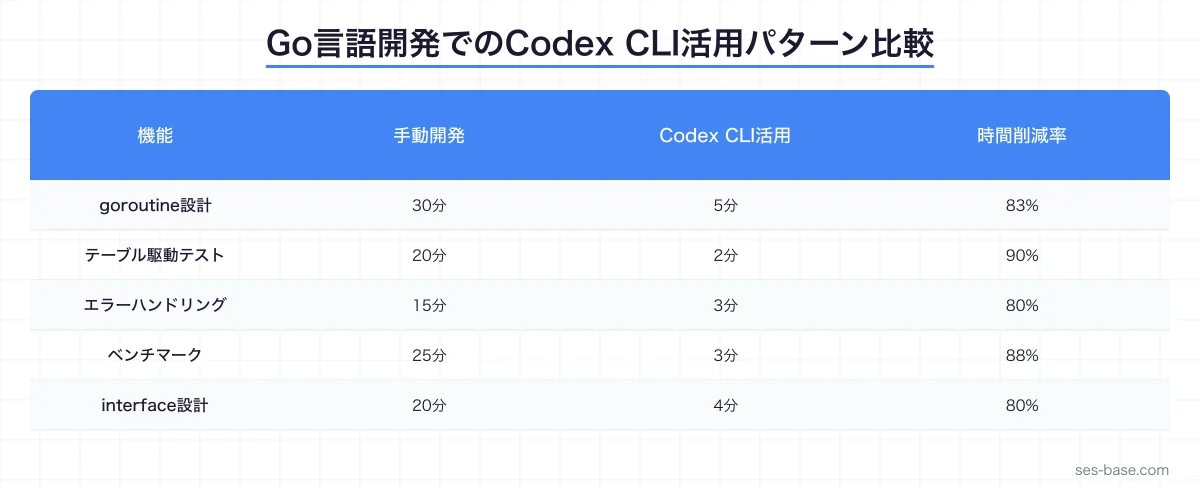
実践2: テーブル駆動テストの自動生成
基本的なテーブル駆動テスト
Go特有のテーブル駆動テストパターンをCodex CLIで効率的に生成できます。
codex "以下の関数のテーブル駆動テストを生成して:
- 正常系: 各種入力パターン
- 異常系: nil入力、空文字、境界値
- エラーメッセージの検証も含める"
func TestParseConfig(t *testing.T) {
tests := []struct {
name string
input string
want *Config
wantErr string
}{
{
name: "正常系_全フィールド指定",
input: `{"host":"localhost","port":8080}`,
want: &Config{Host: "localhost", Port: 8080},
},
{
name: "正常系_ポート省略でデフォルト値",
input: `{"host":"localhost"}`,
want: &Config{Host: "localhost", Port: 3000},
},
{
name: "異常系_空文字",
input: "",
wantErr: "empty input",
},
{
name: "異常系_不正なJSON",
input: `{invalid}`,
wantErr: "invalid character",
},
{
name: "異常系_ポート範囲外",
input: `{"host":"localhost","port":99999}`,
wantErr: "port must be between 1 and 65535",
},
}
for _, tt := range tests {
t.Run(tt.name, func(t *testing.T) {
got, err := ParseConfig(tt.input)
if tt.wantErr != "" {
require.Error(t, err)
assert.Contains(t, err.Error(), tt.wantErr)
return
}
require.NoError(t, err)
assert.Equal(t, tt.want, got)
})
}
}ベンチマークテストの生成
codex "この関数のベンチマークテストを生成して:
- b.ReportAllocs()でメモリアロケーションも計測
- 入力サイズを変えたサブベンチマーク(10, 100, 1000, 10000)
- b.ResetTimer()を適切に使用"
func BenchmarkProcessData(b *testing.B) {
sizes := []int{10, 100, 1000, 10000}
for _, size := range sizes {
b.Run(fmt.Sprintf("size_%d", size), func(b *testing.B) {
data := generateTestData(size)
b.ReportAllocs()
b.ResetTimer()
for i := 0; i < b.N; i++ {
_ = ProcessData(data)
}
})
}
}ファジングテストの自動生成
Go 1.18以降で導入されたファジングテストもCodex CLIで生成できます。
codex "ParseURL関数のファジングテストを生成して。
       Go標準のtesting.Fを使用、初期コーパスも設定して"
func FuzzParseURL(f *testing.F) {
// 初期コーパス
seeds := []string{
"https://example.com",
"http://localhost:8080/path?key=value",
"ftp://user:[email protected]",
"",
"not-a-url",
"://missing-scheme",
}
for _, seed := range seeds {
f.Add(seed)
}
f.Fuzz(func(t *testing.T, input string) {
result, err := ParseURL(input)
if err != nil {
// エラー時はnilを返すべき
if result != nil {
t.Errorf("ParseURL(%q) returned non-nil result with error", input)
}
return
}
// 成功時は必須フィールドが設定されているべき
if result.Scheme == "" {
t.Errorf("ParseURL(%q) returned empty scheme", input)
}
})
}実践3: エラーハンドリングのパターン
カスタムエラー型の設計
Go言語のエラーハンドリングは独特ですが、Codex CLIはGoのイディオムに沿ったエラー型を生成できます。
codex "以下の要件でカスタムエラー型を設計して:
- NotFoundError, ValidationError, ConflictError
- errors.Is/Asで判定可能
- HTTPステータスコードへの変換メソッド付き
- エラーのラッピングに対応"
package apperror
import (
"errors"
"fmt"
"net/http"
)
// AppError はアプリケーション固有のエラーを表す
type AppError struct {
Code ErrorCode
Message string
Err error
}
type ErrorCode int
const (
ErrNotFound ErrorCode = iota + 1
ErrValidation
ErrConflict
ErrInternal
)
func (e *AppError) Error() string {
if e.Err != nil {
return fmt.Sprintf("%s: %v", e.Message, e.Err)
}
return e.Message
}
func (e *AppError) Unwrap() error {
return e.Err
}
func (e *AppError) HTTPStatus() int {
switch e.Code {
case ErrNotFound:
return http.StatusNotFound
case ErrValidation:
return http.StatusBadRequest
case ErrConflict:
return http.StatusConflict
default:
return http.StatusInternalServerError
}
}
// NewNotFound は404エラーを生成する
func NewNotFound(resource string, id any) *AppError {
return &AppError{
Code: ErrNotFound,
Message: fmt.Sprintf("%s not found: %v", resource, id),
}
}
// NewValidation はバリデーションエラーを生成する
func NewValidation(field, reason string) *AppError {
return &AppError{
Code: ErrValidation,
Message: fmt.Sprintf("validation failed for %s: %s", field, reason),
}
}
// IsNotFound はNotFoundエラーかどうかを判定する
func IsNotFound(err error) bool {
var appErr *AppError
return errors.As(err, &appErr) && appErr.Code == ErrNotFound
}実践4: interface設計とDI
Functional Optionsパターン
Goで広く使われるFunctional Optionsパターンの生成も得意です。
codex "HTTPクライアントのFunctional Optionsパターンを実装して。
       タイムアウト、リトライ回数、ベースURL、カスタムヘッダーをオプションで設定可能に"
type Client struct {
baseURL string
timeout time.Duration
maxRetries int
headers map[string]string
httpClient *http.Client
}
type Option func(*Client)
func WithTimeout(d time.Duration) Option {
return func(c *Client) {
c.timeout = d
}
}
func WithMaxRetries(n int) Option {
return func(c *Client) {
c.maxRetries = n
}
}
func WithBaseURL(url string) Option {
return func(c *Client) {
c.baseURL = url
}
}
func WithHeader(key, value string) Option {
return func(c *Client) {
c.headers[key] = value
}
}
func NewClient(opts ...Option) *Client {
c := &Client{
timeout: 30 * time.Second,
maxRetries: 3,
headers: make(map[string]string),
}
for _, opt := range opts {
opt(c)
}
c.httpClient = &http.Client{Timeout: c.timeout}
return c
}リポジトリパターンとDI
codex "ユーザーリポジトリをinterface+実装で設計して。
PostgreSQL実装とインメモリ実装(テスト用)の2つを用意"テストでの差し替えについてはCodex CLIテスト自動化ガイドで詳しく解説しています。
実践5: パフォーマンス最適化
プロファイリング結果の分析
codex "pprofの結果を分析して、以下のボトルネックを改善するコードを提案して:
- CPU: JSON Marshalが全体の40%
- メモリ: 大量のstring allocations
- goroutine: 同時実行数が制限なしで増加"
Codex CLIは以下のような最適化を提案します:
- JSON Marshal最適化:
encoding/json→github.com/goccy/go-jsonへの移行 - 文字列アロケーション削減:
strings.Builderの活用、[]byteベースの処理 - goroutine制御:
golang.org/x/sync/semaphoreによる同時実行数制限
// Before: 無制限goroutine
for _, item := range items {
	go process(item)
}

// After: セマフォで同時実行数を制限
sem := semaphore.NewWeighted(int64(runtime.NumCPU()))
g, ctx := errgroup.WithContext(ctx)
for _, item := range items {
	item := item
	g.Go(func() error {
		if err := sem.Acquire(ctx, 1); err != nil {
			return err
		}
		defer sem.Release(1)
		return process(ctx, item)
	})
}
return g.Wait()パフォーマンス最適化全般についてはCodex CLIパフォーマンス最適化ガイドも参照してください。
SES案件でのGo開発スキルの需要
Go言語はマイクロサービス・クラウドインフラ・DevOpsツールの領域で高い需要があります。SES市場での主な案件パターンは以下の通りです。
| 案件分野 | 技術スタック | 単価目安 |
|---|---|---|
| マイクロサービス開発 | Go + gRPC + Kubernetes | 75-95万/月 |
| クラウドインフラツール | Go + Terraform Provider | 70-90万/月 |
| バックエンドAPI開発 | Go + Gin/Echo + PostgreSQL | 65-85万/月 |
| ブロックチェーン関連 | Go + Ethereum/Cosmos SDK | 80-100万/月 |
Codex CLIを使いこなすことで、これらの案件での開発速度と品質を同時に向上させることができます。
Codex CLIのGo開発設定ベストプラクティス
.codex設定ファイル
# .codex/config.yaml
language: go
go:
  version: "1.22"
  module: "github.com/yourorg/project"
  linter: golangci-lint
  test_flags: ["-race", "-count=1"]

rules:
  - "エラーは必ず%wでラップする"
  - "context.Contextは第一引数にする"
  - "exported関数には必ずGoDocコメントを書く"
  - "テストはテーブル駆動で書く"
まとめ — Codex CLIでGoの生産性を最大化
Go言語の「明示的で冗長」な特性は、AIコーディングツールとの相性が特に良い言語です。
- ボイラープレート削減: エラーハンドリング、テスト、構造体定義を自動生成
- 並行処理の正確な設計: goroutine、channel、contextのパターンを適切に生成
- テスト品質の向上: テーブル駆動テスト、ベンチマーク、ファジングを網羅
- パフォーマンス最適化: プロファイリング結果に基づく改善提案
Codex CLIを使いこなすことで、Go開発の生産性を2倍以上に引き上げることが可能です。
SES BASEでは、Go言語のスキルを活かせる開発案件を多数掲載しています。
関連記事: