
- Codex CLIでReact→Next.js、Vue→Nuxtの移行を80%自動化できる
- 段階的移行戦略で本番稼働を止めずにフレームワークを刷新
- SES現場でのフレームワーク移行案件は月単価80〜120万円の高需要領域
「技術的負債の解消のため、ReactアプリをNext.jsに移行したい」——SES現場でこのような要望は増え続けています。しかし、フレームワーク移行はルーティング体系の変更、データフェッチの書き換え、ビルド設定の刷新と、膨大な作業が伴います。
OpenAI Codex CLIを使えば、こうした移行作業の大部分を自動化できます。この記事では、主要なフレームワーク移行パターンとCodex CLIの活用方法を実践的に解説します。
- フレームワーク移行の全体戦略と段階的アプローチ
- React → Next.js App Routerの移行をCodex CLIで自動化する方法
- Vue 2 → Vue 3 / Nuxt 3への移行パターン
- Express → Fastifyのバックエンド移行手法
- 移行後のテスト自動化と品質担保
フレームワーク移行が求められる背景
なぜSES現場でフレームワーク移行が急増しているのか
2026年現在、以下の理由からフレームワーク移行案件が急増しています:
- React 18→19のBreaking Changes: Server Componentsの本格化で従来のSPA構成が陳腐化
- Vue 2のEOL: 2023年末にサポート終了、未移行プロジェクトがセキュリティリスクに
- Next.js App Routerの普及: Pages Routerから App Routerへの移行ニーズが爆発
- パフォーマンス要件の厳格化: Core Web Vitalsのスコア改善にSSR/SSGが必須に
フレームワーク移行スキルを持つSESエンジニアの月単価は80〜120万円と高水準です。
移行戦略の選択
| 戦略 | メリット | デメリット | 適用場面 |
|---|---|---|---|
| Big Bang | 一度に完了 | リスク高い | 小規模アプリ |
| 段階的移行 | リスク低い | 期間長い | 中〜大規模 |
| ストラングラーパターン | 既存を維持しつつ移行 | 複雑 | 大規模・本番稼働中 |
React → Next.js App Router 移行をCodex CLIで自動化
Step 1: 移行対象の分析
まずCodex CLIにプロジェクト全体を分析させます:
codex "このReactプロジェクトをNext.js App Routerに移行する計画を立てて。
- 全コンポーネントの一覧と依存関係を整理
- Client/Serverコンポーネントの分類案を作成
- 移行順序の提案
- 推定工数を出して"
Codex CLIは以下のような分析レポートを生成します:
## 移行分析レポート

### コンポーネント分類
| カテゴリ | コンポーネント数 | Server Component候補 | Client Component |
|---|---|---|---|
| ページ | 24 | 18 | 6 |
| レイアウト | 5 | 5 | 0 |
| UIパーツ | 42 | 15 | 27 |
| フォーム | 12 | 0 | 12 |

### 移行順序(推奨)
1. プロジェクト構造の変換(app/ディレクトリ作成)
2. 共通レイアウトの移行(layout.tsx)
3. 静的ページの移行(Server Components化)
4. 動的ページの移行(データフェッチ書き換え)
5. インタラクティブページの移行("use client"追加)
6. API Routesの移行(Route Handlers化)

### 推定工数: 約40時間(Codex CLI使用で約8時間に短縮)
Step 2: プロジェクト構造の変換
codex "React SPAのディレクトリ構造をNext.js App Router形式に変換して。
- src/pages/ → app/ に変換
- 共通レイアウトを app/layout.tsx に抽出
- 既存のルーティング設定をファイルベースルーティングに変換
- _app.tsxのグローバル設定をlayout.tsxに統合"
Codex CLIが生成する構造変換の例:
// 変換前: src/pages/products/[id].tsx (React Router)
import { useParams } from 'react-router-dom';
import { useState, useEffect } from 'react';

export default function ProductDetail() {
  const { id } = useParams();
  const [product, setProduct] = useState(null);

  useEffect(() => {
    fetch(`/api/products/${id}`)
      .then(res => res.json())
      .then(setProduct);
  }, [id]);

  if (!product) return <div>Loading...</div>;

  return (
    <div>
      <h1>{product.name}</h1>
      <p>{product.description}</p>
      <p>¥{product.price.toLocaleString()}</p>
    </div>
  );
}
// 変換後: app/products/[id]/page.tsx (Next.js App Router)
import { notFound } from 'next/navigation';
import { ProductActions } from './product-actions';
// Server Componentとしてデータフェッチ
async function getProduct(id: string) {
const res = await fetch(`${process.env.API_URL}/products/${id}`, {
next: { revalidate: 60 },
});
if (!res.ok) return null;
return res.json();
}
// メタデータの動的生成
export async function generateMetadata({ params }: { params: { id: string } }) {
const product = await getProduct(params.id);
if (!product) return {};
return {
title: `${product.name} | ストア`,
description: product.description,
};
}
export default async function ProductDetailPage({
params,
}: {
params: { id: string };
}) {
const product = await getProduct(params.id);
if (!product) notFound();
return (
<div>
<h1>{product.name}</h1>
<p>{product.description}</p>
<p>¥{product.price.toLocaleString()}</p>
{/* インタラクティブ部分はClient Component */}
<ProductActions productId={params.id} />
</div>
);
}Step 3: データフェッチパターンの変換
React SPAの useEffect + useState パターンをNext.jsのServer Componentsに変換します:
codex "全コンポーネントのuseEffect+fetchパターンを
Next.js App Routerのサーバーサイドデータフェッチに変換して。
- Server Componentに変換可能なものはasync関数化
- インタラクティブなものは'use client'を追加してuseEffectを維持
- キャッシュ戦略(revalidate / no-store)を適切に設定"
典型的なパターン変換表
| React SPA パターン | Next.js App Router パターン |
|---|---|
useEffect + fetch | async Server Component |
useSWR / React Query | Server Component + revalidate |
useState + フォーム | "use client" + Server Actions |
useContext (グローバル状態) | Server Component + props drilling / Zustand |
React Router <Link> | next/link <Link> |
React Router useNavigate | next/navigation useRouter |
Step 4: API Routesの移行
codex "Express風のAPIルートをNext.js Route Handlersに変換して。
- src/api/*.ts → app/api/*/route.ts
- ミドルウェアの処理をnext/server middleware.tsに移行
- レスポンスをNextResponseに変換"
// 変換前: src/api/products.ts (Express風)
import express from 'react';
router.get('/products', async (req, res) => {
const { category, page = 1 } = req.query;
const products = await db.products.findMany({
where: category ? { category } : {},
skip: (page - 1) * 20,
take: 20,
});
res.json(products);
});// 変換後: app/api/products/route.ts (Next.js Route Handler)
import { NextRequest, NextResponse } from 'next/server';
import { db } from '@/lib/db';
export async function GET(request: NextRequest) {
const searchParams = request.nextUrl.searchParams;
const category = searchParams.get('category');
const page = parseInt(searchParams.get('page') || '1');
const products = await db.products.findMany({
where: category ? { category } : {},
skip: (page - 1) * 20,
take: 20,
});
return NextResponse.json(products);
}Vue 2 → Vue 3 / Nuxt 3 移行
Options API → Composition API の自動変換
Vue 2からVue 3への移行で最も工数がかかるのが、Options APIからComposition APIへの変換です。
codex "全Vue 2コンポーネントをVue 3 Composition API(script setup)に変換して。
- data() → ref/reactive
- computed → computed()
- methods → 通常の関数
- watch → watch/watchEffect
- mounted → onMounted
- Vuexストア → Pinia"
<!-- 変換前: Vue 2 Options API -->
<template>
<div class="user-list">
<input v-model="searchQuery" placeholder="検索..." />
<ul>
<li v-for="user in filteredUsers" :key="user.id">
{{ user.name }} - {{ user.role }}
</li>
</ul>
<p>表示中: {{ filteredUsers.length }} / {{ users.length }}</p>
</div>
</template>
<script>
import { mapState, mapActions } from 'vuex';
export default {
name: 'UserList',
data() {
return {
searchQuery: '',
};
},
computed: {
...mapState('users', ['users']),
filteredUsers() {
return this.users.filter(user =>
user.name.toLowerCase().includes(this.searchQuery.toLowerCase())
);
},
},
mounted() {
this.fetchUsers();
},
methods: {
...mapActions('users', ['fetchUsers']),
},
};
</script><!-- 変換後: Vue 3 Composition API (script setup) -->
<template>
<div class="user-list">
<input v-model="searchQuery" placeholder="検索..." />
<ul>
<li v-for="user in filteredUsers" :key="user.id">
{{ user.name }} - {{ user.role }}
</li>
</ul>
<p>表示中: {{ filteredUsers.length }} / {{ users.length }}</p>
</div>
</template>
<script setup lang="ts">
import { ref, computed, onMounted } from 'vue';
import { useUserStore } from '@/stores/users';
const userStore = useUserStore();
const searchQuery = ref('');
const users = computed(() => userStore.users);
const filteredUsers = computed(() =>
users.value.filter(user =>
user.name.toLowerCase().includes(searchQuery.value.toLowerCase())
)
);
onMounted(() => {
userStore.fetchUsers();
});
</script>Vuex → Pinia 移行
codex "VuexストアをすべてPiniaに移行して。
- modules → 個別store
- mutations削除、actionsに統合
- TypeScript型定義を追加"
// 変換前: Vuex store/modules/users.js
export default {
namespaced: true,
state: () => ({
users: [],
loading: false,
error: null,
}),
mutations: {
SET_USERS(state, users) {
state.users = users;
},
SET_LOADING(state, loading) {
state.loading = loading;
},
},
actions: {
async fetchUsers({ commit }) {
commit('SET_LOADING', true);
try {
const res = await fetch('/api/users');
const users = await res.json();
commit('SET_USERS', users);
} finally {
commit('SET_LOADING', false);
}
},
},
getters: {
activeUsers: (state) => state.users.filter(u => u.active),
},
};// 変換後: stores/users.ts (Pinia)
import { defineStore } from 'pinia';
interface User {
id: string;
name: string;
role: string;
active: boolean;
}
export const useUserStore = defineStore('users', {
state: () => ({
users: [] as User[],
loading: false,
error: null as string | null,
}),
getters: {
activeUsers: (state) => state.users.filter(u => u.active),
},
actions: {
async fetchUsers() {
this.loading = true;
try {
const res = await fetch('/api/users');
this.users = await res.json();
} catch (err) {
this.error = err instanceof Error ? err.message : 'Unknown error';
} finally {
this.loading = false;
}
},
},
});Express → Fastify バックエンド移行
なぜFastifyに移行するのか
| 比較項目 | Express | Fastify |
|---|---|---|
| パフォーマンス | 基準 | 2〜3倍高速 |
| TypeScript | △ 型が不完全 | ◎ ファーストクラスサポート |
| バリデーション | 手動 | JSON Schema内蔵 |
| プラグインシステム | ミドルウェアチェーン | カプセル化プラグイン |
| メンテナンス | 枯れている | アクティブに開発中 |
codex "ExpressアプリケーションをFastifyに移行して。
- ルーティングをFastify形式に変換
- ミドルウェアをFastifyプラグインに変換
- バリデーションをJSON Schemaに変換
- エラーハンドリングをFastify形式に"
// 変換前: Express
import express from 'express';
import cors from 'cors';
import { body, validationResult } from 'express-validator';
const app = express();
app.use(cors());
app.use(express.json());
app.post('/users',
body('email').isEmail(),
body('name').isLength({ min: 2 }),
async (req, res) => {
const errors = validationResult(req);
if (!errors.isEmpty()) {
return res.status(400).json({ errors: errors.array() });
}
const user = await createUser(req.body);
res.status(201).json(user);
}
);// 変換後: Fastify
import Fastify from 'fastify';
import cors from '@fastify/cors';
const app = Fastify({ logger: true });
await app.register(cors);
const createUserSchema = {
body: {
type: 'object',
required: ['email', 'name'],
properties: {
email: { type: 'string', format: 'email' },
name: { type: 'string', minLength: 2 },
},
},
response: {
201: {
type: 'object',
properties: {
id: { type: 'string' },
email: { type: 'string' },
name: { type: 'string' },
},
},
},
} as const;
app.post('/users', { schema: createUserSchema }, async (request, reply) => {
const user = await createUser(request.body);
return reply.status(201).send(user);
});移行後のテスト自動化
リグレッションテストの自動生成
codex "移行前後で動作が変わっていないことを確認するリグレッションテストを自動生成して。
- 全APIエンドポイントの入出力テスト
- 主要なユーザーフローのE2Eテスト
- パフォーマンスベンチマーク(移行前後の比較)"
// tests/regression/api-compatibility.test.ts
import { describe, it, expect } from 'vitest';
describe('API互換性テスト', () => {
const endpoints = [
{ method: 'GET', path: '/api/products', expectedStatus: 200 },
{ method: 'GET', path: '/api/products/1', expectedStatus: 200 },
{ method: 'POST', path: '/api/products', body: { name: 'Test', price: 100 }, expectedStatus: 201 },
{ method: 'PUT', path: '/api/products/1', body: { name: 'Updated' }, expectedStatus: 200 },
{ method: 'DELETE', path: '/api/products/1', expectedStatus: 204 },
];
for (const endpoint of endpoints) {
it(`${endpoint.method} ${endpoint.path} → ${endpoint.expectedStatus}`, async () => {
const res = await fetch(`http://localhost:3000${endpoint.path}`, {
method: endpoint.method,
headers: { 'Content-Type': 'application/json' },
body: endpoint.body ? JSON.stringify(endpoint.body) : undefined,
});
expect(res.status).toBe(endpoint.expectedStatus);
if (res.status === 200 || res.status === 201) {
const data = await res.json();
expect(data).toBeDefined();
}
});
}
});ビジュアルリグレッションテスト
codex "Playwrightでビジュアルリグレッションテストをセットアップして。
移行前のスクリーンショットと比較して、UIの差分を検出できるようにして。"
// tests/visual/pages.spec.ts
import { test, expect } from '@playwright/test';
const pages = [
{ name: 'トップ', path: '/' },
{ name: '商品一覧', path: '/products' },
{ name: '商品詳細', path: '/products/1' },
{ name: 'カート', path: '/cart' },
{ name: 'ログイン', path: '/login' },
];
for (const page of pages) {
test(`ビジュアルリグレッション: ${page.name}`, async ({ page: p }) => {
await p.goto(page.path);
await p.waitForLoadState('networkidle');
await expect(p).toHaveScreenshot(`${page.name}.png`, {
maxDiffPixelRatio: 0.01,
});
});
}SES現場での移行プロジェクト管理
移行タイムライン例(中規模プロジェクト)
| フェーズ | 期間 | 作業内容 | Codex CLI活用 |
|---|---|---|---|
| 分析 | 1週間 | 現状調査・移行計画策定 | プロジェクト分析レポート生成 |
| 基盤 | 1週間 | 新フレームワーク設定・CI/CD構築 | 設定ファイル自動生成 |
| 移行 | 3-4週間 | コンポーネント・ルーティング変換 | コード自動変換(80%) |
| テスト | 1-2週間 | リグレッションテスト・性能テスト | テストコード自動生成 |
| 最適化 | 1週間 | パフォーマンスチューニング | 最適化提案 |
Codex CLIによる工数削減効果
実際のSES現場での移行プロジェクトにおいて、Codex CLIを活用した場合の工数削減効果:
- コード変換作業: 手動40時間 → Codex CLI使用8時間(80%削減)
- テスト作成: 手動20時間 → Codex CLI使用5時間(75%削減)
- 設定ファイル作成: 手動8時間 → Codex CLI使用1時間(87%削減)
- ドキュメント作成: 手動10時間 → Codex CLI使用3時間(70%削減)
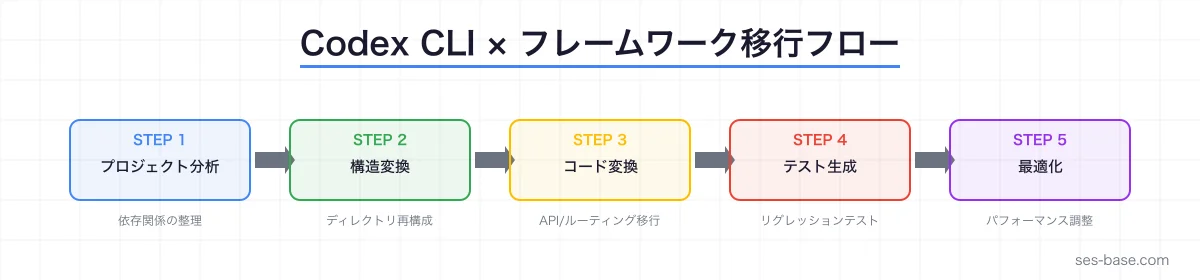
まとめ
フレームワーク移行は、SES現場で今最も求められるスキルの一つです。OpenAI Codex CLIを活用することで、移行作業の大部分を自動化し、品質を維持しながら大幅な工数削減が可能です。
- React → Next.js: Server Components化、データフェッチ変換、Route Handlers移行を自動化
- Vue 2 → Vue 3: Options API → Composition API、Vuex → Pinia の一括変換
- Express → Fastify: ルーティング、バリデーション、プラグインの自動変換
- テスト自動化: リグレッションテスト、ビジュアルテストの自動生成
Codex CLIのパワーを最大限に活かし、SESエンジニアとしての市場価値を高めていきましょう。
SES BASEでは、React/Next.js、Vue/Nuxt、Node.jsのフレームワーク移行案件を多数掲載。高単価案件に挑戦して、キャリアアップを実現しましょう。