- Codex CLIでEmbedding生成からベクトルDB連携まで一気通貫で自動化できる
- pgvector・Pinecone・Chromaの3大ベクトルDBの実装パターンを完全網羅
- SES案件で急増中のRAG基盤構築スキルを効率的に習得できる
「社内文書を検索できるAIチャットボットを作ってほしい」「既存データベースにセマンティック検索を追加したい」——2026年のSES案件で、こうしたベクトル検索・RAG(Retrieval-Augmented Generation)関連の要件が急増しています。
結論から言えば、Codex CLIを使えば、Embeddingの生成からベクトルDBへの格納、類似検索APIの構築まで、RAG基盤の実装を大幅に効率化できます。
この記事はOpenAI Codex CLI完全攻略シリーズの第73回として、ベクトル検索とEmbedding実装の実践テクニックを詳しく解説します。
- Embedding(ベクトル化)の基礎概念とOpenAI Embedding APIの使い方
- pgvector・Pinecone・Chromaの3大ベクトルDBの比較と使い分け
- Codex CLIでRAG基盤を自動構築する具体的な手順
- ハイブリッド検索(ベクトル+キーワード)の実装方法
- SES案件でのベクトル検索スキルの需要と年収への影響
ベクトル検索・Embeddingの基礎知識
Embeddingとは何か
Embeddingとは、テキストや画像などの非構造データを高次元のベクトル(数値の配列)に変換する技術です。意味的に近いデータは、ベクトル空間上でも近い位置に配置されます。
# Embeddingの概念
"TypeScriptの開発"  → [0.23, -0.45, 0.78, ..., 0.12]  (1536次元)
"フロントエンド開発" → [0.21, -0.43, 0.76, ..., 0.15]  ← 意味が近い=距離が近い
"料理のレシピ"     → [-0.67, 0.89, -0.12, ..., -0.54]  ← 意味が遠い=距離が遠い
なぜ今ベクトル検索が重要なのか
| 従来のキーワード検索 | ベクトル検索 |
|---|---|
| 完全一致・部分一致 | 意味的な類似性で検索 |
| 「TypeScript」で検索すると「TS」はヒットしない | 「TypeScript」も「TS」も同じ意味として検索可能 |
| シノニム辞書の手動管理が必要 | 自動的に同義語・関連語を理解 |
| 多言語対応が困難 | 多言語でも意味ベースで検索可能 |
Codex CLIでEmbedding生成を自動化する
OpenAI Embedding APIの基本実装
# Codex CLIへのプロンプト例
codex "OpenAIのtext-embedding-3-smallモデルを使って、
テキストをEmbeddingに変換するTypeScriptモジュールを作成して。
要件:
- バッチ処理対応(一度に最大2048テキスト)
- レート制限対策(429エラー時の指数バックオフ)
- キャッシュ機能(同じテキストの再計算を防止)
- コスト計算ログ"
Codex CLIが生成するコード例:
// src/embedding/embedding-service.ts
import OpenAI from 'openai';

interface EmbeddingResult {
  text: string;
  vector: number[];
  model: string;
  tokenCount: number;
}

interface EmbeddingServiceConfig {
  model: 'text-embedding-3-small' | 'text-embedding-3-large';
  dimensions?: number;
  batchSize: number;
  maxRetries: number;
}

export class EmbeddingService {
  private client: OpenAI;
  private config: EmbeddingServiceConfig;
  private cache = new Map<string, number[]>();
  private totalTokens = 0;

  constructor(apiKey: string, config?: Partial<EmbeddingServiceConfig>) {
    this.client = new OpenAI({ apiKey });
    this.config = {
      model: config?.model ?? 'text-embedding-3-small',
      dimensions: config?.dimensions,
      batchSize: config?.batchSize ?? 100,
      maxRetries: config?.maxRetries ?? 3,
    };
  }

  async embed(text: string): Promise<EmbeddingResult> {
    const results = await this.embedBatch([text]);
    return results[0];
  }

  async embedBatch(texts: string[]): Promise<EmbeddingResult[]> {
    const results: EmbeddingResult[] = [];
    const uncachedTexts: string[] = [];
    const uncachedIndices: number[] = [];

    // キャッシュチェック
    for (let i = 0; i < texts.length; i++) {
      const cached = this.cache.get(texts[i]);
      if (cached) {
        results[i] = {
          text: texts[i],
          vector: cached,
          model: this.config.model,
          tokenCount: 0,
        };
      } else {
        uncachedTexts.push(texts[i]);
        uncachedIndices.push(i);
      }
    }

    // バッチ処理
    for (let i = 0; i < uncachedTexts.length; i += this.config.batchSize) {
      const batch = uncachedTexts.slice(i, i + this.config.batchSize);
      const response = await this.callWithRetry(batch);

      for (let j = 0; j < response.data.length; j++) {
        const vector = response.data[j].embedding;
        const originalIndex = uncachedIndices[i + j];
        const text = uncachedTexts[i + j];

        this.cache.set(text, vector);
        results[originalIndex] = {
          text,
          vector,
          model: this.config.model,
          tokenCount: 0,
        };
      }

      this.totalTokens += response.usage.total_tokens;
    }

    return results;
  }

  private async callWithRetry(texts: string[]) {
    for (let attempt = 0; attempt < this.config.maxRetries; attempt++) {
      try {
        return await this.client.embeddings.create({
          model: this.config.model,
          input: texts,
          ...(this.config.dimensions && { dimensions: this.config.dimensions }),
        });
      } catch (error: any) {
        if (error?.status === 429 && attempt < this.config.maxRetries - 1) {
          const delay = Math.pow(2, attempt) * 1000;
          console.warn(`Rate limited. Retrying in ${delay}ms...`);
          await new Promise(r => setTimeout(r, delay));
          continue;
        }
        throw error;
      }
    }
    throw new Error('Max retries exhausted');
  }

  getCostEstimate(): { tokens: number; cost: number } {
    const costPer1M = this.config.model === 'text-embedding-3-small' ? 0.02 : 0.13;
    return {
      tokens: this.totalTokens,
      cost: (this.totalTokens / 1_000_000) * costPer1M,
    };
  }
}
pgvectorでベクトル検索を構築する
PostgreSQL + pgvectorのセットアップ
pgvectorは、PostgreSQLにベクトル検索機能を追加する拡張機能です。既存のPostgreSQL環境に追加できるため、SES案件では最も導入しやすい選択肢です。
codex "pgvectorを使ったベクトル検索のTypeScript実装を作成して。
要件:
- テーブル作成のマイグレーション
- ベクトルの挿入・更新・削除
- コサイン類似度による検索
- IVFFlatインデックスの作成
- メタデータフィルタリングとの組み合わせ"
// src/vector-db/pgvector-store.ts
import { Pool } from 'pg';
interface Document {
id: string;
content: string;
embedding: number[];
metadata: Record<string, unknown>;
}
interface SearchResult {
id: string;
content: string;
metadata: Record<string, unknown>;
similarity: number;
}
export class PgVectorStore {
private pool: Pool;
private tableName: string;
private dimensions: number;
constructor(pool: Pool, tableName = 'documents', dimensions = 1536) {
this.pool = pool;
this.tableName = tableName;
this.dimensions = dimensions;
}
async initialize(): Promise<void> {
await this.pool.query('CREATE EXTENSION IF NOT EXISTS vector');
await this.pool.query(`
CREATE TABLE IF NOT EXISTS ${this.tableName} (
id TEXT PRIMARY KEY,
content TEXT NOT NULL,
embedding vector(${this.dimensions}),
metadata JSONB DEFAULT '{}',
created_at TIMESTAMPTZ DEFAULT NOW(),
updated_at TIMESTAMPTZ DEFAULT NOW()
)
`);
// IVFFlatインデックスの作成(100万件以上のデータで効果的)
await this.pool.query(`
CREATE INDEX IF NOT EXISTS idx_${this.tableName}_embedding
ON ${this.tableName}
USING ivfflat (embedding vector_cosine_ops)
WITH (lists = 100)
`);
}
async upsert(documents: Document[]): Promise<void> {
const client = await this.pool.connect();
try {
await client.query('BEGIN');
for (const doc of documents) {
await client.query(
`INSERT INTO ${this.tableName} (id, content, embedding, metadata, updated_at)
VALUES ($1, $2, $3::vector, $4, NOW())
ON CONFLICT (id) DO UPDATE SET
content = EXCLUDED.content,
embedding = EXCLUDED.embedding,
metadata = EXCLUDED.metadata,
updated_at = NOW()`,
[
doc.id,
doc.content,
`[${doc.embedding.join(',')}]`,
JSON.stringify(doc.metadata),
]
);
}
await client.query('COMMIT');
} catch (error) {
await client.query('ROLLBACK');
throw error;
} finally {
client.release();
}
}
async search(
queryEmbedding: number[],
options: {
topK?: number;
threshold?: number;
metadataFilter?: Record<string, unknown>;
} = {}
): Promise<SearchResult[]> {
const { topK = 10, threshold = 0.7, metadataFilter } = options;
let whereClause = '';
const params: unknown[] = [`[${queryEmbedding.join(',')}]`];
if (metadataFilter) {
const conditions = Object.entries(metadataFilter).map(([key, value], i) => {
params.push(JSON.stringify(value));
return `metadata->>'${key}' = $${i + 2}::text`;
});
whereClause = `WHERE ${conditions.join(' AND ')}`;
}
const { rows } = await this.pool.query(
`SELECT
id, content, metadata,
1 - (embedding <=> $1::vector) as similarity
FROM ${this.tableName}
${whereClause}
ORDER BY embedding <=> $1::vector
LIMIT ${topK}`,
params
);
return rows
.filter((row: any) => row.similarity >= threshold)
.map((row: any) => ({
id: row.id,
content: row.content,
metadata: row.metadata,
similarity: parseFloat(row.similarity),
}));
}
async delete(ids: string[]): Promise<void> {
await this.pool.query(
`DELETE FROM ${this.tableName} WHERE id = ANY($1)`,
[ids]
);
}
}Pineconeでスケーラブルなベクトル検索を実装する
Pinecone vs pgvector の使い分け
| 観点 | pgvector | Pinecone |
|---|---|---|
| 運用コスト | PostgreSQL料金のみ | 従量課金(月$70〜) |
| スケーラビリティ | 単一DBの制約あり | 自動スケーリング |
| データ量 | 〜数百万件が実用的 | 数十億件まで対応 |
| メタデータフィルタ | SQLで自由自在 | 独自フィルタ構文 |
| SES案件推奨 | ★★★★★ | ★★★☆☆ |
| 既存DB統合 | 容易 | API経由のみ |
codex "Pinecone SDKを使ったベクトル検索のTypeScript実装を作成して。
名前空間の活用、メタデータフィルタリング、バッチupsertを含めて。"
// src/vector-db/pinecone-store.ts
import { Pinecone } from '@pinecone-database/pinecone';
interface PineconeDocument {
id: string;
values: number[];
metadata: Record<string, string | number | boolean>;
}
export class PineconeVectorStore {
private client: Pinecone;
private indexName: string;
private namespace: string;
constructor(apiKey: string, indexName: string, namespace = 'default') {
this.client = new Pinecone({ apiKey });
this.indexName = indexName;
this.namespace = namespace;
}
async upsert(documents: PineconeDocument[]): Promise<void> {
const index = this.client.index(this.indexName);
const ns = index.namespace(this.namespace);
// バッチサイズ100で分割
const batchSize = 100;
for (let i = 0; i < documents.length; i += batchSize) {
const batch = documents.slice(i, i + batchSize);
await ns.upsert(batch);
}
}
async search(
queryVector: number[],
topK = 10,
filter?: Record<string, unknown>
): Promise<Array<{ id: string; score: number; metadata: Record<string, any> }>> {
const index = this.client.index(this.indexName);
const ns = index.namespace(this.namespace);
const results = await ns.query({
vector: queryVector,
topK,
includeMetadata: true,
filter,
});
return (results.matches ?? []).map(match => ({
id: match.id,
score: match.score ?? 0,
metadata: match.metadata ?? {},
}));
}
async deleteByFilter(filter: Record<string, unknown>): Promise<void> {
const index = this.client.index(this.indexName);
const ns = index.namespace(this.namespace);
await ns.deleteMany(filter);
}
}RAG(Retrieval-Augmented Generation)基盤の構築
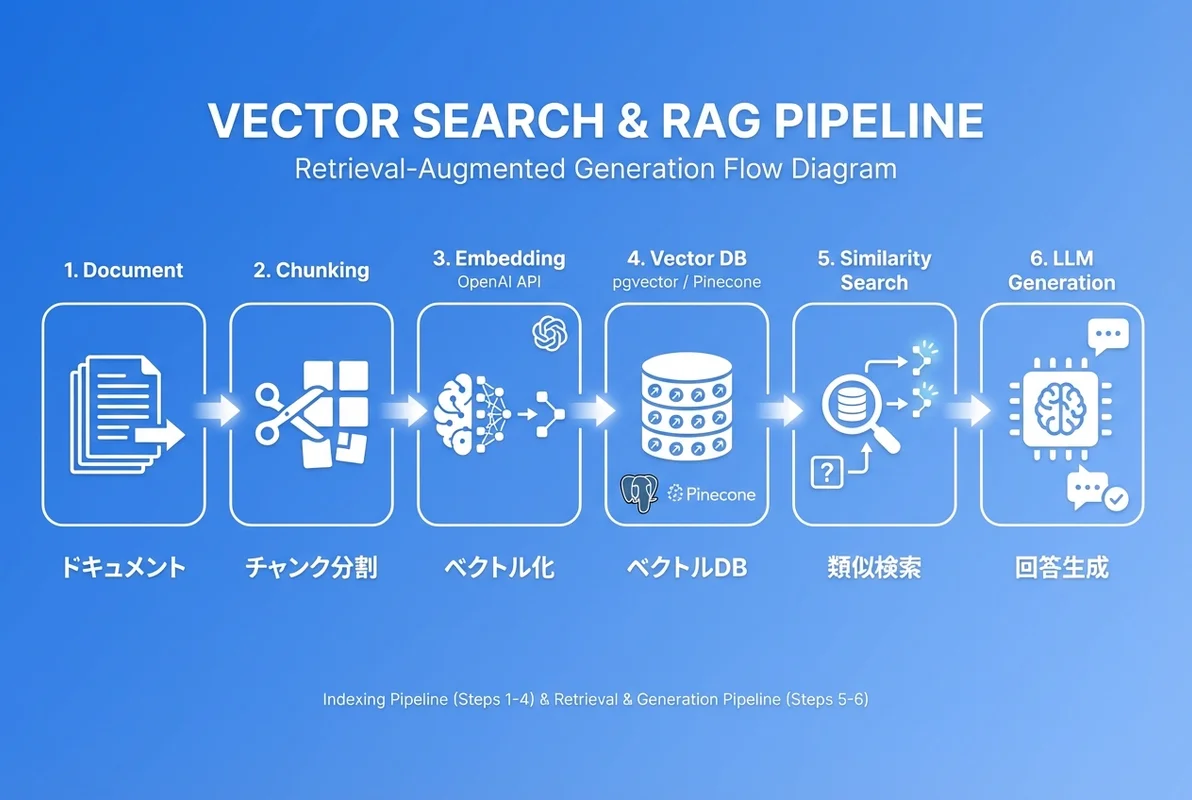
RAGパイプライン全体像
RAGは、外部知識を検索して取得し、それをコンテキストとしてLLMに渡すことで、ハルシネーション(幻覚)を低減し、最新情報に基づいた回答を生成する技術です。
# RAGパイプライン
ユーザーの質問
    ↓
① Embedding生成(質問をベクトル化)
    ↓
② ベクトル検索(類似ドキュメントを取得)
    ↓
③ コンテキスト構築(検索結果をプロンプトに組み込み)
    ↓
④ LLM生成(コンテキスト付きで回答を生成)
    ↓
回答をユーザーに返す
Codex CLIでRAGパイプラインを自動構築する
codex "社内ドキュメント検索のRAGパイプラインをTypeScriptで実装して。
要件:
- ドキュメントのチャンク分割(オーバーラップ付き)
- pgvectorによるベクトル検索
- OpenAI GPT-4oによる回答生成
- ソース引用(どのドキュメントから回答したかを明示)
- ストリーミングレスポンス"
// src/rag/document-chunker.ts
interface Chunk {
id: string;
content: string;
documentId: string;
chunkIndex: number;
metadata: {
source: string;
page?: number;
section?: string;
};
}
export class DocumentChunker {
private chunkSize: number;
private overlap: number;
constructor(chunkSize = 500, overlap = 50) {
this.chunkSize = chunkSize;
this.overlap = overlap;
}
chunk(documentId: string, content: string, metadata: Chunk['metadata']): Chunk[] {
const sentences = this.splitIntoSentences(content);
const chunks: Chunk[] = [];
let currentChunk = '';
let chunkIndex = 0;
for (const sentence of sentences) {
if ((currentChunk + sentence).length > this.chunkSize && currentChunk.length > 0) {
chunks.push({
id: `${documentId}_chunk_${chunkIndex}`,
content: currentChunk.trim(),
documentId,
chunkIndex,
metadata,
});
// オーバーラップ: 最後の数文をキャリーオーバー
const words = currentChunk.split(' ');
const overlapWords = words.slice(-Math.floor(this.overlap / 5));
currentChunk = overlapWords.join(' ') + ' ' + sentence;
chunkIndex++;
} else {
currentChunk += (currentChunk ? ' ' : '') + sentence;
}
}
if (currentChunk.trim()) {
chunks.push({
id: `${documentId}_chunk_${chunkIndex}`,
content: currentChunk.trim(),
documentId,
chunkIndex,
metadata,
});
}
return chunks;
}
private splitIntoSentences(text: string): string[] {
return text
.split(/(?<=[。.!?\n])/g)
.map(s => s.trim())
.filter(s => s.length > 0);
}
}
// src/rag/rag-pipeline.ts
import OpenAI from 'openai';
interface RAGResponse {
answer: string;
sources: Array<{
documentId: string;
content: string;
similarity: number;
}>;
tokenUsage: {
prompt: number;
completion: number;
total: number;
};
}
export class RAGPipeline {
private openai: OpenAI;
private embeddingService: any; // EmbeddingService
private vectorStore: any; // PgVectorStore
constructor(openai: OpenAI, embeddingService: any, vectorStore: any) {
this.openai = openai;
this.embeddingService = embeddingService;
this.vectorStore = vectorStore;
}
async query(question: string, topK = 5): Promise<RAGResponse> {
// ① 質問をEmbeddingに変換
const { vector } = await this.embeddingService.embed(question);
// ② ベクトル検索で関連ドキュメントを取得
const searchResults = await this.vectorStore.search(vector, {
topK,
threshold: 0.7,
});
// ③ コンテキストを構築
const context = searchResults
.map((r: any, i: number) => `[出典${i + 1}] ${r.content}`)
.join('\n\n');
// ④ LLMに質問とコンテキストを渡して回答を生成
const response = await this.openai.chat.completions.create({
model: 'gpt-4o',
messages: [
{
role: 'system',
content: `あなたは社内ドキュメントに基づいて回答するアシスタントです。
提供されたコンテキストの情報のみを使って回答してください。
回答には必ず[出典N]の形式で情報源を明記してください。
コンテキストに答えがない場合は「この情報は見つかりませんでした」と回答してください。`,
},
{
role: 'user',
content: `## コンテキスト\n${context}\n\n## 質問\n${question}`,
},
],
temperature: 0.1,
});
return {
answer: response.choices[0].message.content ?? '',
sources: searchResults.map((r: any) => ({
documentId: r.id,
content: r.content,
similarity: r.similarity,
})),
tokenUsage: {
prompt: response.usage?.prompt_tokens ?? 0,
completion: response.usage?.completion_tokens ?? 0,
total: response.usage?.total_tokens ?? 0,
},
};
}
}ハイブリッド検索の実装
ベクトル検索 × キーワード検索の組み合わせ
実際のSES案件では、ベクトル検索だけでなく**キーワード検索との組み合わせ(ハイブリッド検索)**が求められることが多いです。
codex "pgvectorのベクトル検索とPostgreSQLの全文検索を組み合わせた
ハイブリッド検索をTypeScriptで実装して。
RRF(Reciprocal Rank Fusion)でスコアを統合して。"
// src/search/hybrid-search.ts
interface HybridSearchResult {
id: string;
content: string;
vectorScore: number;
textScore: number;
combinedScore: number;
}
export class HybridSearch {
private pool: any; // pg.Pool
private embeddingService: any;
constructor(pool: any, embeddingService: any) {
this.pool = pool;
this.embeddingService = embeddingService;
}
async initialize(): Promise<void> {
// 全文検索用のGINインデックスを作成
await this.pool.query(`
ALTER TABLE documents
ADD COLUMN IF NOT EXISTS search_vector tsvector
GENERATED ALWAYS AS (
to_tsvector('japanese', content)
) STORED
`);
await this.pool.query(`
CREATE INDEX IF NOT EXISTS idx_documents_search
ON documents USING gin(search_vector)
`);
}
async search(query: string, topK = 10): Promise<HybridSearchResult[]> {
// ベクトル検索
const { vector } = await this.embeddingService.embed(query);
const vectorResults = await this.pool.query(
`SELECT id, content,
1 - (embedding <=> $1::vector) as score
FROM documents
ORDER BY embedding <=> $1::vector
LIMIT $2`,
[`[${vector.join(',')}]`, topK * 2]
);
// キーワード検索
const textResults = await this.pool.query(
`SELECT id, content,
ts_rank(search_vector, plainto_tsquery('japanese', $1)) as score
FROM documents
WHERE search_vector @@ plainto_tsquery('japanese', $1)
ORDER BY score DESC
LIMIT $2`,
[query, topK * 2]
);
// RRF(Reciprocal Rank Fusion)でスコア統合
return this.reciprocalRankFusion(
vectorResults.rows,
textResults.rows,
topK
);
}
private reciprocalRankFusion(
vectorResults: any[],
textResults: any[],
topK: number,
k = 60
): HybridSearchResult[] {
const scores = new Map<string, {
id: string;
content: string;
vectorScore: number;
textScore: number;
combinedScore: number;
}>();
// ベクトル検索のRRFスコア
vectorResults.forEach((result, rank) => {
const rrfScore = 1 / (k + rank + 1);
const existing = scores.get(result.id);
if (existing) {
existing.vectorScore = result.score;
existing.combinedScore += rrfScore;
} else {
scores.set(result.id, {
id: result.id,
content: result.content,
vectorScore: result.score,
textScore: 0,
combinedScore: rrfScore,
});
}
});
// キーワード検索のRRFスコア
textResults.forEach((result, rank) => {
const rrfScore = 1 / (k + rank + 1);
const existing = scores.get(result.id);
if (existing) {
existing.textScore = result.score;
existing.combinedScore += rrfScore;
} else {
scores.set(result.id, {
id: result.id,
content: result.content,
vectorScore: 0,
textScore: result.score,
combinedScore: rrfScore,
});
}
});
return Array.from(scores.values())
.sort((a, b) => b.combinedScore - a.combinedScore)
.slice(0, topK);
}
}
パフォーマンス最適化
Embeddingのバッチ処理とキャッシュ戦略
大量のドキュメントを処理する場合、Embedding生成のコストとパフォーマンスが課題になります。
codex "10万件のドキュメントをEmbeddingに変換するための
パフォーマンス最適化コードを書いて。
- 並列バッチ処理(concurrency制御付き)
- Redisキャッシュ
- 差分更新(変更があったドキュメントのみ再計算)
- 進捗表示"
// src/embedding/batch-processor.ts
interface BatchProcessorConfig {
concurrency: number;
batchSize: number;
cacheEnabled: boolean;
}
export class EmbeddingBatchProcessor {
private config: BatchProcessorConfig;
private embeddingService: any;
private vectorStore: any;
private processed = 0;
private total = 0;
constructor(
embeddingService: any,
vectorStore: any,
config?: Partial<BatchProcessorConfig>
) {
this.embeddingService = embeddingService;
this.vectorStore = vectorStore;
this.config = {
concurrency: config?.concurrency ?? 5,
batchSize: config?.batchSize ?? 100,
cacheEnabled: config?.cacheEnabled ?? true,
};
}
async processDocuments(
documents: Array<{ id: string; content: string; metadata: any }>
): Promise<{ processed: number; skipped: number; errors: number }> {
this.total = documents.length;
this.processed = 0;
let skipped = 0;
let errors = 0;
// バッチに分割
const batches: typeof documents[] = [];
for (let i = 0; i < documents.length; i += this.config.batchSize) {
batches.push(documents.slice(i, i + this.config.batchSize));
}
// 並列バッチ処理
const semaphore = new Array(this.config.concurrency).fill(null);
let batchIndex = 0;
await Promise.all(
semaphore.map(async () => {
while (batchIndex < batches.length) {
const currentBatch = batches[batchIndex++];
if (!currentBatch) break;
try {
const texts = currentBatch.map(d => d.content);
const embeddings = await this.embeddingService.embedBatch(texts);
const docsWithEmbeddings = currentBatch.map((doc, i) => ({
id: doc.id,
content: doc.content,
embedding: embeddings[i].vector,
metadata: doc.metadata,
}));
await this.vectorStore.upsert(docsWithEmbeddings);
this.processed += currentBatch.length;
this.logProgress();
} catch (error) {
errors += currentBatch.length;
console.error(`Batch error:`, error);
}
}
})
);
return { processed: this.processed, skipped, errors };
}
private logProgress(): void {
const pct = ((this.processed / this.total) * 100).toFixed(1);
console.log(`Progress: ${this.processed}/${this.total} (${pct}%)`);
}
}SES現場でのベクトル検索スキルの需要と年収
2026年のRAG関連案件の動向
| スキルレベル | 想定単価 | 案件内容 |
|---|---|---|
| 基礎 | 65-80万円/月 | 既存RAG基盤の運用・改善 |
| 中級 | 80-100万円/月 | RAG基盤の新規構築・チューニング |
| 上級 | 100-130万円/月 | マルチモーダルRAG・エージェントシステム設計 |
キャリアアップのロードマップ
- Step 1: Embedding APIの基礎理解(1-2週間)
- Step 2: pgvectorでの基本的なベクトル検索実装(2-3週間)
- Step 3: RAGパイプラインの構築(1ヶ月)
- Step 4: ハイブリッド検索・リランキングの実装(2-3週間)
- Step 5: 本番運用のパフォーマンス最適化(継続的)
まとめ
Codex CLIを活用したベクトル検索・Embedding実装の方法について、基礎から実践までを解説しました。
- EmbeddingはテキストをベクトルAI変換し、意味ベースの検索を実現する技術
- pgvectorは既存PostgreSQL環境に追加できるため、SES案件で最も導入しやすい
- RAGパイプラインはEmbedding生成→ベクトル検索→LLM生成の3ステップで構成される
- ハイブリッド検索(ベクトル+キーワード)でさらに精度を向上できる
- 2026年のSES市場でRAGスキルは65〜130万円/月の案件に直結する
次のステップ: ベクトル検索の基礎を押さえたら、Codex CLIでAIエージェントを開発する方法で、RAGを活用した高度なAIシステム構築に挑戦しましょう。
関連記事: