
- OpenAI Codex CLIでWCAG 2.2準拠のアクセシビリティテストを自動化する手法を解説
- axe-core・Lighthouse・Pa11yとの連携でa11y問題を自動検出・修正提案
- SES現場で差別化できるアクセシビリティスキルの市場価値と学習ロードマップ
「アクセシビリティ対応をお願いします」——2026年、この要件がSES案件で急増しています。改正障害者差別解消法の施行、欧州のEuropean Accessibility Act(EAA)の適用開始、そしてグローバル企業のWCAG準拠義務化により、**Webアクセシビリティ(a11y)**はもはやオプションではなく必須要件です。
しかし、WCAG 2.2の適合基準は86項目にもおよび、手動でのチェックは膨大な時間を要します。そこでOpenAI Codex CLIの出番です。AIの力を借りれば、アクセシビリティテストの自動化、問題の自動検出、さらには修正コードの自動生成まで実現できます。
この記事では、OpenAI Codex CLIを使ってアクセシビリティテストを効率化する実践的な方法を、豊富なコード例とともに解説します。
- WCAG 2.2の基礎とSES現場で求められるアクセシビリティ対応
- OpenAI Codex CLIでaxe-core・Lighthouseを連携させる方法
- アクセシビリティ問題の自動検出と修正コード生成
- CI/CDパイプラインへのa11yテスト組み込み
- スクリーンリーダー対応のARIA実装パターン
- アクセシビリティエンジニアとしてのキャリア戦略
Webアクセシビリティの基礎知識|なぜ今、SES現場で必要か
2026年のアクセシビリティ法規制
Webアクセシビリティへの対応要求が世界的に加速しています:
| 法規制 | 対象地域 | 施行時期 | 要件 |
|---|---|---|---|
| 改正障害者差別解消法 | 日本 | 2024年4月〜 | 合理的配慮の義務化 |
| European Accessibility Act | EU | 2025年6月〜 | デジタルサービスのa11y義務化 |
| ADA Title III | 米国 | 適用中 | Webサイトもバリアフリー対象 |
| JIS X 8341-3 | 日本 | 適用中 | WCAG 2.1ベースの国内規格 |
WCAG 2.2の4原則と適合レベル
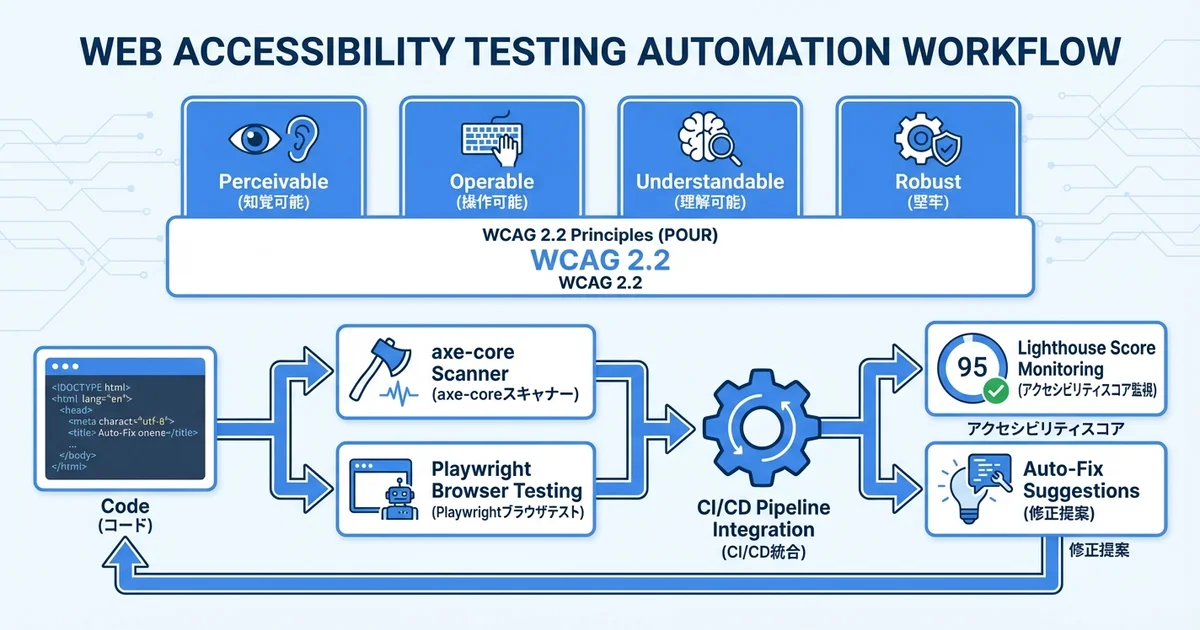
WCAG(Web Content Accessibility Guidelines)2.2は、4つの原則に基づいています:
WCAG 2.2 の4原則(POUR):

1. Perceivable(知覚可能)
   └ 代替テキスト、キャプション、色に依存しないデザイン

2. Operable(操作可能)
   └ キーボード操作、十分な操作時間、発作を誘発しない

3. Understandable(理解可能)
   └ 読みやすいテキスト、予測可能な動作、エラー支援

4. Robust(堅牢)
└ 支援技術との互換性、標準準拠のマークアップ適合レベルは3段階あり、SES案件では通常レベルAAが求められます:
- レベルA: 最低限のアクセシビリティ(30項目)
- レベルAA: 標準的なアクセシビリティ(50項目)← SES案件の標準要件
- レベルAAA: 最高レベルのアクセシビリティ(86項目)
OpenAI Codex CLIでアクセシビリティ監査を始める
axe-coreとの連携セットアップ
axe-coreは最も広く使われているアクセシビリティテストエンジンです。OpenAI Codex CLIで自動監査環境を構築しましょう:
codex "以下の構成でアクセシビリティテスト環境を構築して:
1. axe-core + Playwright でブラウザベースの自動監査
2. WCAG 2.2 レベルAA をターゲット
3. テスト結果をJSON + HTMLレポートで出力
4. package.jsonに必要なスクリプトを追加"
Codex CLIが生成するセットアップ:
// a11y-tests/setup.ts
import { test, expect } from '@playwright/test';
import AxeBuilder from '@axe-core/playwright';
import fs from 'fs';

interface A11yTestConfig {
  baseUrl: string;
  pages: string[];
  wcagLevel: 'wcag2a' | 'wcag2aa' | 'wcag2aaa';
  outputDir: string;
}

const config: A11yTestConfig = {
  baseUrl: process.env.BASE_URL || 'http://localhost:3000',
  pages: [
    '/',
    '/about',
    '/contact',
    '/products',
    '/login',
    '/register',
    '/dashboard',
  ],
  wcagLevel: 'wcag2aa',
  outputDir: './a11y-reports',
};

// レポートディレクトリの作成
if (!fs.existsSync(config.outputDir)) {
  fs.mkdirSync(config.outputDir, { recursive: true });
}

export { config };
export type { A11yTestConfig };
全ページ自動監査の実装
// a11y-tests/audit-all-pages.test.ts
import { test, expect } from '@playwright/test';
import AxeBuilder from '@axe-core/playwright';
import fs from 'fs';
import { config } from './setup';

interface ViolationSummary {
  page: string;
  totalViolations: number;
  critical: number;
  serious: number;
  moderate: number;
  minor: number;
  violations: {
    id: string;
    impact: string;
    description: string;
    helpUrl: string;
    nodes: number;
  }[];
}

const results: ViolationSummary[] = [];

for (const page of config.pages) {
  test(`アクセシビリティ監査: ${page}`, async ({ page: browserPage }) => {
    await browserPage.goto(`${config.baseUrl}${page}`);
    await browserPage.waitForLoadState('networkidle');

    const axeResults = await new AxeBuilder({ page: browserPage })
      .withTags([config.wcagLevel])
      .analyze();

    const summary: ViolationSummary = {
      page,
      totalViolations: axeResults.violations.length,
      critical: axeResults.violations.filter((v) => v.impact === 'critical').length,
      serious: axeResults.violations.filter((v) => v.impact === 'serious').length,
      moderate: axeResults.violations.filter((v) => v.impact === 'moderate').length,
      minor: axeResults.violations.filter((v) => v.impact === 'minor').length,
      violations: axeResults.violations.map((v) => ({
        id: v.id,
        impact: v.impact || 'unknown',
        description: v.description,
        helpUrl: v.helpUrl,
        nodes: v.nodes.length,
      })),
    };

    results.push(summary);

    // 個別ページレポートの保存
    fs.writeFileSync(
      `${config.outputDir}/report-${page.replace(/\//g, '_') || 'home'}.json`,
      JSON.stringify({ summary, details: axeResults }, null, 2)
    );

    // criticalまたはseriousな違反がないことを確認
    expect(summary.critical, `${page}: critical violations found`).toBe(0);
    expect(summary.serious, `${page}: serious violations found`).toBe(0);
  });
}

test.afterAll(async () => {
  // 総合レポートの生成
  const totalReport = {
    timestamp: new Date().toISOString(),
    config: { wcagLevel: config.wcagLevel, pagesAudited: config.pages.length },
    summary: {
      totalPages: results.length,
      totalViolations: results.reduce((sum, r) => sum + r.totalViolations, 0),
      pagesWithViolations: results.filter((r) => r.totalViolations > 0).length,
    },
    pages: results,
  };

  fs.writeFileSync(
    `${config.outputDir}/full-report.json`,
    JSON.stringify(totalReport, null, 2)
  );

  console.log('\n📊 アクセシビリティ監査結果:');
  console.table(results.map((r) => ({
    ページ: r.page,
    合計: r.totalViolations,
    Critical: r.critical,
    Serious: r.serious,
    Moderate: r.moderate,
    Minor: r.minor,
  })));
});
主要なアクセシビリティ問題とCodex CLIによる自動修正
画像の代替テキスト(alt属性)
最も頻繁に検出されるa11y問題の一つが、画像のalt属性の欠落です:
codex "プロジェクト内の全HTMLファイルとReactコンポーネントをスキャンして、
alt属性が欠落している<img>タグを一覧で表示して。
各画像の文脈から適切なalt属性を提案して"
Codex CLIによる自動修正の例:
// scripts/fix-alt-text.ts
import { globSync } from 'glob';
import fs from 'fs';

interface AltTextFix {
  file: string;
  line: number;
  original: string;
  suggested: string;
  context: string;
}

function scanMissingAltText(): AltTextFix[] {
  const files = globSync('src/**/*.{tsx,jsx,html}');
  const fixes: AltTextFix[] = [];

  for (const file of files) {
    const content = fs.readFileSync(file, 'utf-8');
    const lines = content.split('\n');

    lines.forEach((line, index) => {
      // alt属性が空または欠落している<img>を検出
      const imgRegex = /<img\s[^>]*(?:alt=["'][\s]*["']|(?!.*alt=))[^>]*>/gi;
      const match = imgRegex.exec(line);

      if (match) {
        // src属性からコンテキストを推定
        const srcMatch = match[0].match(/src=["']([^"']*)["']/);
        const src = srcMatch ? srcMatch[1] : 'unknown';

        fixes.push({
          file,
          line: index + 1,
          original: match[0],
          suggested: generateAltSuggestion(src, line),
          context: lines.slice(Math.max(0, index - 2), index + 3).join('\n'),
        });
      }
    });
  }

  return fixes;
}

function generateAltSuggestion(src: string, context: string): string {
  // ファイル名からalt属性を推定
  const filename = src.split('/').pop()?.replace(/\.[^.]+$/, '') || '';
  const words = filename.replace(/[-_]/g, ' ');

  // デコレーション画像の場合は空のaltを推奨
  if (src.includes('decoration') || src.includes('bg-') || src.includes('pattern')) {
    return 'alt=""(装飾画像)';
  }

  return `alt="${words}"`;
}

const fixes = scanMissingAltText();
console.log(`\n🔍 alt属性の問題: ${fixes.length}件検出\n`);
fixes.forEach((fix) => {
  console.log(`📁 ${fix.file}:${fix.line}`);
  console.log(`  元: ${fix.original.slice(0, 80)}...`);
  console.log(`  提案: ${fix.suggested}`);
  console.log('');
});
キーボードナビゲーションの修正
codex "以下のReactコンポーネントのキーボードアクセシビリティを改善して:
- カスタムドロップダウンメニュー
- モーダルダイアログ(フォーカストラップ)
- タブパネル
WAI-ARIA パターンに準拠させて"
// src/components/accessible/AccessibleDropdown.tsx
import React, { useState, useRef, useEffect, useCallback } from 'react';
interface DropdownOption {
value: string;
label: string;
}
interface AccessibleDropdownProps {
options: DropdownOption[];
value: string;
onChange: (value: string) => void;
label: string;
id: string;
}
export function AccessibleDropdown({
options, value, onChange, label, id,
}: AccessibleDropdownProps) {
const [isOpen, setIsOpen] = useState(false);
const [activeIndex, setActiveIndex] = useState(-1);
const listRef = useRef<HTMLUListElement>(null);
const buttonRef = useRef<HTMLButtonElement>(null);
const selectedOption = options.find((o) => o.value === value);
const handleKeyDown = useCallback(
(e: React.KeyboardEvent) => {
switch (e.key) {
case 'ArrowDown':
e.preventDefault();
if (!isOpen) {
setIsOpen(true);
setActiveIndex(0);
} else {
setActiveIndex((prev) => Math.min(prev + 1, options.length - 1));
}
break;
case 'ArrowUp':
e.preventDefault();
if (isOpen) {
setActiveIndex((prev) => Math.max(prev - 1, 0));
}
break;
case 'Enter':
case ' ':
e.preventDefault();
if (isOpen && activeIndex >= 0) {
onChange(options[activeIndex].value);
setIsOpen(false);
buttonRef.current?.focus();
} else {
setIsOpen(true);
}
break;
case 'Escape':
setIsOpen(false);
buttonRef.current?.focus();
break;
case 'Home':
e.preventDefault();
setActiveIndex(0);
break;
case 'End':
e.preventDefault();
setActiveIndex(options.length - 1);
break;
}
},
[isOpen, activeIndex, options, onChange]
);
useEffect(() => {
if (isOpen && activeIndex >= 0 && listRef.current) {
const items = listRef.current.querySelectorAll('[role="option"]');
(items[activeIndex] as HTMLElement)?.scrollIntoView({ block: 'nearest' });
}
}, [activeIndex, isOpen]);
return (
<div className="dropdown" onKeyDown={handleKeyDown}>
<label id={`${id}-label`}>{label}</label>
<button
ref={buttonRef}
role="combobox"
aria-expanded={isOpen}
aria-haspopup="listbox"
aria-labelledby={`${id}-label`}
aria-activedescendant={
isOpen && activeIndex >= 0 ? `${id}-option-${activeIndex}` : undefined
}
onClick={() => setIsOpen(!isOpen)}
>
{selectedOption?.label || '選択してください'}
<span aria-hidden="true">▼</span>
</button>
{isOpen && (
<ul
ref={listRef}
role="listbox"
aria-labelledby={`${id}-label`}
tabIndex={-1}
>
{options.map((option, index) => (
<li
key={option.value}
id={`${id}-option-${index}`}
role="option"
aria-selected={option.value === value}
className={index === activeIndex ? 'active' : ''}
onClick={() => {
onChange(option.value);
setIsOpen(false);
buttonRef.current?.focus();
}}
>
{option.label}
</li>
))}
</ul>
)}
</div>
);
}フォーカストラップ付きモーダル
// src/components/accessible/AccessibleModal.tsx
import React, { useEffect, useRef, useCallback } from 'react';

interface AccessibleModalProps {
  isOpen: boolean;
  onClose: () => void;
  title: string;
  children: React.ReactNode;
}

export function AccessibleModal({ isOpen, onClose, title, children }: AccessibleModalProps) {
  const modalRef = useRef<HTMLDivElement>(null);
  const previousFocus = useRef<HTMLElement | null>(null);

  // フォーカス可能な要素を取得
  const getFocusableElements = useCallback((): HTMLElement[] => {
    if (!modalRef.current) return [];
    return Array.from(
      modalRef.current.querySelectorAll<HTMLElement>(
        'a[href], button:not([disabled]), input:not([disabled]), ' +
        'select:not([disabled]), textarea:not([disabled]), [tabindex]:not([tabindex="-1"])'
      )
    );
  }, []);

  // フォーカストラップ
  const handleKeyDown = useCallback(
    (e: KeyboardEvent) => {
      if (e.key === 'Escape') {
        onClose();
        return;
      }

      if (e.key === 'Tab') {
        const focusable = getFocusableElements();
        if (focusable.length === 0) return;

        const firstElement = focusable[0];
        const lastElement = focusable[focusable.length - 1];

        if (e.shiftKey) {
          if (document.activeElement === firstElement) {
            e.preventDefault();
            lastElement.focus();
          }
        } else {
          if (document.activeElement === lastElement) {
            e.preventDefault();
            firstElement.focus();
          }
        }
      }
    },
    [getFocusableElements, onClose]
  );

  useEffect(() => {
    if (isOpen) {
      previousFocus.current = document.activeElement as HTMLElement;
      document.addEventListener('keydown', handleKeyDown);
      document.body.style.overflow = 'hidden';

      // 最初のフォーカス可能な要素にフォーカス
      requestAnimationFrame(() => {
        const focusable = getFocusableElements();
        if (focusable.length > 0) focusable[0].focus();
      });
    }

    return () => {
      document.removeEventListener('keydown', handleKeyDown);
      document.body.style.overflow = '';
      previousFocus.current?.focus();
    };
  }, [isOpen, handleKeyDown, getFocusableElements]);

  if (!isOpen) return null;

  return (
    <div
      className="modal-overlay"
      role="presentation"
      onClick={(e) => {
        if (e.target === e.currentTarget) onClose();
      }}
    >
      <div
        ref={modalRef}
        role="dialog"
        aria-modal="true"
        aria-labelledby="modal-title"
        className="modal-content"
      >
        <h2 id="modal-title">{title}</h2>
        {children}
        <button onClick={onClose} aria-label="閉じる" className="modal-close">
          ✕
        </button>
      </div>
    </div>
  );
}
カラーコントラストの自動チェックと修正
コントラスト比の計算と修正提案
WCAG 2.2では、テキストのコントラスト比は4.5:1以上(レベルAA)が求められます:
codex "CSSファイルからテキストと背景のカラーコントラスト比を計算し、
WCAG AA基準を満たしていない箇所を検出して。
修正案(最小限の色調整)も自動生成して"
// scripts/check-color-contrast.ts
interface ColorPair {
selector: string;
foreground: string;
background: string;
ratio: number;
requiredRatio: number;
passes: boolean;
suggestedFix?: string;
}
function hexToRgb(hex: string): { r: number; g: number; b: number } {
const result = /^#?([a-f\d]{2})([a-f\d]{2})([a-f\d]{2})$/i.exec(hex);
if (!result) throw new Error(`Invalid hex color: ${hex}`);
return {
r: parseInt(result[1], 16),
g: parseInt(result[2], 16),
b: parseInt(result[3], 16),
};
}
function relativeLuminance(r: number, g: number, b: number): number {
const [rs, gs, bs] = [r, g, b].map((c) => {
const s = c / 255;
return s <= 0.03928 ? s / 12.92 : Math.pow((s + 0.055) / 1.055, 2.4);
});
return 0.2126 * rs + 0.7152 * gs + 0.0722 * bs;
}
function contrastRatio(color1: string, color2: string): number {
const rgb1 = hexToRgb(color1);
const rgb2 = hexToRgb(color2);
const l1 = relativeLuminance(rgb1.r, rgb1.g, rgb1.b);
const l2 = relativeLuminance(rgb2.r, rgb2.g, rgb2.b);
const lighter = Math.max(l1, l2);
const darker = Math.min(l1, l2);
return (lighter + 0.05) / (darker + 0.05);
}
// 使用例
const pairs: ColorPair[] = [
{ selector: '.text-gray', foreground: '#999999', background: '#ffffff',
ratio: 0, requiredRatio: 4.5, passes: false },
{ selector: '.link-blue', foreground: '#0066cc', background: '#f0f0f0',
ratio: 0, requiredRatio: 4.5, passes: false },
];
pairs.forEach((pair) => {
pair.ratio = Math.round(contrastRatio(pair.foreground, pair.background) * 100) / 100;
pair.passes = pair.ratio >= pair.requiredRatio;
if (!pair.passes) {
pair.suggestedFix = `コントラスト比 ${pair.ratio}:1 → 最低 ${pair.requiredRatio}:1 必要。前景色を暗くするか背景色を明るくしてください。`;
}
});
console.log('\n🎨 カラーコントラスト検査結果:\n');
pairs.forEach((pair) => {
const status = pair.passes ? '✅ PASS' : '❌ FAIL';
console.log(`${status} ${pair.selector}: ${pair.ratio}:1 (要求: ${pair.requiredRatio}:1)`);
if (pair.suggestedFix) console.log(` 💡 ${pair.suggestedFix}`);
});CI/CDへのアクセシビリティテスト組み込み
GitHub Actionsでの自動テスト
codex "GitHub ActionsでPlaywright + axe-coreのa11yテストを
自動実行するワークフローを作成して。
PRごとに実行し、WCAG AA違反があればPRにコメントする"
# .github/workflows/a11y-test.yml
name: Accessibility Test
on:
pull_request:
branches: [main, develop]
jobs:
a11y-audit:
runs-on: ubuntu-latest
steps:
- uses: actions/checkout@v4
- uses: actions/setup-node@v4
with:
node-version: '22'
cache: 'npm'
- run: npm ci
- name: Install Playwright browsers
run: npx playwright install --with-deps chromium
- name: Start dev server
run: npm run dev &
env:
PORT: 3000
- name: Wait for server
run: npx wait-on http://localhost:3000 --timeout 30000
- name: Run accessibility tests
run: npx playwright test a11y-tests/ --reporter=json > a11y-results.json
continue-on-error: true
- name: Generate report
if: always()
run: node scripts/generate-a11y-report.js
- name: Comment on PR
if: always() && github.event_name == 'pull_request'
uses: actions/github-script@v7
with:
script: |
const fs = require('fs');
const report = JSON.parse(fs.readFileSync('a11y-results.json', 'utf8'));
const violations = report.suites?.[0]?.specs?.filter(s => s.ok === false) || [];
if (violations.length === 0) {
await github.rest.issues.createComment({
owner: context.repo.owner,
repo: context.repo.repo,
issue_number: context.issue.number,
body: '✅ **アクセシビリティテスト**: 全ページ WCAG 2.2 AA 準拠 🎉'
});
return;
}
let body = '## ❌ アクセシビリティ問題が検出されました\n\n';
body += `| ページ | 違反数 | 重大度 |\n|---|---|---|\n`;
violations.forEach(v => {
body += `| ${v.title} | - | 要確認 |\n`;
});
body += '\n詳細はCIログを確認してください。';
await github.rest.issues.createComment({
owner: context.repo.owner,
repo: context.repo.repo,
issue_number: context.issue.number,
body
});Lighthouseとの連携
codex "Lighthouseのアクセシビリティスコアをモニタリングして、
スコアが90未満に下がったらSlack通知する仕組みを構築して"
// scripts/lighthouse-a11y.ts
import lighthouse from 'lighthouse';
import * as chromeLauncher from 'chrome-launcher';
interface LighthouseA11yResult {
url: string;
score: number;
audits: {
id: string;
title: string;
score: number | null;
description: string;
}[];
}
async function runLighthouseA11y(url: string): Promise<LighthouseA11yResult> {
const chrome = await chromeLauncher.launch({
chromeFlags: ['--headless', '--no-sandbox'],
});
try {
const result = await lighthouse(url, {
port: chrome.port,
onlyCategories: ['accessibility'],
output: 'json',
});
const a11yCategory = result?.lhr.categories.accessibility;
const audits = Object.values(result?.lhr.audits || {})
.filter((audit: any) => audit.scoreDisplayMode !== 'manual')
.map((audit: any) => ({
id: audit.id,
title: audit.title,
score: audit.score,
description: audit.description,
}));
return {
url,
score: (a11yCategory?.score || 0) * 100,
audits: audits.filter((a) => a.score !== null && a.score < 1),
};
} finally {
chrome.kill();
}
}
async function main() {
const urls = [
'http://localhost:3000/',
'http://localhost:3000/about',
'http://localhost:3000/contact',
];
console.log('🔍 Lighthouseアクセシビリティ監査を開始...\n');
for (const url of urls) {
const result = await runLighthouseA11y(url);
const status = result.score >= 90 ? '✅' : '❌';
console.log(`${status} ${result.url}: ${result.score}/100`);
if (result.audits.length > 0) {
console.log(' 問題のある監査項目:');
result.audits.forEach((audit) => {
console.log(` - ${audit.title} (スコア: ${audit.score})`);
});
}
console.log('');
}
}
main().catch(console.error);ARIA実装パターン|スクリーンリーダー対応
ライブリージョンの実装
codex "Reactでaria-liveを使ったライブリージョンの実装パターンを生成して。
トースト通知・フォームバリデーション・動的コンテンツ更新の3パターンで"
// src/components/accessible/LiveRegion.tsx
import React, { useState, useEffect, useRef } from 'react';
interface LiveRegionProps {
message: string;
politeness?: 'polite' | 'assertive';
clearAfterMs?: number;
}
// 汎用ライブリージョン
export function LiveRegion({
message,
politeness = 'polite',
clearAfterMs = 5000,
}: LiveRegionProps) {
const [currentMessage, setCurrentMessage] = useState('');
useEffect(() => {
if (message) {
// 一度クリアしてから再設定(スクリーンリーダーの再読み上げを確実に)
setCurrentMessage('');
requestAnimationFrame(() => {
setCurrentMessage(message);
});
if (clearAfterMs > 0) {
const timer = setTimeout(() => setCurrentMessage(''), clearAfterMs);
return () => clearTimeout(timer);
}
}
}, [message, clearAfterMs]);
return (
<div
role="status"
aria-live={politeness}
aria-atomic="true"
className="sr-only"
>
{currentMessage}
</div>
);
}
// フォームバリデーション用
export function FormValidationAnnouncer({
errors,
}: {
errors: Record<string, string>;
}) {
const errorMessages = Object.values(errors).filter(Boolean);
return (
<div
role="alert"
aria-live="assertive"
className="sr-only"
>
{errorMessages.length > 0 && (
<p>{errorMessages.length}件のエラーがあります: {errorMessages.join('、')}</p>
)}
</div>
);
}
// トースト通知用
export function ToastAnnouncer({ toasts }: { toasts: { id: string; message: string; type: string }[] }) {
const latestToast = toasts[toasts.length - 1];
return (
<div
role="status"
aria-live="polite"
aria-atomic="true"
className="sr-only"
>
{latestToast && `${latestToast.type === 'error' ? 'エラー' : '通知'}: ${latestToast.message}`}
</div>
);
}スキップリンクの実装
// src/components/accessible/SkipLinks.tsx
import React from 'react';

export function SkipLinks() {
  return (
    <nav aria-label="スキップリンク" className="skip-links">
      <a href="#main-content" className="skip-link">
        メインコンテンツへスキップ
      </a>
      <a href="#navigation" className="skip-link">
        ナビゲーションへスキップ
      </a>
      <a href="#footer" className="skip-link">
        フッターへスキップ
      </a>
    </nav>
  );
}

// CSS(スキップリンクは通常非表示、フォーカス時に表示)
const skipLinkStyles = `
.skip-links {
  position: absolute;
  top: 0;
  left: 0;
  z-index: 9999;
}

.skip-link {
  position: absolute;
  left: -9999px;
  top: 0;
  padding: 8px 16px;
  background: #000;
  color: #fff;
  font-weight: bold;
  text-decoration: none;
}

.skip-link:focus {
  left: 0;
  outline: 3px solid #4A90D9;
  outline-offset: 2px;
}
`;
SES現場でのアクセシビリティスキルの市場価値
アクセシビリティエンジニアの需要と単価
2026年、アクセシビリティ対応ができるエンジニアは市場で大きなアドバンテージを持っています:
| スキルレベル | 対応可能範囲 | 月単価目安 |
|---|---|---|
| 基本レベル | alt属性・セマンティックHTML対応 | 60〜75万円 |
| 中級レベル | WCAG AA準拠・ARIA実装・テスト自動化 | 75〜90万円 |
| 上級レベル | 監査レポート作成・チーム教育・設計段階からの参画 | 90〜110万円 |
| エキスパート | コンサルティング・法規制アドバイス・組織体制構築 | 110〜130万円 |
Codex CLIを使った学習ロードマップ
STEP 1: WCAG基礎の理解(1-2週間)
├── 4原則(POUR)と適合レベルの学習
├── Codex CLI: "WCAGの各適合基準をコード例付きで解説して"
└── axe-core DevToolsでの手動チェック

STEP 2: 自動テスト環境の構築(2-3週間)
├── Playwright + axe-coreのセットアップ
├── CI/CDへの組み込み
└── Codex CLI: "a11yテストの設計パターンを教えて"

STEP 3: ARIA実装の実践(3-4週間)
├── WAI-ARIAパターンの学習と実装
├── スクリーンリーダーでの動作確認
└── Codex CLI: "複雑なUIコンポーネントのARIA対応を実装して"

STEP 4: 監査・レポーティング(継続的)
├── 監査レポートの作成
├── チームへの教育・ガイドライン整備
└── Codex CLI: "a11y監査レポートのテンプレートを作成して"
まとめ|Codex CLIでアクセシビリティ対応を効率化する
OpenAI Codex CLIを活用することで、Webアクセシビリティテストの自動化と品質改善を大幅に効率化できます。
この記事で紹介した主なポイント:
- WCAG 2.2基礎: 4原則と適合レベル、2026年の法規制動向
- 自動監査: axe-core + Playwrightによる全ページ自動チェック
- 自動修正: alt属性・キーボードナビゲーション・カラーコントラストの自動修正
- CI/CD統合: GitHub Actionsでのa11yテスト自動化
- ARIA実装: WAI-ARIAパターンに準拠したコンポーネント設計
- テスト戦略: Lighthouseスコアモニタリングと継続的改善
アクセシビリティスキルは、2026年のSES市場において高い需要と単価プレミアムを享受できる貴重な専門性です。Codex CLIを活用して効率的にスキルアップしていきましょう。
WCAG対応・アクセシビリティテストのスキルを活かせるSES案件をお探しなら、SES BASEで最新案件をチェックしましょう。