⚡ 3秒でわかる!この記事のポイント
- Cloud Workflowsはサーバーレスで複数のAPIやサービスを連携するオーケストレーションサービス
- YAML/JSONベースの宣言的定義で、複雑なワークフローをシンプルに記述可能
- SES案件で増加するマイクロサービス連携・データパイプライン構築に直結するスキル
「Cloud Functionsを複数連携させたいが、直接呼び出しだとエラーハンドリングが複雑になる」「データ処理パイプラインで複数のAPIを順番に呼び出す必要がある」——マイクロサービスアーキテクチャが普及する中、サービス間のオーケストレーションは重要な技術課題です。
Google Cloud Workflowsは、サーバーレスで複数のサービスやAPIを連携・制御するオーケストレーションサービスです。サーバーの管理不要で、YAML/JSON形式でワークフローを定義するだけで、複雑なサービス間連携を実現できます。
この記事では、Cloud Workflowsの基礎から実践的なワークフロー構築まで、SES現場で使えるレベルで詳しく解説します。
この記事でわかること
- Cloud Workflowsの基本概念とアーキテクチャ
- YAML形式でのワークフロー定義の書き方
- 条件分岐・ループ・並列処理の実装
- エラーハンドリングとリトライ戦略
- Cloud Functions・Cloud Run・BigQueryとの連携パターン
- SES案件での活用パターンと年収への影響
Cloud Workflowsの基礎
Cloud Workflowsとは
Cloud Workflowsは、Googleが提供するフルマネージドのオーケストレーションサービスです。
# Cloud Workflowsの位置づけ
┌────────────────────────────────────────┐
│          Cloud Workflows               │
│    (オーケストレーター)                   │
└───┬──────────┬──────────┬──────────┬───┘
    ↓          ↓          ↓          ↓
┌───────┐ ┌───────┐ ┌───────┐ ┌────────┐
│Cloud  │ │Cloud  │ │Big    │ │External│
│Func.  │ │Run    │ │Query  │ │API     │
└───────┘ └───────┘ └───────┘ └────────┘
AWS Step Functionsとの比較
| 観点 | Cloud Workflows | AWS Step Functions |
|---|---|---|
| 定義言語 | YAML / JSON | Amazon States Language(JSON) |
| 料金 | ステップ実行数課金(5,000ステップ無料/月) | 状態遷移数課金(4,000遷移無料/月) |
| 最大実行時間 | 1年 | 1年(Standard)/ 5分(Express) |
| ネイティブ統合 | Google Cloudサービス | AWSサービス |
| ビジュアルエディタ | なし | あり |
| 学習コスト | 低い(YAML) | 中程度(ASL) |
基本的なワークフローの作成
Hello Worldワークフロー
# hello-workflow.yaml
main:
  steps:
    - init:
        assign:
          - greeting: "Hello from Cloud Workflows!"
    - log_greeting:
        call: sys.log
        args:
          text: ${greeting}
    - return_result:
        return: ${greeting}
# ワークフローのデプロイ
gcloud workflows deploy hello-workflow \
--source=hello-workflow.yaml \
--location=asia-northeast1
# ワークフローの実行
gcloud workflows run hello-workflow \
--location=asia-northeast1変数とデータ操作
main:
  params: [input]
  steps:
    - assign_variables:
        assign:
          - user_name: ${input.name}
          - user_email: ${input.email}
          - timestamp: ${sys.now()}
          - processed: false

    - validate_input:
        switch:
          - condition: ${user_name == "" or user_email == ""}
            raise: "ValidationError: name and email are required"

    - process_data:
        assign:
          - result:
              name: ${user_name}
              email: ${user_email}
              processedAt: ${timestamp}
              status: "completed"
          - processed: true

    - return_result:
        return: ${result}
条件分岐とループの実装
条件分岐(switch)
main:
  params: [order]
  steps:
    - determine_shipping:
        switch:
          - condition: ${order.total >= 10000}
            assign:
              - shipping_fee: 0
              - shipping_type: "無料配送"
          - condition: ${order.total >= 5000}
            assign:
              - shipping_fee: 300
              - shipping_type: "通常配送"
          - condition: true  # default
            assign:
              - shipping_fee: 800
              - shipping_type: "通常配送(送料有り)"

    - calculate_total:
        assign:
          - final_total: ${order.total + shipping_fee}

    - return_result:
        return:
          orderId: ${order.id}
          subtotal: ${order.total}
          shippingFee: ${shipping_fee}
          shippingType: ${shipping_type}
          finalTotal: ${final_total}
ループ処理(for-in)
main:
  params: [input]
  steps:
    - init:
        assign:
          - items: ${input.items}
          - results: []
          - total_processed: 0

    - process_items:
        for:
          value: item
          in: ${items}
          steps:
            - process_single:
                call: http.post
                args:
                  url: https://api.example.com/process
                  body:
                    itemId: ${item.id}
                    quantity: ${item.quantity}
                result: process_result

            - append_result:
                assign:
                  - results: ${list.concat(results, [process_result.body])}
                  - total_processed: ${total_processed + 1}

    - return_summary:
        return:
          totalProcessed: ${total_processed}
          results: ${results}
並列処理の実装
parallel ステップ
Cloud Workflowsの parallel ステップを使うと、複数の処理を同時に実行できます。
main:
  params: [userId]
  steps:
    - fetch_data_parallel:
        parallel:
          shared: [user_profile, order_history, recommendations]
          branches:
            - get_profile:
                steps:
                  - call_profile_api:
                      call: http.get
                      args:
                        url: ${"https://api.example.com/users/" + userId}
                      result: profile_response
                  - save_profile:
                      assign:
                        - user_profile: ${profile_response.body}

            - get_orders:
                steps:
                  - call_orders_api:
                      call: http.get
                      args:
                        url: ${"https://api.example.com/orders?userId=" + userId}
                      result: orders_response
                  - save_orders:
                      assign:
                        - order_history: ${orders_response.body}

            - get_recommendations:
                steps:
                  - call_ml_api:
                      call: http.post
                      args:
                        url: https://ml-api.example.com/recommend
                        body:
                          userId: ${userId}
                      result: rec_response
                  - save_recommendations:
                      assign:
                        - recommendations: ${rec_response.body}

    - combine_results:
        return:
          profile: ${user_profile}
          orders: ${order_history}
          recommendations: ${recommendations}
エラーハンドリングとリトライ
try-except-retry パターン
main:
  steps:
    - call_external_api:
        try:
          call: http.post
          args:
            url: https://api.payment.example.com/charge
            body:
              amount: 5000
              currency: "JPY"
            timeout: 30
          result: payment_result
        retry:
          predicate: ${default_retry_predicate}
          max_retries: 3
          backoff:
            initial_delay: 1
            max_delay: 30
            multiplier: 2
        except:
          as: e
          steps:
            - log_error:
                call: sys.log
                args:
                  severity: "ERROR"
                  text: ${"Payment failed - " + e.message}
            - handle_failure:
                switch:
                  - condition: ${e.code == 429}
                    raise: "RateLimitExceeded"
                  - condition: ${e.code >= 500}
                    raise: "ServiceUnavailable"
                  - condition: true
                    assign:
                      - payment_result:
                          status: "failed"
                          error: ${e.message}

    - check_result:
        switch:
          - condition: ${payment_result.body.status == "succeeded"}
            next: success_flow
          - condition: true
            next: failure_flow

    - success_flow:
        return:
          status: "success"
          transactionId: ${payment_result.body.transactionId}

    - failure_flow:
        return:
          status: "failed"
          reason: ${payment_result.error}
カスタムリトライ条件
# リトライすべきHTTPステータスコードを定義
default_retry_predicate:
  params: [e]
  steps:
    - check_status:
        switch:
          - condition: ${e.code == 429}  # Too Many Requests
            return: true
          - condition: ${e.code == 502}  # Bad Gateway
            return: true
          - condition: ${e.code == 503}  # Service Unavailable
            return: true
          - condition: ${e.code == 504}  # Gateway Timeout
            return: true
        return: false
実践:データ処理パイプラインの構築
ETLパイプライン
Cloud Storage → BigQuery → Cloud Functions → Slack通知のパイプラインを構築します。
# etl-pipeline.yaml
main:
  params: [event]
  steps:
    - extract_config:
        assign:
          - bucket: ${event.bucket}
          - file_name: ${event.name}
          - dataset: "analytics"
          - table: "daily_events"
          - start_time: ${sys.now()}

    - validate_file:
        switch:
          - condition: ${not(text.match_regex(file_name, ".*\\.csv$"))}
            next: skip_non_csv

    - load_to_bigquery:
        try:
          call: googleapis.bigquery.v2.jobs.insert
          args:
            projectId: ${sys.get_env("GOOGLE_CLOUD_PROJECT_ID")}
            body:
              configuration:
                load:
                  sourceUris:
                    - ${"gs://" + bucket + "/" + file_name}
                  destinationTable:
                    projectId: ${sys.get_env("GOOGLE_CLOUD_PROJECT_ID")}
                    datasetId: ${dataset}
                    tableId: ${table}
                  sourceFormat: "CSV"
                  writeDisposition: "WRITE_APPEND"
                  autodetect: true
          result: load_result
        except:
          as: e
          steps:
            - notify_load_error:
                call: http.post
                args:
                  url: ${sys.get_env("SLACK_WEBHOOK_URL")}
                  body:
                    text: ${"❌ BigQueryロードエラー: " + file_name + " - " + e.message}
                next: end_with_error

    - run_transformation:
        call: googleapis.bigquery.v2.jobs.insert
        args:
          projectId: ${sys.get_env("GOOGLE_CLOUD_PROJECT_ID")}
          body:
            configuration:
              query:
                query: |
                  INSERT INTO analytics.daily_summary
                  SELECT
                    DATE(event_timestamp) as date,
                    event_type,
                    COUNT(*) as event_count,
                    COUNT(DISTINCT user_id) as unique_users
                  FROM analytics.daily_events
                  WHERE DATE(event_timestamp) = CURRENT_DATE()
                  GROUP BY 1, 2
                useLegacySql: false
        result: transform_result

    - calculate_duration:
        assign:
          - duration_seconds: ${sys.now() - start_time}

    - notify_success:
        call: http.post
        args:
          url: ${sys.get_env("SLACK_WEBHOOK_URL")}
          body:
            text: ${"✅ ETLパイプライン完了\nファイル: " + file_name + "\n処理時間: " + string(duration_seconds) + "秒"}

    - return_success:
        return:
          status: "completed"
          file: ${file_name}
          duration: ${duration_seconds}

    - skip_non_csv:
        return:
          status: "skipped"
          reason: "Non-CSV file"

    - end_with_error:
        return:
          status: "error"
          file: ${file_name}
Eventarcとの連携
Cloud Storageへのファイルアップロードをトリガーにワークフローを自動実行:
# Eventarcトリガーの作成
gcloud eventarc triggers create etl-trigger \
  --location=asia-northeast1 \
  --destination-workflow=etl-pipeline \
  --destination-workflow-location=asia-northeast1 \
  --event-filters="type=google.cloud.storage.object.v1.finalized" \
  --event-filters="bucket=my-data-bucket" \
  --service-account=workflows-sa@PROJECT_ID.iam.gserviceaccount.com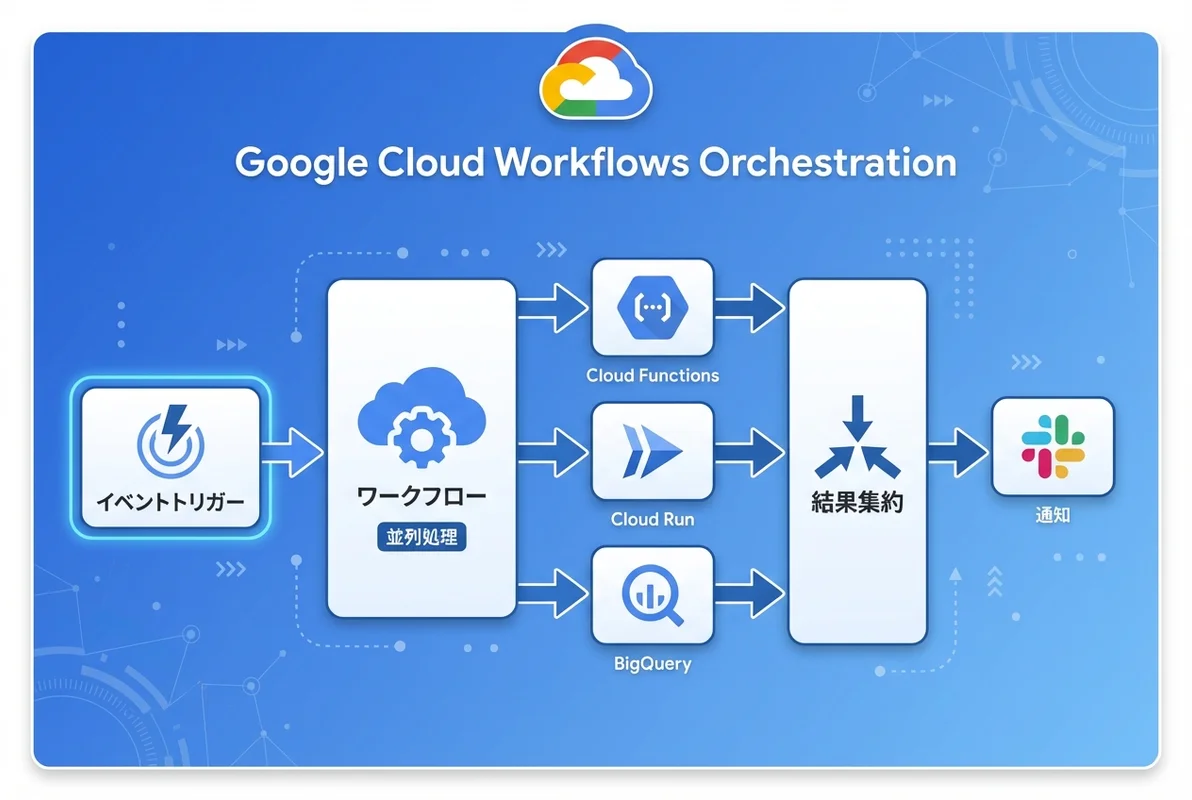
Cloud RunとCloud Functionsの連携
マイクロサービスのオーケストレーション
# microservice-orchestration.yaml
main:
  params: [request]
  steps:
    - authenticate:
        call: http.post
        args:
          url: https://auth-service-xxxxx-an.a.run.app/verify
          headers:
            Authorization: ${"Bearer " + request.token}
          body:
            userId: ${request.userId}
        result: auth_result

    - check_auth:
        switch:
          - condition: ${auth_result.body.verified != true}
            raise: "Unauthorized"

    - process_order:
        parallel:
          shared: [inventory_status, payment_status]
          branches:
            - check_inventory:
                steps:
                  - call_inventory:
                      call: http.post
                      args:
                        url: https://inventory-service-xxxxx-an.a.run.app/check
                        body:
                          items: ${request.items}
                      result: inventory_response
                  - save_inventory:
                      assign:
                        - inventory_status: ${inventory_response.body}

            - process_payment:
                steps:
                  - call_payment:
                      call: http.post
                      args:
                        url: https://payment-service-xxxxx-an.a.run.app/charge
                        body:
                          userId: ${request.userId}
                          amount: ${request.totalAmount}
                      result: payment_response
                  - save_payment:
                      assign:
                        - payment_status: ${payment_response.body}

    - verify_results:
        switch:
          - condition: ${inventory_status.available and payment_status.success}
            next: create_shipment
          - condition: ${not(inventory_status.available)}
            next: handle_out_of_stock
          - condition: ${not(payment_status.success)}
            next: handle_payment_failure

    - create_shipment:
        call: http.post
        args:
          url: https://shipping-service-xxxxx-an.a.run.app/create
          body:
            orderId: ${request.orderId}
            items: ${request.items}
            address: ${request.shippingAddress}
        result: shipment_result
        next: return_success

    - handle_out_of_stock:
        return:
          status: "failed"
          reason: "在庫不足"

    - handle_payment_failure:
        return:
          status: "failed"
          reason: "決済失敗"

    - return_success:
        return:
          status: "completed"
          orderId: ${request.orderId}
          shipmentId: ${shipment_result.body.shipmentId}
Terraformでのインフラ管理
# terraform/workflows.tf
resource "google_workflows_workflow" "etl_pipeline" {
  name            = "etl-pipeline"
  region          = "asia-northeast1"
  description     = "Daily ETL Pipeline"
  service_account = google_service_account.workflows_sa.id

  source_contents = file("${path.module}/workflows/etl-pipeline.yaml")
}

resource "google_service_account" "workflows_sa" {
  account_id   = "workflows-sa"
  display_name = "Workflows Service Account"
}

resource "google_project_iam_member" "workflows_bigquery" {
  project = var.project_id
  role    = "roles/bigquery.dataEditor"
  member  = "serviceAccount:${google_service_account.workflows_sa.email}"
}

resource "google_eventarc_trigger" "etl_trigger" {
  name     = "etl-trigger"
  location = "asia-northeast1"

  matching_criteria {
    attribute = "type"
    value     = "google.cloud.storage.object.v1.finalized"
  }
  matching_criteria {
    attribute = "bucket"
    value     = google_storage_bucket.data_bucket.name
  }

  destination {
    workflow = google_workflows_workflow.etl_pipeline.id
  }

  service_account = google_service_account.workflows_sa.id
}
SES案件でのCloud Workflows活用
2026年の需要と単価
| 活用パターン | 想定単価 | スキル要件 |
|---|---|---|
| ETL/データパイプライン | 70-90万円/月 | Workflows + BigQuery + Cloud Functions |
| マイクロサービス連携 | 80-100万円/月 | Workflows + Cloud Run + Eventarc |
| 業務プロセス自動化 | 75-95万円/月 | Workflows + API連携 + Pub/Sub |
まとめ
Google Cloud Workflowsによるサーバーレスオーケストレーションについて、基礎から実践まで解説しました。
この記事のまとめ
- Cloud WorkflowsはYAMLベースでサーバーレスなサービス間オーケストレーションを実現する
- 条件分岐・ループ・並列処理・リトライをシンプルに記述できる
- Eventarcとの連携でイベントドリブンなワークフロー実行が可能
- ETLパイプライン・マイクロサービス連携の定番ツール
- SES案件でWorkflowsスキルは70〜100万円/月の案件に直結する
次のステップ: Cloud Workflowsの基礎を押さえたら、Google CloudのEventarcでイベント駆動アーキテクチャを構築する方法で、より高度なイベント駆動パターンに挑戦しましょう。
関連記事: