- Firestoreはフルマネージドでサーバーレスに使えるGCPのNoSQLデータベース
- リアルタイム同期・オフライン対応・自動スケーリングで開発効率が飛躍的に向上
- モバイル・Webアプリ案件でFirestore経験者の需要が急増中
「RDBの設計は得意だが、NoSQLのデータモデリングが難しい」「Firestoreの料金体系が複雑でコスト管理が不安」「リアルタイム同期が必要な案件にアサインされたが、どう設計すればいいかわからない」
こうした悩みを持つSESエンジニアは少なくありません。Google Cloud Firestoreは、Googleが提供するフルマネージドのNoSQLドキュメントデータベースです。Firebase経由でのフロントエンド直接アクセスと、Google Cloud経由でのバックエンドアクセスの両方に対応し、モバイル・Web・サーバーサイドの幅広いユースケースをカバーします。
本記事では、Firestoreの基礎からSES案件で求められる実践的な設計パターンまで体系的に解説します。
Firestoreの基本概念
データモデル
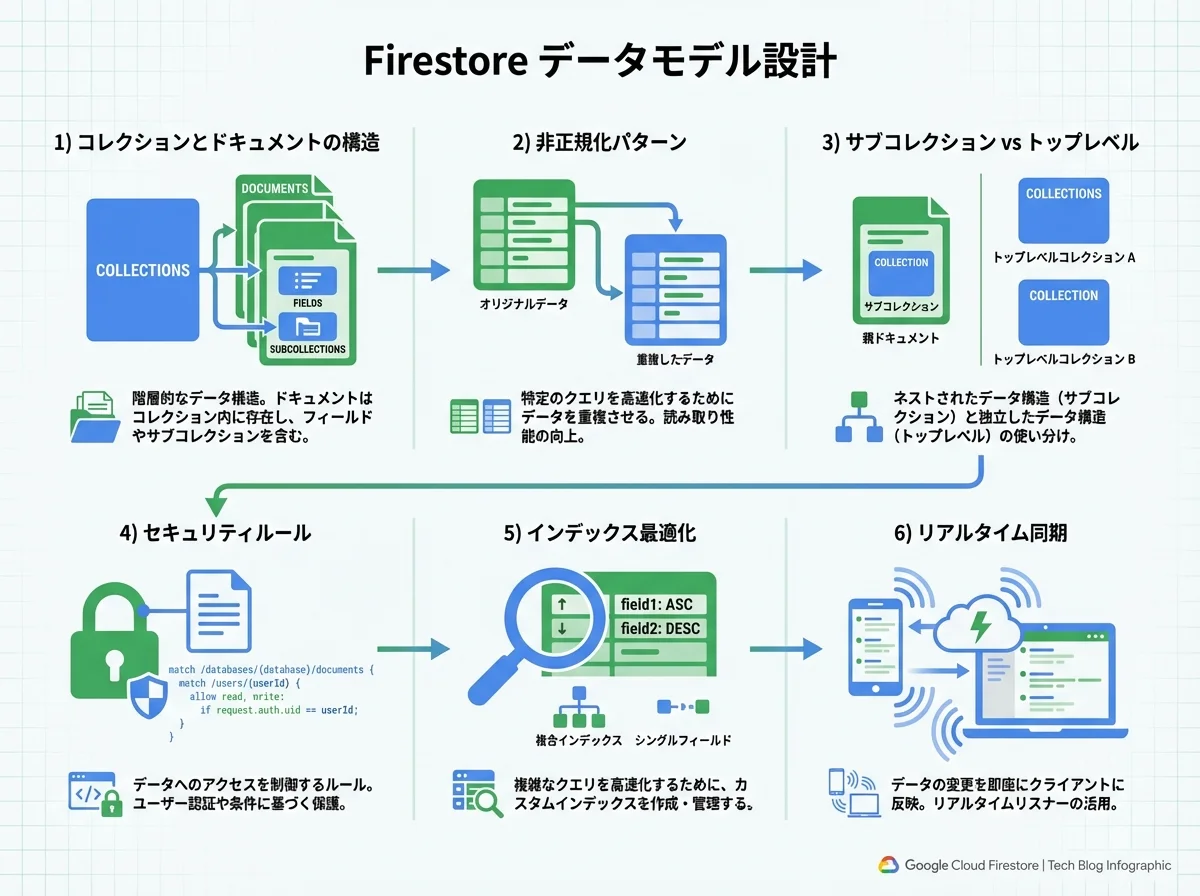
Firestoreはドキュメント指向のNoSQLデータベースです。データはコレクション→ドキュメント→フィールドという階層で管理されます:
users (コレクション)
├── user-001 (ドキュメント)
│   ├── name: "田中太郎"
│   ├── email: "[email protected]"
│   ├── role: "engineer"
│   ├── skills: ["TypeScript", "Go", "AWS"]
│   └── profile (サブコレクション)
│       └── detail-001
│           ├── bio: "バックエンドエンジニア歴5年"
│           └── portfolio: "https://..."
├── user-002 (ドキュメント)
│   ├── name: "佐藤花子"
│   ...
RDBとの比較
| 概念 | RDB | Firestore |
|---|---|---|
| テーブル | TABLE | コレクション |
| 行 | ROW | ドキュメント |
| 列 | COLUMN | フィールド |
| 主キー | PRIMARY KEY | ドキュメントID |
| 外部キー | FOREIGN KEY | 参照(手動管理) |
| JOIN | SQL JOIN | サブコレクション or 非正規化 |
| トランザクション | ACID | ACID(制限付き) |
| スキーマ | 固定スキーマ | スキーマレス |
Firestoreのエディション
| エディション | 特徴 | 料金モデル | 推奨ユースケース |
|---|---|---|---|
| Native mode | リアルタイム同期・オフライン対応 | ドキュメントR/W課金 | モバイル・Webアプリ |
| Datastore mode | 大規模バッチ処理向け | オペレーション課金 | バックエンドシステム |
実践①:データモデル設計
非正規化パターン
Firestoreでは、JOINが使えないためデータの非正規化(デノーマライゼーション)が基本戦略です:
// ❌ RDB的な設計(Firestoreでは非効率)
// orders コレクション
{
  id: "order-001",
  userId: "user-001",  // 別コレクションへの参照
  productIds: ["prod-001", "prod-002"]  // 別コレクションへの参照
}
// → ユーザー名や商品名を表示するたびに追加のreadが必要

// ✅ 非正規化した設計(Firestoreに適した設計)
// orders コレクション
{
  id: "order-001",
  userId: "user-001",
  userName: "田中太郎",  // ユーザー名を埋め込み
  items: [
    {
      productId: "prod-001",
      productName: "MacBook Pro",  // 商品名を埋め込み
      price: 298000,
      quantity: 1
    },
    {
      productId: "prod-002",
      productName: "Magic Keyboard",
      price: 19800,
      quantity: 2
    }
  ],
  totalAmount: 337600,
  status: "confirmed",
  createdAt: Timestamp.now()
}
サブコレクション vs トップレベルコレクション
// パターン1: サブコレクション(親子関係が強い場合)
// /users/{userId}/orders/{orderId}
// メリット: 「あるユーザーの注文一覧」の取得が効率的
// デメリット: 「全ユーザーの注文」をクロスで検索しにくい

// パターン2: トップレベルコレクション + フィールド参照
// /orders/{orderId} with userId フィールド
// メリット: 柔軟なクエリが可能
// デメリット: セキュリティルールが複雑になる

// 推奨: コレクショングループクエリで解決
import { collectionGroup, query, where, getDocs } from 'firebase/firestore';

// 全ユーザーの「未発送」注文を取得
const q = query(
  collectionGroup(db, 'orders'),
  where('status', '==', 'pending'),
  where('createdAt', '>', lastWeek)
);
const snapshot = await getDocs(q);
設計パターン集
1:N リレーション
// ブログ記事とコメント
// articles/{articleId}/comments/{commentId}

// 記事にコメント数をキャッシュ
await runTransaction(db, async (transaction) => {
  const articleRef = doc(db, 'articles', articleId);
  const commentRef = doc(collection(db, `articles/${articleId}/comments`));

  transaction.set(commentRef, {
    authorId: userId,
    authorName: userName,
    content: commentText,
    createdAt: serverTimestamp(),
  });

  transaction.update(articleRef, {
    commentCount: increment(1),
    lastCommentAt: serverTimestamp(),
  });
});
M:N リレーション
// ユーザーとプロジェクト(M:N)
// 方法1: 中間コレクション
// /memberships/{membershipId}
{
  userId: "user-001",
  projectId: "proj-001",
  role: "editor",
  joinedAt: Timestamp.now()
}

// 方法2: 配列フィールド(メンバー数が少ない場合)
// /projects/{projectId}
{
  name: "プロジェクトA",
  memberIds: ["user-001", "user-002", "user-003"],  // 最大30人程度
}
実践②:CRUD操作とリアルタイム同期
基本CRUD
import {
  collection, doc, getDoc, getDocs, setDoc, updateDoc, deleteDoc,
  query, where, orderBy, limit, startAfter,
  onSnapshot, serverTimestamp, increment
} from 'firebase/firestore';
import { db } from './firebase-config';

// Create
async function createProject(data: ProjectInput) {
  const projectRef = doc(collection(db, 'projects'));
  await setDoc(projectRef, {
    ...data,
    id: projectRef.id,
    createdAt: serverTimestamp(),
    updatedAt: serverTimestamp(),
    memberCount: 1,
  });
  return projectRef.id;
}

// Read(単一ドキュメント)
async function getProject(projectId: string) {
  const docRef = doc(db, 'projects', projectId);
  const docSnap = await getDoc(docRef);

  if (!docSnap.exists()) {
    throw new Error('プロジェクトが見つかりません');
  }
  return { id: docSnap.id, ...docSnap.data() } as Project;
}

// Read(クエリ + ページネーション)
async function listProjects(userId: string, pageSize: number, lastDoc?: DocumentSnapshot) {
  let q = query(
    collection(db, 'projects'),
    where('memberIds', 'array-contains', userId),
    orderBy('updatedAt', 'desc'),
    limit(pageSize)
  );

  if (lastDoc) {
    q = query(q, startAfter(lastDoc));
  }

  const snapshot = await getDocs(q);
  return {
    projects: snapshot.docs.map(doc => ({ id: doc.id, ...doc.data() })),
    lastDoc: snapshot.docs[snapshot.docs.length - 1],
    hasMore: snapshot.docs.length === pageSize,
  };
}

// Update(部分更新)
async function updateProject(projectId: string, updates: Partial<ProjectInput>) {
  const docRef = doc(db, 'projects', projectId);
  await updateDoc(docRef, {
    ...updates,
    updatedAt: serverTimestamp(),
  });
}

// Delete(論理削除推奨)
async function deleteProject(projectId: string) {
  const docRef = doc(db, 'projects', projectId);
  await updateDoc(docRef, {
    deletedAt: serverTimestamp(),
    status: 'deleted',
  });
}
リアルタイム同期
Firestoreの最大の強みはリアルタイム同期です:
// チャットメッセージのリアルタイム監視
function subscribeToMessages(roomId: string, callback: (messages: Message[]) => void) {
  const q = query(
    collection(db, `rooms/${roomId}/messages`),
    orderBy('createdAt', 'desc'),
    limit(50)
  );

  return onSnapshot(q, (snapshot) => {
    const messages: Message[] = [];
    snapshot.docChanges().forEach((change) => {
      if (change.type === 'added') {
        console.log('新着メッセージ:', change.doc.data());
      }
      if (change.type === 'modified') {
        console.log('メッセージ更新:', change.doc.data());
      }
    });

    snapshot.forEach((doc) => {
      messages.push({ id: doc.id, ...doc.data() } as Message);
    });

    callback(messages.reverse());
  }, (error) => {
    console.error('リアルタイム同期エラー:', error);
  });
}

// React Hookでの使用
function useMessages(roomId: string) {
  const [messages, setMessages] = useState<Message[]>([]);

  useEffect(() => {
    const unsubscribe = subscribeToMessages(roomId, setMessages);
    return () => unsubscribe();
  }, [roomId]);

  return messages;
}
実践③:セキュリティルール
セキュリティルールはFirestore運用の最重要ポイントです。ルールの不備はデータ漏洩に直結します:
rules_version = '2';
service cloud.firestore {
  match /databases/{database}/documents {

    // ヘルパー関数
    function isAuthenticated() {
      return request.auth != null;
    }

    function isOwner(userId) {
      return request.auth.uid == userId;
    }

    function hasRole(role) {
      return get(/databases/$(database)/documents/users/$(request.auth.uid)).data.role == role;
    }

    function isValidProject(data) {
      return data.name is string
        && data.name.size() >= 1
        && data.name.size() <= 100
        && data.memberIds is list
        && data.memberIds.size() <= 50;
    }

    // ユーザー
    match /users/{userId} {
      allow read: if isAuthenticated();
      allow create: if isOwner(userId);
      allow update: if isOwner(userId) || hasRole('admin');
      allow delete: if hasRole('admin');
    }

    // プロジェクト
    match /projects/{projectId} {
      allow read: if isAuthenticated()
        && request.auth.uid in resource.data.memberIds;
      allow create: if isAuthenticated()
        && isValidProject(request.resource.data)
        && request.auth.uid in request.resource.data.memberIds;
      allow update: if isAuthenticated()
        && request.auth.uid in resource.data.memberIds;
      allow delete: if hasRole('admin');

      // タスク(サブコレクション)
      match /tasks/{taskId} {
        allow read, write: if isAuthenticated()
          && request.auth.uid in get(/databases/$(database)/documents/projects/$(projectId)).data.memberIds;
      }
    }
  }
}
実践④:インデックスとパフォーマンス最適化
複合インデックス
// firestore.indexes.json
{
  "indexes": [
    {
      "collectionGroup": "orders",
      "queryScope": "COLLECTION",
      "fields": [
        { "fieldPath": "userId", "order": "ASCENDING" },
        { "fieldPath": "status", "order": "ASCENDING" },
        { "fieldPath": "createdAt", "order": "DESCENDING" }
      ]
    },
    {
      "collectionGroup": "projects",
      "queryScope": "COLLECTION",
      "fields": [
        { "fieldPath": "memberIds", "arrayConfig": "CONTAINS" },
        { "fieldPath": "updatedAt", "order": "DESCENDING" }
      ]
    }
  ],
  "fieldOverrides": [
    {
      "collectionGroup": "messages",
      "fieldPath": "content",
      "indexes": []
    }
  ]
}
コスト最適化
Firestoreの料金は読み取り/書き込みオペレーション数で課金されるため、最適化が重要です:
// ❌ N+1問題(コスト膨大)
const projects = await getDocs(collection(db, 'projects'));
for (const project of projects.docs) {
  const members = await getDocs(collection(db, `projects/${project.id}/members`));
  // プロジェクト数 × メンバー数のreadが発生
}

// ✅ 非正規化でread数を削減
const projects = await getDocs(collection(db, 'projects'));
// projects ドキュメント内に memberNames 配列を埋め込み済み
// 追加のreadなしで表示に必要な情報が揃う

// ✅ バッチ読み取り
const docRefs = userIds.map(id => doc(db, 'users', id));
const snapshots = await getAll(...docRefs);  // Admin SDK
// N回のread → 1回のバッチreadに削減| 操作 | 無料枠(日次) | 超過後の料金 |
|---|---|---|
| ドキュメント読み取り | 50,000 | $0.06 / 10万件 |
| ドキュメント書き込み | 20,000 | $0.18 / 10万件 |
| ドキュメント削除 | 20,000 | $0.02 / 10万件 |
| ストレージ | 1 GiB | $0.18 / GiB / 月 |
実践⑤:バックエンド統合(Admin SDK)
Cloud Functions連携
import { onDocumentCreated, onDocumentUpdated } from 'firebase-functions/v2/firestore';
import { getFirestore, FieldValue } from 'firebase-admin/firestore';

const db = getFirestore();

// 注文作成時に在庫を更新
export const onOrderCreated = onDocumentCreated('orders/{orderId}', async (event) => {
  const order = event.data?.data();
  if (!order) return;

  const batch = db.batch();

  for (const item of order.items) {
    const productRef = db.doc(`products/${item.productId}`);
    batch.update(productRef, {
      stock: FieldValue.increment(-item.quantity),
      salesCount: FieldValue.increment(item.quantity),
    });
  }

  // 売上サマリーを更新
  const today = new Date().toISOString().split('T')[0];
  const summaryRef = db.doc(`salesSummary/${today}`);
  batch.set(summaryRef, {
    totalOrders: FieldValue.increment(1),
    totalRevenue: FieldValue.increment(order.totalAmount),
    updatedAt: FieldValue.serverTimestamp(),
  }, { merge: true });

  await batch.commit();
});

// ユーザープロフィール更新時に非正規化データを同期
export const onUserUpdated = onDocumentUpdated('users/{userId}', async (event) => {
  const before = event.data?.before.data();
  const after = event.data?.after.data();

  if (before?.name === after?.name) return;

  const userId = event.params.userId;
  const newName = after?.name;

  // このユーザーが投稿した全記事の authorName を更新
  const articles = await db.collection('articles')
    .where('authorId', '==', userId)
    .get();

  const batch = db.batch();
  articles.forEach((doc) => {
    batch.update(doc.ref, { authorName: newName });
  });

  await batch.commit();
});
SES案件でのFirestoreスキルの価値
需要の高い案件タイプ
| 案件タイプ | Firestoreの活用場面 | 月単価目安 |
|---|---|---|
| チャット・メッセージング | リアルタイム同期 | 70〜85万円 |
| IoTダッシュボード | デバイスデータのリアルタイム表示 | 75〜90万円 |
| EC・マーケットプレイス | 商品カタログ・注文管理 | 65〜80万円 |
| コラボレーションツール | 共同編集・通知 | 70〜85万円 |
| モバイルアプリ | オフライン対応・プッシュ同期 | 70〜85万円 |
面談でアピールすべきポイント
- 設計力: 「RDBとNoSQLの特性を理解し、ユースケースに応じた最適なデータモデル設計ができます」
- セキュリティ: 「Firestoreセキュリティルールの設計で、ロールベースのアクセス制御を実装しました」
- パフォーマンス: 「非正規化とインデックス設計でread回数を70%削減し、コスト最適化を実現しました」
まとめ
Google Cloud Firestoreは、リアルタイム同期・オフライン対応・サーバーレスという強力な特徴を持つNoSQLデータベースです。RDBの経験を活かしつつ、NoSQL特有の設計パターン(非正規化・サブコレクション・コレクショングループ)を理解すれば、SES案件で確実に活用できるスキルになります。
特に「セキュリティルール」「コスト最適化」「リアルタイム同期」の3つは、実案件で必ず問われるポイントです。本記事の実装例を参考に、実際に手を動かして習得してみてください。