⚡ 3秒でわかる!この記事のポイント
- EventarcはGoogle Cloudのイベント駆動基盤で、120以上のGCPサービスからイベントを受信可能
- Cloud Run・Cloud Functions・GKEをイベントターゲットとして設定し、サーバーレスで処理
- Eventarc案件はSES市場で単価70-90万円、クラウドネイティブ設計スキルとして需要が急増中
「GCSにファイルがアップロードされたら自動処理したい」「Firestoreの変更をリアルタイムで検知したい」
Google Cloud Eventarcは、こうしたイベント駆動の要件を統一的なインターフェースで実現するサービスです。GCPの各サービスが発行するイベントをキャッチし、Cloud RunやCloud Functionsに自動的にルーティングできます。
この記事では、Eventarcの基本概念から実践的なユースケースまでを体系的に解説します。
この記事でわかること
- Eventarcのアーキテクチャと基本概念
- トリガーの設定方法(直接・Pub/Sub・Audit Log経由)
- Cloud Run / Cloud Functionsとの連携パターン
- 実践的なユースケース(画像処理、データ連携、監査)
- SES現場でのイベント駆動案件の需要と必要スキル
Eventarcのアーキテクチャ
イベントの流れ
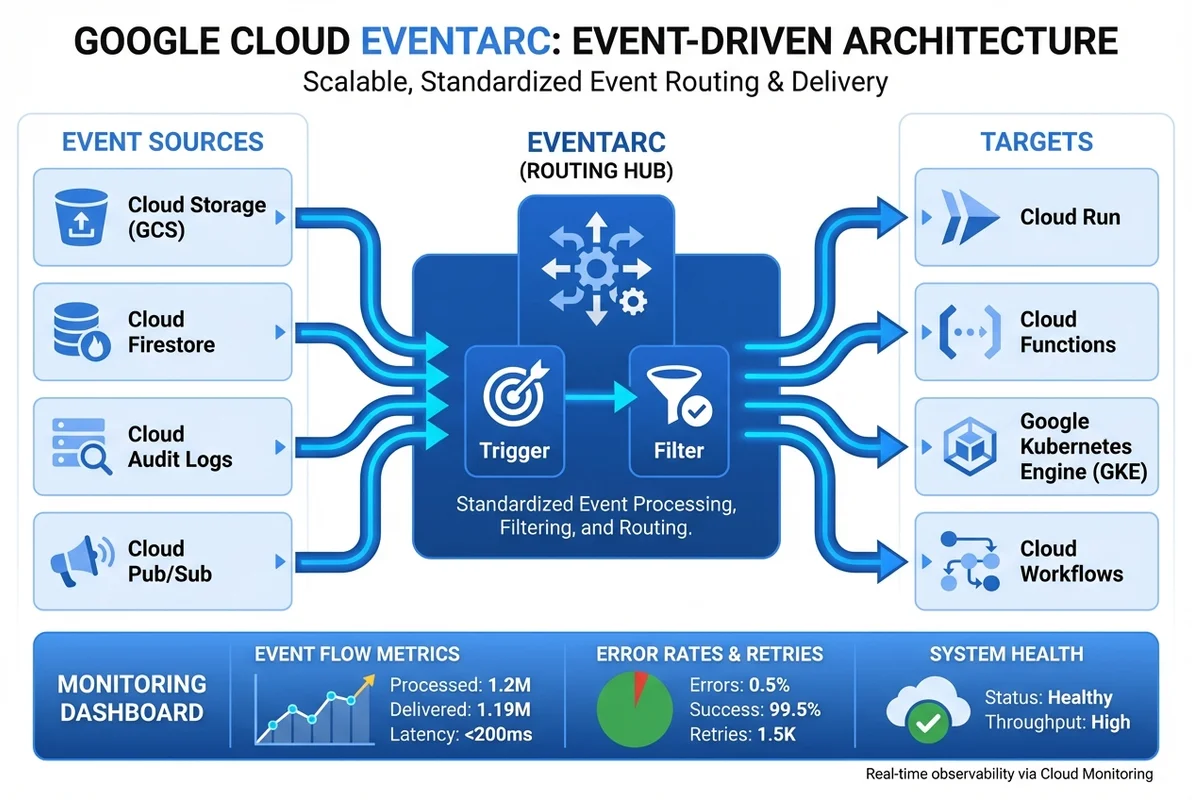
Eventarcは、イベントソース → トリガー → ターゲットの3層構造で動作します。
[イベントソース]          [トリガー]           [ターゲット]
GCS バケット        →  Eventarc Trigger  →  Cloud Run
Firestore          →  (フィルタ条件)      →  Cloud Functions
Cloud Audit Logs   →                      →  GKE
Pub/Sub Topic      →                      →  Workflows
カスタムイベント    →                      →
イベントタイプ
Eventarcは3種類のイベントソースをサポートしています。
| イベントタイプ | 説明 | 例 |
|---|---|---|
| 直接イベント | GCPサービスが直接発行 | GCSオブジェクト作成、Firestore更新 |
| Cloud Audit Log | 監査ログから生成 | BigQueryジョブ完了、IAM変更 |
| Pub/Sub | Pub/Subトピック経由 | カスタムイベント、サードパーティ連携 |
トリガーの設定
GCSイベントトリガー
ファイルアップロードを検知して自動処理する最も基本的なパターンです。
# GCSオブジェクト作成イベントのトリガー
gcloud eventarc triggers create gcs-upload-trigger \
  --location=asia-northeast1 \
  --destination-run-service=image-processor \
  --destination-run-region=asia-northeast1 \
  --event-filters="type=google.cloud.storage.object.v1.finalized" \
  --event-filters="bucket=my-uploads-bucket" \
  --service-account=eventarc-sa@PROJECT_ID.iam.gserviceaccount.com
Terraformでの設定
# terraform/eventarc.tf

# GCSアップロードトリガー
resource "google_eventarc_trigger" "gcs_upload" {
  name     = "gcs-upload-trigger"
  location = "asia-northeast1"
  project  = var.project_id

  matching_criteria {
    attribute = "type"
    value     = "google.cloud.storage.object.v1.finalized"
  }

  matching_criteria {
    attribute = "bucket"
    value     = google_storage_bucket.uploads.name
  }

  destination {
    cloud_run_service {
      service = google_cloud_run_v2_service.image_processor.name
      region  = "asia-northeast1"
    }
  }

  service_account = google_service_account.eventarc_sa.email
}

# Firestoreドキュメント変更トリガー
resource "google_eventarc_trigger" "firestore_update" {
  name     = "firestore-update-trigger"
  location = "asia-northeast1"
  project  = var.project_id

  matching_criteria {
    attribute = "type"
    value     = "google.cloud.firestore.document.v1.written"
  }

  matching_criteria {
    attribute = "database"
    value     = "(default)"
  }

  destination {
    cloud_run_service {
      service = google_cloud_run_v2_service.data_sync.name
      region  = "asia-northeast1"
    }
  }

  service_account = google_service_account.eventarc_sa.email
}

# Audit Logトリガー(BigQueryジョブ完了)
resource "google_eventarc_trigger" "bigquery_job_complete" {
  name     = "bigquery-job-trigger"
  location = "asia-northeast1"
  project  = var.project_id

  matching_criteria {
    attribute = "type"
    value     = "google.cloud.audit.log.v1.written"
  }

  matching_criteria {
    attribute = "serviceName"
    value     = "bigquery.googleapis.com"
  }

  matching_criteria {
    attribute = "methodName"
    value     = "google.cloud.bigquery.v2.JobService.InsertJob"
  }

  destination {
    cloud_run_service {
      service = google_cloud_run_v2_service.job_monitor.name
      region  = "asia-northeast1"
    }
  }

  service_account = google_service_account.eventarc_sa.email
}
Cloud Runイベントハンドラの実装
画像処理サービス
GCSにアップロードされた画像を自動的にリサイズ・最適化するサービスの実装例です。
// src/handlers/image-processor.ts
import express from 'express';
import sharp from 'sharp';
import { Storage } from '@google-cloud/storage';

const app = express();
const storage = new Storage();

interface CloudEvent {
  id: string;
  type: string;
  source: string;
  time: string;
  data: {
    bucket: string;
    name: string;
    contentType: string;
    size: string;
    metageneration: string;
  };
}

app.post('/', express.json(), async (req, res) => {
  const event: CloudEvent = req.body;

  console.log(`Processing event: ${event.id}`, {
    bucket: event.data.bucket,
    object: event.data.name,
    contentType: event.data.contentType,
  });

  // 画像ファイルのみ処理
  if (!event.data.contentType?.startsWith('image/')) {
    console.log('Skipping non-image file');
    return res.status(200).send('OK - skipped');
  }

  // 処理済みファイルの再処理を防止
  if (event.data.name.startsWith('processed/')) {
    console.log('Skipping already processed file');
    return res.status(200).send('OK - already processed');
  }

  try {
    const bucket = storage.bucket(event.data.bucket);
    const file = bucket.file(event.data.name);

    // 元画像をダウンロード
    const [buffer] = await file.download();

    // リサイズバリエーションを生成
    const variants = [
      { suffix: 'thumb', width: 150, height: 150 },
      { suffix: 'medium', width: 800, height: 600 },
      { suffix: 'large', width: 1920, height: 1080 },
      { suffix: 'og', width: 1200, height: 630 },
    ];

    const results = await Promise.all(
      variants.map(async (variant) => {
        const processed = await sharp(buffer)
          .resize(variant.width, variant.height, {
            fit: 'cover',
            position: 'center',
          })
          .webp({ quality: 85 })
          .toBuffer();

        const outputPath = `processed/${variant.suffix}/${event.data.name.replace(/\.[^.]+$/, '.webp')}`;
        await bucket.file(outputPath).save(processed, {
          contentType: 'image/webp',
          metadata: {
            originalFile: event.data.name,
            variant: variant.suffix,
            processedAt: new Date().toISOString(),
          },
        });

        return { variant: variant.suffix, path: outputPath, size: processed.length };
      })
    );

    console.log('Image processing complete', { results });
    res.status(200).json({ success: true, variants: results });
  } catch (error) {
    console.error('Image processing failed', error);
    res.status(500).json({ error: 'Processing failed' });
  }
});

const PORT = process.env.PORT || 8080;
app.listen(PORT, () => {
  console.log(`Image processor listening on port ${PORT}`);
});
データ同期サービス
Firestoreの変更をリアルタイムで検知し、他のシステムに同期するパターンです。
// src/handlers/data-sync.ts
import express from 'express';
import { BigQuery } from '@google-cloud/bigquery';
import { PubSub } from '@google-cloud/pubsub';

const app = express();
const bigquery = new BigQuery();
const pubsub = new PubSub();

interface FirestoreEvent {
  id: string;
  type: string;
  data: {
    oldValue?: { fields: Record<string, any> };
    value?: { fields: Record<string, any> };
    updateMask?: { fieldPaths: string[] };
  };
}

app.post('/', express.json(), async (req, res) => {
  const event: FirestoreEvent = req.body;

  try {
    // 変更の種類を判定
    const changeType = getChangeType(event);
    console.log(`Firestore ${changeType}:`, { eventId: event.id });

    // 1. BigQueryに変更ログを書き込み
    await bigquery
      .dataset('analytics')
      .table('firestore_changes')
      .insert([{
        event_id: event.id,
        change_type: changeType,
        document_data: JSON.stringify(event.data.value?.fields),
        changed_fields: event.data.updateMask?.fieldPaths?.join(','),
        timestamp: new Date().toISOString(),
      }]);

    // 2. 変更通知をPub/Subにパブリッシュ
    await pubsub.topic('data-changes').publishMessage({
      json: {
        changeType,
        data: event.data.value?.fields,
        oldData: event.data.oldValue?.fields,
      },
      attributes: { changeType },
    });

    res.status(200).send('OK');
  } catch (error) {
    console.error('Data sync failed', error);
    res.status(500).send('Error');
  }
});

function getChangeType(event: FirestoreEvent): string {
  if (!event.data.oldValue && event.data.value) return 'CREATE';
  if (event.data.oldValue && !event.data.value) return 'DELETE';
  return 'UPDATE';
}
実践的なユースケース
ユースケース1: セキュリティ監査の自動化
# IAMポリシー変更を検知してアラートを送信
gcloud eventarc triggers create iam-audit-trigger \
  --location=asia-northeast1 \
  --destination-run-service=security-auditor \
  --event-filters="type=google.cloud.audit.log.v1.written" \
  --event-filters="serviceName=iam.googleapis.com" \
  --event-filters="methodName=google.iam.admin.v1.SetIamPolicy" \
  --service-account=eventarc-sa@PROJECT_ID.iam.gserviceaccount.com
ユースケース2: CI/CDパイプラインの自動トリガー
# Container Registryへのイメージプッシュでデプロイをトリガー
gcloud eventarc triggers create deploy-trigger \
  --location=asia-northeast1 \
  --destination-run-service=deployment-manager \
  --event-filters="type=google.cloud.audit.log.v1.written" \
  --event-filters="serviceName=artifactregistry.googleapis.com" \
  --event-filters="methodName=docker.upload" \
  --service-account=eventarc-sa@PROJECT_ID.iam.gserviceaccount.com
ユースケース3: コスト異常検知
# Billing Export → BigQuery → Eventarc → アラート
resource "google_eventarc_trigger" "cost_anomaly" {
  name     = "cost-anomaly-trigger"
  location = "asia-northeast1"

  matching_criteria {
    attribute = "type"
    value     = "google.cloud.audit.log.v1.written"
  }

  matching_criteria {
    attribute = "serviceName"
    value     = "bigquery.googleapis.com"
  }

  destination {
    cloud_run_service {
      service = google_cloud_run_v2_service.cost_monitor.name
      region  = "asia-northeast1"
    }
  }

  service_account = google_service_account.eventarc_sa.email
}
カスタムイベントの発行
Pub/Sub経由のカスタムイベント
アプリケーション固有のイベントをEventarcで処理する方法です。
// カスタムイベントの発行
import { PubSub } from '@google-cloud/pubsub';

const pubsub = new PubSub();

async function publishCustomEvent(eventType: string, data: Record<string, any>) {
  const topic = pubsub.topic('custom-events');

  await topic.publishMessage({
    json: {
      specversion: '1.0',
      type: `com.ses-base.${eventType}`,
      source: '/services/api-gateway',
      id: crypto.randomUUID(),
      time: new Date().toISOString(),
      data,
    },
    attributes: {
      eventType,
    },
  });
}

// 使用例
await publishCustomEvent('engineer.registered', {
  engineerId: 'eng-001',
  name: '田中太郎',
  skills: ['TypeScript', 'React', 'AWS'],
});
モニタリングとデバッグ
Eventarcのログ確認
# トリガーの実行ログ
gcloud logging read 'resource.type="cloud_run_revision" AND
  textPayload:"Processing event"' \
  --limit=20 \
  --format=json

# トリガーの失敗ログ
gcloud logging read 'resource.type="eventarc.googleapis.com/Trigger" AND
  severity>=WARNING' \
  --limit=10

# Cloud Monitoringでアラート設定
gcloud alpha monitoring policies create \
  --display-name="Eventarc Trigger Failures" \
  --condition-display-name="High failure rate" \
  --condition-filter='resource.type="cloud_run_revision" AND
    metric.type="run.googleapis.com/request_count" AND
    metric.labels.response_code_class="5xx"' \
  --condition-threshold-value=10 \
  --condition-threshold-duration=300s \
  --notification-channels=CHANNEL_ID
リトライとDead Letter
# リトライポリシーの設定
resource "google_eventarc_trigger" "with_retry" {
  name     = "retry-trigger"
  location = "asia-northeast1"

  matching_criteria {
    attribute = "type"
    value     = "google.cloud.storage.object.v1.finalized"
  }

  destination {
    cloud_run_service {
      service = google_cloud_run_v2_service.processor.name
      region  = "asia-northeast1"
    }
  }

  # Cloud Runのタイムアウトとリトライ
  transport {
    pubsub {
      topic = google_pubsub_topic.eventarc_transport.id
    }
  }

  service_account = google_service_account.eventarc_sa.email
}

# Dead Letter Topic
resource "google_pubsub_subscription" "eventarc_sub_with_dlq" {
  name  = "eventarc-retry-sub"
  topic = google_pubsub_topic.eventarc_transport.id

  retry_policy {
    minimum_backoff = "10s"
    maximum_backoff = "600s"
  }

  dead_letter_policy {
    dead_letter_topic     = google_pubsub_topic.dead_letter.id
    max_delivery_attempts = 5
  }
}
SES現場でのEventarc案件
需要と単価
| スキル | 月単価目安 | 主な案件タイプ |
|---|---|---|
| Eventarc設計・構築 | 70-90万円 | イベント駆動基盤の新規構築 |
| Cloud Run + Eventarc | 65-85万円 | サーバーレスアプリ開発 |
| データパイプライン構築 | 75-95万円 | リアルタイムデータ処理 |
| GCP基盤設計コンサル | 80-100万円 | アーキテクチャ設計・移行支援 |
面談でのアピールポイント
【イベント駆動基盤構築実績】
- Google Cloud Eventarcで120以上のイベントソースを統合管理
- Cloud Run + Eventarcでサーバーレスなデータ処理基盤を構築し
  インフラ運用コストを70%削減
- Audit Logトリガーでセキュリティ監査を自動化し
  コンプライアンス対応工数を月40時間→2時間に短縮
- カスタムイベントとPub/Subで社内システム間のリアルタイム連携を実現
まとめ
Google Cloud Eventarcを活用したイベント駆動アプリケーション構築は、以下のステップで進めるのが効果的です。
- イベント設計: ユースケースに応じたイベントタイプの選定
- トリガー設定: Terraform/gcloudでEventarcトリガーを構成
- ハンドラ実装: Cloud Run/Cloud Functionsでイベント処理ロジックを実装
- リトライ・DLQ: 障害時の自動リトライとDead Letter Queueを設定
- モニタリング: Cloud MonitoringとLoggingでイベントフローを監視
EventarcスキルはSES市場で需要が高まっており、クラウドネイティブ設計の重要な要素として高単価案件の獲得につながります。
関連記事
- Google Cloud Pub/Subメッセージングガイドでは、Pub/Subの詳細を解説
- Google Cloud Cloud Run自動スケーリングガイドでは、Cloud Runの設定を紹介
- Google Cloud Cloud Functions サーバーレスガイドでは、Functions 2nd genの活用を解説