- Document AIはGoogleの最先端OCR+AIで、PDF・画像から構造化データを高精度に抽出するフルマネージドサービス
- 請求書・領収書・契約書・本人確認書類など、用途別の専用プロセッサで手間なく導入可能
- SES案件でのDocument AI導入経験は、DX推進案件で高単価を狙える差別化スキルになる
企業のバックオフィス業務で大きな時間を占めているのが紙の書類やPDFの手動入力です。請求書の金額転記、契約書の条項チェック、本人確認書類の照合——これらの作業は正確性が求められるにもかかわらず、人間による手作業に依存しているケースが多くあります。
Google Cloud Document AIは、Googleの最先端OCR技術とAIを組み合わせた文書解析サービスです。PDF・画像から構造化データを高精度に抽出し、業務プロセスの自動化を実現します。
本記事では、Document AIの基本概念からプロセッサの選び方、実装手順、SES案件での活用法まで、実践的に解説します。
- Document AIの仕組みと主要なプロセッサの種類
- 請求書・契約書・本人確認書類の自動処理の実装方法
- 精度向上のチューニングテクニック
- SES案件でのDocument AI導入スキルの市場価値
Document AIとは
サービスの概要
Document AIは、以下の機能を提供するフルマネージドサービスです。
| 機能 | 説明 |
|---|---|
| OCR(文字認識) | 画像・PDFからテキストを高精度に抽出 |
| 構造化データ抽出 | 表・フォーム・キー値ペアの自動認識 |
| 文書分類 | 文書の種類(請求書・契約書等)を自動判別 |
| エンティティ抽出 | 金額・日付・氏名等の特定情報を抽出 |
| カスタムモデル | 独自の文書形式に対応するモデルの学習 |
従来のOCRツールとの最大の違いは、単なるテキスト抽出ではなく、文書の構造と意味を理解する点です。請求書であれば「請求金額」「請求日」「振込先」などのフィールドを自動的に認識し、構造化されたJSONデータとして出力します。
プロセッサの種類
Document AIでは、用途に応じた専用プロセッサが用意されています。
| プロセッサ | 用途 | 対応言語 |
|---|---|---|
| OCR Processor | 汎用的なテキスト抽出 | 200言語以上 |
| Form Parser | フォーム・表の構造抽出 | 多言語対応 |
| Invoice Parser | 請求書の自動解析 | 日本語対応 |
| Receipt Parser | 領収書・レシートの解析 | 日本語対応 |
| Identity Document | パスポート・運転免許の解析 | 多言語対応 |
| Contract Parser | 契約書の条項・当事者抽出 | 英語中心 |
| Custom Extractor | 独自フォーマットの文書解析 | 学習データに依存 |
構築手順
Step 1: プロジェクトの準備
# Document AI APIを有効化
gcloud services enable documentai.googleapis.com

# サービスアカウントの作成
gcloud iam service-accounts create docai-processor \
  --display-name="Document AI Processor"

# 必要な権限を付与
gcloud projects add-iam-policy-binding PROJECT_ID \
  --member="serviceAccount:docai-processor@PROJECT_ID.iam.gserviceaccount.com" \
  --role="roles/documentai.editor"
Step 2: プロセッサの作成
請求書解析プロセッサを例に作成手順を示します。
# 請求書パーサーのプロセッサを作成
curl -X POST \
  -H "Authorization: Bearer $(gcloud auth print-access-token)" \
  -H "Content-Type: application/json" \
  "https://ap-northeast-1-documentai.googleapis.com/v1/projects/PROJECT_ID/locations/ap-northeast-1/processors" \
  -d '{
    "displayName": "invoice-parser-v1",
    "type": "INVOICE_PROCESSOR"
  }'
Step 3: ドキュメントの処理
from google.cloud import documentai_v1 as documentai
from google.api_core.client_options import ClientOptions

def process_document(
    project_id: str,
    location: str,
    processor_id: str,
    file_path: str,
) -> documentai.Document:
    """Document AIでドキュメントを処理する"""

    opts = ClientOptions(
        api_endpoint=f"{location}-documentai.googleapis.com"
    )
    client = documentai.DocumentProcessorServiceClient(
        client_options=opts
    )

    # プロセッサのフルネームを構築
    name = client.processor_path(project_id, location, processor_id)

    # ファイルを読み込み
    with open(file_path, "rb") as f:
        content = f.read()

    # MIMEタイプの判定
    if file_path.endswith(".pdf"):
        mime_type = "application/pdf"
    elif file_path.endswith((".png", ".jpg", ".jpeg")):
        mime_type = "image/png" if file_path.endswith(".png") else "image/jpeg"
    else:
        raise ValueError(f"サポートされていないファイル形式: {file_path}")

    # リクエストの構築
    raw_document = documentai.RawDocument(
        content=content,
        mime_type=mime_type,
    )
    request = documentai.ProcessRequest(
        name=name,
        raw_document=raw_document,
    )

    # 処理実行
    result = client.process_document(request=request)
    return result.document


# 使用例
document = process_document(
    project_id="my-project",
    location="ap-northeast-1",
    processor_id="abc123def456",
    file_path="./invoices/invoice-2026-03.pdf",
)

# 抽出されたテキスト全体
print(f"テキスト: {document.text[:500]}")

# エンティティ(構造化データ)の取得
for entity in document.entities:
    print(f"{entity.type_}: {entity.mention_text} "
          f"(信頼度: {entity.confidence:.2%})")
出力例:
テキスト: 請求書 No. INV-2026-03-001 ...
invoice_date: 2026年3月31日 (信頼度: 98.50%)
due_date: 2026年4月30日 (信頼度: 97.20%)
total_amount: ¥704,000 (信頼度: 99.10%)
supplier_name: 合同会社YouX (信頼度: 96.80%)
line_item/description: システム開発業務 (信頼度: 95.30%)
line_item/amount: ¥640,000 (信頼度: 98.70%)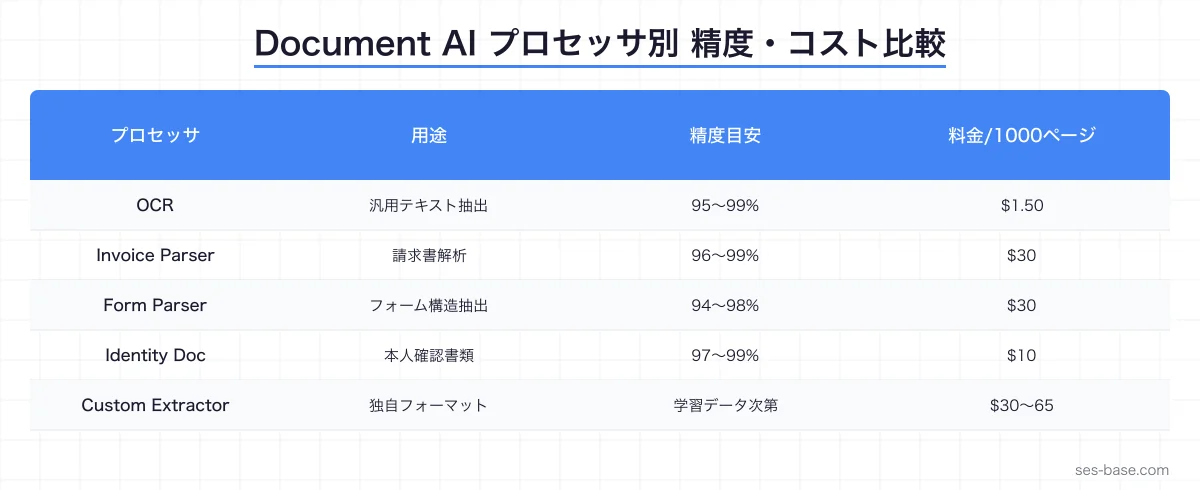
請求書処理の自動化
バッチ処理の実装
大量の請求書を一括処理する場合は、バッチ処理APIを使用します。
from google.cloud import documentai_v1 as documentai
from google.cloud import storage

def batch_process_invoices(
    project_id: str,
    location: str,
    processor_id: str,
    gcs_input_uri: str,
    gcs_output_uri: str,
) -> None:
    """GCS上の請求書を一括処理する"""

    opts = ClientOptions(
        api_endpoint=f"{location}-documentai.googleapis.com"
    )
    client = documentai.DocumentProcessorServiceClient(
        client_options=opts
    )

    name = client.processor_path(project_id, location, processor_id)

    # 入力設定
    gcs_input = documentai.GcsDocuments(
        documents=[
            documentai.GcsDocument(
                gcs_uri=gcs_input_uri,
                mime_type="application/pdf",
            )
        ]
    )
    input_config = documentai.BatchDocumentsInputConfig(
        gcs_documents=gcs_input
    )

    # 出力設定
    output_config = documentai.DocumentOutputConfig(
        gcs_output_config=documentai.DocumentOutputConfig.GcsOutputConfig(
            gcs_uri=gcs_output_uri,
        )
    )

    # バッチ処理の開始(非同期)
    operation = client.batch_process_documents(
        request=documentai.BatchProcessRequest(
            name=name,
            input_documents=input_config,
            document_output_config=output_config,
        )
    )

    # 完了を待機
    result = operation.result(timeout=300)
    print("バッチ処理が完了しました")


# 使用例
batch_process_invoices(
    project_id="my-project",
    location="ap-northeast-1",
    processor_id="abc123def456",
    gcs_input_uri="gs://my-bucket/invoices/2026-03/*.pdf",
    gcs_output_uri="gs://my-bucket/processed/2026-03/",
)
処理結果のDB保存
抽出したデータをデータベースに保存して、集計や分析に活用します。
from google.cloud import firestore

def save_invoice_data(document: documentai.Document, file_name: str):
    """抽出した請求書データをFirestoreに保存"""

    db = firestore.Client()

    # エンティティをディクショナリに変換
    invoice_data = {
        "file_name": file_name,
        "processed_at": firestore.SERVER_TIMESTAMP,
    }

    for entity in document.entities:
        field_name = entity.type_.replace("/", "_")
        invoice_data[field_name] = {
            "value": entity.mention_text,
            "confidence": entity.confidence,
        }

    # Firestoreに保存
    db.collection("invoices").add(invoice_data)
    print(f"保存完了: {file_name}")
契約書分析の実装
契約書の条項抽出
契約書から重要な条項を自動抽出する実装例を紹介します。
def analyze_contract(file_path: str) -> dict:
    """契約書を分析して重要な情報を抽出する"""

    document = process_document(
        project_id="my-project",
        location="us",  # Contract Parserはus/euリージョン
        processor_id="contract-parser-id",
        file_path=file_path,
    )

    contract_info = {
        "parties": [],
        "effective_date": None,
        "expiration_date": None,
        "renewal_terms": None,
        "key_clauses": [],
    }

    for entity in document.entities:
        if entity.type_ == "party":
            contract_info["parties"].append(entity.mention_text)
        elif entity.type_ == "effective_date":
            contract_info["effective_date"] = entity.mention_text
        elif entity.type_ == "expiration_date":
            contract_info["expiration_date"] = entity.mention_text
        elif entity.type_ == "renewal_terms":
            contract_info["renewal_terms"] = entity.mention_text
        elif entity.type_ in ("liability_clause", "termination_clause",
                               "confidentiality_clause"):
            contract_info["key_clauses"].append({
                "type": entity.type_,
                "text": entity.mention_text,
                "confidence": entity.confidence,
            })

    return contract_info
本人確認書類の処理
KYC(本人確認)の自動化
金融・不動産業界で需要の高いKYC処理の自動化例を紹介します。
def verify_identity_document(file_path: str) -> dict:
    """本人確認書類から情報を抽出する"""

    document = process_document(
        project_id="my-project",
        location="us",
        processor_id="identity-processor-id",
        file_path=file_path,
    )

    identity_info = {}

    for entity in document.entities:
        if entity.type_ == "full_name":
            identity_info["name"] = entity.mention_text
        elif entity.type_ == "date_of_birth":
            identity_info["dob"] = entity.mention_text
        elif entity.type_ == "document_id":
            identity_info["document_number"] = entity.mention_text
        elif entity.type_ == "expiration_date":
            identity_info["expiry"] = entity.mention_text
        elif entity.type_ == "address":
            identity_info["address"] = entity.mention_text

    # 信頼度チェック
    low_confidence = [
        e for e in document.entities if e.confidence < 0.85
    ]
    identity_info["requires_review"] = len(low_confidence) > 0

    return identity_info
カスタムプロセッサの作成
独自フォーマットへの対応
標準プロセッサで対応できない独自フォーマットの文書には、カスタムプロセッサを作成します。
# カスタムプロセッサの作成
curl -X POST \
  -H "Authorization: Bearer $(gcloud auth print-access-token)" \
  -H "Content-Type: application/json" \
  "https://ap-northeast-1-documentai.googleapis.com/v1/projects/PROJECT_ID/locations/ap-northeast-1/processors" \
  -d '{
    "displayName": "custom-report-parser",
    "type": "CUSTOM_EXTRACTION_PROCESSOR"
  }'
カスタムプロセッサの学習には、以下のステップが必要です。
- ラベル付きデータの準備: 20〜100件の文書にアノテーション
- モデルの学習: Console上でのトレーニング実行(数時間)
- 評価: テストデータでの精度測定
- デプロイ: プロダクション用プロセッサバージョンの作成
精度向上のテクニック
前処理による精度改善
from PIL import Image, ImageFilter, ImageEnhance

def preprocess_image(image_path: str) -> str:
    """画像の前処理でOCR精度を向上させる"""

    img = Image.open(image_path)

    # グレースケール変換
    img = img.convert("L")

    # コントラスト向上
    enhancer = ImageEnhance.Contrast(img)
    img = enhancer.enhance(1.5)

    # ノイズ除去
    img = img.filter(ImageFilter.MedianFilter(size=3))

    # 解像度の確認(300dpi以上推奨)
    dpi = img.info.get("dpi", (72, 72))
    if dpi[0] < 300:
        scale = 300 / dpi[0]
        new_size = (int(img.width * scale), int(img.height * scale))
        img = img.resize(new_size, Image.LANCZOS)

    output_path = image_path.replace(".jpg", "_processed.png")
    img.save(output_path, dpi=(300, 300))
    return output_path
後処理による精度改善
import re

def post_process_invoice(entities: list) -> dict:
    """抽出データの後処理で精度を改善する"""

    result = {}

    for entity in entities:
        if entity["type"] == "total_amount":
            # 金額のフォーマット統一
            amount_str = entity["value"]
            amount_str = re.sub(r'[¥,$\s]', '', amount_str)
            amount_str = amount_str.replace(',', '')
            try:
                result["total_amount"] = int(amount_str)
            except ValueError:
                result["total_amount"] = None
                result["total_amount_raw"] = entity["value"]

        elif entity["type"] == "invoice_date":
            # 日付のフォーマット統一
            date_str = entity["value"]
            # 和暦→西暦変換等の処理
            result["invoice_date"] = normalize_date(date_str)

    return result
コストの見積もり
料金体系
| プロセッサ | 料金(1,000ページあたり) |
|---|---|
| OCR | $1.50 |
| Form Parser | $30 |
| Invoice Parser | $30 |
| Custom Extractor | $30〜65 |
| Identity Document | $10 |
コスト試算例
月1,000件の請求書を処理する場合:
請求書: 1,000件 × 平均2ページ = 2,000ページ
コスト: 2,000 / 1,000 × $30 = $60/月(約¥9,000)
手動入力の人件費(時給2,000円 × 20時間 = 40,000円)と比較すると、75%以上のコスト削減になります。
SES案件でのDocument AIスキルの価値
Document AI案件の需要
DX推進の一環として、文書処理の自動化案件は増加傾向にあります。
| 業界 | 主な案件内容 | 月額単価(目安) |
|---|---|---|
| 金融 | KYC自動化、契約書分析 | 80〜110万円 |
| 不動産 | 重要事項説明書の解析 | 75〜95万円 |
| 医療 | 医療文書・処方箋の電子化 | 85〜105万円 |
| 製造 | 検査報告書・品質文書の解析 | 70〜90万円 |
| 物流 | 送り状・通関書類の自動処理 | 70〜85万円 |
スキルセット
Document AI案件で求められるスキルセットを紹介します。
- Document AI: プロセッサの設定・カスタマイズ・チューニング
- Python: SDKを使った処理パイプラインの構築
- Cloud Functions / Cloud Run: サーバーレスでの処理基盤構築
- Firestore / BigQuery: 抽出データの保存・分析基盤
- 画像処理: 前処理による精度改善のテクニック
まとめ: Document AIで文書処理を自動化する
Google Cloud Document AIは、企業のバックオフィス業務を劇的に効率化するサービスです。
- 高精度OCR: Googleの最先端技術で日本語文書も高精度に認識
- 専用プロセッサ: 請求書・契約書・本人確認など用途別の即戦力プロセッサ
- カスタム対応: 独自フォーマットにもカスタムモデルで対応可能
- コスト効率: 手動入力と比較して75%以上のコスト削減
- スケーラビリティ: 数件〜数万件まで自動スケーリング
SESエンジニアとしてDocument AIの構築経験を持つことは、DX推進案件で大きな差別化要因になります。本記事の実装例を参考に、実際に手を動かして経験を積んでいきましょう。
関連記事
- Vertex AI MLガイド — 機械学習基盤の構築
- BigQueryデータ分析 — 大規模データの分析基盤
- Cloud Runオートスケーリング — サーバーレス基盤の構築
- IAMセキュリティ — GCPのアクセス制御
- Cloud Functions — サーバーレス関数の実装