「大量のメール送信を同期処理していてAPIがタイムアウトする」「外部APIの呼び出しをレート制御したい」——バックエンド開発でこうした非同期処理の課題に直面するSESエンジニアは少なくありません。
結論から言えば、Google Cloud Tasksを活用することで信頼性の高いタスクキューを構築し、非同期処理・レート制御・リトライを体系的に管理できます。本記事では、基本概念から実践的な設計パターンまで解説します。
この記事を3秒でまとめると
- Cloud Tasksはフルマネージドのタスクキューサービスで、HTTP/Sターゲットにタスクを配信
- レート制御・リトライ・スケジュール実行が組み込みで対応
- Cloud Run / Cloud Functionsとの連携でサーバーレスな非同期処理基盤を構築可能
Google Cloud Tasksとは
Cloud Tasksは、非同期のHTTPリクエスト実行を管理するフルマネージドサービスです。タスクをキューに追加し、指定したターゲット(Cloud Run、Cloud Functions、任意のHTTPエンドポイント)に確実に配信します。
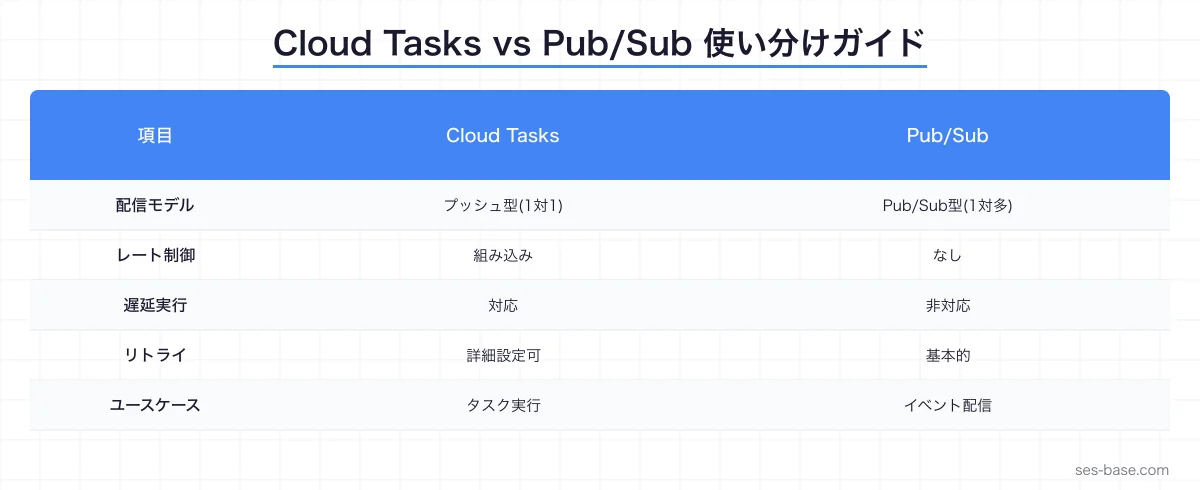
Cloud Tasks vs Pub/Sub:使い分けガイド
| 比較項目 | Cloud Tasks | Pub/Sub |
|---|---|---|
| 配信モデル | プッシュ型(1対1) | Pub/Sub型(1対多) |
| レート制御 | ★★★ 組み込み | ★☆☆ なし |
| スケジュール | ★★★ 遅延実行可能 | ★☆☆ 即時のみ |
| リトライ | ★★★ 細かく設定可能 | ★★☆ 基本的なリトライ |
| 重複排除 | ★★★ タスク名で重複排除 | ★★☆ Exactly-once配信(設定必要) |
| ファンアウト | ★☆☆ 不向き | ★★★ 得意 |
| ユースケース | タスク実行、API呼び出し | イベント配信、データストリーミング |
Cloud Tasksを選ぶべきケース:
- 外部APIへのレート制限付き呼び出し
- メール/通知の非同期送信
- バッチ処理のジョブ投入
- 支払い処理などの信頼性が必要なタスク
- スケジュール実行(5分後に実行、など)
SES案件でのCloud Tasks需要
SES市場でもGoogle Cloud案件は増加しており、Cloud Tasksの知識が求められるケースが増えています。
- ECサイト案件: 注文処理・在庫更新の非同期化
- SaaS開発案件: マルチテナントの通知配信
- 金融系案件: 取引処理のキューイング
- データ処理案件: バッチジョブの投入・管理
Cloud Tasksの基本設定
キューの作成
# キューの作成
gcloud tasks queues create email-queue \
  --location=asia-northeast1 \
  --max-dispatches-per-second=10 \
  --max-concurrent-dispatches=5 \
  --max-attempts=5 \
  --min-backoff=10s \
  --max-backoff=300s \
  --max-doublings=3

# キューの確認
gcloud tasks queues describe email-queue \
  --location=asia-northeast1
キュー設定の解説
| パラメータ | 説明 | 推奨値 |
|---|---|---|
| max-dispatches-per-second | 1秒あたりの最大タスク配信数 | APIのレート制限に合わせる |
| max-concurrent-dispatches | 同時実行タスク数の上限 | ターゲットの処理能力に合わせる |
| max-attempts | 最大リトライ回数 | 3〜10(タスクの重要度による) |
| min-backoff | リトライ間隔の最小値 | 10s〜30s |
| max-backoff | リトライ間隔の最大値 | 300s〜3600s |
| max-doublings | バックオフの指数増加回数 | 3〜5 |
タスクの作成と管理
Pythonでのタスク作成
from google.cloud import tasks_v2
from google.protobuf import timestamp_pb2
from datetime import datetime, timedelta
import json


def create_task(
    project: str,
    location: str,
    queue: str,
    url: str,
    payload: dict,
    delay_seconds: int = 0,
    task_name: str | None = None,
) -> tasks_v2.Task:
    """Cloud Tasksにタスクを作成する"""
    client = tasks_v2.CloudTasksClient()
    parent = client.queue_path(project, location, queue)

    task = tasks_v2.Task(
        http_request=tasks_v2.HttpRequest(
            http_method=tasks_v2.HttpMethod.POST,
            url=url,
            headers={"Content-Type": "application/json"},
            body=json.dumps(payload).encode(),
        ),
    )

    # タスク名による重複排除
    if task_name:
        task.name = f"{parent}/tasks/{task_name}"

    # 遅延実行
    if delay_seconds > 0:
        scheduled_time = timestamp_pb2.Timestamp()
        scheduled_time.FromDatetime(
            datetime.utcnow() + timedelta(seconds=delay_seconds)
        )
        task.schedule_time = scheduled_time

    response = client.create_task(
        request=tasks_v2.CreateTaskRequest(
            parent=parent,
            task=task,
        )
    )

    print(f"タスク作成: {response.name}")
    return response


# 使用例: メール送信タスク
create_task(
    project="my-project",
    location="asia-northeast1",
    queue="email-queue",
    url="https://my-api-xxxxx.run.app/api/send-email",
    payload={
        "to": "[email protected]",
        "subject": "注文確認",
        "template": "order-confirmation",
        "data": {"order_id": "ORD-12345"},
    },
)

# 使用例: 5分後に実行するリマインダー
create_task(
    project="my-project",
    location="asia-northeast1",
    queue="reminder-queue",
    url="https://my-api-xxxxx.run.app/api/send-reminder",
    payload={
        "user_id": "USR-789",
        "message": "カートに商品が残っています",
    },
    delay_seconds=300,  # 5分後
    task_name="cart-reminder-USR-789",  # 重複排除
)
Node.js/TypeScriptでのタスク作成
import { CloudTasksClient } from '@google-cloud/tasks';
import { google } from '@google-cloud/tasks/build/protos/protos';

const client = new CloudTasksClient();

interface TaskOptions {
  project: string;
  location: string;
  queue: string;
  url: string;
  payload: Record<string, unknown>;
  delaySeconds?: number;
  taskName?: string;
}

async function createTask(options: TaskOptions): Promise<string> {
  const {
    project,
    location,
    queue,
    url,
    payload,
    delaySeconds = 0,
    taskName,
  } = options;

  const parent = client.queuePath(project, location, queue);

  const task: google.cloud.tasks.v2.ITask = {
    httpRequest: {
      httpMethod: 'POST',
      url,
      headers: { 'Content-Type': 'application/json' },
      body: Buffer.from(JSON.stringify(payload)).toString('base64'),
    },
  };

  if (taskName) {
    task.name = `${parent}/tasks/${taskName}`;
  }

  if (delaySeconds > 0) {
    const scheduleTime = new Date();
    scheduleTime.setSeconds(scheduleTime.getSeconds() + delaySeconds);
    task.scheduleTime = {
      seconds: Math.floor(scheduleTime.getTime() / 1000),
    };
  }

  const [response] = await client.createTask({ parent, task });
  console.log(`タスク作成: ${response.name}`);
  return response.name!;
}
Cloud Runとの連携パターン
タスクハンドラの実装(Cloud Run)
# app.py - Cloud Run タスクハンドラ
from flask import Flask, request, jsonify
import logging
from functools import wraps

app = Flask(__name__)
logger = logging.getLogger(__name__)


def validate_cloud_tasks(f):
    """Cloud Tasksからのリクエストを検証するデコレータ"""
    @wraps(f)
    def decorated(*args, **kwargs):
        # Cloud Tasksヘッダーの確認
        task_name = request.headers.get("X-CloudTasks-TaskName")
        queue_name = request.headers.get("X-CloudTasks-QueueName")
        retry_count = request.headers.get(
            "X-CloudTasks-TaskRetryCount", "0"
        )

        if not task_name:
            logger.warning("Cloud Tasksヘッダーなし(直接アクセス?)")
            return jsonify({"error": "Unauthorized"}), 403

        logger.info(
            f"タスク実行: {task_name} "
            f"(キュー: {queue_name}, リトライ: {retry_count})"
        )
        return f(*args, **kwargs)
    return decorated


@app.route("/api/send-email", methods=["POST"])
@validate_cloud_tasks
def send_email():
    """メール送信タスクハンドラ"""
    data = request.get_json()

    try:
        to = data["to"]
        subject = data["subject"]
        template = data["template"]
        template_data = data.get("data", {})

        # メール送信処理
        result = email_service.send(
            to=to,
            subject=subject,
            template=template,
            data=template_data,
        )

        logger.info(f"メール送信成功: {to}")
        return jsonify({"status": "sent", "message_id": result.id}), 200

    except Exception as e:
        logger.error(f"メール送信失敗: {str(e)}")
        # 5xx を返すとCloud Tasksがリトライする
        return jsonify({"error": str(e)}), 500


@app.route("/api/process-order", methods=["POST"])
@validate_cloud_tasks
def process_order():
    """注文処理タスクハンドラ"""
    data = request.get_json()
    order_id = data["order_id"]

    try:
        # 1. 在庫確認
        inventory_check(order_id)

        # 2. 決済処理
        payment_result = process_payment(order_id)

        # 3. 出荷指示
        create_shipment(order_id)

        # 4. 確認メールをタスクとして投入
        create_task(
            project="my-project",
            location="asia-northeast1",
            queue="email-queue",
            url="https://my-api-xxxxx.run.app/api/send-email",
            payload={
                "to": data["customer_email"],
                "subject": "ご注文確認",
                "template": "order-confirmation",
                "data": {"order_id": order_id},
            },
        )

        return jsonify({"status": "processed"}), 200

    except PaymentError as e:
        # 決済エラーはリトライ可能
        logger.error(f"決済エラー: {order_id} - {e}")
        return jsonify({"error": str(e)}), 500

    except InventoryError as e:
        # 在庫不足はリトライしても解決しない → 2xx で完了扱い
        logger.warning(f"在庫不足: {order_id}")
        notify_admin(f"在庫不足: {order_id}")
        return jsonify({"status": "out_of_stock"}), 200
レート制御の実践パターン
外部API呼び出しのレート制限
外部APIの呼び出し制限に合わせたキュー設定は、Cloud Tasksの最も典型的なユースケースです。
# Stripe API: 25リクエスト/秒の制限に対応
gcloud tasks queues create stripe-queue \
  --location=asia-northeast1 \
  --max-dispatches-per-second=20 \
  --max-concurrent-dispatches=10 \
  --max-attempts=5 \
  --min-backoff=30s

# SendGrid API: 100リクエスト/秒
gcloud tasks queues create sendgrid-queue \
  --location=asia-northeast1 \
  --max-dispatches-per-second=80 \
  --max-concurrent-dispatches=20 \
  --max-attempts=3 \
  --min-backoff=60s

# 社内API: 控えめな設定
gcloud tasks queues create internal-api-queue \
  --location=asia-northeast1 \
  --max-dispatches-per-second=5 \
  --max-concurrent-dispatches=3 \
  --max-attempts=10 \
  --min-backoff=10s \
  --max-backoff=600s
バルクメール送信の設計
def send_bulk_emails(
    recipients: list[dict],
    template: str,
    subject: str,
) -> int:
    """大量メールを Cloud Tasks 経由で非同期送信"""
    client = tasks_v2.CloudTasksClient()
    parent = client.queue_path(
        "my-project", "asia-northeast1", "email-queue"
    )

    created = 0
    for recipient in recipients:
        task = tasks_v2.Task(
            http_request=tasks_v2.HttpRequest(
                http_method=tasks_v2.HttpMethod.POST,
                url="https://my-api-xxxxx.run.app/api/send-email",
                headers={"Content-Type": "application/json"},
                body=json.dumps({
                    "to": recipient["email"],
                    "subject": subject,
                    "template": template,
                    "data": {
                        "name": recipient["name"],
                        "unsubscribe_token": recipient["token"],
                    },
                }).encode(),
            ),
            # タスク名で重複排除(同じメール配信IDなら再作成されない)
            name=f"{parent}/tasks/campaign-{template}-{recipient['id']}",
        )

        try:
            client.create_task(
                request=tasks_v2.CreateTaskRequest(
                    parent=parent, task=task
                )
            )
            created += 1
        except Exception as e:
            if "ALREADY_EXISTS" in str(e):
                continue  # 重複は無視
            raise

    return created


# 使用例: 10,000通のキャンペーンメール
count = send_bulk_emails(
    recipients=get_campaign_recipients(campaign_id="CAMP-001"),
    template="spring-campaign",
    subject="春のキャンペーンのお知らせ",
)
print(f"{count}件のメール送信タスクを作成しました")
監視とトラブルシューティング
Cloud Monitoringでの監視
# キューの深さ(未処理タスク数)を監視
gcloud monitoring policies create \
  --display-name="Cloud Tasks Queue Depth Alert" \
  --condition-display-name="Queue depth > 1000" \
  --condition-filter='resource.type="cloud_tasks_queue" AND metric.type="cloudtasks.googleapis.com/queue/depth"' \
  --condition-threshold-value=1000 \
  --condition-threshold-duration=300s \
  --notification-channels=$NOTIFICATION_CHANNEL
デバッグのポイント
| 症状 | 原因 | 対処法 |
|---|---|---|
| タスクが溜まり続ける | ターゲットが5xxを返している | ログで原因確認、リトライ設定見直し |
| タスクが即座に失敗 | URLが間違っている | ターゲットURLの確認 |
| レート制限に引っかかる | max-dispatches が低すぎる | キュー設定の調整 |
| 重複実行される | 冪等性が未対応 | タスクハンドラに冪等性を実装 |
| タスクがタイムアウト | 処理時間が長すぎる | 処理の分割、タイムアウト延長 |
コスト最適化
Cloud Tasksの料金
| 項目 | 無料枠 | 超過分 |
|---|---|---|
| タスク操作 | 100万回/月 | $0.40/100万回 |
| タスクの保持 | ─ | 無料 |
Cloud Tasksは非常にコスト効率が良いサービスです。月間100万タスクまで無料で、それを超えても100万タスクあたり$0.40と低価格です。
まとめ:Cloud Tasksで信頼性の高い非同期処理を構築しよう
Google Cloud Tasksは、非同期処理の信頼性とスケーラビリティを担保するフルマネージドサービスです。レート制御・リトライ・スケジュール実行・重複排除が組み込みで利用でき、Cloud RunやCloud Functionsとの連携も容易です。
SESエンジニアとして、非同期処理の設計スキルはバックエンド案件で必須の能力です。Cloud Tasksを使いこなすことで、スケーラブルなシステム設計の実践力を身につけましょう。
Google Cloudの基本はGoogle Cloud入門ガイドを、Cloud RunについてはCloud Run + Cloud SQLチュートリアルをご覧ください。サーバーレス全般はCloud Functionsガイド、メッセージングはPub/Subメッセージングガイドが参考になります。