- Cloud ArmorはGoogle Cloudのマネージド WAF/DDoS防御サービスで、L3〜L7の多層防御を提供
- 事前設定ルール(OWASP Top10対応)とカスタムルールで柔軟なセキュリティポリシーを実装可能
- セキュリティ案件はSES市場で需要急増中、月単価75〜100万円が目安
「SQLインジェクション攻撃を受けた」「DDoS攻撃でサービスが落ちた」「WAFルールの設定が複雑すぎて正しく動作しているかわからない」——Webサービスを運用するSESエンジニアにとって、セキュリティは常に悩みの種です。
2026年のサイバー攻撃は、AIを活用した高度な攻撃手法が主流になりつつあります。Google Cloud Cloud Armorは、Googleの世界規模のインフラと機械学習技術を活用して、これらの攻撃からアプリケーションを保護するマネージドWAF/DDoS防御サービスです。
本記事では、Cloud Armorの基礎からSES案件で求められるセキュリティ設計パターンまで体系的に解説します。
Cloud Armorの概要
Cloud Armorとは
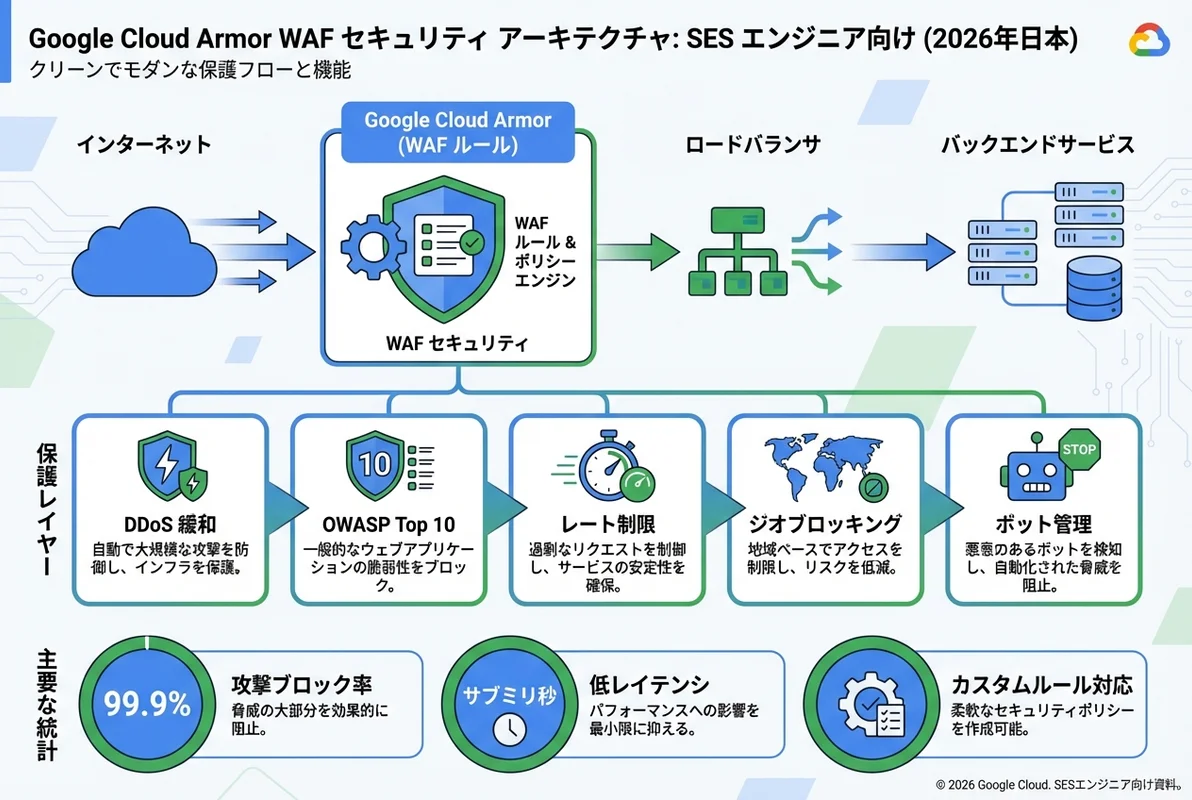
Cloud Armorは、Google Cloud Load Balancing(外部HTTP(S)ロードバランサ)と統合して動作するWAF(Web Application Firewall)およびDDoS防御サービスです。
主な機能:
- DDoS防御: L3/L4のボリューメトリック攻撃からL7のアプリケーション層攻撃まで多層防御
- WAFルール: OWASP Top 10に対応する事前設定ルールとカスタムルール
- Adaptive Protection: 機械学習によるリアルタイムの攻撃検出・自動防御
- Rate Limiting: IPベース・リージョンベースのリクエスト制限
- Bot Management: reCAPTCHA Enterprise連携による不正ボット排除
Cloud Armorの料金体系
| 項目 | Standard | Plus |
|---|---|---|
| ポリシー | $5/月 | $5/月 |
| ルール | $1/月/ルール | $1/月/ルール |
| リクエスト | $0.75/100万リクエスト | $0.75/100万リクエスト |
| Adaptive Protection | - | 含まれる |
| Managed Rules | - | 含まれる |
| DDoS防御 (L3/L4) | 含まれる | 含まれる |
| DDoS防御 (L7) | - | 含まれる |
アーキテクチャ概要
Internet
    ↓
Google Global Network
    ↓
Cloud Armor Security Policy ← WAF Rules / Rate Limiting / Geo Blocking
    ↓
External HTTP(S) Load Balancer
    ↓
Backend Services (GKE / Cloud Run / Compute Engine / Cloud Functions)
Cloud ArmorはGoogle のグローバルエッジネットワーク上で動作するため、攻撃トラフィックがバックエンドに到達する前にブロックできます。これが一般的なWAFアプライアンスとの最大の違いです。
セキュリティポリシーの作成
基本的なポリシー作成
# セキュリティポリシーの作成
gcloud compute security-policies create my-security-policy \
  --description "Production security policy"

# デフォルトルール(全トラフィック許可を明示)
gcloud compute security-policies rules update 2147483647 \
  --security-policy my-security-policy \
  --action allow

# バックエンドサービスにポリシーを適用
gcloud compute backend-services update my-backend-service \
  --security-policy my-security-policy \
  --global
IP制限ルール
特定のIPアドレスからのアクセスを制御します:
# 特定IPのブロック
gcloud compute security-policies rules create 1000 \
  --security-policy my-security-policy \
  --action deny-403 \
  --src-ip-ranges "203.0.113.0/24,198.51.100.0/24" \
  --description "Block malicious IPs"

# 管理画面へのIP制限(特定IPのみ許可)
gcloud compute security-policies rules create 900 \
  --security-policy my-security-policy \
  --action allow \
  --expression "request.path.startsWith('/admin') && inIpRange(origin.ip, '10.0.0.0/8')" \
  --description "Allow admin access only from internal network"

# 上記以外の管理画面アクセスを拒否
gcloud compute security-policies rules create 901 \
  --security-policy my-security-policy \
  --action deny-403 \
  --expression "request.path.startsWith('/admin')" \
  --description "Deny admin access from external"
地理的制限(Geo Blocking)
# 特定の国からのアクセスをブロック
gcloud compute security-policies rules create 800 \
  --security-policy my-security-policy \
  --action deny-403 \
  --expression "origin.region_code == 'CN' || origin.region_code == 'RU'" \
  --description "Block access from specific countries"

# 日本国内のみ許可
gcloud compute security-policies rules create 700 \
  --security-policy my-security-policy \
  --action deny-403 \
  --expression "origin.region_code != 'JP'" \
  --description "Allow only Japan"
OWASP Top 10 対応ルール
事前設定ルール(Preconfigured WAF Rules)
Cloud ArmorはOWASP ModSecurity Core Rule Set(CRS)に基づく事前設定ルールを提供します:
# SQLインジェクション防御
gcloud compute security-policies rules create 100 \
  --security-policy my-security-policy \
  --action deny-403 \
  --expression "evaluatePreconfiguredExpr('sqli-v33-stable')" \
  --description "SQL Injection protection"

# XSS防御
gcloud compute security-policies rules create 101 \
  --security-policy my-security-policy \
  --action deny-403 \
  --expression "evaluatePreconfiguredExpr('xss-v33-stable')" \
  --description "Cross-Site Scripting protection"

# ローカルファイルインクルージョン防御
gcloud compute security-policies rules create 102 \
  --security-policy my-security-policy \
  --action deny-403 \
  --expression "evaluatePreconfiguredExpr('lfi-v33-stable')" \
  --description "Local File Inclusion protection"

# リモートファイルインクルージョン防御
gcloud compute security-policies rules create 103 \
  --security-policy my-security-policy \
  --action deny-403 \
  --expression "evaluatePreconfiguredExpr('rfi-v33-stable')" \
  --description "Remote File Inclusion protection"

# リモートコード実行防御
gcloud compute security-policies rules create 104 \
  --security-policy my-security-policy \
  --action deny-403 \
  --expression "evaluatePreconfiguredExpr('rce-v33-stable')" \
  --description "Remote Code Execution protection"

# プロトコル攻撃防御
gcloud compute security-policies rules create 105 \
  --security-policy my-security-policy \
  --action deny-403 \
  --expression "evaluatePreconfiguredExpr('protocolattack-v33-stable')" \
  --description "Protocol Attack protection"
段階的な導入アプローチ
本番環境でWAFルールを導入する際は、いきなりブロックモードで適用するのではなく、プレビューモードで誤検知を確認することが重要です:
# Step 1: プレビューモードで適用(ログのみ、ブロックなし)
gcloud compute security-policies rules create 100 \
  --security-policy my-security-policy \
  --action deny-403 \
  --expression "evaluatePreconfiguredExpr('sqli-v33-stable')" \
  --preview \
  --description "SQL Injection - PREVIEW MODE"

# Step 2: ログを確認して誤検知を分析(1〜2週間運用)
gcloud logging read "resource.type=http_load_balancer AND jsonPayload.enforcedSecurityPolicy.name=my-security-policy AND jsonPayload.enforcedSecurityPolicy.outcome=DENY" \
  --limit 100 \
  --format json

# Step 3: 誤検知がなければプレビューモードを解除
gcloud compute security-policies rules update 100 \
  --security-policy my-security-policy \
  --no-preview
Rate Limiting の実装
基本的なRate Limiting
# IPベースのRate Limiting(1分間に100リクエストまで)
gcloud compute security-policies rules create 500 \
  --security-policy my-security-policy \
  --action throttle \
  --rate-limit-threshold-count 100 \
  --rate-limit-threshold-interval-sec 60 \
  --conform-action allow \
  --exceed-action deny-429 \
  --enforce-on-key IP \
  --description "Rate limit: 100 req/min per IP"
パスベースのRate Limiting
APIエンドポイントごとに異なるRate Limitを設定します:
# ログインエンドポイント(ブルートフォース防止)
gcloud compute security-policies rules create 501 \
  --security-policy my-security-policy \
  --action throttle \
  --expression "request.path.matches('/api/auth/login')" \
  --rate-limit-threshold-count 5 \
  --rate-limit-threshold-interval-sec 60 \
  --conform-action allow \
  --exceed-action deny-429 \
  --enforce-on-key IP \
  --description "Login endpoint rate limit: 5 req/min per IP"

# APIエンドポイント全般
gcloud compute security-policies rules create 502 \
  --security-policy my-security-policy \
  --action throttle \
  --expression "request.path.startsWith('/api/')" \
  --rate-limit-threshold-count 300 \
  --rate-limit-threshold-interval-sec 60 \
  --conform-action allow \
  --exceed-action deny-429 \
  --enforce-on-key IP \
  --description "API rate limit: 300 req/min per IP"
Adaptive Protection(機械学習ベースの防御)
Adaptive Protectionの有効化
Cloud Armor Plusで利用可能なAdaptive Protectionは、機械学習モデルがトラフィックパターンを学習し、異常なトラフィックを自動検出します:
# Adaptive Protectionの有効化
gcloud compute security-policies update my-security-policy \
  --enable-layer7-ddos-defense \
  --layer7-ddos-defense-rule-visibility STANDARD
Adaptive Protectionは以下のような攻撃を自動検出します:
- HTTP Flood: 大量のHTTPリクエストによるアプリケーション層DDoS
- Slowloris: 低速接続による接続プール枯渇攻撃
- 異常なトラフィックパターン: 通常とは異なるリクエストパターンの急増
アラート通知の設定
# Cloud Monitoring でアラートポリシーを作成
gcloud alpha monitoring policies create \
  --display-name "Cloud Armor Attack Detection" \
  --condition-display-name "Adaptive Protection Alert" \
  --condition-filter 'resource.type="http_load_balancer" AND metric.type="loadbalancing.googleapis.com/https/request_count" AND metric.labels.response_code_class="400"' \
  --condition-threshold-value 1000 \
  --condition-threshold-duration 60s \
  --notification-channels "projects/my-project/notificationChannels/12345"
ログと分析
Cloud Logging でのログ確認
# ブロックされたリクエストのログ
gcloud logging read '
  resource.type="http_load_balancer"
  jsonPayload.enforcedSecurityPolicy.outcome="DENY"
' --limit 50 --format json

# 特定ルールにマッチしたリクエスト
gcloud logging read '
  resource.type="http_load_balancer"
  jsonPayload.enforcedSecurityPolicy.matchedFieldType="BODY"
  jsonPayload.enforcedSecurityPolicy.preconfiguredExprIds:"owasp-crs-v030301-id942100-sqli"
' --limit 20 --format json
BigQueryへのログエクスポート
大量のセキュリティログを分析するために、BigQueryにエクスポートします:
-- 攻撃元IPのTop 10
SELECT
  jsonPayload.remoteIp AS source_ip,
  COUNT(*) AS block_count,
  ARRAY_AGG(DISTINCT jsonPayload.enforcedSecurityPolicy.name) AS matched_policies
FROM `project.dataset.requests`
WHERE jsonPayload.enforcedSecurityPolicy.outcome = 'DENY'
  AND timestamp > TIMESTAMP_SUB(CURRENT_TIMESTAMP(), INTERVAL 24 HOUR)
GROUP BY source_ip
ORDER BY block_count DESC
LIMIT 10;

-- 攻撃タイプ別の集計
SELECT
  jsonPayload.enforcedSecurityPolicy.preconfiguredExprIds AS rule_id,
  COUNT(*) AS hit_count,
  COUNT(DISTINCT jsonPayload.remoteIp) AS unique_ips
FROM `project.dataset.requests`
WHERE jsonPayload.enforcedSecurityPolicy.outcome = 'DENY'
  AND timestamp > TIMESTAMP_SUB(CURRENT_TIMESTAMP(), INTERVAL 7 DAY)
GROUP BY rule_id
ORDER BY hit_count DESC;
IaCによるCloud Armor管理
Terraformでの設定
resource "google_compute_security_policy" "policy" {
  name        = "my-security-policy"
  description = "Production security policy"

  # デフォルトルール(全許可)
  rule {
    action   = "allow"
    priority = 2147483647
    match {
      versioned_expr = "SRC_IPS_V1"
      config {
        src_ip_ranges = ["*"]
      }
    }
  }

  # SQLインジェクション防御
  rule {
    action   = "deny(403)"
    priority = 100
    match {
      expr {
        expression = "evaluatePreconfiguredExpr('sqli-v33-stable')"
      }
    }
    description = "SQL Injection protection"
  }

  # XSS防御
  rule {
    action   = "deny(403)"
    priority = 101
    match {
      expr {
        expression = "evaluatePreconfiguredExpr('xss-v33-stable')"
      }
    }
    description = "XSS protection"
  }

  # Rate Limiting
  rule {
    action   = "throttle"
    priority = 500
    match {
      versioned_expr = "SRC_IPS_V1"
      config {
        src_ip_ranges = ["*"]
      }
    }
    rate_limit_options {
      conform_action = "allow"
      exceed_action  = "deny(429)"
      rate_limit_threshold {
        count        = 100
        interval_sec = 60
      }
      enforce_on_key = "IP"
    }
  }

  # Adaptive Protection
  adaptive_protection_config {
    layer_7_ddos_defense_config {
      enable          = true
      rule_visibility = "STANDARD"
    }
  }
}

# バックエンドサービスに適用
resource "google_compute_backend_service" "default" {
  name            = "my-backend-service"
  security_policy = google_compute_security_policy.policy.self_link
  # ... 他の設定
}
SES面談でのセキュリティスキルアピール
セキュリティ案件で評価されるポイント
WAF/DDoS防御
- Cloud Armor / AWS WAF / Cloudflare の設計・運用経験
- OWASP Top 10の理解と対策実装
- Rate Limiting・Geo Blocking の設計
- 誤検知のチューニング経験
インシデント対応
- セキュリティインシデントの検知・調査・対応フロー
- フォレンジック分析の基礎知識
- 攻撃パターンの分析・レポート作成
コンプライアンス
- PCI DSS / ISO 27001 / SOC 2 の要件理解
- セキュリティ監査対応の経験
- 脆弱性診断ツール(OWASP ZAP、Burp Suite)の利用経験
まとめ
Google Cloud Cloud Armorは、Googleの世界規模のインフラ上で動作するWAF/DDoS防御サービスとして、SES案件のセキュリティ要件を高いレベルで満たせるサービスです。
特に以下の点が、AWS WAFとの差別化ポイントです:
- Adaptive Protection: 機械学習によるリアルタイム攻撃検出
- グローバルエッジ防御: Google のCDNエッジで攻撃をブロック
- reCAPTCHA連携: ボット管理との統合
- CEL式ベースのルール: 柔軟な条件式でカスタムルールを作成
セキュリティエンジニアの需要は2026年も引き続き高く、Cloud Armorの実務経験はキャリアアップの大きな武器になります。