- ApigeeはエンタープライズグレードのAPI管理プラットフォーム、Google Cloud純正
- 認証・レート制限・キャッシュ・分析をノーコードで設定可能
- API管理エンジニアの月単価は85〜130万円、DX推進案件で需要急増中
2026年、APIファーストの設計思想が企業のDX(デジタルトランスフォーメーション)を推進しています。社内システムのAPI化、パートナー向けAPI公開、モバイルアプリのバックエンドAPI——あらゆる場面でAPIが中心的な役割を果たしています。
しかし、APIを安全に公開・運用するには、認証・認可、レート制限、監視、バージョン管理、開発者ポータルなど、多くの機能が必要です。Google Cloud Apigeeは、これらの機能を統合的に提供するエンタープライズAPI管理プラットフォームです。
- Apigeeの全体像とAPIゲートウェイとの違い
- APIプロキシの設計と構築方法
- セキュリティポリシー(OAuth 2.0、APIキー、JWT検証)の設定
- レート制限・キャッシュ・トラフィック管理
- API分析とモニタリング
Apigeeとは
API管理プラットフォームの全体像
Apigeeは単なるAPIゲートウェイではなく、APIのライフサイクル全体を管理するプラットフォームです:
| 機能 | 説明 |
|---|---|
| APIプロキシ | バックエンドAPIへのリバースプロキシ、ポリシー適用 |
| セキュリティ | OAuth 2.0、APIキー、JWT、mTLS |
| トラフィック管理 | レート制限、スパイク防止、クォータ |
| 分析 | API利用状況、レイテンシ、エラー率の可視化 |
| 開発者ポータル | API文書、アプリ登録、APIキー発行のセルフサービス |
| バージョン管理 | APIのリビジョン管理とデプロイ |
| マネタイゼーション | API利用量に基づく課金 |
Apigee X vs Cloud Endpoints vs API Gateway
| 比較項目 | Apigee X | Cloud Endpoints | API Gateway |
|---|---|---|---|
| 対象 | エンタープライズ | 開発チーム | サーバーレス |
| 機能 | フル機能 | 基本的 | 基本的 |
| 分析 | 高度(ビジネス分析) | 基本的 | CloudWatch |
| 開発者ポータル | 標準搭載 | なし | なし |
| マネタイゼーション | あり | なし | なし |
| 料金 | 月額$500〜 | 低コスト | 低コスト |
| 適用規模 | 大規模 | 中小規模 | 小規模 |
SES市場でのAPI管理スキルの需要
DX推進において、API管理はインフラストラクチャの中核です:
- 金融API: Open Banking対応でAPI公開が義務化
- ヘルスケアAPI: FHIR準拠APIの構築・管理
- パートナーAPI: B2B連携のセキュアなAPI公開
- 内部API: マイクロサービス間通信の統制
API管理エンジニアの月単価は85〜130万円で、特にApigee + OAuth 2.0のスキルセットは最も需要が高い組み合わせの一つです。
APIプロキシの設計と構築
基本構成
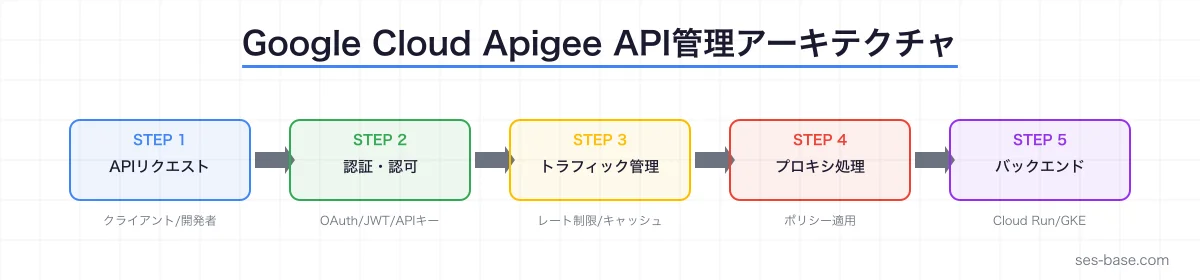
Apigeeのデプロイフローは以下の通りです:
- APIプロキシを作成(バックエンドAPIの前段に配置)
- ポリシーを追加(認証、レート制限、キャッシュなど)
- 環境にデプロイ(dev → staging → prod)
Terraform によるApigee組織の構築
# Apigee組織の作成
resource "google_apigee_organization" "org" {
  project_id         = var.project_id
  analytics_region   = "asia-northeast1"
  runtime_type       = "CLOUD"
  billing_type       = "EVALUATION"
  authorized_network = google_compute_network.apigee.id

  properties {
    property {
      name  = "features.hybrid.enabled"
      value = "true"
    }
  }
}

# 環境の作成
resource "google_apigee_environment" "prod" {
  org_id       = google_apigee_organization.org.id
  name         = "prod"
  description  = "Production environment"
  display_name = "Production"

  deployment_type = "PROXY"
  api_proxy_type  = "PROGRAMMABLE"
}

# 環境グループ
resource "google_apigee_envgroup" "prod" {
  org_id    = google_apigee_organization.org.id
  name      = "prod-group"
  hostnames = ["api.example.com"]
}

# 環境グループへの割り当て
resource "google_apigee_envgroup_attachment" "prod" {
  envgroup_id = google_apigee_envgroup.prod.id
  environment = google_apigee_environment.prod.name
}
APIプロキシの定義
<!-- apiproxy/orders-api.xml -->
<?xml version="1.0" encoding="UTF-8" standalone="yes"?>
<APIProxy revision="1" name="orders-api">
  <DisplayName>Orders API</DisplayName>
  <Description>注文管理API</Description>
  <CreatedBy>[email protected]</CreatedBy>
  <BasePaths>/v1/orders</BasePaths>
  <Policies/>
  <ProxyEndpoints>
    <ProxyEndpoint>default</ProxyEndpoint>
  </ProxyEndpoints>
  <TargetEndpoints>
    <TargetEndpoint>default</TargetEndpoint>
  </TargetEndpoints>
</APIProxy>
<!-- apiproxy/proxies/default.xml -->
<?xml version="1.0" encoding="UTF-8" standalone="yes"?>
<ProxyEndpoint name="default">
<PreFlow name="PreFlow">
<Request>
<Step><Name>Verify-API-Key</Name></Step>
<Step><Name>Spike-Arrest</Name></Step>
<Step><Name>Quota</Name></Step>
</Request>
<Response>
<Step><Name>Add-CORS</Name></Step>
</Response>
</PreFlow>
<Flows>
<Flow name="GetOrders">
<Condition>(proxy.pathsuffix MatchesPath "/") and (request.verb = "GET")</Condition>
<Request>
<Step><Name>Response-Cache</Name></Step>
</Request>
</Flow>
<Flow name="CreateOrder">
<Condition>(proxy.pathsuffix MatchesPath "/") and (request.verb = "POST")</Condition>
<Request>
<Step><Name>Verify-JWT</Name></Step>
<Step><Name>Validate-Request-Body</Name></Step>
</Request>
</Flow>
<Flow name="GetOrderById">
<Condition>(proxy.pathsuffix MatchesPath "/{orderId}") and (request.verb = "GET")</Condition>
<Request/>
</Flow>
</Flows>
<PostFlow name="PostFlow">
<Response>
<Step><Name>Add-Response-Headers</Name></Step>
</Response>
</PostFlow>
<HTTPProxyConnection>
<BasePath>/v1/orders</BasePath>
<VirtualHost>secure</VirtualHost>
</HTTPProxyConnection>
<RouteRule name="default">
<TargetEndpoint>default</TargetEndpoint>
</RouteRule>
</ProxyEndpoint>セキュリティポリシーの実装
APIキー検証
最もシンプルな認証方式です:
<!-- apiproxy/policies/Verify-API-Key.xml -->
<?xml version="1.0" encoding="UTF-8" standalone="yes"?>
<VerifyAPIKey name="Verify-API-Key">
  <APIKey ref="request.queryparam.apikey"/>
  <!-- またはヘッダーから取得 -->
  <!-- <APIKey ref="request.header.x-api-key"/> -->
</VerifyAPIKey>
OAuth 2.0 アクセストークン検証
<!-- apiproxy/policies/Verify-OAuth-Token.xml -->
<?xml version="1.0" encoding="UTF-8" standalone="yes"?>
<OAuthV2 name="Verify-OAuth-Token">
  <Operation>VerifyAccessToken</Operation>
  <ExternalAuthorization>false</ExternalAuthorization>
  <SupportedGrantTypes>
    <GrantType>client_credentials</GrantType>
    <GrantType>authorization_code</GrantType>
  </SupportedGrantTypes>
  <Tokens/>
</OAuthV2>
JWT検証(外部IdP連携)
Auth0やFirebase Authenticationなどの外部IdPが発行したJWTを検証する場合:
<!-- apiproxy/policies/Verify-JWT.xml -->
<?xml version="1.0" encoding="UTF-8" standalone="yes"?>
<VerifyJWT name="Verify-JWT">
  <Algorithm>RS256</Algorithm>
  <Source>request.header.Authorization</Source>
  <IgnoreUnresolvedVariables>false</IgnoreUnresolvedVariables>

  <PublicKey>
    <JWKS uri="https://auth.example.com/.well-known/jwks.json"/>
  </PublicKey>

  <Issuer>https://auth.example.com/</Issuer>
  <Audience>https://api.example.com</Audience>

  <AdditionalClaims>
    <Claim name="scope" ref="jwt.scope" type="string"/>
    <Claim name="sub" ref="jwt.subject" type="string"/>
  </AdditionalClaims>
</VerifyJWT>
スコープベースのアクセス制御
<!-- apiproxy/policies/Check-Scope.xml -->
<?xml version="1.0" encoding="UTF-8" standalone="yes"?>
<RaiseFault name="Check-Scope-Orders-Write">
  <FaultResponse>
    <Set>
      <StatusCode>403</StatusCode>
      <ReasonPhrase>Forbidden</ReasonPhrase>
      <Payload contentType="application/json">
        {"error": "insufficient_scope", "message": "orders:write scope required"}
      </Payload>
    </Set>
  </FaultResponse>
  <IgnoreUnresolvedVariables>true</IgnoreUnresolvedVariables>
  <Condition>NOT (jwt.scope =| "orders:write")</Condition>
</RaiseFault>
トラフィック管理
Spike Arrest(スパイク防止)
急激なトラフィック増加からバックエンドを保護します:
<!-- apiproxy/policies/Spike-Arrest.xml -->
<?xml version="1.0" encoding="UTF-8" standalone="yes"?>
<SpikeArrest name="Spike-Arrest">
  <Rate>30ps</Rate> <!-- 1秒あたり30リクエスト -->
  <Identifier ref="request.header.x-api-key"/>
  <UseEffectiveCount>true</UseEffectiveCount>
</SpikeArrest>
Quota(利用量制限)
APIプランに基づく利用量制限を設定します:
<!-- apiproxy/policies/Quota.xml -->
<?xml version="1.0" encoding="UTF-8" standalone="yes"?>
<Quota name="Quota">
  <Allow countRef="verifyapikey.Verify-API-Key.apiproduct.developer.quota.limit" count="1000"/>
  <Interval ref="verifyapikey.Verify-API-Key.apiproduct.developer.quota.interval">1</Interval>
  <TimeUnit ref="verifyapikey.Verify-API-Key.apiproduct.developer.quota.timeunit">month</TimeUnit>
  <Distributed>true</Distributed>
  <Synchronous>true</Synchronous>
</Quota>
レスポンスキャッシュ
頻繁にアクセスされるデータをキャッシュしてバックエンドの負荷を軽減:
<!-- apiproxy/policies/Response-Cache.xml -->
<?xml version="1.0" encoding="UTF-8" standalone="yes"?>
<ResponseCache name="Response-Cache">
  <CacheKey>
    <Prefix/>
    <KeyFragment ref="request.uri" type="string"/>
    <KeyFragment ref="request.queryparam.page" type="string"/>
  </CacheKey>
  <ExpirySettings>
    <TimeoutInSec>300</TimeoutInSec> <!-- 5分キャッシュ -->
  </ExpirySettings>
  <SkipCacheLookup>
    <Condition>request.verb != "GET"</Condition>
  </SkipCacheLookup>
  <SkipCachePopulation>
    <Condition>response.status.code != 200</Condition>
  </SkipCachePopulation>
</ResponseCache>
API分析とモニタリング
Apigee Analyticsの活用
Apigeeは以下のメトリクスを自動収集します:
- トラフィック: リクエスト数、成功率、エラー率
- レイテンシ: プロキシレイテンシ、ターゲットレイテンシ
- 開発者: アプリごとの利用状況
- エラー: エラーコード別の内訳
カスタム分析の実装
<!-- apiproxy/policies/Statistics-Collector.xml -->
<?xml version="1.0" encoding="UTF-8" standalone="yes"?>
<StatisticsCollector name="Collect-Custom-Stats">
  <Statistics>
    <Statistic name="order_total" ref="request.content.total_amount" type="FLOAT"/>
    <Statistic name="customer_tier" ref="jwt.customer_tier" type="STRING"/>
    <Statistic name="response_size" ref="response.content.length" type="INTEGER"/>
  </Statistics>
</StatisticsCollector>
Cloud Monitoringとの連携
# Apigeeメトリクスに基づくアラート
resource "google_monitoring_alert_policy" "api_error_rate" {
  display_name = "API Error Rate High"
  combiner     = "OR"

  conditions {
    display_name = "API 5xx Error Rate > 5%"
    condition_threshold {
      filter          = "resource.type=\"apigee.googleapis.com/Proxy\" AND metric.type=\"apigee.googleapis.com/proxy/response_count\" AND metric.labels.response_code >= 500"
      duration        = "300s"
      comparison      = "COMPARISON_GT"
      threshold_value = 5

      aggregations {
        alignment_period   = "60s"
        per_series_aligner = "ALIGN_RATE"
      }
    }
  }

  notification_channels = [google_monitoring_notification_channel.slack.name]
}
開発者ポータルの構築
Apigee統合ポータル
Apigeeには開発者向けのセルフサービスポータルが標準搭載されています:
- APIカタログ: 利用可能なAPIの一覧と説明
- インタラクティブドキュメント: Swagger UIベースのAPI試行
- アプリ登録: APIキーの自動発行
- 利用状況ダッシュボード: 開発者ごとのAPI利用統計
OpenAPI Specからの自動ドキュメント生成
# openapi/orders-api.yaml
openapi: "3.0.3"
info:
  title: "Orders API"
  version: "1.0.0"
  description: "注文管理API - 注文の作成・取得・更新・キャンセルを提供"
  contact:
    name: "API Support"
    email: "[email protected]"

servers:
  - url: "https://api.example.com/v1"
    description: "本番環境"
  - url: "https://api-staging.example.com/v1"
    description: "ステージング環境"

security:
  - BearerAuth: []
  - ApiKeyAuth: []

paths:
  /orders:
    get:
      summary: "注文一覧の取得"
      operationId: "listOrders"
      parameters:
        - name: status
          in: query
          schema:
            type: string
            enum: [pending, confirmed, shipped, delivered, cancelled]
        - name: page
          in: query
          schema:
            type: integer
            default: 1
        - name: limit
          in: query
          schema:
            type: integer
            default: 20
            maximum: 100
      responses:
        "200":
          description: "注文一覧"
          content:
            application/json:
              schema:
                $ref: "#/components/schemas/OrderList"
    post:
      summary: "注文の作成"
      operationId: "createOrder"
      requestBody:
        required: true
        content:
          application/json:
            schema:
              $ref: "#/components/schemas/CreateOrderRequest"
      responses:
        "201":
          description: "注文が作成されました"
          content:
            application/json:
              schema:
                $ref: "#/components/schemas/Order"

components:
  schemas:
    Order:
      type: object
      properties:
        id:
          type: string
          format: uuid
        customerId:
          type: string
        items:
          type: array
          items:
            $ref: "#/components/schemas/OrderItem"
        status:
          type: string
          enum: [pending, confirmed, shipped, delivered, cancelled]
        totalAmount:
          type: integer
          description: "税込合計(円)"
        createdAt:
          type: string
          format: date-time

    OrderItem:
      type: object
      properties:
        productId:
          type: string
        productName:
          type: string
        quantity:
          type: integer
        unitPrice:
          type: integer
        subtotal:
          type: integer

    CreateOrderRequest:
      type: object
      required: [customerId, items]
      properties:
        customerId:
          type: string
        items:
          type: array
          items:
            type: object
            properties:
              productId:
                type: string
              quantity:
                type: integer

    OrderList:
      type: object
      properties:
        orders:
          type: array
          items:
            $ref: "#/components/schemas/Order"
        totalCount:
          type: integer
        page:
          type: integer
        limit:
          type: integer

  securitySchemes:
    BearerAuth:
      type: http
      scheme: bearer
      bearerFormat: JWT
    ApiKeyAuth:
      type: apiKey
      in: header
      name: X-API-Key
CI/CDパイプラインでのAPIデプロイ
apigeectl によるデプロイ自動化
# .github/workflows/deploy-api.yml
name: Deploy API Proxy

on:
  push:
    branches: [main]
    paths:
      - 'apiproxy/**'

jobs:
  deploy:
    runs-on: ubuntu-latest
    steps:
      - uses: actions/checkout@v4

      - name: Authenticate to Google Cloud
        uses: google-github-actions/auth@v2
        with:
          credentials_json: ${{ secrets.GCP_SA_KEY }}

      - name: Install apigeecli
        run: |
          curl -L https://raw.githubusercontent.com/apigee/apigeecli/main/downloadLatest.sh | sh
          echo "$HOME/.apigeecli/bin" >> $GITHUB_PATH

      - name: Deploy to Staging
        run: |
          apigeecli apis create bundle \
            -n orders-api \
            -p apiproxy \
            --org ${{ vars.APIGEE_ORG }} \
            --token $(gcloud auth print-access-token)

          apigeecli apis deploy \
            -n orders-api \
            -e staging \
            --org ${{ vars.APIGEE_ORG }} \
            --token $(gcloud auth print-access-token) \
            --ovr

      - name: Run Integration Tests
        run: |
          npm run test:integration -- --env staging

      - name: Deploy to Production
        if: success()
        run: |
          apigeecli apis deploy \
            -n orders-api \
            -e prod \
            --org ${{ vars.APIGEE_ORG }} \
            --token $(gcloud auth print-access-token) \
            --ovr
SESエンジニアのキャリア戦略
API管理スキルのキャリアパス
| レベル | 月単価 | 求められるスキル |
|---|---|---|
| ジュニア | 65〜85万円 | APIプロキシ設定、基本ポリシー |
| ミドル | 85〜110万円 | OAuth 2.0設計、カスタムポリシー、CI/CD |
| シニア | 110〜140万円 | API戦略設計、マネタイゼーション、ガバナンス |
関連スキルの掛け合わせ
- Apigee + OAuth 2.0 + OpenID Connect: 認証・認可の専門家
- Apigee + Cloud Run + GKE: フルスタックAPI基盤
- Apigee + Terraform + GitOps: API基盤のIaC化
- Apigee + BigQuery: API利用分析とビジネスインサイト
まとめ
Google Cloud Apigeeは、エンタープライズ規模のAPI管理を統合的に実現するプラットフォームです。
- APIプロキシ: バックエンドAPIの前段でセキュリティ・トラフィック管理を実装
- セキュリティ: OAuth 2.0、JWT、APIキーの検証をポリシーで設定
- トラフィック管理: レート制限、キャッシュ、スパイク防止を宣言的に定義
- 分析: API利用状況の可視化とビジネスインサイトの獲得
- 開発者ポータル: APIドキュメントとキー発行のセルフサービス
API管理は2026年のDX推進において中核となるスキルです。Apigeeを使いこなして、SESエンジニアとしての市場価値を最大化しましょう。
SES BASEでは、Google Cloud、Apigee、API設計の高単価案件を多数掲載しています。API管理スキルを活かせる案件をぜひチェックしてください。