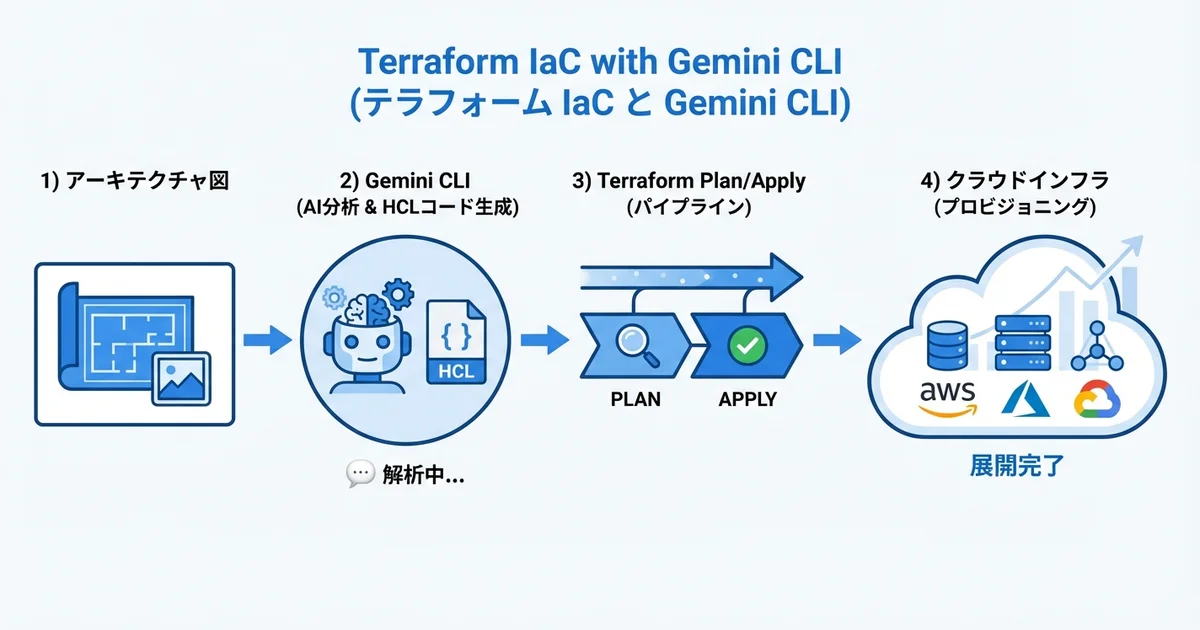
- Gemini CLIのマルチモーダル能力でアーキテクチャ図からTerraformコードを自動生成できる
- terraform planの出力をGemini CLIに渡すだけでリスク分析・影響評価が可能
- 既存インフラのドリフト検出と修正コード生成をAIで自動化できる
「Terraformの構文を覚えるのが大変」「plan結果が長すぎて変更影響を見落としそう」「既存環境のコード化(import)をどう進めればいいかわからない」
結論から言えば、Gemini CLI(Google Antigravity)を活用することでTerraform HCLの生成・レビュー・保守を劇的に効率化できます。特にGeminiのマルチモーダル能力を活かした「図からコード生成」は他のAIツールにない強みです。
Gemini CLI × Terraformの相性が良い理由
Gemini CLI(Google Antigravity)がTerraform開発に特に適している理由は3つあります。
| 特長 | 具体的な活用場面 |
|---|---|
| マルチモーダル入力 | アーキテクチャ図の画像からHCLコードを生成 |
| 200万トークンのコンテキスト | 大規模なTerraformプロジェクト全体を把握 |
| Google Cloud統合 | GCPリソースのベストプラクティスを熟知 |
特に200万トークンのコンテキストウィンドウは、数百ファイルにわたるTerraformモジュールの全体像を把握する際に圧倒的な優位性を発揮します。
基本的なTerraformコード生成
プロバイダー設定の自動生成
gemini "AWS環境のTerraformプロバイダー設定を作成して。東京リージョン、S3バックエンド、DynamoDBステートロック付きで"# versions.tf
terraform {
required_version = ">= 1.7.0"
required_providers {
aws = {
source = "hashicorp/aws"
version = "~> 5.40"
}
}
backend "s3" {
bucket = "ses-base-terraform-state"
key = "production/terraform.tfstate"
region = "ap-northeast-1"
encrypt = true
dynamodb_table = "terraform-state-lock"
}
}
provider "aws" {
region = var.aws_region
default_tags {
tags = {
Project = "ses-base"
Environment = var.environment
ManagedBy = "terraform"
}
}
}# variables.tf
variable "aws_region" {
description = "AWSリージョン"
type = string
default = "ap-northeast-1"
}
variable "environment" {
description = "環境名(production, staging, development)"
type = string
default = "production"
validation {
condition = contains(["production", "staging", "development"], var.environment)
error_message = "environment は production, staging, development のいずれかを指定してください。"
}
}
variable "project_name" {
description = "プロジェクト名"
type = string
default = "ses-base"
}VPC + サブネット構成の一括生成
gemini "マルチAZ構成のVPCを作成して。パブリック/プライベート/データベース用の3層サブネット、NAT Gateway、フローログ付きで"# vpc.tf
module "vpc" {
source = "terraform-aws-modules/vpc/aws"
version = "~> 5.5"
name = "${var.project_name}-${var.environment}"
cidr = "10.0.0.0/16"
azs = ["${var.aws_region}a", "${var.aws_region}c", "${var.aws_region}d"]
private_subnets = ["10.0.1.0/24", "10.0.2.0/24", "10.0.3.0/24"]
public_subnets = ["10.0.101.0/24", "10.0.102.0/24", "10.0.103.0/24"]
database_subnets = ["10.0.201.0/24", "10.0.202.0/24", "10.0.203.0/24"]
enable_nat_gateway = true
single_nat_gateway = var.environment != "production"
one_nat_gateway_per_az = var.environment == "production"
enable_dns_hostnames = true
enable_dns_support = true
create_database_subnet_group = true
create_database_subnet_route_table = true
enable_flow_log = true
create_flow_log_cloudwatch_log_group = true
create_flow_log_iam_role = true
tags = {
Environment = var.environment
}
}アーキテクチャ図からのコード生成
Gemini CLIの最大の強みであるマルチモーダル入力を活かした使い方です。
# アーキテクチャ図の画像を入力にしてTerraformコードを生成
gemini -m "この構成図をTerraformコードに変換して。各リソースのセキュリティグループ設定も含めて" architecture-diagram.png
例えば、AWS構成図(ALB → ECS Fargate → RDS Aurora)の画像を入力すると、Gemini CLIは画像を解析して以下のようなTerraformコードを自動生成します。
# alb.tf
resource "aws_lb" "main" {
  name               = "${var.project_name}-alb"
  internal           = false
  load_balancer_type = "application"
  security_groups    = [aws_security_group.alb.id]
  subnets            = module.vpc.public_subnets

  enable_deletion_protection = var.environment == "production"

  access_logs {
    bucket  = aws_s3_bucket.alb_logs.id
    prefix  = "alb"
    enabled = true
  }
}

resource "aws_lb_target_group" "app" {
  name        = "${var.project_name}-tg"
  port        = 3000
  protocol    = "HTTP"
  vpc_id      = module.vpc.vpc_id
  target_type = "ip"

  health_check {
    enabled             = true
    healthy_threshold   = 3
    unhealthy_threshold = 3
    timeout             = 5
    interval            = 30
    path                = "/health"
    matcher             = "200"
  }

  deregistration_delay = 30
}

resource "aws_lb_listener" "https" {
  load_balancer_arn = aws_lb.main.arn
  port              = 443
  protocol          = "HTTPS"
  ssl_policy        = "ELBSecurityPolicy-TLS13-1-2-2021-06"
  certificate_arn   = aws_acm_certificate_validation.main.certificate_arn

  default_action {
    type             = "forward"
    target_group_arn = aws_lb_target_group.app.arn
  }
}
# ecs.tf
resource "aws_ecs_cluster" "main" {
name = "${var.project_name}-cluster"
setting {
name = "containerInsights"
value = "enabled"
}
}
resource "aws_ecs_service" "app" {
name = "${var.project_name}-service"
cluster = aws_ecs_cluster.main.id
task_definition = aws_ecs_task_definition.app.arn
desired_count = var.environment == "production" ? 3 : 1
launch_type = "FARGATE"
network_configuration {
subnets = module.vpc.private_subnets
security_groups = [aws_security_group.ecs.id]
assign_public_ip = false
}
load_balancer {
target_group_arn = aws_lb_target_group.app.arn
container_name = "app"
container_port = 3000
}
deployment_circuit_breaker {
enable = true
rollback = true
}
deployment_maximum_percent = 200
deployment_minimum_healthy_percent = 100
}
resource "aws_ecs_task_definition" "app" {
family = "${var.project_name}-app"
network_mode = "awsvpc"
requires_compatibilities = ["FARGATE"]
cpu = var.environment == "production" ? 512 : 256
memory = var.environment == "production" ? 1024 : 512
execution_role_arn = aws_iam_role.ecs_execution.arn
task_role_arn = aws_iam_role.ecs_task.arn
container_definitions = jsonencode([{
name = "app"
image = "${aws_ecr_repository.app.repository_url}:latest"
portMappings = [{
containerPort = 3000
protocol = "tcp"
}]
environment = [
{ name = "NODE_ENV", value = var.environment },
{ name = "LOG_LEVEL", value = var.environment == "production" ? "warn" : "debug" },
]
secrets = [
{ name = "DATABASE_URL", valueFrom = aws_ssm_parameter.db_url.arn },
]
logConfiguration = {
logDriver = "awslogs"
options = {
"awslogs-group" = aws_cloudwatch_log_group.app.name
"awslogs-region" = var.aws_region
"awslogs-stream-prefix" = "ecs"
}
}
healthCheck = {
command = ["CMD-SHELL", "curl -f http://localhost:3000/health || exit 1"]
interval = 30
timeout = 5
retries = 3
startPeriod = 60
}
}])
}terraform plan分析
plan結果のAI分析
terraform planの出力は長大になりがちで、変更影響の見落としが起きやすくなります。Gemini CLIを使えば、plan結果を自動分析できます。
terraform plan -no-color 2>&1 | gemini "このterraform planの変更内容を分析して。破壊的変更、セキュリティリスク、コスト影響を特にチェックして"Gemini CLIは以下のような観点で分析結果を返します。
- 破壊的変更の検出:
destroyやforce replacementのリソースを警告 - セキュリティリスク: セキュリティグループの
0.0.0.0/0開放など危険な変更を検出 - コスト影響: インスタンスタイプの変更やリソース追加によるコスト増を推定
- 依存関係の影響: 変更されるリソースに依存する他のリソースへの波及効果
ドリフト検出と自動修正
# stateとの差分を検出
terraform plan -detailed-exitcode -no-color 2>&1 | gemini "ドリフトが検出されました。手動変更された箇所を特定し、Terraformコードに反映するための修正案を提示して"
モジュール設計のベストプラクティス
再利用可能なモジュール構造
gemini "TerraformのモジュールをDRY原則に従って設計して。VPC・ECS・RDS・監視の4モジュール構成で"terraform/
├── environments/
│ ├── production/
│ │ ├── main.tf
│ │ ├── variables.tf
│ │ ├── terraform.tfvars
│ │ └── backend.tf
│ ├── staging/
│ │ ├── main.tf
│ │ ├── variables.tf
│ │ ├── terraform.tfvars
│ │ └── backend.tf
│ └── development/
│ └── ...
├── modules/
│ ├── networking/
│ │ ├── main.tf
│ │ ├── variables.tf
│ │ └── outputs.tf
│ ├── compute/
│ │ ├── main.tf
│ │ ├── variables.tf
│ │ └── outputs.tf
│ ├── database/
│ │ ├── main.tf
│ │ ├── variables.tf
│ │ └── outputs.tf
│ └── monitoring/
│ ├── main.tf
│ ├── variables.tf
│ └── outputs.tf
└── global/
├── iam/
├── s3/
└── ecr/環境別のmain.tfでモジュールを組み合わせます。
# environments/production/main.tf
module "networking" {
  source = "../../modules/networking"

  project_name = var.project_name
  environment  = "production"
  vpc_cidr     = "10.0.0.0/16"
  azs          = ["ap-northeast-1a", "ap-northeast-1c", "ap-northeast-1d"]
}

module "database" {
  source = "../../modules/database"

  project_name     = var.project_name
  environment      = "production"
  vpc_id           = module.networking.vpc_id
  subnet_ids       = module.networking.database_subnet_ids
  instance_class   = "db.r6g.large"
  engine_version   = "15.5"
  multi_az         = true
  backup_retention = 35
}

module "compute" {
  source = "../../modules/compute"

  project_name      = var.project_name
  environment       = "production"
  vpc_id            = module.networking.vpc_id
  private_subnet_ids = module.networking.private_subnet_ids
  public_subnet_ids  = module.networking.public_subnet_ids
  database_url      = module.database.connection_string
  desired_count     = 3
  cpu               = 512
  memory            = 1024
}

module "monitoring" {
  source = "../../modules/monitoring"

  project_name   = var.project_name
  environment    = "production"
  ecs_cluster    = module.compute.cluster_name
  ecs_service    = module.compute.service_name
  alb_arn_suffix = module.compute.alb_arn_suffix
  db_instance_id = module.database.instance_id
  alarm_email    = var.alarm_email
}
CI/CDパイプラインへの統合
GitHub ActionsでのTerraform自動化
gemini "GitHub ActionsでTerraformのCI/CDパイプラインを作成して。PRでplan、mainマージでapply。plan結果をPRコメントに投稿する機能付きで"# .github/workflows/terraform.yml
name: Terraform CI/CD
on:
pull_request:
paths:
- 'terraform/**'
push:
branches: [main]
paths:
- 'terraform/**'
permissions:
id-token: write
contents: read
pull-requests: write
jobs:
plan:
runs-on: ubuntu-latest
if: github.event_name == 'pull_request'
steps:
- uses: actions/checkout@v4
- name: Configure AWS Credentials
uses: aws-actions/configure-aws-credentials@v4
with:
role-to-assume: ${{ secrets.AWS_ROLE_ARN }}
aws-region: ap-northeast-1
- uses: hashicorp/setup-terraform@v3
with:
terraform_version: "1.7.5"
- name: Terraform Init
working-directory: terraform/environments/production
run: terraform init
- name: Terraform Plan
id: plan
working-directory: terraform/environments/production
run: terraform plan -no-color -out=tfplan
continue-on-error: true
- name: Comment PR
uses: actions/github-script@v7
with:
script: |
const output = `#### Terraform Plan 📝
\`\`\`
${{ steps.plan.outputs.stdout }}
\`\`\`
*Pushed by: @${{ github.actor }}*`;
github.rest.issues.createComment({
issue_number: context.issue.number,
owner: context.repo.owner,
repo: context.repo.repo,
body: output
});
apply:
runs-on: ubuntu-latest
if: github.ref == 'refs/heads/main' && github.event_name == 'push'
environment: production
steps:
- uses: actions/checkout@v4
- name: Configure AWS Credentials
uses: aws-actions/configure-aws-credentials@v4
with:
role-to-assume: ${{ secrets.AWS_ROLE_ARN }}
aws-region: ap-northeast-1
- uses: hashicorp/setup-terraform@v3
with:
terraform_version: "1.7.5"
- name: Terraform Init
working-directory: terraform/environments/production
run: terraform init
- name: Terraform Apply
working-directory: terraform/environments/production
run: terraform apply -auto-approveSES案件でのTerraformスキル需要
IaC(Infrastructure as Code)スキルは、クラウドインフラ案件で最も需要が高いスキルの一つです。
| スキルレベル | 要求される技術 | 想定月額単価 |
|---|---|---|
| 初級 | 基本的なリソース定義、plan/apply | 55〜65万円 |
| 中級 | モジュール設計、CI/CD統合、マルチ環境 | 65〜85万円 |
| 上級 | カスタムプロバイダー、大規模移行、ポリシー | 85〜110万円 |
まとめ:Gemini CLIでTerraformインフラ構築を加速しよう
Gemini CLI(Google Antigravity)は、Terraformのインフラ構築を劇的に効率化するパートナーです。マルチモーダル入力によるアーキテクチャ図からのコード生成、200万トークンのコンテキストを活かした大規模プロジェクト分析、plan結果の自動リスク評価など、Terraformのワークフロー全体をAIでサポートします。
SESエンジニアとして、IaCスキルはクラウドインフラ案件の必須要件です。Gemini CLIを活用して効率的にTerraformの実践力を高めていきましょう。
Gemini CLIの基本はGemini CLI完全ガイドを、インフラ自動化はIaCガイドをご覧ください。クラウドデプロイはクラウドデプロイガイド、セキュリティはエンタープライズセキュリティが参考になります。