⚡ 3秒でわかる!この記事のポイント
- Google Antigravityでイベント駆動のマイクロサービスを対話的に設計・実装できる
- Pub/Sub + Cloud Functions + Eventarcの連携パターンをAI支援で効率的に構築
- イベント駆動アーキテクチャ案件はSES市場で単価70-90万円と高需要
「マイクロサービス間の連携が密結合になってしまって、デプロイが怖い…」
多くのSES現場で直面するこの課題を解決するのが**イベント駆動アーキテクチャ(EDA)**です。サービス間の通信を非同期イベントで行うことで、疎結合でスケーラブルなシステムを構築できます。
Google Antigravityを活用すれば、イベントスキーマの設計からPub/Sub・Cloud Functions・Eventarcの設定まで、対話的に効率よく進められます。
この記事でわかること
- イベント駆動アーキテクチャの基本パターンと設計原則
- Google Antigravityを使ったイベントスキーマの設計方法
- Pub/Sub・Cloud Functions・Eventarcの連携実装
- サガパターンによる分散トランザクション管理
- SES現場でのEDA案件の需要と必要スキル
イベント駆動アーキテクチャの基本
なぜイベント駆動が必要なのか
従来の同期的なAPI呼び出しベースのアーキテクチャでは、以下の問題が発生します。
| 同期アーキテクチャの課題 | イベント駆動での解決 |
|---|---|
| サービス間の密結合 | イベントで疎結合に |
| 1サービスの障害が全体に波及 | 非同期処理でフォールトトレラント |
| スケーリングが困難 | サービスごとに独立スケール |
| デプロイ時の依存関係管理 | 独立デプロイ可能 |
Google Antigravityでの基本ワークフロー
# イベント駆動アーキテクチャの設計をAntigravityに依頼
antigravity "以下の要件でイベント駆動アーキテクチャを設計してください。

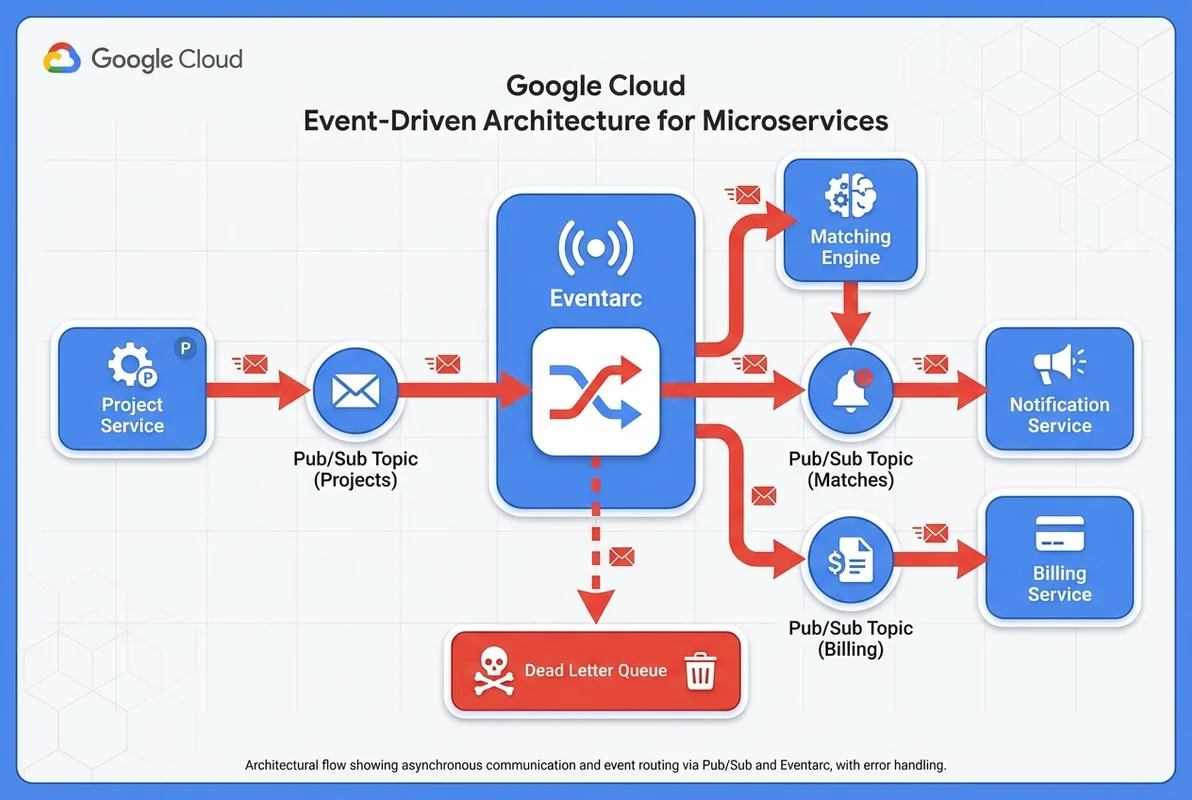
【SES案件マッチングシステム】
サービス:
1. 案件管理サービス(案件の登録・更新)
2. エンジニアマッチングサービス(スキルマッチング)
3. 通知サービス(メール・Slack通知)
4. 請求サービス(契約・請求管理)

ユースケース:
- 新規案件が登録されたら、マッチングを自動実行し、
  該当エンジニアに通知する
- エンジニアが案件に応募したら、案件担当者に通知し、
  仮契約を作成する
- 契約が確定したら、請求スケジュールを自動生成する

技術スタック:
- Google Cloud Pub/Sub
- Cloud Functions (2nd gen)
- Eventarc
- Cloud Run
- Firestore"
イベントスキーマの設計
CloudEvents仕様に準拠したスキーマ
Google Antigravityにイベントスキーマを設計させることで、CloudEvents仕様に準拠した標準的なスキーマを自動生成できます。
antigravity "以下のドメインイベントをCloudEvents仕様で定義してください。

ドメイン: SES案件管理
イベント:
1. 案件登録完了
2. マッチング結果確定
3. エンジニア応募
4. 契約確定
5. 契約終了

各イベントに必要な属性も定義してください。"
Antigravityが生成するスキーマ例:
// src/events/schemas.ts

// CloudEvents Base
interface CloudEvent<T> {
  specversion: '1.0';
  type: string;
  source: string;
  id: string;
  time: string;
  datacontenttype: 'application/json';
  data: T;
}

// 案件登録イベント
interface ProjectCreatedEvent extends CloudEvent<{
  projectId: string;
  name: string;
  requiredSkills: Array<{
    skillId: string;
    skillName: string;
    requiredLevel: 'junior' | 'mid' | 'senior' | 'expert';
  }>;
  budget: {
    min: number;
    max: number;
    currency: 'JPY';
  };
  period: {
    startDate: string;
    endDate: string;
  };
  location: 'remote' | 'onsite' | 'hybrid';
  priority: 'high' | 'medium' | 'low';
}> {
  type: 'com.ses-base.project.created';
  source: '/services/project-management';
}

// マッチング結果イベント
interface MatchingCompletedEvent extends CloudEvent<{
  projectId: string;
  matchedEngineers: Array<{
    engineerId: string;
    matchScore: number;
    matchedSkills: string[];
    availability: 'available' | 'partially' | 'soon';
  }>;
  totalCandidates: number;
  matchingAlgorithm: string;
}> {
  type: 'com.ses-base.matching.completed';
  source: '/services/matching-engine';
}

// 契約確定イベント
interface ContractConfirmedEvent extends CloudEvent<{
  contractId: string;
  projectId: string;
  engineerId: string;
  monthlyRate: number;
  startDate: string;
  endDate: string;
  paymentTerms: {
    billingCycle: 'monthly';
    paymentDueDay: number;
    taxRate: number;
  };
}> {
  type: 'com.ses-base.contract.confirmed';
  source: '/services/contract-management';
}
イベントバージョニング
antigravity "イベントスキーマのバージョニング戦略を設計してください。

要件:
- 後方互換性を保ちながらスキーマを進化させる
- コンシューマーが古いバージョンのイベントも処理できる
- スキーマレジストリでバージョン管理"
// src/events/versioning.ts
// バージョン付きイベント型
type EventVersion = 'v1' | 'v2' | 'v3';
interface VersionedEvent<T> {
specversion: '1.0';
type: string;
dataschema: string; // スキーマURL
data: T;
}
// v1 → v2 の進化例
// v1: location: string
// v2: location: { type: 'remote' | 'onsite' | 'hybrid', address?: string }
function migrateProjectCreatedV1toV2(v1: ProjectCreatedV1): ProjectCreatedV2 {
return {
...v1,
data: {
...v1.data,
location: {
type: v1.data.location as 'remote' | 'onsite' | 'hybrid',
address: undefined,
},
},
dataschema: 'https://schema.ses-base.com/project-created/v2',
};
}Pub/Sub + Cloud Functionsの実装
Pub/Subトピックとサブスクリプションの設定
antigravity "以下のイベント駆動システムのPub/Sub設定を
Terraformで生成してください。

トピック:
- project-events (案件関連)
- matching-events (マッチング関連)
- notification-events (通知関連)
- billing-events (請求関連)

サブスクリプション:
- matching-engine → project-events を購読
- notification-service → project-events, matching-events を購読
- billing-service → matching-events (契約確定のみフィルタ)

要件:
- Dead Letter Queue
- リトライポリシー(最大5回、指数バックオフ)
- メッセージ保持期間: 7日"
Antigravityが生成するTerraform:
# terraform/pubsub.tf

# === トピック ===
resource "google_pubsub_topic" "project_events" {
  name = "project-events"

  message_storage_policy {
    allowed_persistence_regions = ["asia-northeast1"]
  }

  schema_settings {
    schema   = google_pubsub_schema.project_events.id
    encoding = "JSON"
  }
}

resource "google_pubsub_topic" "matching_events" {
  name = "matching-events"

  message_storage_policy {
    allowed_persistence_regions = ["asia-northeast1"]
  }
}

# Dead Letter Topic
resource "google_pubsub_topic" "dead_letter" {
  name = "dead-letter-topic"
}

# === サブスクリプション ===
resource "google_pubsub_subscription" "matching_engine" {
  name  = "matching-engine-sub"
  topic = google_pubsub_topic.project_events.name

  ack_deadline_seconds = 60

  retry_policy {
    minimum_backoff = "10s"
    maximum_backoff = "600s"
  }

  dead_letter_policy {
    dead_letter_topic     = google_pubsub_topic.dead_letter.id
    max_delivery_attempts = 5
  }

  push_config {
    push_endpoint = google_cloud_run_service.matching_engine.status[0].url
    oidc_token {
      service_account_email = google_service_account.pubsub_invoker.email
    }
  }

  message_retention_duration = "604800s" # 7日
}

resource "google_pubsub_subscription" "billing_filtered" {
  name  = "billing-service-sub"
  topic = google_pubsub_topic.matching_events.name

  filter = "attributes.eventType = \"contract.confirmed\""

  retry_policy {
    minimum_backoff = "30s"
    maximum_backoff = "600s"
  }

  dead_letter_policy {
    dead_letter_topic     = google_pubsub_topic.dead_letter.id
    max_delivery_attempts = 5
  }
}
Cloud Functionsのイベントハンドラ
antigravity "マッチングエンジンのCloud Functionを実装してください。

機能:
- project-eventsトピックからイベントを受信
- project.created イベントの場合、スキルマッチングを実行
- マッチング結果をmatching-eventsトピックにパブリッシュ
- エラー時はリトライ + DLQ

技術: TypeScript, Cloud Functions 2nd gen"
// functions/matching-engine/src/index.ts
import { CloudEvent } from '@google-cloud/functions-framework';
import { PubSub } from '@google-cloud/pubsub';
import { Firestore } from '@google-cloud/firestore';
const pubsub = new PubSub();
const db = new Firestore();
interface ProjectCreatedData {
projectId: string;
requiredSkills: Array<{
skillId: string;
requiredLevel: string;
}>;
budget: { min: number; max: number };
location: string;
}
export async function handleProjectEvent(
cloudEvent: CloudEvent<{ message: { data: string } }>
) {
const eventData = JSON.parse(
Buffer.from(cloudEvent.data!.message.data, 'base64').toString()
);
console.log(`Processing event: ${cloudEvent.type}`, {
projectId: eventData.projectId,
});
switch (cloudEvent.type) {
case 'com.ses-base.project.created':
await processProjectCreated(eventData as ProjectCreatedData);
break;
default:
console.log(`Unhandled event type: ${cloudEvent.type}`);
}
}
async function processProjectCreated(data: ProjectCreatedData) {
// 1. 要件に合うエンジニアを検索
const engineers = await findMatchingEngineers(data);
// 2. スコアリング
const scored = engineers.map(eng => ({
engineerId: eng.id,
matchScore: calculateMatchScore(eng, data),
matchedSkills: eng.skills
.filter(s => data.requiredSkills.some(rs => rs.skillId === s.skillId))
.map(s => s.skillName),
availability: eng.availability,
}));
// 3. スコア順にソート
scored.sort((a, b) => b.matchScore - a.matchScore);
const topMatches = scored.slice(0, 20);
// 4. マッチング結果をパブリッシュ
const matchingEvent = {
projectId: data.projectId,
matchedEngineers: topMatches,
totalCandidates: scored.length,
matchingAlgorithm: 'skill-weighted-v2',
};
await pubsub.topic('matching-events').publishMessage({
json: matchingEvent,
attributes: {
eventType: 'matching.completed',
projectId: data.projectId,
},
});
// 5. 結果をFirestoreに保存
await db.collection('matching-results').doc(data.projectId).set({
...matchingEvent,
createdAt: new Date(),
});
console.log(`Matching completed: ${topMatches.length} matches for project ${data.projectId}`);
}
function calculateMatchScore(
engineer: Engineer,
project: ProjectCreatedData
): number {
let score = 0;
const maxScore = project.requiredSkills.length * 25;
for (const required of project.requiredSkills) {
const engSkill = engineer.skills.find(s => s.skillId === required.skillId);
if (engSkill) {
const levelScore = getLevelScore(engSkill.level, required.requiredLevel);
score += levelScore;
}
}
// 単価の適合度(予算内なら加点)
if (engineer.monthlyRate >= project.budget.min &&
engineer.monthlyRate <= project.budget.max) {
score += 15;
}
// 稼働可能性
if (engineer.availability === 'available') score += 10;
else if (engineer.availability === 'soon') score += 5;
return Math.round((score / (maxScore + 25)) * 100);
}
サガパターンによる分散トランザクション
契約確定のサガ実装
イベント駆動アーキテクチャでは、複数サービスにまたがるトランザクションをサガパターンで管理します。
antigravity "契約確定のサガパターンを実装してください。

ステップ:
1. 契約サービス: 仮契約作成
2. エンジニアサービス: 稼働ステータス変更
3. 請求サービス: 請求スケジュール作成
4. 通知サービス: 確定通知送信

補償トランザクション:
- ステップ3が失敗 → ステップ2,1をロールバック
- ステップ2が失敗 → ステップ1をロールバック"
// src/sagas/contract-confirmation.saga.ts
interface SagaStep {
name: string;
execute: (context: SagaContext) => Promise<void>;
compensate: (context: SagaContext) => Promise<void>;
}
class ContractConfirmationSaga {
private steps: SagaStep[] = [
{
name: 'create-contract',
execute: async (ctx) => {
const contract = await this.contractService.createContract({
projectId: ctx.projectId,
engineerId: ctx.engineerId,
monthlyRate: ctx.monthlyRate,
startDate: ctx.startDate,
});
ctx.contractId = contract.id;
},
compensate: async (ctx) => {
await this.contractService.cancelContract(ctx.contractId!);
},
},
{
name: 'update-engineer-status',
execute: async (ctx) => {
await this.engineerService.updateAvailability(
ctx.engineerId, 'assigned'
);
},
compensate: async (ctx) => {
await this.engineerService.updateAvailability(
ctx.engineerId, 'available'
);
},
},
{
name: 'create-billing-schedule',
execute: async (ctx) => {
const schedule = await this.billingService.createSchedule({
contractId: ctx.contractId!,
monthlyRate: ctx.monthlyRate,
startDate: ctx.startDate,
paymentDueDay: 25,
});
ctx.billingScheduleId = schedule.id;
},
compensate: async (ctx) => {
await this.billingService.cancelSchedule(ctx.billingScheduleId!);
},
},
{
name: 'send-notifications',
execute: async (ctx) => {
await this.notificationService.sendContractConfirmation({
contractId: ctx.contractId!,
engineerId: ctx.engineerId,
projectId: ctx.projectId,
});
},
compensate: async (_ctx) => {
// 通知は補償不要(取消通知を送ることは可能)
},
},
];
async execute(context: SagaContext): Promise<void> {
const completedSteps: SagaStep[] = [];
for (const step of this.steps) {
try {
console.log(`Saga step: ${step.name} - executing`);
await step.execute(context);
completedSteps.push(step);
console.log(`Saga step: ${step.name} - completed`);
} catch (error) {
console.error(`Saga step: ${step.name} - failed`, error);
// 補償トランザクション実行(逆順)
for (const completed of completedSteps.reverse()) {
try {
console.log(`Compensating: ${completed.name}`);
await completed.compensate(context);
} catch (compError) {
console.error(`Compensation failed: ${completed.name}`, compError);
// 補償失敗はアラート + 手動対応
await this.alertService.critical(
`Saga compensation failed: ${completed.name}`,
{ context, error: compError }
);
}
}
throw new SagaFailedError(step.name, error);
}
}
}
}モニタリングとオブザーバビリティ
イベントフローの可視化
antigravity "イベント駆動システムのモニタリングダッシュボードを
Cloud Monitoringで設計してください。

監視項目:
- イベント処理レイテンシ(P50, P95, P99)
- Dead Letter Queueの滞留件数
- サブスクリプションのバックログ
- エラーレート
- サガの成功/失敗率"
SES現場でのEDA案件
需要と単価
| 案件タイプ | 月単価目安 | 求められるスキル |
|---|---|---|
| EDA設計・構築 | 75-95万円 | Pub/Sub、Eventarc、CloudEvents、サガパターン |
| マイクロサービス開発 | 70-90万円 | gRPC、イベントソーシング、CQRS |
| リアルタイムデータ処理 | 75-95万円 | Dataflow、Pub/Sub、ストリーミング |
| クラウドネイティブ移行 | 80-100万円 | モノリス分割、段階的移行戦略 |
面談でのアピールポイント
【イベント駆動アーキテクチャ実績】
- Google Cloud Pub/Sub + Eventarcでマイクロサービス間連携を構築
- サガパターンで分散トランザクションを管理し、
  データ一貫性を99.99%確保
- Dead Letter Queue + アラートで障害検知時間を
  平均30分→2分に短縮
- Google Antigravityを活用してイベントスキーマ設計を効率化
まとめ
Google Antigravityを活用したイベント駆動アーキテクチャの構築は、以下のステップで進めるのが効果的です。
- イベント設計: CloudEvents仕様に準拠したイベントスキーマを定義
- インフラ構築: Pub/Sub・Eventarc・Cloud Functionsの設定をTerraformで管理
- ハンドラ実装: イベントハンドラを型安全に実装
- 分散トランザクション: サガパターンで複数サービスの整合性を確保
- モニタリング: イベントフローの可視化と異常検知を設定
イベント駆動アーキテクチャのスキルは、SES市場で高い需要があります。Google Antigravityを活用して効率的に学習し、高単価案件の獲得につなげましょう。
関連記事
- Google Antigravityマイクロサービス構築ガイドでは、サービス分割の基礎を解説
- Google Antigravityクラウドデプロイメントガイドでは、Cloud Runへのデプロイを紹介
- Google Antigravityモニタリング設定ガイドでは、監視の詳細を解説