
⚡ 3秒でわかる!この記事のポイント
- Google Antigravityでビルド・テスト・デプロイのCI/CDパイプラインを自動生成・最適化
- ビルド時間を50%削減するキャッシュ戦略・並列実行・増分ビルドの実装パターンを解説
- SES現場で活用できるCI/CDエンジニアのスキルと高単価案件の獲得方法
「CI/CDパイプラインが遅すぎて、開発のボトルネックになっている」——SES案件でインフラ周りを担当するエンジニアなら、一度は聞いたことがある悩みではないでしょうか。ビルドに15分、テストに30分、デプロイまで含めると1時間以上——こんなパイプラインでは開発サイクルが回りません。
2026年現在、CI/CDの最適化はDevOpsの中核スキルとして需要が高まっています。特にモノレポやマイクロサービスアーキテクチャの普及により、パイプラインの複雑性は増す一方です。
この記事では、**Google Antigravity(Gemini CLI)**を活用してCI/CDパイプラインを分析・最適化する実践的な手法を解説します。
この記事でわかること
- CI/CDパイプラインのボトルネック分析手法
- Google Antigravityでビルドキャッシュ戦略を自動構築する方法
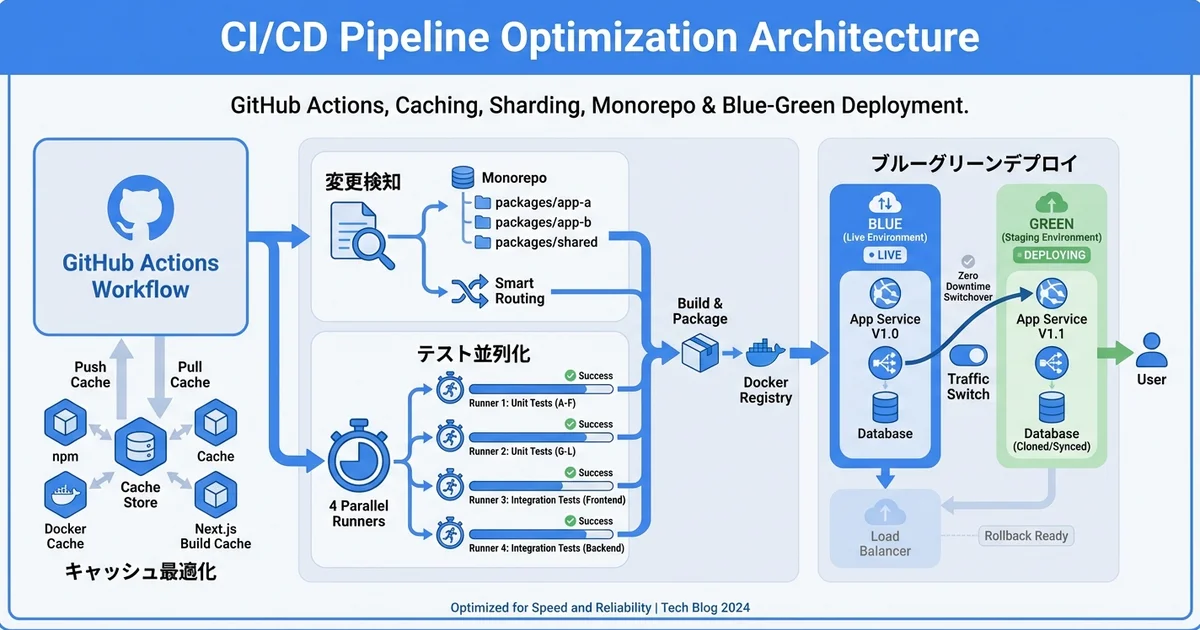
- テストの並列実行と最適なシャーディング設定
- 増分ビルド・変更検知による無駄な実行の削減
- マルチステージデプロイの安全な自動化
- CI/CDエンジニアとしてのキャリア戦略
CI/CDパイプラインの現状分析|ボトルネックを見つける
パイプラインのパフォーマンス指標
まず、Google Antigravityを使って現在のCI/CDパイプラインを分析しましょう:
antigravity "以下のGitHub Actionsワークフローを分析して、
ボトルネックと最適化ポイントを洗い出して:
$(cat .github/workflows/ci.yml)"
CI/CDパフォーマンスの主要指標:
| 指標 | 目標値 | 説明 |
|---|---|---|
| ビルド時間 | < 5分 | コンパイル・バンドルの所要時間 |
| テスト実行時間 | < 10分 | ユニット・統合テストの合計 |
| デプロイ時間 | < 5分 | ステージング・本番へのデプロイ |
| パイプライン全体 | < 15分 | プッシュからデプロイ完了まで |
| 成功率 | > 95% | パイプラインの安定性 |
| MTTR | < 30分 | 失敗からの復旧時間 |
現状把握スクリプトの自動生成
antigravity "GitHub Actions APIを使って過去30日のワークフロー実行データを収集し、
以下を分析するスクリプトを作成して:
1. 各ステップの平均実行時間
2. 最も失敗頻度の高いステップ
3. 実行時間のトレンド(改善/悪化の傾向)
4. キャッシュヒット率"
// scripts/analyze-pipeline.ts
import { Octokit } from '@octokit/rest';
interface PipelineAnalysis {
totalRuns: number;
successRate: number;
avgDurationMinutes: number;
slowestSteps: { name: string; avgDuration: number }[];
failureHotspots: { name: string; failureRate: number }[];
trends: { week: string; avgDuration: number; successRate: number }[];
}
async function analyzePipeline(
owner: string,
repo: string,
workflowId: string,
days = 30
): Promise<PipelineAnalysis> {
const octokit = new Octokit({ auth: process.env.GITHUB_TOKEN });
const since = new Date(Date.now() - days * 24 * 60 * 60 * 1000).toISOString();
// ワークフロー実行一覧を取得
const { data: runs } = await octokit.actions.listWorkflowRuns({
owner,
repo,
workflow_id: workflowId,
created: `>=${since}`,
per_page: 100,
});
const completedRuns = runs.workflow_runs.filter(
(r) => r.status === 'completed'
);
// 各実行のジョブ詳細を取得
const jobDetails = await Promise.all(
completedRuns.slice(0, 50).map(async (run) => {
const { data: jobs } = await octokit.actions.listJobsForWorkflowRun({
owner,
repo,
run_id: run.id,
});
return { run, jobs: jobs.jobs };
})
);
// ステップ別の実行時間を集計
const stepTimes: Record<string, number[]> = {};
const stepFailures: Record<string, number> = {};
jobDetails.forEach(({ jobs }) => {
jobs.forEach((job) => {
job.steps?.forEach((step) => {
if (!step.name || !step.started_at || !step.completed_at) return;
const duration = (
new Date(step.completed_at).getTime() -
new Date(step.started_at).getTime()
) / 1000;
if (!stepTimes[step.name]) stepTimes[step.name] = [];
stepTimes[step.name].push(duration);
if (step.conclusion === 'failure') {
stepFailures[step.name] = (stepFailures[step.name] || 0) + 1;
}
});
});
});
const successfulRuns = completedRuns.filter((r) => r.conclusion === 'success');
return {
totalRuns: completedRuns.length,
successRate: (successfulRuns.length / completedRuns.length) * 100,
avgDurationMinutes: completedRuns.reduce((sum, r) => {
if (!r.run_started_at) return sum;
const dur = (new Date(r.updated_at).getTime() - new Date(r.run_started_at).getTime()) / 60000;
return sum + dur;
}, 0) / completedRuns.length,
slowestSteps: Object.entries(stepTimes)
.map(([name, times]) => ({
name,
avgDuration: times.reduce((a, b) => a + b, 0) / times.length,
}))
.sort((a, b) => b.avgDuration - a.avgDuration)
.slice(0, 10),
failureHotspots: Object.entries(stepFailures)
.map(([name, count]) => ({
name,
failureRate: (count / (stepTimes[name]?.length || 1)) * 100,
}))
.sort((a, b) => b.failureRate - a.failureRate)
.slice(0, 5),
trends: [], // 週次トレンド(簡略化)
};
}
// 実行
analyzePipeline('owner', 'repo', 'ci.yml').then((analysis) => {
console.log('\n📊 CI/CDパイプライン分析結果:\n');
console.log(`実行回数: ${analysis.totalRuns}`);
console.log(`成功率: ${analysis.successRate.toFixed(1)}%`);
console.log(`平均実行時間: ${analysis.avgDurationMinutes.toFixed(1)}分\n`);
console.log('🐌 最も遅いステップ:');
analysis.slowestSteps.forEach((s, i) => {
console.log(` ${i + 1}. ${s.name}: ${s.avgDuration.toFixed(1)}秒`);
});
console.log('\n💥 失敗頻度の高いステップ:');
analysis.failureHotspots.forEach((s, i) => {
console.log(` ${i + 1}. ${s.name}: ${s.failureRate.toFixed(1)}%`);
});
});ビルドの高速化|キャッシュ戦略の最適化
依存関係キャッシュの最適化
antigravity "以下のNode.js + TypeScriptプロジェクトのGitHub Actionsワークフローで
最適なキャッシュ戦略を設計して:
- npm依存関係のキャッシュ
- TypeScriptコンパイル結果のキャッシュ
- Next.jsビルドキャッシュ
- Playwrightブラウザキャッシュ
- Dockerレイヤーキャッシュ
キャッシュキーの設計パターンも含めて"
# .github/workflows/optimized-ci.yml
name: Optimized CI Pipeline
on:
push:
branches: [main, develop]
pull_request:
branches: [main]
env:
NODE_VERSION: '22'
TURBO_TOKEN: ${{ secrets.TURBO_TOKEN }}
TURBO_TEAM: ${{ vars.TURBO_TEAM }}
jobs:
# ステップ1: 変更検知(不要なジョブをスキップ)
changes:
runs-on: ubuntu-latest
outputs:
frontend: ${{ steps.filter.outputs.frontend }}
backend: ${{ steps.filter.outputs.backend }}
infra: ${{ steps.filter.outputs.infra }}
docs: ${{ steps.filter.outputs.docs }}
steps:
- uses: actions/checkout@v4
- uses: dorny/paths-filter@v3
id: filter
with:
filters: |
frontend:
- 'apps/web/**'
- 'packages/ui/**'
backend:
- 'apps/api/**'
- 'packages/shared/**'
infra:
- 'terraform/**'
- 'Dockerfile*'
docs:
- 'docs/**'
- '*.md'
# ステップ2: 依存関係のインストール(共通)
install:
runs-on: ubuntu-latest
steps:
- uses: actions/checkout@v4
- uses: actions/setup-node@v4
with:
node-version: ${{ env.NODE_VERSION }}
# npm キャッシュ(lock fileのハッシュをキーに)
- uses: actions/cache@v4
id: npm-cache
with:
path: |
node_modules
~/.npm
key: npm-${{ runner.os }}-${{ hashFiles('package-lock.json') }}
restore-keys: |
npm-${{ runner.os }}-
- name: Install dependencies
if: steps.npm-cache.outputs.cache-hit != 'true'
run: npm ci --prefer-offline
# ステップ3: リント + 型チェック(並列実行)
lint-and-typecheck:
needs: install
runs-on: ubuntu-latest
strategy:
matrix:
check: [lint, typecheck]
steps:
- uses: actions/checkout@v4
- uses: actions/setup-node@v4
with:
node-version: ${{ env.NODE_VERSION }}
- uses: actions/cache@v4
with:
path: |
node_modules
~/.npm
key: npm-${{ runner.os }}-${{ hashFiles('package-lock.json') }}
# TypeScript ビルドキャッシュ
- uses: actions/cache@v4
if: matrix.check == 'typecheck'
with:
path: |
**/tsconfig.tsbuildinfo
**/.tsbuildinfo
key: tsc-${{ runner.os }}-${{ hashFiles('**/tsconfig.json') }}-${{ github.sha }}
restore-keys: |
tsc-${{ runner.os }}-${{ hashFiles('**/tsconfig.json') }}-
- run: npm run ${{ matrix.check }}
# ステップ4: テスト(シャーディング並列実行)
test:
needs: [install, changes]
if: needs.changes.outputs.frontend == 'true' || needs.changes.outputs.backend == 'true'
runs-on: ubuntu-latest
strategy:
matrix:
shard: [1, 2, 3, 4]
steps:
- uses: actions/checkout@v4
- uses: actions/setup-node@v4
with:
node-version: ${{ env.NODE_VERSION }}
- uses: actions/cache@v4
with:
path: |
node_modules
~/.npm
key: npm-${{ runner.os }}-${{ hashFiles('package-lock.json') }}
- name: Run tests (shard ${{ matrix.shard }}/4)
run: npx vitest --shard=${{ matrix.shard }}/4 --reporter=json --outputFile=test-results-${{ matrix.shard }}.json
- uses: actions/upload-artifact@v4
if: always()
with:
name: test-results-${{ matrix.shard }}
path: test-results-${{ matrix.shard }}.json
# ステップ5: ビルド(変更があるパッケージのみ)
build:
needs: [lint-and-typecheck, test]
runs-on: ubuntu-latest
steps:
- uses: actions/checkout@v4
with:
fetch-depth: 2
- uses: actions/setup-node@v4
with:
node-version: ${{ env.NODE_VERSION }}
- uses: actions/cache@v4
with:
path: |
node_modules
~/.npm
key: npm-${{ runner.os }}-${{ hashFiles('package-lock.json') }}
# Next.js ビルドキャッシュ
- uses: actions/cache@v4
with:
path: |
apps/web/.next/cache
key: nextjs-${{ runner.os }}-${{ hashFiles('apps/web/**/*.ts', 'apps/web/**/*.tsx') }}
restore-keys: |
nextjs-${{ runner.os }}-
# Turborepo でキャッシュ活用ビルド
- name: Build with Turborepo
run: npx turbo build --filter=...[HEAD~1]
- uses: actions/upload-artifact@v4
with:
name: build-output
path: apps/web/.next/
# ステップ6: デプロイ(mainブランチのみ)
deploy:
needs: build
if: github.ref == 'refs/heads/main'
runs-on: ubuntu-latest
environment: production
steps:
- uses: actions/checkout@v4
- uses: actions/download-artifact@v4
with:
name: build-output
path: apps/web/.next/
- name: Deploy to production
run: |
echo "Deploying to production..."
# デプロイコマンドDocker ビルドの最適化
antigravity "以下のDockerfileを最適化して:
1. マルチステージビルドでイメージサイズを最小化
2. BuildKitキャッシュマウントでビルド時間を短縮
3. レイヤーキャッシュを最大限活用する順序
4. セキュリティスキャンも追加"
# syntax=docker/dockerfile:1.7
# ============ ステージ1: 依存関係(キャッシュ優先) ============
FROM node:22-alpine AS deps
WORKDIR /app
# package.json と lock file だけ先にコピー(キャッシュ活用)
COPY package.json package-lock.json ./
RUN --mount=type=cache,target=/root/.npm \
npm ci --prefer-offline --no-audit
# ============ ステージ2: ビルド ============
FROM node:22-alpine AS builder
WORKDIR /app
COPY --from=deps /app/node_modules ./node_modules
COPY . .
# TypeScript ビルドキャッシュ
RUN --mount=type=cache,target=/app/.next/cache \
npm run build
# ============ ステージ3: 実行(最小イメージ) ============
FROM node:22-alpine AS runner
WORKDIR /app
# 非rootユーザーで実行
RUN addgroup --system --gid 1001 nodejs && \
adduser --system --uid 1001 nextjs
COPY --from=builder /app/public ./public
COPY --from=builder --chown=nextjs:nodejs /app/.next/standalone ./
COPY --from=builder --chown=nextjs:nodejs /app/.next/static ./.next/static
USER nextjs
EXPOSE 3000
ENV NODE_ENV=production
ENV PORT=3000
CMD ["node", "server.js"]テストの並列化と最適化
Vitest のシャーディング最適化
antigravity "Vitestのテスト実行時間を最適化するための設定を生成して。
以下の戦略を含めて:
1. テスト分割の最適化(実行時間ベースのシャーディング)
2. 依存関係の少ないテストの並列実行
3. スナップショットテストの分離
4. テスト結果キャッシュの活用"
// vitest.config.ts(最適化版)
import { defineConfig } from 'vitest/config';
export default defineConfig({
test: {
// 並列実行の設定
pool: 'threads',
poolOptions: {
threads: {
maxThreads: 4, // CI環境のCPUコア数に合わせる
minThreads: 2,
},
},
// テストの分離戦略
sequence: {
shuffle: true, // テスト順序のシャッフル(依存関係の検出)
},
// キャッシュ設定
cache: {
dir: '.vitest-cache',
},
// カバレッジ設定(必要時のみ生成)
coverage: {
provider: 'v8',
enabled: !!process.env.CI,
reporter: ['text-summary', 'lcov'],
reportsDirectory: './coverage',
},
// タイムアウト設定
testTimeout: 10000,
hookTimeout: 10000,
},
});テスト実行時間の分析と最適化スクリプト
// scripts/optimize-test-sharding.ts
import fs from 'fs';

interface TestTiming {
  file: string;
  duration: number;
}

interface ShardAllocation {
  shard: number;
  files: string[];
  totalDuration: number;
}

function optimizeShardAllocation(
  timings: TestTiming[],
  numShards: number
): ShardAllocation[] {
  // 実行時間の降順でソート
  const sorted = [...timings].sort((a, b) => b.duration - a.duration);

  // 貪欲法で最適化(最も空いているシャードに割り当て)
  const shards: ShardAllocation[] = Array.from({ length: numShards }, (_, i) => ({
    shard: i + 1,
    files: [],
    totalDuration: 0,
  }));

  sorted.forEach((test) => {
    // 最も空いているシャードを選択
    const targetShard = shards.reduce((min, current) =>
      current.totalDuration < min.totalDuration ? current : min
    );

    targetShard.files.push(test.file);
    targetShard.totalDuration += test.duration;
  });

  return shards;
}

// テスト結果からタイミングデータを読み込み
function loadTimings(resultFiles: string[]): TestTiming[] {
  const timings: TestTiming[] = [];

  resultFiles.forEach((file) => {
    if (!fs.existsSync(file)) return;
    const data = JSON.parse(fs.readFileSync(file, 'utf-8'));
    data.testResults?.forEach((result: any) => {
      timings.push({
        file: result.name,
        duration: result.endTime - result.startTime,
      });
    });
  });

  return timings;
}

// 最適化結果を表示
const timings = loadTimings([
  'test-results-1.json',
  'test-results-2.json',
  'test-results-3.json',
  'test-results-4.json',
]);

const optimized = optimizeShardAllocation(timings, 4);
console.log('\n📊 最適化されたシャード配分:\n');
optimized.forEach((shard) => {
  console.log(`シャード ${shard.shard}: ${shard.files.length}ファイル / ${(shard.totalDuration / 1000).toFixed(1)}秒`);
});

const maxDuration = Math.max(...optimized.map((s) => s.totalDuration));
const minDuration = Math.min(...optimized.map((s) => s.totalDuration));
console.log(`\n均等度: ${((1 - (maxDuration - minDuration) / maxDuration) * 100).toFixed(1)}%`);
増分ビルドと変更検知
モノレポでの影響範囲分析
antigravity "Turborepoベースのモノレポで、変更されたパッケージと
その依存パッケージだけをビルド・テストするスクリプトを作成して。
パッケージ間の依存グラフを解析して最小限のビルドスコープを決定する"
// scripts/detect-changes.ts
import { execSync } from 'child_process';
import fs from 'fs';
import path from 'path';
interface PackageInfo {
name: string;
path: string;
dependencies: string[];
devDependencies: string[];
}
interface ChangeAnalysis {
changedPackages: string[];
affectedPackages: string[];
buildScope: string[];
testScope: string[];
skipReason?: string;
}
function getChangedFiles(baseBranch = 'main'): string[] {
try {
const output = execSync(
`git diff --name-only ${baseBranch}...HEAD`,
{ encoding: 'utf-8' }
);
return output.trim().split('\n').filter(Boolean);
} catch {
// ローカル開発の場合は直近のコミットと比較
const output = execSync(
'git diff --name-only HEAD~1',
{ encoding: 'utf-8' }
);
return output.trim().split('\n').filter(Boolean);
}
}
function buildDependencyGraph(workspaceRoot: string): Map<string, PackageInfo> {
const graph = new Map<string, PackageInfo>();
const workspaceDirs = ['apps', 'packages'];
workspaceDirs.forEach((dir) => {
const fullDir = path.join(workspaceRoot, dir);
if (!fs.existsSync(fullDir)) return;
fs.readdirSync(fullDir).forEach((pkg) => {
const pkgJsonPath = path.join(fullDir, pkg, 'package.json');
if (!fs.existsSync(pkgJsonPath)) return;
const pkgJson = JSON.parse(fs.readFileSync(pkgJsonPath, 'utf-8'));
graph.set(pkgJson.name, {
name: pkgJson.name,
path: path.join(dir, pkg),
dependencies: Object.keys(pkgJson.dependencies || {}),
devDependencies: Object.keys(pkgJson.devDependencies || {}),
});
});
});
return graph;
}
function findAffectedPackages(
changedPackages: string[],
graph: Map<string, PackageInfo>
): string[] {
const affected = new Set(changedPackages);
let hasChanges = true;
// 逆依存を辿って影響範囲を拡大
while (hasChanges) {
hasChanges = false;
graph.forEach((pkg) => {
if (affected.has(pkg.name)) return;
const allDeps = [...pkg.dependencies, ...pkg.devDependencies];
if (allDeps.some((dep) => affected.has(dep))) {
affected.add(pkg.name);
hasChanges = true;
}
});
}
return Array.from(affected);
}
function analyzeChanges(workspaceRoot: string): ChangeAnalysis {
const changedFiles = getChangedFiles();
const graph = buildDependencyGraph(workspaceRoot);
// 変更されたパッケージを特定
const changedPackages = new Set<string>();
changedFiles.forEach((file) => {
graph.forEach((pkg) => {
if (file.startsWith(pkg.path + '/')) {
changedPackages.add(pkg.name);
}
});
});
const changedPkgArray = Array.from(changedPackages);
// ドキュメントのみの変更はビルドスキップ
if (changedFiles.every((f) => f.endsWith('.md') || f.startsWith('docs/'))) {
return {
changedPackages: changedPkgArray,
affectedPackages: [],
buildScope: [],
testScope: [],
skipReason: 'ドキュメントのみの変更のため、ビルド・テストをスキップ',
};
}
const affected = findAffectedPackages(changedPkgArray, graph);
return {
changedPackages: changedPkgArray,
affectedPackages: affected,
buildScope: affected.filter((p) => {
const info = graph.get(p);
return info?.path.startsWith('apps/');
}),
testScope: affected,
};
}
const analysis = analyzeChanges('.');
console.log('\n📊 変更影響分析:\n');
console.log(`変更パッケージ: ${analysis.changedPackages.join(', ') || 'なし'}`);
console.log(`影響パッケージ: ${analysis.affectedPackages.join(', ') || 'なし'}`);
console.log(`ビルド対象: ${analysis.buildScope.join(', ') || 'なし'}`);
console.log(`テスト対象: ${analysis.testScope.join(', ') || 'なし'}`);
if (analysis.skipReason) {
console.log(`⏭️ ${analysis.skipReason}`);
}デプロイの安全な自動化
ブルーグリーンデプロイの実装
antigravity "GitHub Actions + AWS ECSでブルーグリーンデプロイを実装して。
以下の要件:
- ヘルスチェック合格後にトラフィック切り替え
- 自動ロールバック(エラー率閾値超過時)
- デプロイ進捗のSlack通知
- カナリアリリースオプション"
# .github/workflows/deploy-blue-green.yml
name: Blue-Green Deploy
on:
workflow_dispatch:
inputs:
environment:
description: 'Deploy environment'
required: true
type: choice
options: [staging, production]
strategy:
description: 'Deploy strategy'
required: true
type: choice
options: [blue-green, canary]
canary_percentage:
description: 'Canary traffic percentage'
required: false
default: '10'
jobs:
deploy:
runs-on: ubuntu-latest
environment: ${{ github.event.inputs.environment }}
steps:
- uses: actions/checkout@v4
- name: Configure AWS
uses: aws-actions/configure-aws-credentials@v4
with:
aws-access-key-id: ${{ secrets.AWS_ACCESS_KEY_ID }}
aws-secret-access-key: ${{ secrets.AWS_SECRET_ACCESS_KEY }}
aws-region: ap-northeast-1
- name: Notify deploy start
uses: slackapi/slack-github-action@v1
with:
payload: |
{
"text": "🚀 デプロイ開始: ${{ github.event.inputs.environment }} (${{ github.event.inputs.strategy }})"
}
- name: Build and push Docker image
run: |
aws ecr get-login-password | docker login --username AWS --password-stdin $ECR_REGISTRY
docker build -t $ECR_REGISTRY/$IMAGE_NAME:${{ github.sha }} .
docker push $ECR_REGISTRY/$IMAGE_NAME:${{ github.sha }}
- name: Deploy new version
run: |
# ECSタスク定義を更新
aws ecs register-task-definition \
--cli-input-json file://task-definition.json \
--container-definitions '[{"image":"'$ECR_REGISTRY/$IMAGE_NAME:${{ github.sha }}'"}]'
# Blue-Greenデプロイを開始
aws deploy create-deployment \
--application-name $APP_NAME \
--deployment-group-name $DEPLOY_GROUP \
--revision '{"revisionType":"AppSpecContent","appSpecContent":{"content":"..."}}'
- name: Wait for health check
run: |
echo "Waiting for health check..."
for i in $(seq 1 30); do
STATUS=$(aws deploy get-deployment --deployment-id $DEPLOY_ID --query 'deploymentInfo.status' --output text)
if [ "$STATUS" = "Succeeded" ]; then
echo "✅ Deploy succeeded"
exit 0
elif [ "$STATUS" = "Failed" ]; then
echo "❌ Deploy failed"
exit 1
fi
sleep 10
done
echo "⏰ Deploy timed out"
exit 1
- name: Notify result
if: always()
uses: slackapi/slack-github-action@v1
with:
payload: |
{
"text": "${{ job.status == 'success' && '✅' || '❌' }} デプロイ${{ job.status == 'success' && '成功' || '失敗' }}: ${{ github.event.inputs.environment }}"
}
SES現場でのCI/CDスキルの市場価値
CI/CDエンジニアの需要と単価
| スキルレベル | 対応可能範囲 | 月単価目安 |
|---|---|---|
| 基本レベル | GitHub Actionsの基本設定・ワークフロー作成 | 60〜75万円 |
| 中級レベル | キャッシュ最適化・並列化・マルチステージビルド | 75〜90万円 |
| 上級レベル | モノレポCI/CD・カナリアデプロイ・自動ロールバック | 90〜110万円 |
| エキスパート | プラットフォームエンジニアリング・開発者体験最適化 | 110〜130万円 |
Google Antigravityを使った学習ロードマップ
STEP 1: CI/CDの基礎(1-2週間)
├── GitHub Actionsの基本文法
├── Antigravity: "GitHub Actionsの基本構文をサンプル付きで解説して"
└── 簡単なビルド・テストパイプラインの構築

STEP 2: 最適化テクニック(2-3週間)
├── キャッシュ戦略の設計と実装
├── テスト並列化・シャーディング
└── Antigravity: "CI/CDのビルド時間を50%削減する方法を教えて"

STEP 3: 高度なデプロイ戦略(3-4週間)
├── ブルーグリーン・カナリアデプロイ
├── 自動ロールバック
└── Antigravity: "安全なデプロイ戦略をコード付きで解説して"

STEP 4: プラットフォームエンジニアリング(継続的)
├── 開発者体験の最適化
├── カスタムランナー・セルフホスト
└── Antigravity: "開発者生産性を測定する指標と改善方法を教えて"
まとめ|Google AntigravityでCI/CDパイプラインを最適化する
Google Antigravityを活用することで、CI/CDパイプラインのボトルネック分析から最適化まで効率的に実施できます。
この記事で紹介した主なポイント:
- パイプライン分析: 実行データ収集とボトルネック可視化
- ビルド高速化: キャッシュ戦略・Docker最適化・Turborepo活用
- テスト並列化: シャーディング・実行時間ベースの最適配分
- 増分ビルド: 変更検知と影響範囲分析による無駄の削減
- 安全なデプロイ: ブルーグリーン・カナリアデプロイの自動化
CI/CDの最適化スキルは、2026年のSES市場でDevOpsエンジニアとしての高い市場価値につながります。Google Antigravityを活用して、パイプラインの品質と速度を同時に向上させましょう。
💡 SES BASEでCI/CD案件を探す
CI/CD最適化・DevOpsのスキルを活かせるSES案件をお探しなら、SES BASEで最新案件をチェックしましょう。