- Claude CodeでWebSocket・SSE・Socket.IOのリアルタイム通信コードを自動生成
- チャットアプリ・プッシュ通知・ライブダッシュボードの実装パターンを網羅
- SES現場で求められるリアルタイム通信スキルの習得とキャリアアップに直結
「チャット機能やリアルタイム通知を実装してほしい」——SES案件でこうした要件に直面したとき、WebSocketやServer-Sent Events(SSE)の実装に不安を感じるエンジニアは少なくありません。リアルタイム通信は、HTTPリクエスト/レスポンスとは異なるパラダイムであり、接続管理・スケーリング・エラーハンドリングなど考慮すべき点が多岐にわたります。
2026年現在、リアルタイム通信は多くのWebアプリケーションで必須の機能となっています。チャット、ライブ通知、リアルタイムダッシュボード、共同編集——これらはすべてWebSocketやSSEといった技術に支えられています。
この記事では、Claude Codeを活用してWebSocket・リアルタイム通信アプリケーションを効率的に開発する方法を、実践的なコード例とともに詳しく解説します。
- WebSocket・SSE・Socket.IOの基礎と使い分け
- Claude Codeでリアルタイムチャットアプリを実装する手順
- プッシュ通知システムの構築パターン
- ライブダッシュボードのリアルタイム更新実装
- 本番環境でのスケーリングとエラーハンドリング
- SESエンジニアとしてのリアルタイム通信スキルの市場価値
リアルタイム通信の基礎知識|WebSocket・SSE・ポーリングの違い
HTTP通信の限界とリアルタイム通信の必要性
従来のHTTP通信はリクエスト/レスポンス型であり、クライアントがサーバーにリクエストを送って初めてデータを受け取れます。しかし、チャットやライブ通知のようにサーバー側から能動的にデータを送る必要がある場合、この方式では限界があります。
従来のHTTP通信:
クライアント → リクエスト → サーバー → レスポンス → クライアント
(毎回新しい接続が必要、サーバーからの能動的な送信は不可)

WebSocket通信:
クライアント ⇆ 双方向通信 ⇆ サーバー
(一度接続すれば、どちらからでもデータを送受信可能)
3つのリアルタイム通信技術の比較
| 技術 | 通信方向 | プロトコル | ユースケース | 複雑度 |
|---|---|---|---|---|
| WebSocket | 双方向 | ws:// / wss:// | チャット、ゲーム、共同編集 | 中〜高 |
| SSE (Server-Sent Events) | サーバー→クライアント | HTTP | 通知、ライブフィード、ダッシュボード | 低〜中 |
| ロングポーリング | 擬似双方向 | HTTP | レガシー対応、簡易通知 | 低 |
Claude Codeに以下のように指示するだけで、要件に最適な技術を選定してくれます:
claude "チャット機能を実装したい。ユーザー数は最大1000人同時接続。
WebSocket、SSE、Socket.IOのどれが最適か比較して、
推奨技術で基本的なサーバー/クライアントのコードを生成して"
WebSocketプロトコルの仕組み
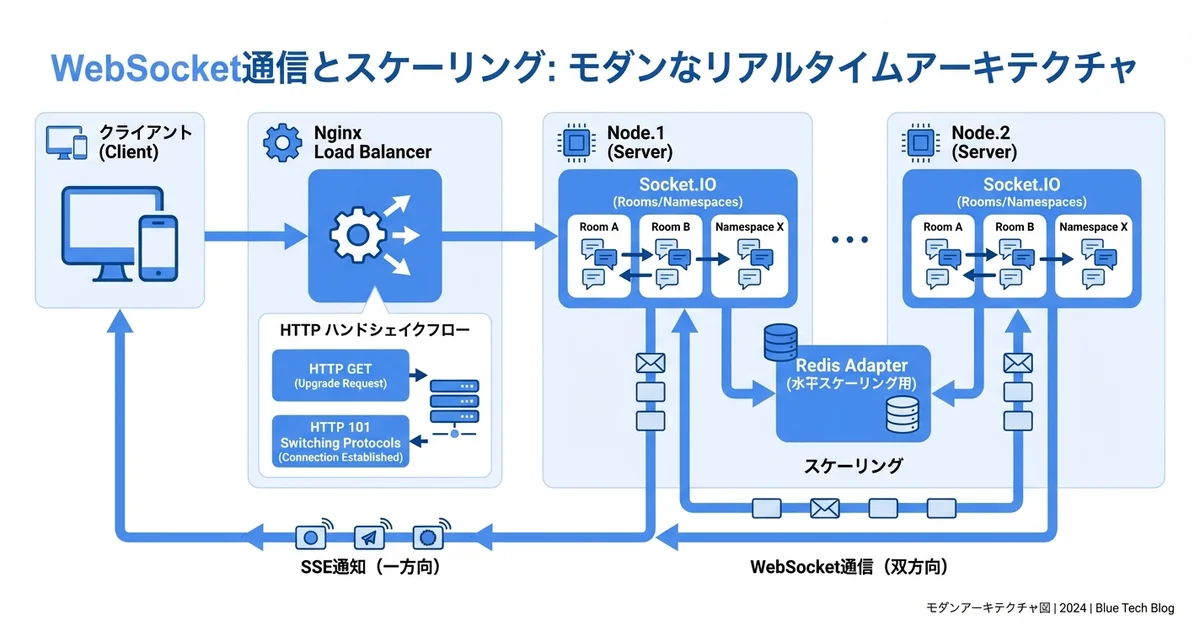
WebSocketは、HTTPハンドシェイクでコネクションを確立した後、TCPコネクション上で双方向のフレーム通信を行います。
1. クライアント → サーバー: HTTP Upgrade リクエスト
   GET /chat HTTP/1.1
   Upgrade: websocket
   Connection: Upgrade
   Sec-WebSocket-Key: dGhlIHNhbXBsZSBub25jZQ==

2. サーバー → クライアント: 101 Switching Protocols
   HTTP/1.1 101 Switching Protocols
   Upgrade: websocket
   Connection: Upgrade
   Sec-WebSocket-Accept: s3pPLMBiTxaQ9kYGzzhZRbK+xOo=

3. 双方向フレーム通信の開始
   クライアント ⇆ データフレーム ⇆ サーバー
Claude CodeでWebSocketサーバーを構築する
Node.js + wsライブラリによる基本実装
Claude Codeに以下のプロンプトを与えて、WebSocketサーバーの基盤を構築します:
claude "Node.js + TypeScript + wsライブラリで以下を実装して:
1. WebSocketサーバー(ポート8080)
2. 接続管理(接続/切断の追跡)
3. ハートビート機能(30秒間隔のping/pong)
4. JSON形式のメッセージプロトコル
5. 型安全なメッセージハンドラー"
Claude Codeが生成するWebSocketサーバーの例:
// src/websocket/server.ts
import { WebSocketServer, WebSocket } from 'ws';
import { IncomingMessage } from 'http';
import { v4 as uuidv4 } from 'uuid';

// メッセージ型定義
interface WSMessage {
  type: 'chat' | 'notification' | 'presence' | 'typing';
  payload: Record<string, unknown>;
  timestamp: number;
  senderId: string;
}

interface Client {
  id: string;
  ws: WebSocket;
  isAlive: boolean;
  userId: string;
  connectedAt: Date;
  metadata: Record<string, unknown>;
}

class WebSocketManager {
  private wss: WebSocketServer;
  private clients: Map<string, Client> = new Map();
  private heartbeatInterval: NodeJS.Timeout | null = null;

  constructor(port: number) {
    this.wss = new WebSocketServer({ port });
    this.setupEventHandlers();
    this.startHeartbeat();
    console.log(`WebSocket server running on port ${port}`);
  }

  private setupEventHandlers(): void {
    this.wss.on('connection', (ws: WebSocket, req: IncomingMessage) => {
      const clientId = uuidv4();
      const userId = this.extractUserId(req);

      const client: Client = {
        id: clientId,
        ws,
        isAlive: true,
        userId,
        connectedAt: new Date(),
        metadata: {},
      };

      this.clients.set(clientId, client);
      console.log(`Client connected: ${clientId} (user: ${userId})`);

      // 接続確認メッセージを送信
      this.sendToClient(client, {
        type: 'notification',
        payload: { message: 'Connected successfully', clientId },
        timestamp: Date.now(),
        senderId: 'server',
      });

      // オンラインユーザー一覧をブロードキャスト
      this.broadcastPresence();

      ws.on('message', (data: Buffer) => {
        this.handleMessage(client, data);
      });

      ws.on('pong', () => {
        client.isAlive = true;
      });

      ws.on('close', () => {
        this.clients.delete(clientId);
        console.log(`Client disconnected: ${clientId}`);
        this.broadcastPresence();
      });

      ws.on('error', (error: Error) => {
        console.error(`WebSocket error for ${clientId}:`, error);
      });
    });
  }

  private handleMessage(client: Client, data: Buffer): void {
    try {
      const message: WSMessage = JSON.parse(data.toString());

      switch (message.type) {
        case 'chat':
          this.handleChatMessage(client, message);
          break;
        case 'typing':
          this.handleTypingIndicator(client, message);
          break;
        case 'presence':
          this.handlePresenceUpdate(client, message);
          break;
        default:
          console.warn(`Unknown message type: ${message.type}`);
      }
    } catch (error) {
      console.error('Failed to parse message:', error);
      this.sendToClient(client, {
        type: 'notification',
        payload: { error: 'Invalid message format' },
        timestamp: Date.now(),
        senderId: 'server',
      });
    }
  }

  private handleChatMessage(client: Client, message: WSMessage): void {
    const chatMessage: WSMessage = {
      ...message,
      senderId: client.userId,
      timestamp: Date.now(),
    };

    // 全クライアントにブロードキャスト
    this.broadcast(chatMessage);
  }

  private handleTypingIndicator(client: Client, message: WSMessage): void {
    // 送信者以外にタイピング状態を通知
    this.broadcastExcept(client.id, {
      type: 'typing',
      payload: { userId: client.userId, isTyping: message.payload.isTyping },
      timestamp: Date.now(),
      senderId: client.userId,
    });
  }

  private handlePresenceUpdate(client: Client, message: WSMessage): void {
    client.metadata = { ...client.metadata, ...message.payload };
    this.broadcastPresence();
  }

  private startHeartbeat(): void {
    this.heartbeatInterval = setInterval(() => {
      this.clients.forEach((client, id) => {
        if (!client.isAlive) {
          console.log(`Terminating inactive client: ${id}`);
          client.ws.terminate();
          this.clients.delete(id);
          return;
        }
        client.isAlive = false;
        client.ws.ping();
      });
    }, 30000);
  }

  private sendToClient(client: Client, message: WSMessage): void {
    if (client.ws.readyState === WebSocket.OPEN) {
      client.ws.send(JSON.stringify(message));
    }
  }

  private broadcast(message: WSMessage): void {
    this.clients.forEach((client) => {
      this.sendToClient(client, message);
    });
  }

  private broadcastExcept(excludeId: string, message: WSMessage): void {
    this.clients.forEach((client) => {
      if (client.id !== excludeId) {
        this.sendToClient(client, message);
      }
    });
  }

  private broadcastPresence(): void {
    const onlineUsers = Array.from(this.clients.values()).map((c) => ({
      userId: c.userId,
      connectedAt: c.connectedAt.toISOString(),
    }));

    this.broadcast({
      type: 'presence',
      payload: { onlineUsers, count: onlineUsers.length },
      timestamp: Date.now(),
      senderId: 'server',
    });
  }

  private extractUserId(req: IncomingMessage): string {
    const url = new URL(req.url || '', `http://${req.headers.host}`);
    return url.searchParams.get('userId') || `anonymous-${uuidv4().slice(0, 8)}`;
  }

  public getConnectionCount(): number {
    return this.clients.size;
  }

  public shutdown(): void {
    if (this.heartbeatInterval) {
      clearInterval(this.heartbeatInterval);
    }
    this.wss.close();
  }
}

export default WebSocketManager;
クライアント側の実装
Claude Codeにフロントエンド側のWebSocketクライアントも生成させます:
claude "先ほどのWebSocketサーバーに接続するReact + TypeScriptの
カスタムフックを作って。自動再接続、指数バックオフ、
接続状態管理を含めて"
// src/hooks/useWebSocket.ts
import { useCallback, useEffect, useRef, useState } from 'react';
interface UseWebSocketOptions {
url: string;
userId: string;
onMessage?: (message: WSMessage) => void;
reconnectAttempts?: number;
reconnectInterval?: number;
}
type ConnectionStatus = 'connecting' | 'connected' | 'disconnected' | 'error';
interface WSMessage {
type: string;
payload: Record<string, unknown>;
timestamp: number;
senderId: string;
}
export function useWebSocket({
url,
userId,
onMessage,
reconnectAttempts = 5,
reconnectInterval = 1000,
}: UseWebSocketOptions) {
const [status, setStatus] = useState<ConnectionStatus>('disconnected');
const wsRef = useRef<WebSocket | null>(null);
const attemptRef = useRef(0);
const timerRef = useRef<NodeJS.Timeout | null>(null);
const connect = useCallback(() => {
const wsUrl = `${url}?userId=${encodeURIComponent(userId)}`;
const ws = new WebSocket(wsUrl);
wsRef.current = ws;
setStatus('connecting');
ws.onopen = () => {
setStatus('connected');
attemptRef.current = 0;
console.log('WebSocket connected');
};
ws.onmessage = (event: MessageEvent) => {
try {
const message: WSMessage = JSON.parse(event.data);
onMessage?.(message);
} catch (error) {
console.error('Failed to parse WebSocket message:', error);
}
};
ws.onclose = () => {
setStatus('disconnected');
wsRef.current = null;
// 指数バックオフで再接続
if (attemptRef.current < reconnectAttempts) {
const delay = reconnectInterval * Math.pow(2, attemptRef.current);
console.log(`Reconnecting in ${delay}ms (attempt ${attemptRef.current + 1})`);
timerRef.current = setTimeout(() => {
attemptRef.current += 1;
connect();
}, delay);
}
};
ws.onerror = () => {
setStatus('error');
};
}, [url, userId, onMessage, reconnectAttempts, reconnectInterval]);
const sendMessage = useCallback((message: Omit<WSMessage, 'timestamp' | 'senderId'>) => {
if (wsRef.current?.readyState === WebSocket.OPEN) {
wsRef.current.send(JSON.stringify({
...message,
timestamp: Date.now(),
senderId: userId,
}));
}
}, [userId]);
const disconnect = useCallback(() => {
if (timerRef.current) clearTimeout(timerRef.current);
wsRef.current?.close();
}, []);
useEffect(() => {
connect();
return () => {
if (timerRef.current) clearTimeout(timerRef.current);
wsRef.current?.close();
};
}, [connect]);
return { status, sendMessage, disconnect };
}リアルタイムチャットアプリの実装
メッセージ管理とUIの構築
Claude Codeに完全なチャットコンポーネントを生成させます:
claude "Reactで以下の機能を持つチャットコンポーネントを作成して:
- メッセージ一覧表示(自分/他人で左右分け)
- メッセージ入力・送信
- タイピングインジケーター
- オンラインユーザー表示
- 無限スクロール(過去メッセージ読み込み)
- 先ほどのuseWebSocketフックを使用"
// src/components/ChatRoom.tsx
import React, { useState, useRef, useEffect, useCallback } from 'react';
import { useWebSocket } from '../hooks/useWebSocket';
interface ChatMessage {
id: string;
type: 'chat';
senderId: string;
senderName: string;
content: string;
timestamp: number;
}
interface ChatRoomProps {
roomId: string;
userId: string;
userName: string;
}
export function ChatRoom({ roomId, userId, userName }: ChatRoomProps) {
const [messages, setMessages] = useState<ChatMessage[]>([]);
const [inputText, setInputText] = useState('');
const [typingUsers, setTypingUsers] = useState<Set<string>>(new Set());
const [onlineUsers, setOnlineUsers] = useState<string[]>([]);
const messagesEndRef = useRef<HTMLDivElement>(null);
const typingTimeoutRef = useRef<NodeJS.Timeout | null>(null);
const handleMessage = useCallback((msg: any) => {
switch (msg.type) {
case 'chat':
setMessages((prev) => [...prev, {
id: `${msg.timestamp}-${msg.senderId}`,
type: 'chat',
senderId: msg.senderId,
senderName: msg.payload.senderName || msg.senderId,
content: msg.payload.content,
timestamp: msg.timestamp,
}]);
break;
case 'typing':
if (msg.payload.isTyping) {
setTypingUsers((prev) => new Set(prev).add(msg.payload.userId));
} else {
setTypingUsers((prev) => {
const next = new Set(prev);
next.delete(msg.payload.userId);
return next;
});
}
break;
case 'presence':
setOnlineUsers(
(msg.payload.onlineUsers as any[]).map((u) => u.userId)
);
break;
}
}, []);
const { status, sendMessage } = useWebSocket({
url: `ws://localhost:8080/chat/${roomId}`,
userId,
onMessage: handleMessage,
});
const handleSend = () => {
if (!inputText.trim()) return;
sendMessage({
type: 'chat',
payload: { content: inputText, senderName: userName },
});
setInputText('');
// タイピング停止を通知
sendMessage({ type: 'typing', payload: { isTyping: false } });
};
const handleInputChange = (e: React.ChangeEvent<HTMLInputElement>) => {
setInputText(e.target.value);
// タイピング中を通知
sendMessage({ type: 'typing', payload: { isTyping: true } });
// 2秒後にタイピング停止を通知
if (typingTimeoutRef.current) clearTimeout(typingTimeoutRef.current);
typingTimeoutRef.current = setTimeout(() => {
sendMessage({ type: 'typing', payload: { isTyping: false } });
}, 2000);
};
useEffect(() => {
messagesEndRef.current?.scrollIntoView({ behavior: 'smooth' });
}, [messages]);
return (
<div className="chat-room">
<div className="chat-header">
<h2>Room: {roomId}</h2>
<span className={`status-badge ${status}`}>{status}</span>
<span>{onlineUsers.length} online</span>
</div>
<div className="messages-container">
{messages.map((msg) => (
<div
key={msg.id}
className={`message ${msg.senderId === userId ? 'own' : 'other'}`}
>
<span className="sender">{msg.senderName}</span>
<p className="content">{msg.content}</p>
<span className="time">
{new Date(msg.timestamp).toLocaleTimeString()}
</span>
</div>
))}
<div ref={messagesEndRef} />
</div>
{typingUsers.size > 0 && (
<div className="typing-indicator">
{Array.from(typingUsers).join(', ')} が入力中...
</div>
)}
<div className="input-area">
<input
type="text"
value={inputText}
onChange={handleInputChange}
onKeyDown={(e) => e.key === 'Enter' && handleSend()}
placeholder="メッセージを入力..."
disabled={status !== 'connected'}
/>
<button onClick={handleSend} disabled={status !== 'connected'}>
送信
</button>
</div>
</div>
);
}メッセージの永続化とルーム管理
Claude Codeにデータベース連携のコードも生成させましょう:
claude "WebSocketチャットのメッセージをRedis + PostgreSQLで永続化する
コードを生成して。Redisはリアルタイムのメッセージキュー、
PostgreSQLは永続ストレージとして使う。
ルーム管理機能も含めて"
// src/services/MessageStore.ts
import { Pool } from 'pg';
import Redis from 'ioredis';
interface StoredMessage {
id: string;
roomId: string;
senderId: string;
content: string;
timestamp: Date;
}
class MessageStore {
private pg: Pool;
private redis: Redis;
constructor() {
this.pg = new Pool({
connectionString: process.env.DATABASE_URL,
});
this.redis = new Redis(process.env.REDIS_URL);
}
async saveMessage(message: StoredMessage): Promise<void> {
// Redisに直近メッセージをキャッシュ(最新100件)
await this.redis.lpush(
`room:${message.roomId}:messages`,
JSON.stringify(message)
);
await this.redis.ltrim(`room:${message.roomId}:messages`, 0, 99);
// PostgreSQLに永続保存
await this.pg.query(
`INSERT INTO messages (id, room_id, sender_id, content, created_at)
VALUES ($1, $2, $3, $4, $5)`,
[message.id, message.roomId, message.senderId, message.content, message.timestamp]
);
}
async getRecentMessages(roomId: string, limit = 50): Promise<StoredMessage[]> {
// まずRedisキャッシュから取得
const cached = await this.redis.lrange(`room:${roomId}:messages`, 0, limit - 1);
if (cached.length > 0) {
return cached.map((m) => JSON.parse(m));
}
// キャッシュミスの場合はPostgreSQLから取得
const result = await this.pg.query(
`SELECT id, room_id as "roomId", sender_id as "senderId", content,
created_at as timestamp
FROM messages WHERE room_id = $1
ORDER BY created_at DESC LIMIT $2`,
[roomId, limit]
);
return result.rows;
}
async getMessageHistory(
roomId: string,
before: Date,
limit = 50
): Promise<StoredMessage[]> {
const result = await this.pg.query(
`SELECT id, room_id as "roomId", sender_id as "senderId", content,
created_at as timestamp
FROM messages WHERE room_id = $1 AND created_at < $2
ORDER BY created_at DESC LIMIT $3`,
[roomId, before, limit]
);
return result.rows;
}
}
export default MessageStore;Server-Sent Events(SSE)によるプッシュ通知システム
SSEが適しているケース
WebSocketは双方向通信ですが、通知やライブフィードのようにサーバーからの一方向通信にはSSEが最適です。SSEはHTTPプロトコル上で動作するため、ファイアウォールやプロキシの問題が少なく、実装もシンプルです。
claude "Express.js + TypeScriptでSSEベースの通知システムを実装して。
以下の要件:
- ユーザーごとの通知チャネル
- 通知の種類: info, warning, error, success
- 接続のKeep-Alive管理
- 未読通知の管理
- 再接続時のイベントID対応(Last-Event-ID)"
// src/sse/NotificationServer.ts
import express, { Request, Response } from 'express';
interface Notification {
id: string;
type: 'info' | 'warning' | 'error' | 'success';
title: string;
message: string;
timestamp: number;
read: boolean;
}
interface SSEClient {
id: string;
userId: string;
res: Response;
lastEventId: string | null;
}
class NotificationServer {
private clients: Map<string, SSEClient[]> = new Map();
private notifications: Map<string, Notification[]> = new Map();
setupRoutes(app: express.Application): void {
// SSE接続エンドポイント
app.get('/api/notifications/stream', (req: Request, res: Response) => {
const userId = req.query.userId as string;
if (!userId) {
res.status(400).json({ error: 'userId is required' });
return;
}
// SSEヘッダー設定
res.writeHead(200, {
'Content-Type': 'text/event-stream',
'Cache-Control': 'no-cache',
'Connection': 'keep-alive',
'X-Accel-Buffering': 'no', // Nginx対応
});
const client: SSEClient = {
id: `${userId}-${Date.now()}`,
userId,
res,
lastEventId: req.headers['last-event-id'] as string || null,
};
// クライアント登録
if (!this.clients.has(userId)) {
this.clients.set(userId, []);
}
this.clients.get(userId)!.push(client);
// 未送信の通知を再送(再接続対応)
if (client.lastEventId) {
this.resendMissedNotifications(client);
}
// Keep-Alive(30秒ごとにコメント送信)
const keepAlive = setInterval(() => {
res.write(':keepalive\n\n');
}, 30000);
// 切断処理
req.on('close', () => {
clearInterval(keepAlive);
const userClients = this.clients.get(userId) || [];
this.clients.set(
userId,
userClients.filter((c) => c.id !== client.id)
);
});
});
// 通知送信エンドポイント
app.post('/api/notifications/send', express.json(), (req: Request, res: Response) => {
const { userId, type, title, message } = req.body;
const notification = this.createNotification(userId, type, title, message);
this.sendNotification(userId, notification);
res.json({ success: true, notificationId: notification.id });
});
}
private createNotification(
userId: string,
type: Notification['type'],
title: string,
message: string
): Notification {
const notification: Notification = {
id: `notif-${Date.now()}-${Math.random().toString(36).slice(2, 8)}`,
type,
title,
message,
timestamp: Date.now(),
read: false,
};
// 通知履歴を保存
if (!this.notifications.has(userId)) {
this.notifications.set(userId, []);
}
this.notifications.get(userId)!.push(notification);
return notification;
}
private sendNotification(userId: string, notification: Notification): void {
const userClients = this.clients.get(userId) || [];
userClients.forEach((client) => {
client.res.write(`id: ${notification.id}\n`);
client.res.write(`event: notification\n`);
client.res.write(`data: ${JSON.stringify(notification)}\n\n`);
});
}
private resendMissedNotifications(client: SSEClient): void {
const userNotifications = this.notifications.get(client.userId) || [];
const lastIndex = userNotifications.findIndex(
(n) => n.id === client.lastEventId
);
if (lastIndex >= 0) {
const missed = userNotifications.slice(lastIndex + 1);
missed.forEach((notification) => {
client.res.write(`id: ${notification.id}\n`);
client.res.write(`event: notification\n`);
client.res.write(`data: ${JSON.stringify(notification)}\n\n`);
});
}
}
}
export default NotificationServer;フロントエンドでのSSE受信
// src/hooks/useSSENotifications.ts
import { useEffect, useRef, useState, useCallback } from 'react';

interface Notification {
  id: string;
  type: 'info' | 'warning' | 'error' | 'success';
  title: string;
  message: string;
  timestamp: number;
}

export function useSSENotifications(userId: string) {
  const [notifications, setNotifications] = useState<Notification[]>([]);
  const [isConnected, setIsConnected] = useState(false);
  const eventSourceRef = useRef<EventSource | null>(null);

  const connect = useCallback(() => {
    const es = new EventSource(
      `/api/notifications/stream?userId=${encodeURIComponent(userId)}`
    );
    eventSourceRef.current = es;

    es.onopen = () => setIsConnected(true);

    es.addEventListener('notification', (event: MessageEvent) => {
      const notification: Notification = JSON.parse(event.data);
      setNotifications((prev) => [notification, ...prev]);

      // ブラウザ通知(許可がある場合)
      if (Notification.permission === 'granted') {
        new Notification(notification.title, {
          body: notification.message,
          icon: '/notification-icon.png',
        });
      }
    });

    es.onerror = () => {
      setIsConnected(false);
      es.close();
      // 5秒後に再接続
      setTimeout(connect, 5000);
    };
  }, [userId]);

  useEffect(() => {
    connect();
    return () => eventSourceRef.current?.close();
  }, [connect]);

  const clearNotification = useCallback((id: string) => {
    setNotifications((prev) => prev.filter((n) => n.id !== id));
  }, []);

  return { notifications, isConnected, clearNotification };
}
ライブダッシュボードのリアルタイム更新
Socket.IOによる高機能リアルタイムダッシュボード
ライブダッシュボードには、ルーム機能やフォールバック機能が充実したSocket.IOが適しています。
claude "Socket.IO + TypeScriptで以下のリアルタイムダッシュボードを実装して:
- サーバーメトリクス(CPU、メモリ、ディスク使用率)の1秒間隔更新
- アクセスログのリアルタイムストリーミング
- アラートの即時通知
- ダッシュボードのルーム分け(チームごとに異なるメトリクス)
- 接続数のリアルタイム表示"
// src/dashboard/DashboardServer.ts
import { Server, Socket } from 'socket.io';
import http from 'http';
import os from 'os';
interface ServerMetrics {
cpuUsage: number;
memoryUsage: number;
memoryTotal: number;
diskUsage: number;
uptime: number;
activeConnections: number;
requestsPerSecond: number;
timestamp: number;
}
interface AlertEvent {
id: string;
severity: 'info' | 'warning' | 'critical';
title: string;
message: string;
source: string;
timestamp: number;
}
class DashboardServer {
private io: Server;
private metricsInterval: NodeJS.Timeout | null = null;
constructor(httpServer: http.Server) {
this.io = new Server(httpServer, {
cors: { origin: '*' },
transports: ['websocket', 'polling'],
});
this.setupNamespaces();
this.startMetricsCollection();
}
private setupNamespaces(): void {
// メトリクス名前空間
const metricsNs = this.io.of('/metrics');
metricsNs.on('connection', (socket: Socket) => {
console.log(`Metrics client connected: ${socket.id}`);
socket.on('join-team', (teamId: string) => {
socket.join(`team:${teamId}`);
console.log(`Socket ${socket.id} joined team: ${teamId}`);
});
socket.on('disconnect', () => {
console.log(`Metrics client disconnected: ${socket.id}`);
});
});
// ログストリーミング名前空間
const logsNs = this.io.of('/logs');
logsNs.on('connection', (socket: Socket) => {
socket.on('subscribe', (filter: { level?: string; source?: string }) => {
if (filter.level) socket.join(`level:${filter.level}`);
if (filter.source) socket.join(`source:${filter.source}`);
});
});
}
private startMetricsCollection(): void {
this.metricsInterval = setInterval(async () => {
const metrics = await this.collectMetrics();
this.io.of('/metrics').emit('metrics-update', metrics);
}, 1000);
}
private async collectMetrics(): Promise<ServerMetrics> {
const cpus = os.cpus();
const cpuUsage = cpus.reduce((acc, cpu) => {
const total = Object.values(cpu.times).reduce((a, b) => a + b, 0);
const idle = cpu.times.idle;
return acc + ((total - idle) / total) * 100;
}, 0) / cpus.length;
const totalMem = os.totalmem();
const freeMem = os.freemem();
return {
cpuUsage: Math.round(cpuUsage * 100) / 100,
memoryUsage: Math.round(((totalMem - freeMem) / totalMem) * 10000) / 100,
memoryTotal: totalMem,
diskUsage: 0, // 別途実装
uptime: os.uptime(),
activeConnections: this.io.of('/metrics').sockets.size,
requestsPerSecond: 0, // 別途実装
timestamp: Date.now(),
};
}
public sendAlert(alert: AlertEvent): void {
this.io.of('/metrics').emit('alert', alert);
}
public streamLog(log: {
level: string;
message: string;
source: string;
timestamp: number;
}): void {
const logsNs = this.io.of('/logs');
logsNs.emit('log-entry', log);
logsNs.to(`level:${log.level}`).emit('filtered-log', log);
logsNs.to(`source:${log.source}`).emit('filtered-log', log);
}
public shutdown(): void {
if (this.metricsInterval) clearInterval(this.metricsInterval);
this.io.close();
}
}
export default DashboardServer;本番環境でのスケーリングとベストプラクティス
Redis Adapterによる水平スケーリング
複数のサーバーインスタンスでWebSocket接続を分散する場合、Redis Adapterを使ったPub/Sub方式が標準的なアプローチです。
claude "Socket.IOのRedis Adapterを使った水平スケーリングの構成を
作成して。Nginx + 複数Node.jsプロセス + Redis Pub/Subの構成で"
// src/scaling/ScaledServer.ts
import { createAdapter } from '@socket.io/redis-adapter';
import { createClient } from 'redis';
import { Server } from 'socket.io';
async function setupScaledServer(io: Server): Promise<void> {
const pubClient = createClient({ url: process.env.REDIS_URL });
const subClient = pubClient.duplicate();
await Promise.all([pubClient.connect(), subClient.connect()]);
io.adapter(createAdapter(pubClient, subClient));
console.log('Redis adapter configured for horizontal scaling');
}
export { setupScaledServer };Nginxの設定例:
upstream websocket_backend {
    ip_hash;  # スティッキーセッション(WebSocketに必要)
    server 127.0.0.1:3001;
    server 127.0.0.1:3002;
    server 127.0.0.1:3003;
    server 127.0.0.1:3004;
}

server {
    listen 443 ssl;
    server_name example.com;

    location /socket.io/ {
        proxy_pass http://websocket_backend;
        proxy_http_version 1.1;
        proxy_set_header Upgrade $http_upgrade;
        proxy_set_header Connection "upgrade";
        proxy_set_header Host $host;
        proxy_set_header X-Real-IP $remote_addr;
        proxy_read_timeout 86400;  # 24時間のタイムアウト
        proxy_send_timeout 86400;
    }
}
接続数の最適化とメモリ管理
大量の同時接続を処理するためのベストプラクティス:
// src/optimization/ConnectionManager.ts
class ConnectionOptimizer {
  private maxConnectionsPerServer = 10000;
  private messageRateLimit = 100; // メッセージ/秒/クライアント
  private messageCounts: Map<string, number[]> = new Map();

  // レートリミット
  checkRateLimit(clientId: string): boolean {
    const now = Date.now();
    const timestamps = this.messageCounts.get(clientId) || [];

    // 1秒以内のメッセージ数をカウント
    const recentMessages = timestamps.filter((t) => now - t < 1000);
    this.messageCounts.set(clientId, [...recentMessages, now]);

    return recentMessages.length < this.messageRateLimit;
  }

  // メッセージのバッチ送信
  batchMessages(messages: any[], intervalMs = 100): any[][] {
    const batchSize = Math.ceil(messages.length / (intervalMs / 10));
    const batches: any[][] = [];
    for (let i = 0; i < messages.length; i += batchSize) {
      batches.push(messages.slice(i, i + batchSize));
    }
    return batches;
  }

  // 接続プール管理
  shouldAcceptConnection(currentConnections: number): boolean {
    return currentConnections < this.maxConnectionsPerServer;
  }
}

export default ConnectionOptimizer;
セキュリティ対策
// src/security/WebSocketAuth.ts
import jwt from 'jsonwebtoken';
import { IncomingMessage } from 'http';
interface TokenPayload {
userId: string;
roles: string[];
exp: number;
}
class WebSocketAuth {
private secret: string;
constructor() {
this.secret = process.env.JWT_SECRET || 'your-secret-key';
}
// 接続時の認証
authenticateConnection(req: IncomingMessage): TokenPayload | null {
try {
const url = new URL(req.url || '', `http://${req.headers.host}`);
const token = url.searchParams.get('token');
if (!token) return null;
const payload = jwt.verify(token, this.secret) as TokenPayload;
return payload;
} catch {
return null;
}
}
// Origin検証
validateOrigin(req: IncomingMessage): boolean {
const origin = req.headers.origin;
const allowedOrigins = (process.env.ALLOWED_ORIGINS || '').split(',');
return !origin || allowedOrigins.includes(origin);
}
// メッセージサニタイゼーション
sanitizeMessage(content: string): string {
return content
.replace(/</g, '<')
.replace(/>/g, '>')
.replace(/"/g, '"')
.slice(0, 5000); // 最大文字数制限
}
}
export default WebSocketAuth;エラーハンドリングとリトライ戦略
堅牢な接続管理
claude "WebSocket接続の堅牢なエラーハンドリング戦略を実装して。
接続断、メッセージ送信失敗、サーバー過負荷への対応を含めて。
指数バックオフ + ジッター付きのリトライロジックも"
// src/resilience/ResilientWebSocket.ts
class ResilientWebSocket {
private url: string;
private ws: WebSocket | null = null;
private messageQueue: string[] = [];
private reconnectAttempt = 0;
private maxReconnectAttempts = 10;
private baseDelay = 1000;
private maxDelay = 30000;
constructor(url: string) {
this.url = url;
}
connect(): void {
try {
this.ws = new WebSocket(this.url);
this.ws.onopen = () => {
this.reconnectAttempt = 0;
this.flushMessageQueue();
};
this.ws.onclose = (event) => {
if (event.code === 1000) return; // 正常切断
this.scheduleReconnect();
};
this.ws.onerror = () => {
// oncloseが呼ばれるので、ここではログのみ
console.error('WebSocket error occurred');
};
} catch (error) {
this.scheduleReconnect();
}
}
send(message: string): void {
if (this.ws?.readyState === WebSocket.OPEN) {
try {
this.ws.send(message);
} catch {
this.messageQueue.push(message);
}
} else {
this.messageQueue.push(message);
}
}
private scheduleReconnect(): void {
if (this.reconnectAttempt >= this.maxReconnectAttempts) {
console.error('Max reconnection attempts reached');
return;
}
// 指数バックオフ + ジッター
const delay = Math.min(
this.baseDelay * Math.pow(2, this.reconnectAttempt) +
Math.random() * 1000,
this.maxDelay
);
console.log(`Reconnecting in ${Math.round(delay)}ms...`);
setTimeout(() => {
this.reconnectAttempt++;
this.connect();
}, delay);
}
private flushMessageQueue(): void {
while (this.messageQueue.length > 0) {
const message = this.messageQueue.shift();
if (message) this.send(message);
}
}
}
export default ResilientWebSocket;テスト戦略|Claude Codeでリアルタイム通信をテストする
WebSocketのユニットテスト
claude "WebSocketサーバーのテストコードをJest + ws-mockで書いて。
接続、メッセージ送受信、切断、再接続のテストケースを含めて"
// src/__tests__/websocket.test.ts
import { WebSocketServer } from 'ws';
import WebSocket from 'ws';
describe('WebSocket Server', () => {
let wss: WebSocketServer;
const PORT = 9090;
beforeAll((done) => {
wss = new WebSocketServer({ port: PORT });
wss.on('listening', done);
});
afterAll((done) => {
wss.close(done);
});
test('クライアントが接続できること', (done) => {
const ws = new WebSocket(`ws://localhost:${PORT}`);
ws.on('open', () => {
expect(ws.readyState).toBe(WebSocket.OPEN);
ws.close();
done();
});
});
test('メッセージを送受信できること', (done) => {
const testMessage = JSON.stringify({
type: 'chat',
payload: { content: 'Hello' },
});
wss.once('connection', (serverWs) => {
serverWs.on('message', (data) => {
const received = JSON.parse(data.toString());
expect(received.type).toBe('chat');
expect(received.payload.content).toBe('Hello');
serverWs.send(JSON.stringify({ type: 'ack', payload: {} }));
});
});
const ws = new WebSocket(`ws://localhost:${PORT}`);
ws.on('open', () => ws.send(testMessage));
ws.on('message', (data) => {
const response = JSON.parse(data.toString());
expect(response.type).toBe('ack');
ws.close();
done();
});
});
test('同時接続を処理できること', (done) => {
const clients: WebSocket[] = [];
const numClients = 50;
let connected = 0;
for (let i = 0; i < numClients; i++) {
const ws = new WebSocket(`ws://localhost:${PORT}`);
clients.push(ws);
ws.on('open', () => {
connected++;
if (connected === numClients) {
expect(wss.clients.size).toBe(numClients);
clients.forEach((c) => c.close());
done();
}
});
}
});
});負荷テスト
claude "WebSocketサーバーの負荷テストスクリプトを作成して。
1000同時接続、1秒あたり10000メッセージの負荷シナリオで、
レイテンシ・スループット・メモリ使用量を計測する"
// scripts/load-test.ts
import WebSocket from 'ws';
interface LoadTestResult {
totalConnections: number;
successfulConnections: number;
totalMessages: number;
avgLatencyMs: number;
p95LatencyMs: number;
p99LatencyMs: number;
messagesPerSecond: number;
durationMs: number;
}
async function runLoadTest(config: {
url: string;
connections: number;
messagesPerClient: number;
rampUpMs: number;
}): Promise<LoadTestResult> {
const latencies: number[] = [];
let successfulConnections = 0;
let totalMessages = 0;
const startTime = Date.now();
const clients = await Promise.allSettled(
Array.from({ length: config.connections }, (_, i) =>
new Promise<WebSocket>((resolve, reject) => {
setTimeout(() => {
const ws = new WebSocket(config.url);
ws.on('open', () => {
successfulConnections++;
resolve(ws);
});
ws.on('error', reject);
}, (i / config.connections) * config.rampUpMs);
})
)
);
const activeClients = clients
.filter((r) => r.status === 'fulfilled')
.map((r) => (r as PromiseFulfilledResult<WebSocket>).value);
// メッセージ送受信テスト
await Promise.all(
activeClients.map(
(ws) =>
new Promise<void>((resolve) => {
let sent = 0;
ws.on('message', (data) => {
const msg = JSON.parse(data.toString());
if (msg.sentAt) {
latencies.push(Date.now() - msg.sentAt);
}
totalMessages++;
});
const interval = setInterval(() => {
if (sent >= config.messagesPerClient) {
clearInterval(interval);
resolve();
return;
}
ws.send(JSON.stringify({
type: 'ping',
sentAt: Date.now(),
}));
sent++;
}, 100);
})
)
);
const durationMs = Date.now() - startTime;
latencies.sort((a, b) => a - b);
// クリーンアップ
activeClients.forEach((ws) => ws.close());
return {
totalConnections: config.connections,
successfulConnections,
totalMessages,
avgLatencyMs: latencies.reduce((a, b) => a + b, 0) / latencies.length,
p95LatencyMs: latencies[Math.floor(latencies.length * 0.95)] || 0,
p99LatencyMs: latencies[Math.floor(latencies.length * 0.99)] || 0,
messagesPerSecond: totalMessages / (durationMs / 1000),
durationMs,
};
}
// 実行
runLoadTest({
url: 'ws://localhost:8080',
connections: 1000,
messagesPerClient: 10,
rampUpMs: 5000,
}).then((result) => {
console.table(result);
});
SES現場でのリアルタイム通信スキルの活用
需要の高いリアルタイム通信の案件パターン
2026年現在、リアルタイム通信スキルが求められるSES案件は急増しています:
| 案件タイプ | 技術スタック | 月単価目安 |
|---|---|---|
| チャットシステム開発 | WebSocket + React + Redis | 70〜90万円 |
| IoTデータ収集基盤 | MQTT + WebSocket + AWS IoT | 75〜95万円 |
| 金融取引ダッシュボード | SSE + Next.js + GraphQL Subscriptions | 80〜100万円 |
| リアルタイムコラボツール | Socket.IO + CRDT + PostgreSQL | 80〜100万円 |
| ライブ配信プラットフォーム | WebRTC + WebSocket + メディアサーバー | 85〜110万円 |
Claude Codeを活用した学習ロードマップ
STEP 1: WebSocketの基礎(1-2週間)
├── プロトコルの仕組みを理解
├── 基本的なサーバー/クライアントを実装
└── Claude Code: "WebSocketの基礎を学ぶためのハンズオンを作って"

STEP 2: Socket.IOでの実践(2-3週間)
├── チャットアプリの構築
├── ルーム・名前空間の活用
└── Claude Code: "Socket.IOでマルチルームチャットを実装して"

STEP 3: スケーリング(2-3週間)
├── Redis Adapterの導入
├── Nginx + WebSocket設定
└── Claude Code: "WebSocketのスケーリング構成を構築して"

STEP 4: 本番運用(継続的)
├── 監視・アラート設定
├── パフォーマンスチューニング
└── Claude Code: "WebSocket接続の監視ダッシュボードを作って"
まとめ|Claude Codeでリアルタイム通信開発を加速する
Claude Codeを活用することで、WebSocket・SSE・Socket.IOによるリアルタイム通信アプリケーションの開発を大幅に効率化できます。
この記事で紹介した主なポイント:
- WebSocket基礎: プロトコルの仕組みとTypeScriptでの型安全な実装
- チャットアプリ: メッセージ管理、タイピングインジケーター、ルーム管理
- プッシュ通知: SSEベースの通知システムと再接続対応
- ライブダッシュボード: Socket.IOによるメトリクスのリアルタイム更新
- スケーリング: Redis Adapter + Nginx構成で水平スケーリング
- テスト: ユニットテストから負荷テストまでのテスト戦略
リアルタイム通信は、2026年のSES市場において高単価案件に直結するスキルです。Claude Codeを活用して効率的にスキルアップし、キャリアの幅を広げていきましょう。
WebSocket・Socket.IO・リアルタイム通信のスキルを活かせるSES案件をお探しなら、SES BASEで最新案件をチェックしましょう。高単価案件を効率的に見つけられます。