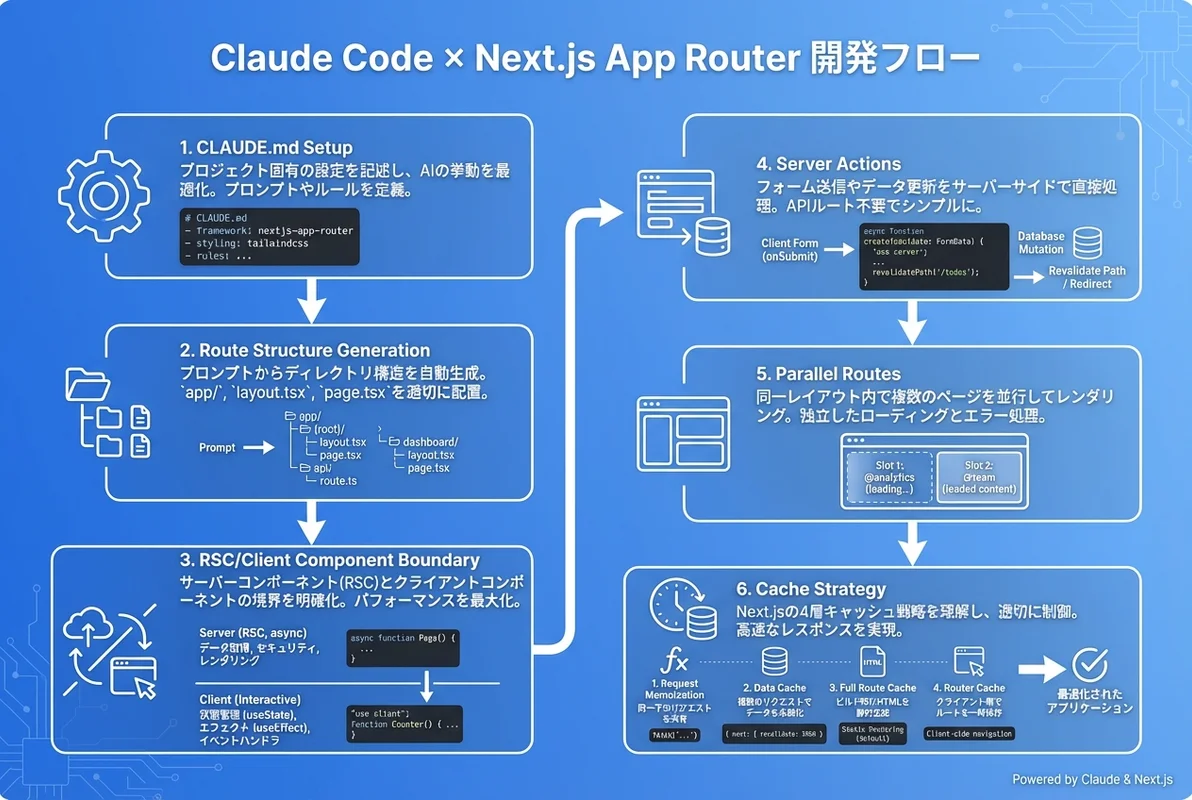
- Claude CodeはNext.js App Routerの複雑なファイル規約(layout/page/loading/error)を理解し、正確なルーティング構造を自動生成する
- React Server Components(RSC)とServer Actionsのコード生成では、クライアント/サーバー境界を適切に判断してくれる
- Parallel Routes・Intercepting Routes・Route Groupsなど高度なパターンもプロンプト一つで実装可能
「Next.js App Routerに移行したいけど、ファイル構造やServer Componentsの使い分けが複雑すぎる…」 「RSCとClient Componentsの境界をどこに引けばいいか、毎回迷ってしまう…」
Next.js App Routerは強力なフレームワークですが、その複雑なファイル規約とサーバー/クライアントの境界管理は、多くのエンジニアにとって悩みの種です。Claude Codeを活用すれば、これらの複雑さを大幅に軽減し、App Routerの本来のパワーを引き出した開発が可能になります。
この記事では、Claude Codeを使ったNext.js App Router開発の実践テクニックを、初期セットアップから高度なルーティングパターンまで体系的に解説します。
- Claude CodeでApp Routerプロジェクトを効率的にセットアップする方法
- RSCとClient Componentsの境界を正しく設計するプロンプト術
- Server Actions・Parallel Routes・Route Groupsの実装パターン
- SES現場でのNext.js開発案件に活かせる実践テクニック
Next.js App Routerの複雑さとClaude Codeの相性
App Routerが難しい理由
Next.js App Router(v13以降)は、従来のPages Routerから大幅にアーキテクチャが変更されました。主な複雑さのポイントは以下の通りです。
- ファイル規約の多さ:
page.tsx,layout.tsx,loading.tsx,error.tsx,not-found.tsx,template.tsx,default.tsxなど、特殊ファイルが10種類以上 - Server/Client境界: デフォルトがServer Componentになり、
'use client'ディレクティブの配置が重要に - データフェッチの変遷:
getServerSideProps廃止、async Server Componentsへの移行 - キャッシュ戦略: 4層のキャッシュ(Request Memoization, Data Cache, Full Route Cache, Router Cache)の理解が必要
- ルーティングの高度化: Parallel Routes、Intercepting Routes、Route Groupsなど新概念の追加
Claude Codeが解決する問題
Claude Codeは、これらの複雑さに対して以下の価値を提供します。
| 課題 | Claude Codeの解決策 |
|---|---|
| ファイル規約の暗記 | 適切なファイルを適切な場所に自動生成 |
| Server/Client境界の判断 | コンポーネントの性質に応じて自動で'use client'を付与 |
| データフェッチパターン | async RSC / Server Actions / Route Handlersを使い分け |
| キャッシュ戦略の設定 | revalidateやdynamicの適切な値を提案 |
| TypeScript型定義 | ルートパラメータやフォームデータの型を自動生成 |
CLAUDE.mdでNext.jsプロジェクトを設定する
推奨するCLAUDE.md設定
Claude Codeの動作をNext.jsプロジェクトに最適化するために、CLAUDE.mdに以下の設定を記述します。
# Next.js App Router プロジェクト

## アーキテクチャ
- Next.js 15 + App Router
- React 19 Server Components(デフォルト)
- TypeScript strict mode
- Tailwind CSS v4 for styling
- Drizzle ORM for database

## ファイル規約
- app/ ディレクトリ構造に従う
- Server Componentsがデフォルト。'use client'は必要な場合のみ
- コンポーネントは components/ に集約
- Server Actionsは app/_actions/ に配置
- 型定義は types/ ディレクトリ

## コーディングルール
- データフェッチはasync Server Componentsで行う
- フォーム送信はServer Actionsを使う
- クライアント状態が必要なコンポーネントのみ'use client'
- エラーハンドリングはerror.tsxで統一
- loading.tsxでSuspense境界を設定

## テスト
- Vitest + React Testing Library
- E2E: Playwright
この設定により、Claude Codeは生成するコードの品質を大幅に向上させます。CLAUDE.md活用ガイドも参考にしてください。
プロジェクト初期化プロンプト
Next.js 15 App Routerプロジェクトを作成して。
以下の構成にしてほしい:
- TypeScript strict mode
- Tailwind CSS v4
- src/app ディレクトリ構造
- 認証(NextAuth.js v5)
- DB: PostgreSQL + Drizzle ORM
- ダッシュボード用のRoute Group: (dashboard)
- 公開ページ用のRoute Group: (public)
- 共通レイアウト(ヘッダー・サイドバー・フッター)
Claude Codeはこのプロンプトから、以下のような構造を自動生成します。
src/app/
├── (dashboard)/
│   ├── layout.tsx          # ダッシュボード用レイアウト(サイドバー付き)
│   ├── dashboard/
│   │   └── page.tsx
│   ├── settings/
│   │   └── page.tsx
│   └── projects/
│       ├── page.tsx
│       └── [id]/
│           └── page.tsx
├── (public)/
│   ├── layout.tsx          # 公開ページ用レイアウト
│   ├── page.tsx            # トップページ
│   ├── about/
│   │   └── page.tsx
│   └── pricing/
│       └── page.tsx
├── api/
│   └── auth/
│       └── [...nextauth]/
│           └── route.ts
├── layout.tsx              # ルートレイアウト
├── not-found.tsx
└── global-error.tsx
React Server Components(RSC)の活用
Server/Client境界の設計プロンプト
RSCで最も重要なのは、どのコンポーネントをServer Componentにし、どれをClient Componentにするかの判断です。Claude Codeには以下のようなプロンプトで明確に指示できます。
ユーザープロフィールページを作成して。以下の要件で:

Server Components(データフェッチ担当):
- UserProfilePage: DBからユーザー情報を取得
- UserPosts: ユーザーの投稿一覧を取得
- UserStats: 統計情報を取得

Client Components(インタラクション担当):
- EditProfileForm: プロフィール編集フォーム(useState使用)
- FollowButton: フォローボタン(楽観的更新)
- PostFilter: 投稿のフィルタリングUI
Claude Codeが生成するServer Componentの例:
// app/users/[id]/page.tsx — Server Component(デフォルト)
import { notFound } from 'next/navigation';
import { db } from '@/lib/db';
import { users } from '@/lib/db/schema';
import { eq } from 'drizzle-orm';
import { UserStats } from './_components/user-stats';
import { UserPosts } from './_components/user-posts';
import { EditProfileForm } from './_components/edit-profile-form';

interface Props {
  params: Promise<{ id: string }>;
}

export default async function UserProfilePage({ params }: Props) {
  const { id } = await params;
  const user = await db.query.users.findFirst({
    where: eq(users.id, id),
    with: { profile: true },
  });

  if (!user) notFound();

  return (
    <div className="max-w-4xl mx-auto p-6">
      <h1 className="text-3xl font-bold">{user.name}</h1>

      {/* Server Component: データフェッチを含む */}
      <UserStats userId={user.id} />

      {/* Client Component: フォーム操作が必要 */}
      <EditProfileForm user={user} />

      {/* Server Component: 投稿一覧の取得 */}
      <UserPosts userId={user.id} />
    </div>
  );
}

export async function generateMetadata({ params }: Props) {
  const { id } = await params;
  const user = await db.query.users.findFirst({
    where: eq(users.id, id),
  });
  return {
    title: user ? `${user.name}のプロフィール` : 'ユーザーが見つかりません',
    description: user?.profile?.bio ?? '',
  };
}
対応するClient Componentの例:
// app/users/[id]/_components/edit-profile-form.tsx
'use client';

import { useState, useTransition } from 'react';
import { updateProfile } from '@/app/_actions/user';
import type { User } from '@/types';

export function EditProfileForm({ user }: { user: User }) {
  const [isPending, startTransition] = useTransition();
  const [optimisticName, setOptimisticName] = useState(user.name);

  async function handleSubmit(formData: FormData) {
    const newName = formData.get('name') as string;
    setOptimisticName(newName);

    startTransition(async () => {
      await updateProfile(user.id, formData);
    });
  }

  return (
    <form action={handleSubmit} className="space-y-4">
      <input
        name="name"
        defaultValue={optimisticName}
        className="border rounded px-3 py-2"
      />
      <button
        type="submit"
        disabled={isPending}
        className="bg-blue-600 text-white px-4 py-2 rounded"
      >
        {isPending ? '保存中...' : '保存'}
      </button>
    </form>
  );
}
RSCでよくあるエラーとClaude Codeの対処
Claude Codeは、RSCでよくあるエラーパターンを理解し、適切に回避してくれます。
| エラー | 原因 | Claude Codeの対処 |
|---|---|---|
useState is not defined | Server ComponentでuseStateを使用 | 自動で'use client'を付与するか、設計を分離 |
Event handlers in Server Components | Server ComponentにonClick等を配置 | インタラクション部分をClient Componentに抽出 |
Async Client Component | Client Componentをasyncにした | データフェッチをServer Componentに移動 |
Serialization error | PropsにDate/Map等を渡した | シリアライズ可能な形式に変換 |
Server Actionsの実装パターン
フォーム送信の基本パターン
Server Actionsは、Next.js App Routerにおけるデータ変更の推奨パターンです。Claude Codeに以下のように指示すると、型安全なServer Actionsを生成してくれます。
お問い合わせフォームのServer Actionを作成して。
- Zod でバリデーション
- DB保存 + メール送信
- エラーハンドリング(バリデーションエラー / サーバーエラー)
- 楽観的更新対応
- revalidatePathで一覧ページを更新
生成されるServer Action:
// app/_actions/contact.ts
'use server';

import { z } from 'zod';
import { db } from '@/lib/db';
import { contacts } from '@/lib/db/schema';
import { revalidatePath } from 'next/cache';
import { sendEmail } from '@/lib/email';

const contactSchema = z.object({
  name: z.string().min(1, '名前は必須です').max(100),
  email: z.string().email('有効なメールアドレスを入力してください'),
  company: z.string().optional(),
  message: z.string().min(10, 'メッセージは10文字以上で入力してください').max(5000),
  category: z.enum(['general', 'support', 'partnership']),
});

export type ContactFormState = {
  success: boolean;
  errors?: Record<string, string[]>;
  message?: string;
};

export async function submitContact(
  prevState: ContactFormState,
  formData: FormData
): Promise<ContactFormState> {
  const rawData = Object.fromEntries(formData);

  const result = contactSchema.safeParse(rawData);
  if (!result.success) {
    return {
      success: false,
      errors: result.error.flatten().fieldErrors,
    };
  }

  try {
    const [contact] = await db.insert(contacts).values({
      ...result.data,
      createdAt: new Date(),
    }).returning();

    await sendEmail({
      to: '[email protected]',
      subject: `お問い合わせ: ${result.data.category}`,
      body: `${result.data.name}様からのお問い合わせ\n\n${result.data.message}`,
    });

    revalidatePath('/admin/contacts');

    return {
      success: true,
      message: 'お問い合わせを受け付けました',
    };
  } catch (error) {
    console.error('Contact submission error:', error);
    return {
      success: false,
      message: 'サーバーエラーが発生しました。時間をおいて再度お試しください。',
    };
  }
}
useActionState と useOptimistic の活用
React 19 の useActionState と useOptimistic を組み合わせたパターンも、Claude Codeは正確に生成します。
// components/contact-form.tsx
'use client';

import { useActionState, useOptimistic } from 'react';
import { submitContact, type ContactFormState } from '@/app/_actions/contact';

const initialState: ContactFormState = { success: false };

export function ContactForm() {
  const [state, formAction, isPending] = useActionState(submitContact, initialState);

  return (
    <form action={formAction} className="space-y-6">
      {state.message && (
        <div className={`p-4 rounded ${state.success ? 'bg-green-50 text-green-800' : 'bg-red-50 text-red-800'}`}>
          {state.message}
        </div>
      )}

      <div>
        <label htmlFor="name" className="block text-sm font-medium">名前</label>
        <input id="name" name="name" required className="mt-1 block w-full rounded border px-3 py-2" />
        {state.errors?.name && (
          <p className="mt-1 text-sm text-red-600">{state.errors.name[0]}</p>
        )}
      </div>

      <div>
        <label htmlFor="email" className="block text-sm font-medium">メールアドレス</label>
        <input id="email" name="email" type="email" required className="mt-1 block w-full rounded border px-3 py-2" />
        {state.errors?.email && (
          <p className="mt-1 text-sm text-red-600">{state.errors.email[0]}</p>
        )}
      </div>

      <div>
        <label htmlFor="category" className="block text-sm font-medium">カテゴリ</label>
        <select id="category" name="category" className="mt-1 block w-full rounded border px-3 py-2">
          <option value="general">一般的なお問い合わせ</option>
          <option value="support">技術サポート</option>
          <option value="partnership">パートナーシップ</option>
        </select>
      </div>

      <div>
        <label htmlFor="message" className="block text-sm font-medium">メッセージ</label>
        <textarea id="message" name="message" rows={5} required className="mt-1 block w-full rounded border px-3 py-2" />
        {state.errors?.message && (
          <p className="mt-1 text-sm text-red-600">{state.errors.message[0]}</p>
        )}
      </div>

      <button
        type="submit"
        disabled={isPending}
        className="w-full bg-blue-600 text-white py-3 rounded font-semibold hover:bg-blue-700 disabled:opacity-50"
      >
        {isPending ? '送信中...' : '送信する'}
      </button>
    </form>
  );
}
Parallel RoutesとIntercepting Routes
Parallel Routesの実装
Parallel Routesは、同一レイアウト内で複数のページを同時にレンダリングする強力な機能です。ダッシュボード画面での活用例をClaude Codeに指示してみましょう。
ダッシュボードにParallel Routesを実装して。
左カラム: @analytics(グラフ表示)
右カラム: @notifications(通知一覧)
モーダル: @modal(詳細表示)
各スロットに独立したloading.tsxとerror.tsxを配置
生成されるファイル構造:
src/app/(dashboard)/dashboard/
├── layout.tsx              # Parallel Routesのスロットを受け取る
├── page.tsx                # メインコンテンツ
├── @analytics/
│   ├── page.tsx           # 分析グラフ
│   ├── loading.tsx        # 分析データ読み込み中
│   ├── error.tsx          # 分析エラー
│   └── default.tsx        # デフォルト表示
├── @notifications/
│   ├── page.tsx           # 通知一覧
│   ├── loading.tsx        # 通知読み込み中
│   ├── error.tsx          # 通知エラー
│   └── default.tsx        # デフォルト表示
└── @modal/
    ├── default.tsx        # モーダル非表示時
    └── (..)projects/[id]/
        └── page.tsx       # プロジェクト詳細モーダル
レイアウトファイル:
// src/app/(dashboard)/dashboard/layout.tsx
export default function DashboardLayout({
  children,
  analytics,
  notifications,
  modal,
}: {
  children: React.ReactNode;
  analytics: React.ReactNode;
  notifications: React.ReactNode;
  modal: React.ReactNode;
}) {
  return (
    <div className="grid grid-cols-12 gap-6 p-6">
      {/* メインコンテンツ */}
      <main className="col-span-8">{children}</main>

      {/* サイドパネル */}
      <aside className="col-span-4 space-y-6">
        <section className="bg-white rounded-lg shadow p-4">
          <h2 className="text-lg font-semibold mb-4">📊 アナリティクス</h2>
          {analytics}
        </section>
        <section className="bg-white rounded-lg shadow p-4">
          <h2 className="text-lg font-semibold mb-4">🔔 通知</h2>
          {notifications}
        </section>
      </aside>

      {/* モーダルスロット */}
      {modal}
    </div>
  );
}
Intercepting Routesでモーダルを実現
InstagramライクなモーダルUIを実装するパターンです。
// src/app/(dashboard)/dashboard/@modal/(..)projects/[id]/page.tsx
import { db } from '@/lib/db';
import { projects } from '@/lib/db/schema';
import { eq } from 'drizzle-orm';
import { Modal } from '@/components/modal';

interface Props {
  params: Promise<{ id: string }>;
}

export default async function ProjectModal({ params }: Props) {
  const { id } = await params;
  const project = await db.query.projects.findFirst({
    where: eq(projects.id, id),
  });

  if (!project) return null;

  return (
    <Modal>
      <h2 className="text-2xl font-bold">{project.name}</h2>
      <p className="mt-2 text-gray-600">{project.description}</p>
      <div className="mt-4 grid grid-cols-2 gap-4">
        <div className="bg-gray-50 p-3 rounded">
          <span className="text-sm text-gray-500">ステータス</span>
          <p className="font-semibold">{project.status}</p>
        </div>
        <div className="bg-gray-50 p-3 rounded">
          <span className="text-sm text-gray-500">メンバー</span>
          <p className="font-semibold">{project.memberCount}人</p>
        </div>
      </div>
    </Modal>
  );
}
キャッシュ戦略の最適化
Claude Codeにキャッシュを設計させる
Next.js App Routerの4層キャッシュは非常に複雑ですが、Claude Codeに適切なプロンプトを与えれば、最適なキャッシュ戦略を設計してくれます。
以下のページのキャッシュ戦略を設計して:
- トップページ: 1時間キャッシュ、ISR
- ユーザーダッシュボード: キャッシュなし、リアルタイム
- ブログ記事: ビルド時静的生成、更新時ISR
- 商品一覧: 5分キャッシュ、タグベースrevalidation
- 検索結果: キャッシュなし
Claude Codeが生成するキャッシュ設定:
// app/(public)/page.tsx — トップページ(ISR: 1時間)
export const revalidate = 3600;

export default async function HomePage() {
  const featured = await fetch('https://api.example.com/featured', {
    next: { revalidate: 3600 },
  }).then(r => r.json());

  return <FeaturedSection items={featured} />;
}

// app/(dashboard)/dashboard/page.tsx — ダッシュボード(動的)
export const dynamic = 'force-dynamic';

export default async function DashboardPage() {
  const stats = await db.query.stats.findMany({
    orderBy: desc(stats.updatedAt),
  });
  return <DashboardView stats={stats} />;
}

// app/(public)/blog/[slug]/page.tsx — ブログ(静的 + ISR)
export async function generateStaticParams() {
  const posts = await db.query.posts.findMany({
    columns: { slug: true },
  });
  return posts.map(p => ({ slug: p.slug }));
}

export const revalidate = 86400; // 24時間

// app/(public)/products/page.tsx — 商品一覧(タグベースrevalidation)
export default async function ProductsPage() {
  const products = await fetch('https://api.example.com/products', {
    next: { tags: ['products'], revalidate: 300 },
  }).then(r => r.json());

  return <ProductGrid products={products} />;
}

// 商品更新時のrevalidation
// app/_actions/product.ts
'use server';
import { revalidateTag } from 'next/cache';

export async function updateProduct(id: string, data: FormData) {
  await db.update(products).set({ /* ... */ }).where(eq(products.id, id));
  revalidateTag('products');
}
ミドルウェアと認証パターン
NextAuth.js v5との統合
認証フローはApp Routerで特に設計が重要な部分です。Claude Codeに以下のように指示すると、NextAuth.js v5との統合コードを生成してくれます。
NextAuth.js v5で認証を実装して。
- GitHub / Google OAuth
- ミドルウェアでダッシュボードを保護
- セッション情報をServer Componentから取得
- ロールベースアクセス制御(admin/member/viewer)
// middleware.ts
import { auth } from '@/lib/auth';
import { NextResponse } from 'next/server';
export default auth((req) => {
const isAuthenticated = !!req.auth;
const isAuthPage = req.nextUrl.pathname.startsWith('/auth');
const isDashboard = req.nextUrl.pathname.startsWith('/dashboard');
const isAdmin = req.nextUrl.pathname.startsWith('/admin');
// 未認証ユーザーがダッシュボードにアクセス → ログインページ
if (isDashboard && !isAuthenticated) {
return NextResponse.redirect(new URL('/auth/signin', req.url));
}
// 管理者ページのアクセス制御
if (isAdmin && req.auth?.user?.role !== 'admin') {
return NextResponse.redirect(new URL('/dashboard', req.url));
}
// 認証済みユーザーがログインページにアクセス → ダッシュボード
if (isAuthPage && isAuthenticated) {
return NextResponse.redirect(new URL('/dashboard', req.url));
}
return NextResponse.next();
});
export const config = {
matcher: ['/dashboard/:path*', '/admin/:path*', '/auth/:path*'],
};SES現場でのNext.js App Router開発
よくある案件パターンとClaude Codeの活用
SES現場でNext.js App Routerを使う案件は増加傾向にあります。以下のパターンでClaude Codeが特に威力を発揮します。
1. レガシーPages Router → App Router移行
Pages RouterのこのコンポーネントをApp Routerに移行して。
getServerSideProps → async Server Component
useRouter → useRouter (next/navigation)
Link → Link (変更なし)
APIルート → Route Handler
2. 管理画面(ダッシュボード)開発
SES案件で最も多いパターンの一つ。Claude Codeで以下を一気に生成できます。
- CRUD画面のフルセット(一覧・詳細・作成・編集・削除)
- データテーブル(ソート・フィルタ・ページネーション)
- フォームバリデーション(Zod + Server Actions)
- 権限管理(ロールベース)
3. マルチテナントSaaS
マルチテナント対応のSaaSアプリ構造を作成して。
- /[tenant]/dashboard — テナント別ダッシュボード
- テナント解決はミドルウェアでサブドメインから
- テナントごとのDB分離(スキーマレベル)
- 共通管理画面(/admin)はスーパーアドミンのみ
単価への影響
Next.js App Routerのスキルは、SES市場で高い評価を得ています。
| スキルセット | 月額単価相場(2026年) |
|---|---|
| React(基本) | 60〜75万円 |
| Next.js Pages Router | 70〜85万円 |
| Next.js App Router | 75〜95万円 |
| App Router + RSC + Server Actions | 80〜100万円 |
| 上記 + Claude Code活用 | 85〜110万円 |
Claude Code入門ガイドと合わせて、App Routerのスキルを身につけることで、SES市場での競争力を大幅に高められます。
よくあるプロンプトテンプレート集
CRUD画面生成
[モデル名]のCRUD画面をApp Routerで作成して。
- 一覧: Server Component、ページネーション、検索フィルタ付き
- 詳細: Server Component、関連データもfetch
- 作成/編集: Client Component、Server Action、Zodバリデーション
- 削除: Server Actionで確認ダイアログ付き
- loading.tsx / error.tsx / not-found.tsx も配置
API Route Handler生成
REST APIのRoute Handlerを作成して。
- GET /api/users — 一覧(ページネーション・フィルタ対応)
- GET /api/users/[id] — 詳細
- POST /api/users — 作成(Zodバリデーション)
- PATCH /api/users/[id] — 更新
- DELETE /api/users/[id] — 削除
- 各エンドポイントに認証チェック
- エラーレスポンスは統一フォーマット
- OpenAPI/Swagger型コメント付き
パフォーマンス最適化
このページのパフォーマンスを最適化して。
- 画像: next/imageに変換、適切なsizes設定
- フォント: next/fontでGoogleフォント最適化
- コンポーネント: dynamic importで遅延読み込み
- Suspense境界を適切に配置
- メタデータ: generateMetadata でSEO最適化
まとめ — App Router開発の生産性を最大化する
Claude Code × Next.js App Routerの組み合わせは、現代のフルスタック開発において最も生産性の高いワークフローの一つです。
- ファイル規約の複雑さをClaude Codeが吸収し、正確なディレクトリ構造を自動生成
- Server/Client境界の判断をAIが支援し、RSCのメリットを最大化
- Server Actionsのボイラープレートを瞬時に生成し、型安全なデータ変更を実現
- Parallel Routes・Intercepting Routesなどの高度なパターンもプロンプトで実装
Claude Codeフロントエンド開発ガイドやTypeScript開発ガイドと組み合わせて学習を進め、SES現場でのNext.js App Router開発を効率化してください。Claude Codeのプロンプト設計術も合わせて参考にすることで、より精度の高いコード生成が可能になります。