「try-catchを書くのは簡単だけど、正しく設計するのは難しい」——エラーハンドリングはすべてのエンジニアが直面する課題です。
Claude Codeを活用すれば、プロジェクト全体のエラーハンドリング戦略を一貫性のある形で設計・実装できます。 本記事では、Claude Codeによるエラーハンドリングの自動化テクニックを、実際のコード例とともに徹底解説します。
この記事を3秒でまとめると
- Claude Codeでエラーハンドリングの設計パターンを自動生成し、コード品質を向上
- リトライ戦略・サーキットブレーカー・エラー境界の実装を効率化
- SES現場でのAPI連携・DB接続・外部サービス統合のエラー処理を標準化
なぜエラーハンドリングが重要なのか
エラーハンドリングは「動くコード」と「信頼できるコード」を分ける境界線です。SESプロジェクトでは、以下の理由でエラー処理の品質が特に重要になります。
SES現場でのエラーハンドリングの課題
SESエンジニアが直面するエラーハンドリングの課題は多岐にわたります。
- 外部API連携: 複数のサービスと連携するシステムでは、各APIのエラーレスポンスが異なる
- レガシーシステム対応: 既存システムのエラーコード体系が不統一
- チーム間の規約差異: プロジェクトごとにエラー処理のルールが異なる
- ログ設計の不備: エラーが発生しても、原因特定に必要な情報がログに残っていない
Claude Codeを使えば、これらの課題に対して一貫性のあるエラーハンドリング戦略を効率的に実装できます。
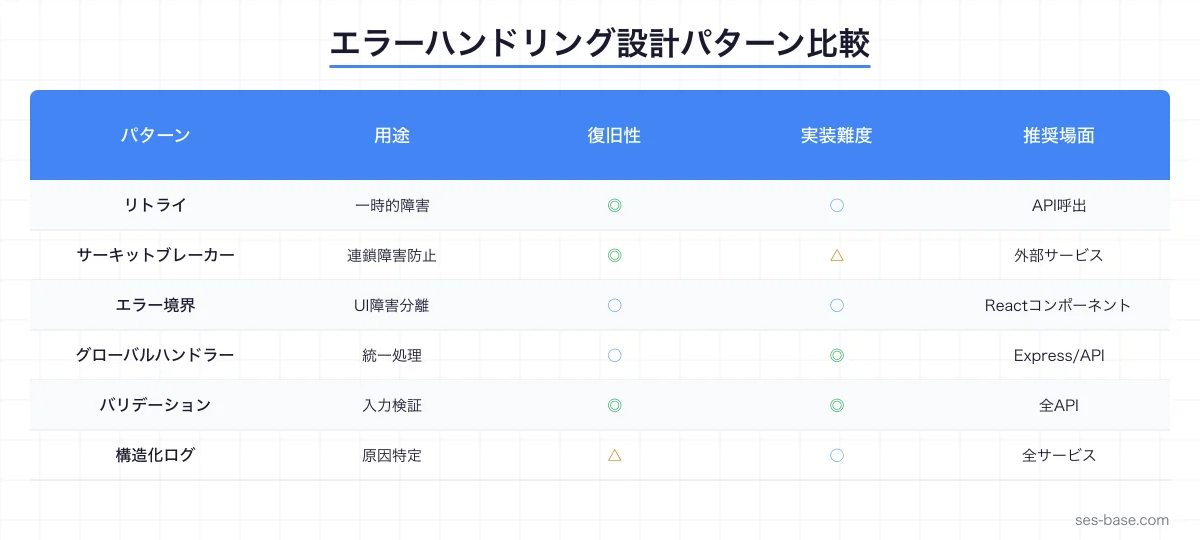
Claude Codeでエラーハンドリングを設計する基本アプローチ
エラー分類の自動化
まず、Claude Codeにプロジェクトのエラーを体系的に分類させましょう。
プロジェクト内のすべてのエラーハンドリングを分析して、以下の4カテゴリに分類してください:
1. リカバリ可能な一時的エラー(ネットワークタイムアウト、レートリミット等)
2. リカバリ可能な永続的エラー(バリデーションエラー、認証エラー等)
3. リカバリ不可能なエラー(データ破損、設定ミス等)
4. ビジネスロジックエラー(残高不足、在庫切れ等)
Claude Codeは、コードベース全体をスキャンして、各try-catchブロックのエラー処理を分類し、改善提案を行います。
カスタムエラークラスの設計
プロジェクト固有のエラークラス階層を、Claude Codeに設計させるのが効果的です。
// Claude Codeに生成させるカスタムエラー階層
export class AppError extends Error {
  constructor(
    message: string,
    public readonly code: string,
    public readonly statusCode: number,
    public readonly isOperational: boolean = true,
    public readonly context?: Record<string, unknown>
  ) {
    super(message);
    this.name = this.constructor.name;
    Error.captureStackTrace(this, this.constructor);
  }
}

export class ValidationError extends AppError {
  constructor(message: string, context?: Record<string, unknown>) {
    super(message, 'VALIDATION_ERROR', 400, true, context);
  }
}

export class AuthenticationError extends AppError {
  constructor(message: string, context?: Record<string, unknown>) {
    super(message, 'AUTH_ERROR', 401, true, context);
  }
}

export class AuthorizationError extends AppError {
  constructor(message: string, context?: Record<string, unknown>) {
    super(message, 'FORBIDDEN', 403, true, context);
  }
}

export class NotFoundError extends AppError {
  constructor(resource: string, id: string) {
    super(`${resource} not found: ${id}`, 'NOT_FOUND', 404, true, { resource, id });
  }
}

export class ExternalServiceError extends AppError {
  constructor(service: string, message: string, context?: Record<string, unknown>) {
    super(`External service error [${service}]: ${message}`, 'EXTERNAL_ERROR', 502, true, {
      service,
      ...context,
    });
  }
}

export class DatabaseError extends AppError {
  constructor(operation: string, message: string, context?: Record<string, unknown>) {
    super(`Database error [${operation}]: ${message}`, 'DB_ERROR', 500, true, {
      operation,
      ...context,
    });
  }
}
Claude Codeへのプロンプト例:
プロジェクト内のエラー発生パターンを分析して、カスタムエラークラスの階層を設計してください。
各エラークラスには以下を含めてください:
- HTTPステータスコード
- エラーコード(文字列)
- オペレーショナルかどうかのフラグ
- コンテキスト情報
リトライ戦略の実装
指数バックオフ付きリトライ
外部API呼び出しには、リトライ戦略が不可欠です。Claude Codeで以下のようなリトライユーティリティを生成しましょう。
interface RetryOptions {
  maxRetries: number;
  baseDelay: number;
  maxDelay: number;
  backoffFactor: number;
  retryableErrors?: string[];
  onRetry?: (error: Error, attempt: number) => void;
}

const defaultOptions: RetryOptions = {
  maxRetries: 3,
  baseDelay: 1000,
  maxDelay: 30000,
  backoffFactor: 2,
};

async function withRetry<T>(
  fn: () => Promise<T>,
  options: Partial<RetryOptions> = {}
): Promise<T> {
  const opts = { ...defaultOptions, ...options };
  let lastError: Error;

  for (let attempt = 1; attempt <= opts.maxRetries + 1; attempt++) {
    try {
      return await fn();
    } catch (error) {
      lastError = error as Error;

      if (attempt > opts.maxRetries) break;

      // リトライ可能なエラーかチェック
      if (opts.retryableErrors && !isRetryable(error, opts.retryableErrors)) {
        throw error;
      }

      const delay = Math.min(
        opts.baseDelay * Math.pow(opts.backoffFactor, attempt - 1),
        opts.maxDelay
      );

      // ジッター(±20%)を追加してサンダリングハード問題を回避
      const jitter = delay * (0.8 + Math.random() * 0.4);

      opts.onRetry?.(lastError, attempt);

      await new Promise((resolve) => setTimeout(resolve, jitter));
    }
  }

  throw lastError!;
}

function isRetryable(error: unknown, retryableErrors: string[]): boolean {
  if (error instanceof AppError) {
    return retryableErrors.includes(error.code);
  }
  return true; // 不明なエラーはリトライ可能とみなす
}
サーキットブレーカーパターン
外部サービスの障害が連鎖しないよう、サーキットブレーカーを実装します。
enum CircuitState {
  CLOSED = 'CLOSED',     // 正常動作中
  OPEN = 'OPEN',         // 障害検出・リクエスト遮断中
  HALF_OPEN = 'HALF_OPEN' // 回復確認中
}

class CircuitBreaker {
  private state: CircuitState = CircuitState.CLOSED;
  private failureCount = 0;
  private lastFailureTime = 0;
  private successCount = 0;

  constructor(
    private readonly options: {
      failureThreshold: number;  // 障害判定の閾値
      resetTimeout: number;      // OPEN→HALF_OPEN の待機時間(ms)
      successThreshold: number;  // HALF_OPEN→CLOSED に必要な成功数
    }
  ) {}

  async execute<T>(fn: () => Promise<T>): Promise<T> {
    if (this.state === CircuitState.OPEN) {
      if (Date.now() - this.lastFailureTime >= this.options.resetTimeout) {
        this.state = CircuitState.HALF_OPEN;
        this.successCount = 0;
      } else {
        throw new ExternalServiceError(
          'CircuitBreaker',
          'Circuit is OPEN — requests are blocked'
        );
      }
    }

    try {
      const result = await fn();
      this.onSuccess();
      return result;
    } catch (error) {
      this.onFailure();
      throw error;
    }
  }

  private onSuccess(): void {
    if (this.state === CircuitState.HALF_OPEN) {
      this.successCount++;
      if (this.successCount >= this.options.successThreshold) {
        this.state = CircuitState.CLOSED;
        this.failureCount = 0;
      }
    } else {
      this.failureCount = 0;
    }
  }

  private onFailure(): void {
    this.failureCount++;
    this.lastFailureTime = Date.now();
    if (this.failureCount >= this.options.failureThreshold) {
      this.state = CircuitState.OPEN;
    }
  }

  getState(): CircuitState {
    return this.state;
  }
}
Claude Codeへのプロンプト例:
外部API呼び出し箇所をすべて洗い出し、以下の基準でリトライとサーキットブレーカーを適用してください:
- 冪等なAPI: 指数バックオフ付きリトライ(最大3回)
- 非冪等なAPI: リトライなし、サーキットブレーカーのみ
- バッチ処理: リトライ+部分成功の結果返却
グローバルエラーハンドラーの構築
Express.jsでのエラーハンドリングミドルウェア
SES案件で頻繁に使われるExpress.jsのエラーハンドリングミドルウェアをClaude Codeで構築します。
import { Request, Response, NextFunction } from 'express';
import { AppError } from './errors';
import { logger } from './logger';

// 非同期ハンドラーのラッパー
export const asyncHandler = (fn: Function) => {
  return (req: Request, res: Response, next: NextFunction) => {
    Promise.resolve(fn(req, res, next)).catch(next);
  };
};

// グローバルエラーハンドラー
export const globalErrorHandler = (
  err: Error,
  req: Request,
  res: Response,
  _next: NextFunction
): void => {
  // AppError(オペレーショナルエラー)の場合
  if (err instanceof AppError && err.isOperational) {
    logger.warn('Operational error', {
      code: err.code,
      message: err.message,
      statusCode: err.statusCode,
      context: err.context,
      path: req.path,
      method: req.method,
    });

    res.status(err.statusCode).json({
      status: 'error',
      code: err.code,
      message: err.message,
      ...(process.env.NODE_ENV === 'development' && { stack: err.stack }),
    });
    return;
  }

  // 予期しないエラー(プログラミングエラー)の場合
  logger.error('Unexpected error', {
    error: err.message,
    stack: err.stack,
    path: req.path,
    method: req.method,
    body: req.body,
    query: req.query,
  });

  res.status(500).json({
    status: 'error',
    code: 'INTERNAL_ERROR',
    message: 'An unexpected error occurred',
    ...(process.env.NODE_ENV === 'development' && {
      originalMessage: err.message,
      stack: err.stack,
    }),
  });
};

// 404ハンドラー
export const notFoundHandler = (req: Request, _res: Response, next: NextFunction): void => {
  next(new NotFoundError('Route', req.originalUrl));
};
Reactでのエラーバウンダリ
フロントエンド開発では、Reactのエラーバウンダリも重要です。
import React, { Component, ErrorInfo, ReactNode } from 'react';

interface ErrorBoundaryProps {
  children: ReactNode;
  fallback?: ReactNode;
  onError?: (error: Error, errorInfo: ErrorInfo) => void;
}

interface ErrorBoundaryState {
  hasError: boolean;
  error: Error | null;
}

class ErrorBoundary extends Component<ErrorBoundaryProps, ErrorBoundaryState> {
  constructor(props: ErrorBoundaryProps) {
    super(props);
    this.state = { hasError: false, error: null };
  }

  static getDerivedStateFromError(error: Error): ErrorBoundaryState {
    return { hasError: true, error };
  }

  componentDidCatch(error: Error, errorInfo: ErrorInfo): void {
    // エラーログをサービスに送信
    this.props.onError?.(error, errorInfo);
    console.error('ErrorBoundary caught:', error, errorInfo);
  }

  render(): ReactNode {
    if (this.state.hasError) {
      return this.props.fallback || (
        <div role="alert" style={{ padding: '2rem', textAlign: 'center' }}>
          <h2>エラーが発生しました</h2>
          <p>ページをリロードしてもう一度お試しください。</p>
          <button onClick={() => this.setState({ hasError: false, error: null })}>
            再試行
          </button>
        </div>
      );
    }

    return this.props.children;
  }
}

export default ErrorBoundary;
構造化ログとエラートラッキング
構造化ログの設計
エラーが発生した際に、原因を素早く特定するための構造化ログを設計します。
import winston from 'winston';

const logger = winston.createLogger({
  level: process.env.LOG_LEVEL || 'info',
  format: winston.format.combine(
    winston.format.timestamp(),
    winston.format.errors({ stack: true }),
    winston.format.json()
  ),
  defaultMeta: {
    service: process.env.SERVICE_NAME || 'api',
    environment: process.env.NODE_ENV || 'development',
  },
  transports: [
    new winston.transports.Console({
      format: winston.format.combine(
        winston.format.colorize(),
        winston.format.simple()
      ),
    }),
  ],
});

// リクエストコンテキスト付きロガー
export function createRequestLogger(req: Request) {
  return logger.child({
    requestId: req.headers['x-request-id'] || crypto.randomUUID(),
    userId: (req as any).user?.id,
    path: req.path,
    method: req.method,
    ip: req.ip,
  });
}
エラーモニタリングとアラート
SES現場では、エラーの監視とアラートの仕組みが不可欠です。Claude Codeで以下のようなエラーモニタリング基盤を構築できます。
// エラーメトリクス収集
class ErrorMetrics {
  private counters = new Map<string, number>();
  private lastReset = Date.now();

  increment(errorCode: string): void {
    const count = this.counters.get(errorCode) || 0;
    this.counters.set(errorCode, count + 1);
  }

  getMetrics(): Record<string, number> {
    return Object.fromEntries(this.counters);
  }

  // 閾値を超えたエラーをアラート対象として返却
  getAlerts(threshold: number): string[] {
    return Array.from(this.counters.entries())
      .filter(([_, count]) => count >= threshold)
      .map(([code]) => code);
  }

  reset(): void {
    this.counters.clear();
    this.lastReset = Date.now();
  }
}
バリデーションエラーの統一設計
Zodを使ったバリデーション
TypeScriptプロジェクトでは、Zodによるバリデーションが標準的です。Claude Codeで統一的なバリデーション層を構築しましょう。
import { z, ZodError, ZodSchema } from 'zod';

// バリデーションエラーのフォーマット
function formatZodError(error: ZodError): Record<string, string[]> {
  const formatted: Record<string, string[]> = {};

  for (const issue of error.issues) {
    const path = issue.path.join('.');
    if (!formatted[path]) {
      formatted[path] = [];
    }
    formatted[path].push(issue.message);
  }

  return formatted;
}

// バリデーションミドルウェア
export function validate(schema: ZodSchema) {
  return (req: Request, _res: Response, next: NextFunction) => {
    try {
      schema.parse({
        body: req.body,
        query: req.query,
        params: req.params,
      });
      next();
    } catch (error) {
      if (error instanceof ZodError) {
        const details = formatZodError(error);
        next(new ValidationError('Validation failed', { details }));
      } else {
        next(error);
      }
    }
  };
}

// 使用例:ユーザー作成API
const createUserSchema = z.object({
  body: z.object({
    name: z.string().min(1, '名前は必須です').max(100, '名前は100文字以内で入力してください'),
    email: z.string().email('有効なメールアドレスを入力してください'),
    age: z.number().int().min(18, '18歳以上である必要があります').optional(),
  }),
});

app.post('/api/users', validate(createUserSchema), asyncHandler(async (req, res) => {
  const user = await userService.create(req.body);
  res.status(201).json(user);
}));
データベースエラーの処理パターン
トランザクションのエラーハンドリング
データベース操作では、トランザクションの整合性を保つエラー処理が重要です。
import { PrismaClient, Prisma } from '@prisma/client';

const prisma = new PrismaClient();

async function transferFunds(
  fromAccountId: string,
  toAccountId: string,
  amount: number
): Promise<void> {
  try {
    await prisma.$transaction(async (tx) => {
      // 送金元の残高確認
      const fromAccount = await tx.account.findUnique({
        where: { id: fromAccountId },
      });

      if (!fromAccount) {
        throw new NotFoundError('Account', fromAccountId);
      }

      if (fromAccount.balance < amount) {
        throw new ValidationError('Insufficient balance', {
          currentBalance: fromAccount.balance,
          requestedAmount: amount,
        });
      }

      // 残高の更新
      await tx.account.update({
        where: { id: fromAccountId },
        data: { balance: { decrement: amount } },
      });

      await tx.account.update({
        where: { id: toAccountId },
        data: { balance: { increment: amount } },
      });

      // 取引履歴の記録
      await tx.transaction.create({
        data: {
          fromAccountId,
          toAccountId,
          amount,
          type: 'TRANSFER',
        },
      });
    });
  } catch (error) {
    if (error instanceof AppError) throw error;

    if (error instanceof Prisma.PrismaClientKnownRequestError) {
      switch (error.code) {
        case 'P2025':
          throw new NotFoundError('Record', 'unknown');
        case 'P2002':
          throw new ValidationError('Duplicate entry', { field: error.meta?.target });
        default:
          throw new DatabaseError('transaction', error.message, { prismaCode: error.code });
      }
    }

    throw new DatabaseError('transferFunds', (error as Error).message);
  }
}
コネクションエラーのリカバリ
データベース接続が不安定な場合のリカバリ戦略も重要です。
class DatabaseConnectionManager {
  private retryCount = 0;
  private readonly maxRetries = 5;
  private readonly baseDelay = 1000;

  async getConnection(): Promise<PrismaClient> {
    while (this.retryCount < this.maxRetries) {
      try {
        await prisma.$connect();
        this.retryCount = 0;
        return prisma;
      } catch (error) {
        this.retryCount++;
        const delay = this.baseDelay * Math.pow(2, this.retryCount - 1);

        logger.warn('Database connection failed, retrying...', {
          attempt: this.retryCount,
          maxRetries: this.maxRetries,
          nextRetryIn: delay,
        });

        if (this.retryCount >= this.maxRetries) {
          throw new DatabaseError(
            'connect',
            `Failed to connect after ${this.maxRetries} attempts`,
            { lastError: (error as Error).message }
          );
        }

        await new Promise((resolve) => setTimeout(resolve, delay));
      }
    }

    throw new DatabaseError('connect', 'Max retries exceeded');
  }
}
Claude Codeを使ったエラーハンドリングの改善ワークフロー
既存コードの分析と改善提案
Claude Codeに以下のプロンプトを投げることで、既存コードベースのエラーハンドリングを一括改善できます。
以下の手順でプロジェクトのエラーハンドリングを改善してください:

1. 全ファイルのtry-catchブロックを検索
2. 以下の問題パターンを検出:
   - catch(e) { } の空キャッチ
   - console.logのみのエラー処理
   - エラーの型チェックなしの処理
   - リソースのクリーンアップが漏れている箇所
3. 各問題箇所に対する修正案を提示
4. 修正の優先度(High/Medium/Low)を判定
CLAUDE.mdでのエラーハンドリング規約
プロジェクトのCLAUDE.mdにエラーハンドリング規約を定義しておくと、Claude Codeが一貫した実装を行います。
## エラーハンドリング規約

- カスタムエラークラス(AppError継承)を使用する
- catch(unknown)でキャッチし、instanceof で型チェックする
- 空のcatchブロックは禁止
- 外部API呼び出しには必ずリトライを実装する
- データベースのトランザクション失敗時はロールバックを確認する
- ログにはrequestId、userId、operationを必ず含める
- 本番環境ではスタックトレースをユーザーに返さないCLAUDE.mdの活用方法で、プロジェクト規約の設定方法を詳しく解説しています。
テスト戦略:エラーケースのテスト
エラーハンドリングのテスト設計
Claude Codeにエラーケースのテストを自動生成させましょう。
import { describe, it, expect, vi } from 'vitest';

describe('withRetry', () => {
  it('should succeed on first attempt', async () => {
    const fn = vi.fn().mockResolvedValue('success');
    const result = await withRetry(fn);
    expect(result).toBe('success');
    expect(fn).toHaveBeenCalledTimes(1);
  });

  it('should retry on transient error and succeed', async () => {
    const fn = vi.fn()
      .mockRejectedValueOnce(new Error('timeout'))
      .mockRejectedValueOnce(new Error('timeout'))
      .mockResolvedValue('success');

    const result = await withRetry(fn, { maxRetries: 3, baseDelay: 10 });
    expect(result).toBe('success');
    expect(fn).toHaveBeenCalledTimes(3);
  });

  it('should throw after max retries', async () => {
    const fn = vi.fn().mockRejectedValue(new Error('persistent failure'));

    await expect(
      withRetry(fn, { maxRetries: 2, baseDelay: 10 })
    ).rejects.toThrow('persistent failure');

    expect(fn).toHaveBeenCalledTimes(3); // 初回 + 2回リトライ
  });

  it('should not retry non-retryable errors', async () => {
    const fn = vi.fn().mockRejectedValue(
      new ValidationError('Invalid input')
    );

    await expect(
      withRetry(fn, {
        maxRetries: 3,
        baseDelay: 10,
        retryableErrors: ['EXTERNAL_ERROR'],
      })
    ).rejects.toThrow('Invalid input');

    expect(fn).toHaveBeenCalledTimes(1);
  });
});

describe('CircuitBreaker', () => {
  it('should open circuit after failure threshold', async () => {
    const breaker = new CircuitBreaker({
      failureThreshold: 3,
      resetTimeout: 5000,
      successThreshold: 2,
    });

    const failingFn = () => Promise.reject(new Error('service down'));

    for (let i = 0; i < 3; i++) {
      await expect(breaker.execute(failingFn)).rejects.toThrow();
    }

    expect(breaker.getState()).toBe(CircuitState.OPEN);

    await expect(breaker.execute(failingFn)).rejects.toThrow(
      'Circuit is OPEN'
    );
  });
});
Claude Codeへのプロンプト:
各エラーハンドリング関数に対して、以下のテストケースを生成してください:
- 正常系
- 一時的エラーからの復帰
- 永続的エラーの適切な処理
- 境界値(リトライ回数上限、タイムアウト等)
- 同時実行時の動作
Claude Codeのテスト自動生成も併せてご覧ください。
SES案件でのエラーハンドリング実践パターン
パターン1:マイクロサービス間通信
SES案件で多いマイクロサービスアーキテクチャでのエラーハンドリングパターンです。
// サービス間通信のエラーハンドラー
class ServiceClient {
  private circuitBreaker: CircuitBreaker;

  constructor(
    private readonly baseUrl: string,
    private readonly serviceName: string
  ) {
    this.circuitBreaker = new CircuitBreaker({
      failureThreshold: 5,
      resetTimeout: 30000,
      successThreshold: 3,
    });
  }

  async request<T>(path: string, options?: RequestInit): Promise<T> {
    return this.circuitBreaker.execute(async () => {
      return withRetry(
        async () => {
          const response = await fetch(`${this.baseUrl}${path}`, {
            ...options,
            headers: {
              'Content-Type': 'application/json',
              'X-Request-Id': crypto.randomUUID(),
              ...options?.headers,
            },
          });

          if (!response.ok) {
            const body = await response.text();
            if (response.status >= 500) {
              throw new ExternalServiceError(this.serviceName, body);
            }
            if (response.status === 429) {
              throw new ExternalServiceError(this.serviceName, 'Rate limited');
            }
            throw new AppError(body, `HTTP_${response.status}`, response.status);
          }

          return response.json() as Promise<T>;
        },
        {
          maxRetries: 3,
          retryableErrors: ['EXTERNAL_ERROR'],
          onRetry: (error, attempt) => {
            logger.warn(`Retrying ${this.serviceName} request`, {
              path,
              attempt,
              error: error.message,
            });
          },
        }
      );
    });
  }
}
パターン2:バッチ処理のエラーハンドリング
大量データ処理でのエラーハンドリングは、部分的な成功を許容する設計が重要です。
interface BatchResult<T> {
  succeeded: T[];
  failed: { item: T; error: Error }[];
  totalProcessed: number;
}

async function processBatch<T>(
  items: T[],
  processor: (item: T) => Promise<void>,
  options: { concurrency: number; continueOnError: boolean } = {
    concurrency: 5,
    continueOnError: true,
  }
): Promise<BatchResult<T>> {
  const result: BatchResult<T> = {
    succeeded: [],
    failed: [],
    totalProcessed: 0,
  };

  // 同時実行数を制限して処理
  const chunks = [];
  for (let i = 0; i < items.length; i += options.concurrency) {
    chunks.push(items.slice(i, i + options.concurrency));
  }

  for (const chunk of chunks) {
    const promises = chunk.map(async (item) => {
      try {
        await processor(item);
        result.succeeded.push(item);
      } catch (error) {
        if (!options.continueOnError) throw error;
        result.failed.push({ item, error: error as Error });
      } finally {
        result.totalProcessed++;
      }
    });

    await Promise.allSettled(promises);
  }

  // 失敗率が高すぎる場合はアラート
  const failureRate = result.failed.length / items.length;
  if (failureRate > 0.1) {
    logger.error('Batch processing failure rate exceeded 10%', {
      total: items.length,
      failed: result.failed.length,
      failureRate: `${(failureRate * 100).toFixed(1)}%`,
    });
  }

  return result;
}
Claude Codeでのマイクロサービス開発でも、サービス間のエラーハンドリングについて詳しく解説しています。
パターン3:非同期処理のエラーハンドリング
Promise.allSettledを活用した非同期エラーハンドリングのパターンです。
// 複数の非同期処理を安全に実行
async function safeParallel<T>(
  tasks: (() => Promise<T>)[],
  options: { timeout?: number } = {}
): Promise<{ results: T[]; errors: Error[] }> {
  const wrappedTasks = tasks.map(async (task, index) => {
    const promise = task();

    if (options.timeout) {
      return Promise.race([
        promise,
        new Promise<never>((_, reject) =>
          setTimeout(
            () => reject(new Error(`Task ${index} timed out after ${options.timeout}ms`)),
            options.timeout
          )
        ),
      ]);
    }

    return promise;
  });

  const outcomes = await Promise.allSettled(wrappedTasks);

  const results: T[] = [];
  const errors: Error[] = [];

  for (const outcome of outcomes) {
    if (outcome.status === 'fulfilled') {
      results.push(outcome.value);
    } else {
      errors.push(outcome.reason);
    }
  }

  return { results, errors };
}
まとめ:Claude Codeでエラーハンドリングを次のレベルへ
エラーハンドリングは「後から追加する」ものではなく、設計段階から組み込むべきアーキテクチャの一部です。Claude Codeを活用することで、以下のメリットが得られます。
- 一貫性: プロジェクト全体で統一されたエラー処理パターンを適用
- 網羅性: エラーケースの洗い出しとテストの自動生成
- 保守性: カスタムエラークラスとグローバルハンドラーによる保守しやすい設計
- 信頼性: リトライ・サーキットブレーカーによる障害耐性の向上
SESエンジニアにとって、エラーハンドリングの設計力はプロジェクトの信頼性を左右するスキルです。Claude Codeを活用して、堅牢なエラー処理を効率的に実装しましょう。
Claude Codeシリーズの他の記事も読む
👉 Claude Codeデバッグガイド 👉 Claude Code テスト自動生成 👉 Claude Code セキュリティガイド 👉 SES BASEで案件を探す