「コンテナイメージをどこに保存すべかわからない」「Docker Hubの無料枠制限が厳しくなった」「イメージの脆弱性チェックを自動化したい」——コンテナ開発を行うSESエンジニアにとって、コンテナレジストリの選択と運用は避けて通れない課題です。
結論から言えば、AWS ECR(Elastic Container Registry)はAWSサービスとのシームレスな統合・自動脆弱性スキャン・コスト効率の良さから、AWS環境でのコンテナ開発における最適解です。本記事では、基礎から本番運用のベストプラクティスまで解説します。
この記事を3秒でまとめると
- ECRはAWSのフルマネージドコンテナレジストリで、ECS/EKS/Lambdaと直接統合
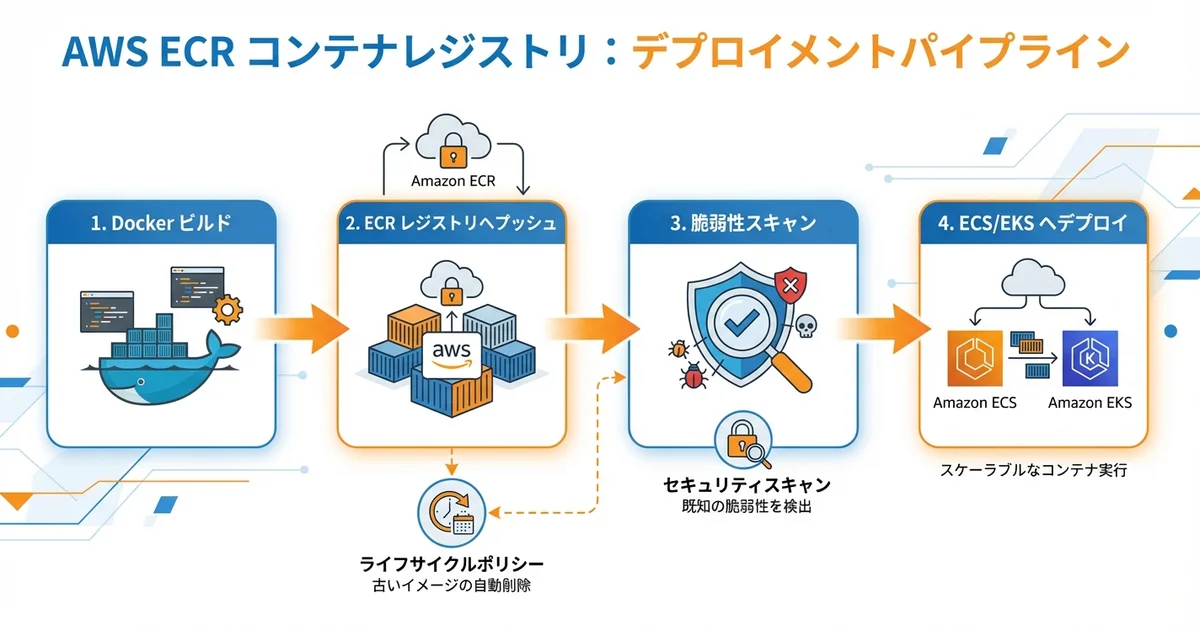
- イメージの自動脆弱性スキャン(Inspector連携)とライフサイクルポリシーで運用を自動化
- GitHub ActionsやCodePipelineとのCI/CD連携でビルド→プッシュ→デプロイを完全自動化
AWS ECRとは
Amazon Elastic Container Registry(ECR)は、AWSが提供するフルマネージドのDockerコンテナレジストリサービスです。Docker Hubの代替として、AWSエコシステム内でコンテナイメージを安全かつ効率的に管理できます。
ECR vs 他のレジストリサービス
| 比較項目 | AWS ECR | Docker Hub | GCR/Artifact Registry | Azure ACR |
|---|---|---|---|---|
| 無料枠 | 500MB/月(プライベート) | 1リポジトリ(パブリック) | 500MB/月 | なし |
| 脆弱性スキャン | Inspector連携(高精度) | 有料プランのみ | Container Analysis | Defender連携 |
| 料金 | $0.10/GB/月 + 転送量 | $5/月〜 | $0.10/GB/月 | $0.003/日/GPUイメージ |
| IAM統合 | ネイティブ | なし | IAM | RBAC |
| 利用場面 | AWS環境全般 | OSS/小規模 | GCP環境 | Azure環境 |
ECRリポジトリの作成と基本操作
AWS CLIでのリポジトリ作成
# プライベートリポジトリの作成
aws ecr create-repository \
  --repository-name ses-base/api-server \
  --image-scanning-configuration scanOnPush=true \
  --encryption-configuration encryptionType=KMS \
  --image-tag-mutability IMMUTABLE \
  --region ap-northeast-1

# パブリックリポジトリの作成(OSS向け)
aws ecr-public create-repository \
  --repository-name ses-base-oss \
  --region us-east-1
設定のポイントは以下です。
scanOnPush=true: イメージプッシュ時に自動脆弱性スキャンを実行encryptionType=KMS: AWS KMSによる暗号化(デフォルトはAES-256)image-tag-mutability=IMMUTABLE: タグの上書きを禁止(本番環境推奨)
Dockerイメージのプッシュ
# ECRへの認証
aws ecr get-login-password --region ap-northeast-1 | \
  docker login --username AWS --password-stdin \
  123456789012.dkr.ecr.ap-northeast-1.amazonaws.com

# イメージのビルドとタグ付け
docker build -t ses-base/api-server:v1.2.3 .
docker tag ses-base/api-server:v1.2.3 \
  123456789012.dkr.ecr.ap-northeast-1.amazonaws.com/ses-base/api-server:v1.2.3

# プッシュ
docker push \
  123456789012.dkr.ecr.ap-northeast-1.amazonaws.com/ses-base/api-server:v1.2.3
Terraformでの定義
# ecr.tf
resource "aws_ecr_repository" "api_server" {
  name                 = "ses-base/api-server"
  image_tag_mutability = "IMMUTABLE"

  image_scanning_configuration {
    scan_on_push = true
  }

  encryption_configuration {
    encryption_type = "KMS"
    kms_key         = aws_kms_key.ecr.arn
  }

  tags = {
    Project     = "ses-base"
    Environment = "production"
    ManagedBy   = "terraform"
  }
}

resource "aws_ecr_repository" "worker" {
  name                 = "ses-base/worker"
  image_tag_mutability = "IMMUTABLE"

  image_scanning_configuration {
    scan_on_push = true
  }

  encryption_configuration {
    encryption_type = "KMS"
    kms_key         = aws_kms_key.ecr.arn
  }

  tags = {
    Project     = "ses-base"
    Environment = "production"
    ManagedBy   = "terraform"
  }
}
ライフサイクルポリシーによるイメージ管理
自動クリーンアップの設定
ECRのライフサイクルポリシーを使えば、古いイメージの自動削除を設定できます。これにより、ストレージコストを最適化できます。
{
  "rules": [
    {
      "rulePriority": 1,
      "description": "タグなしイメージを7日後に削除",
      "selection": {
        "tagStatus": "untagged",
        "countType": "sinceImagePushed",
        "countUnit": "days",
        "countNumber": 7
      },
      "action": {
        "type": "expire"
      }
    },
    {
      "rulePriority": 2,
      "description": "devタグのイメージを直近10個のみ保持",
      "selection": {
        "tagStatus": "tagged",
        "tagPrefixList": ["dev-", "feature-"],
        "countType": "imageCountMoreThan",
        "countNumber": 10
      },
      "action": {
        "type": "expire"
      }
    },
    {
      "rulePriority": 3,
      "description": "本番タグ以外のイメージを30日後に削除",
      "selection": {
        "tagStatus": "tagged",
        "tagPrefixList": ["staging-", "test-"],
        "countType": "sinceImagePushed",
        "countUnit": "days",
        "countNumber": 30
      },
      "action": {
        "type": "expire"
      }
    },
    {
      "rulePriority": 4,
      "description": "本番イメージは直近50個を保持",
      "selection": {
        "tagStatus": "tagged",
        "tagPrefixList": ["v"],
        "countType": "imageCountMoreThan",
        "countNumber": 50
      },
      "action": {
        "type": "expire"
      }
    }
  ]
}
AWS CLIでポリシーを適用
aws ecr put-lifecycle-policy \
  --repository-name ses-base/api-server \
  --lifecycle-policy-text file://lifecycle-policy.json \
  --region ap-northeast-1
Terraformでの定義
resource "aws_ecr_lifecycle_policy" "api_server" {
  repository = aws_ecr_repository.api_server.name

  policy = jsonencode({
    rules = [
      {
        rulePriority = 1
        description  = "タグなしイメージを7日後に削除"
        selection = {
          tagStatus   = "untagged"
          countType   = "sinceImagePushed"
          countUnit   = "days"
          countNumber = 7
        }
        action = {
          type = "expire"
        }
      },
      {
        rulePriority = 2
        description  = "本番イメージは直近50個を保持"
        selection = {
          tagStatus     = "tagged"
          tagPrefixList = ["v"]
          countType     = "imageCountMoreThan"
          countNumber   = 50
        }
        action = {
          type = "expire"
        }
      }
    ]
  })
}
脆弱性スキャンとセキュリティ
ECR Enhanced Scanning(Inspector連携)
ECRのEnhanced Scanningは、Amazon Inspectorと連携してOS パッケージだけでなく、プログラミング言語のパッケージ(npm、pip、Mavenなど)の脆弱性もスキャンします。
# Enhanced Scanningの有効化
aws ecr put-registry-scanning-configuration \
  --scan-type ENHANCED \
  --rules '[{
    "repositoryFilters": [{"filter": "*", "filterType": "WILDCARD"}],
    "scanFrequency": "CONTINUOUS_SCAN"
  }]'
スキャン結果の確認
# 脆弱性スキャン結果の取得
aws ecr describe-image-scan-findings \
  --repository-name ses-base/api-server \
  --image-id imageTag=v1.2.3 \
  --region ap-northeast-1

# 重要度別のサマリー
aws ecr describe-image-scan-findings \
  --repository-name ses-base/api-server \
  --image-id imageTag=v1.2.3 \
  --query 'imageScanFindings.findingSeverityCounts' \
  --output table
出力例:
------------------------------
|    FindingSeverityCounts   |
+----------+-------+--------+
| CRITICAL |  0    |        |
| HIGH     |  2    |        |
| MEDIUM   |  8    |        |
| LOW      |  15   |        |
+----------+-------+--------+
セキュリティベストプラクティス
| 項目 | 推奨設定 | 理由 |
|---|---|---|
| タグ不変性 | IMMUTABLE | 本番イメージの改ざん防止 |
| スキャン | CONTINUOUS_SCAN | 新しいCVEの継続検出 |
| 暗号化 | KMS(CMK) | コンプライアンス要件対応 |
| IAMポリシー | 最小権限 | 不正アクセス防止 |
| ライフサイクル | 有効化 | 古いイメージの自動削除 |
CI/CDパイプライン連携
GitHub Actions連携
# .github/workflows/docker-build.yml
name: Build and Push to ECR

on:
  push:
    branches: [main]
    paths:
      - 'src/**'
      - 'Dockerfile'
  pull_request:
    branches: [main]

permissions:
  id-token: write
  contents: read

env:
  AWS_REGION: ap-northeast-1
  ECR_REPOSITORY: ses-base/api-server

jobs:
  build-and-push:
    runs-on: ubuntu-latest
    steps:
      - uses: actions/checkout@v4

      - name: Configure AWS Credentials
        uses: aws-actions/configure-aws-credentials@v4
        with:
          role-to-assume: ${{ secrets.AWS_ROLE_ARN }}
          aws-region: ${{ env.AWS_REGION }}

      - name: Login to Amazon ECR
        id: login-ecr
        uses: aws-actions/amazon-ecr-login@v2

      - name: Build, tag, and push image
        env:
          ECR_REGISTRY: ${{ steps.login-ecr.outputs.registry }}
          IMAGE_TAG: ${{ github.sha }}
        run: |
          docker build \
            --build-arg BUILD_DATE=$(date -u +%Y-%m-%dT%H:%M:%SZ) \
            --build-arg GIT_COMMIT=${{ github.sha }} \
            -t $ECR_REGISTRY/$ECR_REPOSITORY:$IMAGE_TAG \
            -t $ECR_REGISTRY/$ECR_REPOSITORY:latest \
            .
          docker push $ECR_REGISTRY/$ECR_REPOSITORY:$IMAGE_TAG
          docker push $ECR_REGISTRY/$ECR_REPOSITORY:latest

      - name: Check scan results
        run: |
          sleep 30  # スキャン完了を待機
          CRITICAL=$(aws ecr describe-image-scan-findings \
            --repository-name $ECR_REPOSITORY \
            --image-id imageTag=${{ github.sha }} \
            --query 'imageScanFindings.findingSeverityCounts.CRITICAL' \
            --output text 2>/dev/null || echo "0")

          if [ "$CRITICAL" != "0" ] && [ "$CRITICAL" != "None" ]; then
            echo "CRITICAL vulnerabilities found: $CRITICAL"
            exit 1
          fi
マルチアーキテクチャビルド
ARM64(Graviton)とx86_64の両方に対応するマルチアーキテクチャイメージをビルドする方法です。
- name: Set up Docker Buildx
  uses: docker/setup-buildx-action@v3

- name: Build and push multi-arch
  uses: docker/build-push-action@v6
  with:
    context: .
    platforms: linux/amd64,linux/arm64
    push: true
    tags: |
      ${{ steps.login-ecr.outputs.registry }}/${{ env.ECR_REPOSITORY }}:${{ github.sha }}
      ${{ steps.login-ecr.outputs.registry }}/${{ env.ECR_REPOSITORY }}:latest
    cache-from: type=gha
    cache-to: type=gha,mode=max
ECR Pull Through Cache
外部レジストリ(Docker Hub、GitHub Container Registryなど)のイメージをECR経由でキャッシュする機能です。Pull制限の回避やネットワークレイテンシの削減に有効です。
# Docker HubのPull Through Cacheルール作成
aws ecr create-pull-through-cache-rule \
  --ecr-repository-prefix docker-hub \
  --upstream-registry-url registry-1.docker.io \
  --credential-arn arn:aws:secretsmanager:ap-northeast-1:123456789012:secret:ecr/docker-hub-creds

# 使用例:Docker Hubのnginxをキャッシュ経由でpull
docker pull 123456789012.dkr.ecr.ap-northeast-1.amazonaws.com/docker-hub/library/nginx:latest
クロスリージョン・クロスアカウントレプリケーション
レプリケーション設定
DR(災害復旧)やマルチリージョンデプロイのために、イメージを自動レプリケーションできます。
aws ecr put-replication-configuration \
  --replication-configuration '{
    "rules": [
      {
        "destinations": [
          {
            "region": "us-west-2",
            "registryId": "123456789012"
          },
          {
            "region": "ap-northeast-1",
            "registryId": "987654321098"
          }
        ],
        "repositoryFilters": [
          {
            "filter": "ses-base/",
            "filterType": "PREFIX_MATCH"
          }
        ]
      }
    ]
  }'
コスト最適化
ECRの料金体系
| 項目 | 料金(東京リージョン) |
|---|---|
| ストレージ | $0.10/GB/月 |
| データ転送(同一リージョン) | 無料 |
| データ転送(リージョン間) | $0.09/GB |
| プライベートリポジトリ数 | 無制限(無料) |
| ECR Public | 50GB/月無料、超過分$0.09/GB |
コスト削減のTips
- ライフサイクルポリシー: 不要なイメージを自動削除
- マルチステージビルド: 最終イメージのサイズを最小化
- レイヤーキャッシュ: CI/CDでビルドキャッシュを活用
- Alpine/distroless: ベースイメージを軽量なものに変更
# マルチステージビルドの例
FROM node:22-alpine AS builder
WORKDIR /app
COPY package*.json ./
RUN npm ci --production
COPY . .
RUN npm run build

FROM gcr.io/distroless/nodejs22-debian12
WORKDIR /app
COPY --from=builder /app/dist ./dist
COPY --from=builder /app/node_modules ./node_modules
EXPOSE 3000
CMD ["dist/server.js"]
SES案件でのコンテナレジストリスキル需要
| スキルレベル | 要求される技術 | 想定月額単価 |
|---|---|---|
| 初級 | ECR基本操作、docker push/pull | 50〜60万円 |
| 中級 | ライフサイクル管理、CI/CD連携、脆弱性対応 | 60〜75万円 |
| 上級 | マルチアカウント設計、セキュリティ監査、コスト最適化 | 75〜95万円 |
まとめ:ECRでコンテナイメージ管理を効率化しよう
AWS ECRは、コンテナ開発における不可欠なインフラです。自動脆弱性スキャン、ライフサイクルポリシーによるコスト最適化、ECS/EKS/Lambdaとのネイティブ統合により、セキュアかつ効率的なコンテナイメージ管理を実現します。
SESエンジニアとして、コンテナレジストリの設計・運用スキルはクラウドインフラ案件の基礎力です。ECRを使いこなして、コンテナ開発の生産性を高めましょう。
AWSの基本はAWS入門ガイドを、ECSについてはECS Fargateガイドをご覧ください。CI/CDはCodePipelineガイド、セキュリティはIAMセキュリティガイドが参考になります。