- CognitoはAWSのマネージド認証サービスで、数百万ユーザー規模に対応
- ユーザープール×IDプールの組み合わせでWebアプリ・モバイル・APIの認証を網羅
- SES案件では認証基盤構築スキルの需要が高く、月単価75〜90万円が目安
「Webアプリの認証をゼロから実装するのは大変」「Auth0は高い」「セキュリティ要件を満たす認証基盤をAWSで構築したい」——これらはSES現場で頻繁に聞く声です。
AWS Cognitoは、AWSが提供するマネージド認証・認可サービスです。ユーザーのサインアップ・サインイン・アクセス制御を、セキュアかつスケーラブルに実装できます。2026年のアップデートで、Managed Login UIの刷新やPasskey対応が追加され、さらに実用的になりました。
本記事では、AWS Cognitoの基本概念から実践的な構築手順まで、SES案件で求められるレベルのスキルを体系的に解説します。
Cognitoの基本アーキテクチャ
2つのコアコンポーネント
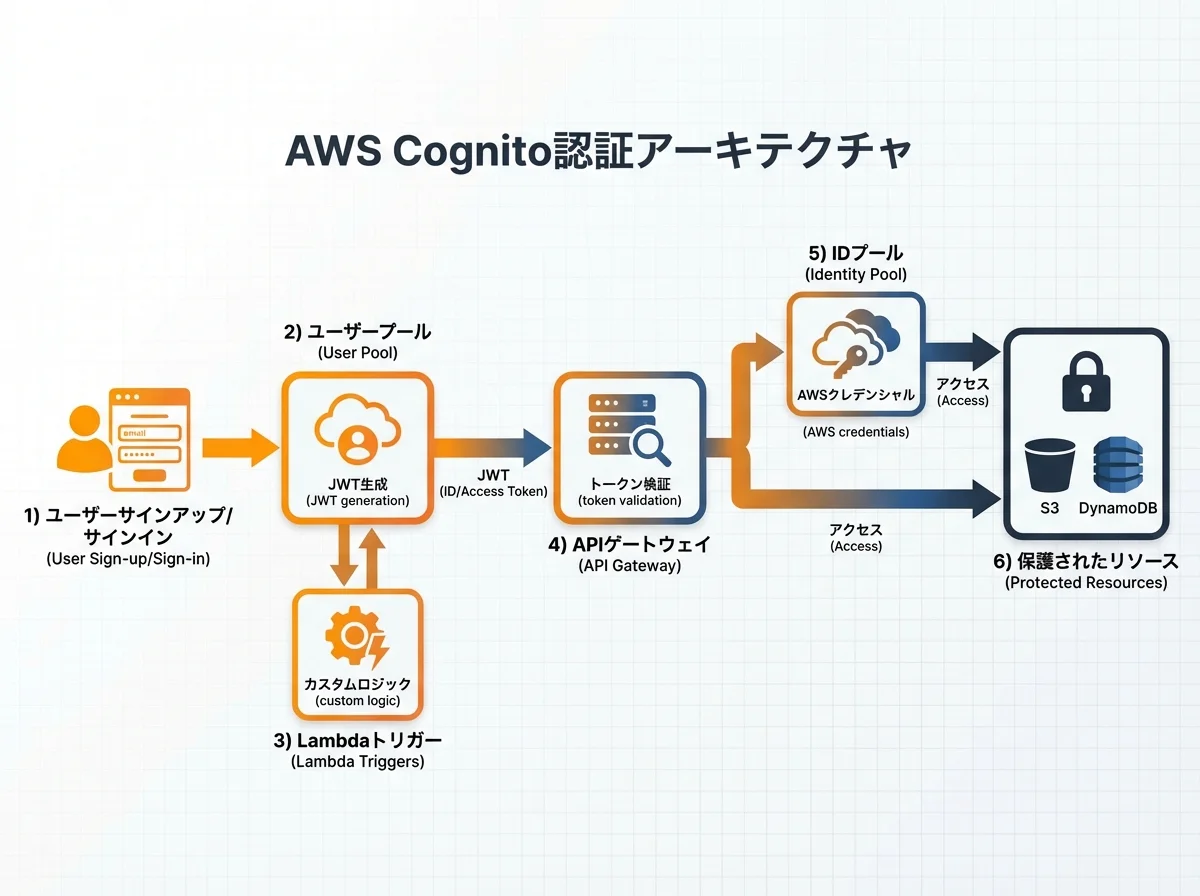
AWS Cognitoは大きく2つのコンポーネントで構成されています:
| コンポーネント | 役割 | 主なユースケース |
|---|---|---|
| ユーザープール | 認証(ユーザーの身元確認) | サインアップ/サインイン、MFA、パスワードポリシー |
| IDプール | 認可(AWSリソースへのアクセス制御) | S3/DynamoDB等への一時的なAWSクレデンシャル発行 |
典型的な認証フロー
ユーザー → Cognito User Pool → JWT発行 → API Gateway → Lambda/ECS
                                              ↓
                              Cognito ID Pool → 一時的AWS認証情報
                                              ↓
                              S3 / DynamoDB / その他AWSサービス
実践①:ユーザープールの構築
CDKでのプロビジョニング
import * as cdk from 'aws-cdk-lib';
import * as cognito from 'aws-cdk-lib/aws-cognito';

export class AuthStack extends cdk.Stack {
  public readonly userPool: cognito.UserPool;
  public readonly userPoolClient: cognito.UserPoolClient;

  constructor(scope: cdk.App, id: string, props?: cdk.StackProps) {
    super(scope, id, props);

    // ユーザープール
    this.userPool = new cognito.UserPool(this, 'AppUserPool', {
      userPoolName: 'my-app-user-pool',
      selfSignUpEnabled: true,
      signInAliases: {
        email: true,
        username: false,
      },
      autoVerify: {
        email: true,
      },
      standardAttributes: {
        email: { required: true, mutable: true },
        fullname: { required: true, mutable: true },
      },
      customAttributes: {
        company: new cognito.StringAttribute({ mutable: true }),
        role: new cognito.StringAttribute({ mutable: false }),
      },
      passwordPolicy: {
        minLength: 12,
        requireLowercase: true,
        requireUppercase: true,
        requireDigits: true,
        requireSymbols: true,
        tempPasswordValidity: cdk.Duration.days(3),
      },
      mfa: cognito.Mfa.OPTIONAL,
      mfaSecondFactor: {
        sms: true,
        otp: true,
      },
      accountRecovery: cognito.AccountRecovery.EMAIL_ONLY,
      removalPolicy: cdk.RemovalPolicy.RETAIN,
    });

    // アプリクライアント
    this.userPoolClient = this.userPool.addClient('WebAppClient', {
      authFlows: {
        userSrp: true,
        userPassword: false, // SRP認証のみ許可(セキュリティ強化)
      },
      oAuth: {
        flows: {
          authorizationCodeGrant: true,
          implicitCodeGrant: false,
        },
        scopes: [cognito.OAuthScope.OPENID, cognito.OAuthScope.EMAIL, cognito.OAuthScope.PROFILE],
        callbackUrls: ['https://myapp.example.com/callback'],
        logoutUrls: ['https://myapp.example.com/logout'],
      },
      accessTokenValidity: cdk.Duration.hours(1),
      idTokenValidity: cdk.Duration.hours(1),
      refreshTokenValidity: cdk.Duration.days(30),
      preventUserExistenceErrors: true,
    });
  }
}
Lambda トリガーの実装
Cognitoのライフサイクルイベントにフックして、カスタムロジックを実行できます:
// Pre Sign-up トリガー: ドメイン制限
export const preSignUp = async (event: CognitoUserPoolTriggerEvent) => {
  const email = event.request.userAttributes.email;
  const allowedDomains = ['company.com', 'partner.co.jp'];

  const domain = email.split('@')[1];
  if (!allowedDomains.includes(domain)) {
    throw new Error('このメールドメインでの登録は許可されていません');
  }

  // メールの自動確認(社内ドメインの場合)
  event.response.autoConfirmUser = true;
  event.response.autoVerifyEmail = true;

  return event;
};

// Post Confirmation トリガー: ユーザー情報をDynamoDBに同期
export const postConfirmation = async (event: CognitoUserPoolTriggerEvent) => {
  const { sub, email, name } = event.request.userAttributes;

  await dynamoClient.send(new PutCommand({
    TableName: 'Users',
    Item: {
      userId: sub,
      email,
      name,
      role: 'viewer',
      createdAt: new Date().toISOString(),
    },
  }));

  return event;
};

// Pre Token Generation トリガー: カスタムクレームの追加
export const preTokenGeneration = async (event: CognitoUserPoolTriggerEvent) => {
  const userId = event.request.userAttributes.sub;

  // DynamoDBからロール情報を取得
  const result = await dynamoClient.send(new GetCommand({
    TableName: 'Users',
    Key: { userId },
  }));

  const role = result.Item?.role || 'viewer';
  const permissions = result.Item?.permissions || [];

  event.response = {
    claimsOverrideDetails: {
      claimsToAddOrOverride: {
        'custom:role': role,
        'custom:permissions': JSON.stringify(permissions),
      },
    },
  };

  return event;
};
実践②:ソーシャルログインの統合
Google / Apple / LINE ログイン
// Google ログイン
const googleProvider = new cognito.UserPoolIdentityProviderGoogle(this, 'Google', {
  userPool: this.userPool,
  clientId: process.env.GOOGLE_CLIENT_ID!,
  clientSecretValue: cdk.SecretValue.secretsManager('google-client-secret'),
  scopes: ['openid', 'email', 'profile'],
  attributeMapping: {
    email: cognito.ProviderAttribute.GOOGLE_EMAIL,
    fullname: cognito.ProviderAttribute.GOOGLE_NAME,
    profilePicture: cognito.ProviderAttribute.GOOGLE_PICTURE,
  },
});

// Apple ログイン
const appleProvider = new cognito.UserPoolIdentityProviderApple(this, 'Apple', {
  userPool: this.userPool,
  clientId: process.env.APPLE_CLIENT_ID!,
  teamId: process.env.APPLE_TEAM_ID!,
  keyId: process.env.APPLE_KEY_ID!,
  privateKey: process.env.APPLE_PRIVATE_KEY!,
  scopes: ['email', 'name'],
  attributeMapping: {
    email: cognito.ProviderAttribute.APPLE_EMAIL,
    fullname: cognito.ProviderAttribute.APPLE_NAME,
  },
});
SAML / OIDC(エンタープライズSSO)
SES案件では、企業のActive DirectoryやOktaとのSSO連携が求められることが多いです:
// SAML IdP連携(Azure AD等)
const samlProvider = new cognito.UserPoolIdentityProviderSaml(this, 'AzureAD', {
  userPool: this.userPool,
  metadata: cognito.UserPoolIdentityProviderSamlMetadata.url(
    'https://login.microsoftonline.com/{tenant-id}/federationmetadata/2007-06/federationmetadata.xml'
  ),
  attributeMapping: {
    email: cognito.ProviderAttribute.other('http://schemas.xmlsoap.org/ws/2005/05/identity/claims/emailaddress'),
    fullname: cognito.ProviderAttribute.other('http://schemas.xmlsoap.org/ws/2005/05/identity/claims/name'),
  },
});
実践③:API Gatewayとの統合
JWT検証(Cognito Authorizer)
import * as apigateway from 'aws-cdk-lib/aws-apigateway';

const api = new apigateway.RestApi(this, 'AppApi', {
  restApiName: 'MyApp API',
});

const authorizer = new apigateway.CognitoUserPoolsAuthorizer(this, 'CognitoAuth', {
  cognitoUserPools: [userPool],
  identitySource: 'method.request.header.Authorization',
});

// 認証必須エンドポイント
const protectedResource = api.root.addResource('protected');
protectedResource.addMethod('GET', new apigateway.LambdaIntegration(protectedHandler), {
  authorizer,
  authorizationType: apigateway.AuthorizationType.COGNITO,
});
Lambda内でのJWT検証
API Gateway以外の場所(WebSocket、AppSync等)でJWTを検証する場合:
import { CognitoJwtVerifier } from 'aws-jwt-verify';

const verifier = CognitoJwtVerifier.create({
  userPoolId: process.env.USER_POOL_ID!,
  tokenUse: 'access',
  clientId: process.env.CLIENT_ID!,
});

export const handler = async (event: APIGatewayProxyEvent) => {
  try {
    const token = event.headers.Authorization?.replace('Bearer ', '');
    if (!token) {
      return { statusCode: 401, body: 'Unauthorized' };
    }

    const payload = await verifier.verify(token);

    // カスタムクレームからロールを取得
    const role = payload['custom:role'] as string;
    const permissions = JSON.parse(payload['custom:permissions'] as string || '[]');

    // ロールベースのアクセス制御
    if (!permissions.includes('admin:read')) {
      return { statusCode: 403, body: 'Forbidden' };
    }

    return {
      statusCode: 200,
      body: JSON.stringify({
        userId: payload.sub,
        role,
        data: await fetchProtectedData(payload.sub),
      }),
    };
  } catch (error) {
    return { statusCode: 401, body: 'Invalid token' };
  }
};
実践④:フロントエンド統合
React + Amplify v6
import { Amplify } from 'aws-amplify';
import { signIn, signUp, confirmSignUp, getCurrentUser, fetchAuthSession } from 'aws-amplify/auth';

Amplify.configure({
  Auth: {
    Cognito: {
      userPoolId: import.meta.env.VITE_USER_POOL_ID,
      userPoolClientId: import.meta.env.VITE_CLIENT_ID,
      loginWith: {
        oauth: {
          domain: import.meta.env.VITE_COGNITO_DOMAIN,
          scopes: ['openid', 'email', 'profile'],
          redirectSignIn: [window.location.origin + '/callback'],
          redirectSignOut: [window.location.origin + '/logout'],
          responseType: 'code',
        },
      },
    },
  },
});

// サインアップ
async function handleSignUp(email: string, password: string, name: string) {
  try {
    const result = await signUp({
      username: email,
      password,
      options: {
        userAttributes: {
          email,
          name,
          'custom:company': 'Example Corp',
        },
      },
    });
    console.log('確認コード送信先:', result.nextStep);
    return result;
  } catch (error) {
    if (error.name === 'UsernameExistsException') {
      throw new Error('このメールアドレスは既に登録されています');
    }
    throw error;
  }
}

// サインイン
async function handleSignIn(email: string, password: string) {
  try {
    const result = await signIn({ username: email, password });

    if (result.nextStep.signInStep === 'CONFIRM_SIGN_IN_WITH_TOTP_CODE') {
      // MFA認証が必要
      return { requiresMFA: true };
    }

    // JWTトークンを取得
    const session = await fetchAuthSession();
    const accessToken = session.tokens?.accessToken?.toString();
    return { accessToken };
  } catch (error) {
    if (error.name === 'NotAuthorizedException') {
      throw new Error('メールアドレスまたはパスワードが正しくありません');
    }
    throw error;
  }
}
認証状態のグローバル管理
// React Context で認証状態を管理
import { createContext, useContext, useEffect, useState } from 'react';
import { getCurrentUser, fetchAuthSession, signOut } from 'aws-amplify/auth';
import { Hub } from 'aws-amplify/utils';

interface AuthContextType {
  user: { userId: string; email: string; role: string } | null;
  loading: boolean;
  signOut: () => Promise<void>;
}

const AuthContext = createContext<AuthContextType>({
  user: null,
  loading: true,
  signOut: async () => {},
});

export function AuthProvider({ children }: { children: React.ReactNode }) {
  const [user, setUser] = useState(null);
  const [loading, setLoading] = useState(true);

  useEffect(() => {
    checkAuth();

    const unsubscribe = Hub.listen('auth', ({ payload }) => {
      switch (payload.event) {
        case 'signedIn':
          checkAuth();
          break;
        case 'signedOut':
          setUser(null);
          break;
      }
    });

    return unsubscribe;
  }, []);

  async function checkAuth() {
    try {
      const currentUser = await getCurrentUser();
      const session = await fetchAuthSession();
      const payload = session.tokens?.idToken?.payload;

      setUser({
        userId: currentUser.userId,
        email: payload?.email as string,
        role: payload?.['custom:role'] as string || 'viewer',
      });
    } catch {
      setUser(null);
    } finally {
      setLoading(false);
    }
  }

  return (
    <AuthContext.Provider value={{ user, loading, signOut }}>
      {children}
    </AuthContext.Provider>
  );
}

export const useAuth = () => useContext(AuthContext);
実践⑤:セキュリティ強化
WAFとの統合
CognitoのHosted UIをWAFで保護します:
import * as wafv2 from 'aws-cdk-lib/aws-wafv2';

const webAcl = new wafv2.CfnWebACL(this, 'CognitoWAF', {
  scope: 'REGIONAL',
  defaultAction: { allow: {} },
  rules: [
    {
      name: 'RateLimit',
      priority: 1,
      action: { block: {} },
      statement: {
        rateBasedStatement: {
          limit: 100,
          aggregateKeyType: 'IP',
        },
      },
      visibilityConfig: {
        sampledRequestsEnabled: true,
        cloudWatchMetricsEnabled: true,
        metricName: 'CognitoRateLimit',
      },
    },
    {
      name: 'GeoBlock',
      priority: 2,
      action: { block: {} },
      statement: {
        geoMatchStatement: {
          countryCodes: ['CN', 'RU', 'KP'],
        },
      },
      visibilityConfig: {
        sampledRequestsEnabled: true,
        cloudWatchMetricsEnabled: true,
        metricName: 'CognitoGeoBlock',
      },
    },
  ],
  visibilityConfig: {
    sampledRequestsEnabled: true,
    cloudWatchMetricsEnabled: true,
    metricName: 'CognitoWAF',
  },
});
アドバンスドセキュリティ
Cognito Advanced Security Featureを有効にすると、以下の保護が追加されます:
- リスクベース認証: 不審なサインイン試行の検出とブロック
- 侵害された認証情報の検出: 流出パスワードデータベースとの照合
- 適応型認証: リスクレベルに応じてMFAを動的に要求
SES面談でのCognitoスキルアピール
Cognito関連スキルは、以下のSES案件で特に高く評価されます:
| 案件タイプ | 求められるスキル | 月単価目安 |
|---|---|---|
| BtoC Webアプリ | ユーザープール設計・ソーシャルログイン | 70〜85万円 |
| エンタープライズ | SAML/OIDC連携・SSO構築 | 80〜95万円 |
| マイクロサービス | JWT検証・API Gateway統合 | 75〜90万円 |
| ヘルスケア・金融 | MFA必須・コンプライアンス対応 | 85〜100万円 |
面談では、以下のポイントを具体的に話せると評価が高いです:
- ユーザープールとIDプールの使い分け
- Lambda トリガーのカスタマイズ経験
- JWT検証の実装パターン
- MFA・Passkey対応の経験
- セキュリティベストプラクティスの理解
まとめ
AWS Cognitoは、認証・認可基盤の構築に必要な機能をフルマネージドで提供する強力なサービスです。SES案件では認証関連のスキルが常に需要があり、Cognitoの実践的な知識は確実にキャリアアップにつながります。
本記事で紹介した構築パターンを参考に、実際に手を動かしてCognitoの認証基盤を構築してみてください。AWS CDKを使えば、Infrastructure as Codeとして再利用可能な形で管理できます。