⚡ 3秒でわかる!この記事のポイント
- AWS Bedrock AgentsでClaude/Titan等のLLMをバックエンドに自律型AIエージェントを構築
- Lambda + API Gateway + DynamoDBのサーバーレス構成でスケーラブルかつ低コスト運用
- SES案件で需要急増中のAIエージェント開発スキルを実践的に習得
AIエージェントの企業導入が加速する中、AWS Bedrock Agentsを使ったサーバーレス構成のAIエージェント開発は、SES案件で最も需要の高いスキルの1つになっています。本記事では、Bedrock Agentsの基本概念からサーバーレス構成での実装、本番運用まで実践的に解説します。
この記事でわかること
- AWS Bedrock Agentsのアーキテクチャと動作原理
- Lambda + API Gateway + DynamoDBとの統合設計パターン
- Action Groups・Knowledge Basesの設定と実装
- SES案件で求められるAIエージェント開発スキルの獲得方法
AWS Bedrock Agentsとは
概要
AWS Bedrock Agentsは、Foundation Model(FM)を基盤とした自律型AIエージェントを構築するためのマネージドサービスです。ユーザーのリクエストに対して、エージェントが自律的に判断し、必要なアクション(API呼び出し・データベースクエリ・外部サービス連携)を実行します。
【Bedrock Agentsの動作フロー】
┌──────────┐    ┌──────────────────────┐
│ ユーザー   │──→│  Bedrock Agent        │
│ リクエスト  │    │  ┌─────────────────┐ │
└──────────┘    │  │ Foundation Model │ │
                │  │ (Claude, Titan)  │ │
                │  └────────┬────────┘ │
                │           │          │
                │  ┌────────▼────────┐ │
                │  │ 推論・計画立案    │ │
                │  └────────┬────────┘ │
                │           │          │
                │  ┌────────▼────────┐ │
                │  │ Action Groups    │ │
                │  │ (Lambda実行)     │ │
                │  └────────┬────────┘ │
                │           │          │
                │  ┌────────▼────────┐ │
                │  │ Knowledge Bases  │ │
                │  │ (RAG検索)       │ │
                │  └─────────────────┘ │
                └──────────────────────┘
Bedrock Agents vs 他のAIエージェントサービス
| 機能 | Bedrock Agents | LangChain on EC2 | OpenAI Assistants |
|---|---|---|---|
| マネージド度 | ◎ フルマネージド | △ 自前管理 | ○ API型 |
| モデル選択 | Claude, Titan, Llama | 任意 | GPT系のみ |
| AWS連携 | ◎ ネイティブ | ○ SDK経由 | △ 別途構築 |
| スケーラビリティ | ◎ 自動 | △ 手動設定 | ○ 自動 |
| コスト | 従量課金 | EC2常時起動 | 従量課金 |
| VPC対応 | ◎ | ◎ | ✗ |
| SLA | 99.9% | 自前で設計 | 99.9% |
SES案件での需要動向
AWS Bedrock関連のSES案件は2025年後半から急増しており、以下の分野で特に需要があります。
【Bedrock Agents案件の需要分野】
1. カスタマーサポートBot   ████████████ 35%
2. 社内ナレッジ検索       ████████████ 30%
3. データ分析自動化       ████████      20%
4. 業務プロセス自動化     ██████        10%
5. その他                 ██            5%
サーバーレスアーキテクチャ設計
全体構成図
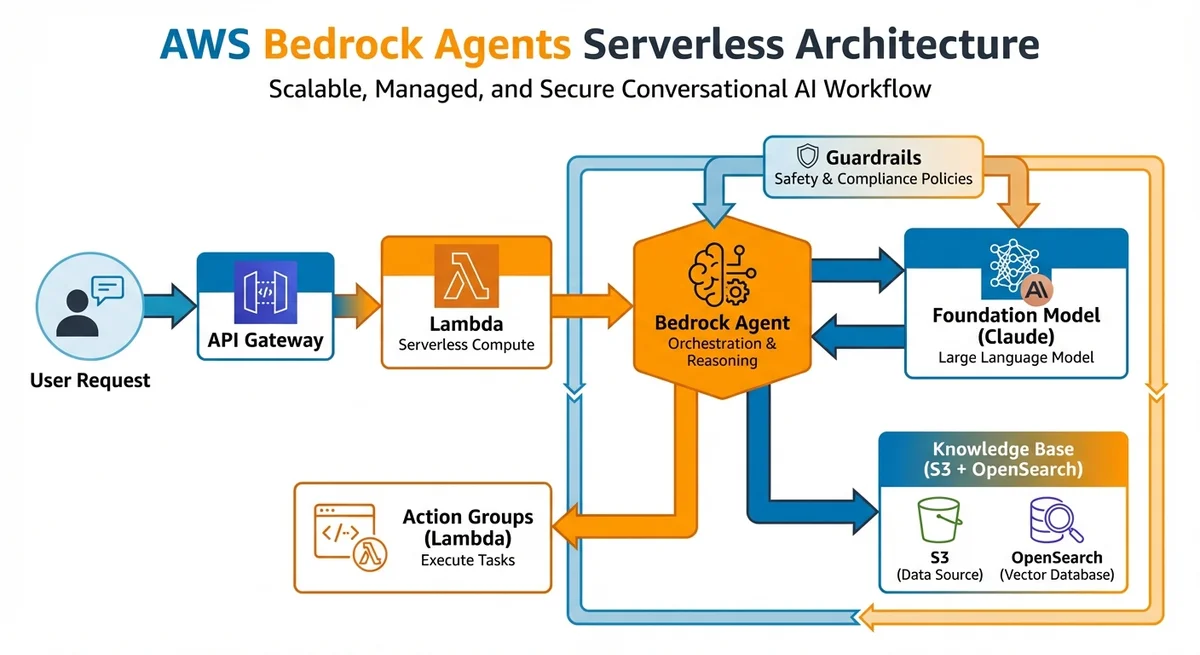
┌─────────┐   ┌──────────────┐   ┌─────────────────┐
│ クライアント│──→│ API Gateway   │──→│ Lambda (入口)    │
└─────────┘   └──────────────┘   └────────┬────────┘
                                          │
                                 ┌────────▼────────┐
                                 │ Bedrock Agent    │
                                 │ (Claude 3.5)     │
                                 └────────┬────────┘
                                          │
                        ┌─────────────────┼─────────────────┐
                        │                 │                  │
               ┌────────▼──────┐  ┌──────▼───────┐  ┌─────▼──────┐
               │ Action Group  │  │ Knowledge    │  │ Guardrails │
               │ (Lambda)      │  │ Base (S3+    │  │ (安全性)    │
               │               │  │ OpenSearch)  │  │            │
               └───────┬───────┘  └──────────────┘  └────────────┘
                       │
           ┌───────────┼───────────┐
           │           │           │
    ┌──────▼───┐ ┌────▼─────┐ ┌──▼──────────┐
    │ DynamoDB │ │ SES      │ │ EventBridge │
    │ (状態管理) │ │ (メール) │ │ (イベント)   │
    └──────────┘ └──────────┘ └─────────────┘
CDKによるインフラ定義
// lib/bedrock-agent-stack.ts
import * as cdk from 'aws-cdk-lib';
import * as bedrock from 'aws-cdk-lib/aws-bedrock';
import * as lambda from 'aws-cdk-lib/aws-lambda';
import * as apigateway from 'aws-cdk-lib/aws-apigateway';
import * as dynamodb from 'aws-cdk-lib/aws-dynamodb';

export class BedrockAgentStack extends cdk.Stack {
  constructor(scope: cdk.App, id: string, props?: cdk.StackProps) {
    super(scope, id, props);

    // DynamoDB テーブル(会話履歴・状態管理)
    const conversationTable = new dynamodb.Table(this, 'ConversationTable', {
      tableName: 'agent-conversations',
      partitionKey: { name: 'sessionId', type: dynamodb.AttributeType.STRING },
      sortKey: { name: 'timestamp', type: dynamodb.AttributeType.NUMBER },
      billingMode: dynamodb.BillingMode.PAY_PER_REQUEST,
      timeToLiveAttribute: 'ttl',
      removalPolicy: cdk.RemovalPolicy.RETAIN,
    });

    // Action Group Lambda
    const actionLambda = new lambda.Function(this, 'ActionGroupLambda', {
      functionName: 'bedrock-agent-actions',
      runtime: lambda.Runtime.NODEJS_22_X,
      handler: 'index.handler',
      code: lambda.Code.fromAsset('lambda/action-group'),
      timeout: cdk.Duration.seconds(30),
      memorySize: 512,
      environment: {
        CONVERSATION_TABLE: conversationTable.tableName,
      },
    });

    conversationTable.grantReadWriteData(actionLambda);

    // API Gateway
    const api = new apigateway.RestApi(this, 'AgentApi', {
      restApiName: 'Bedrock Agent API',
      deployOptions: {
        stageName: 'prod',
        throttlingRateLimit: 100,
        throttlingBurstLimit: 200,
      },
    });

    // エントリポイント Lambda
    const entryLambda = new lambda.Function(this, 'EntryLambda', {
      functionName: 'bedrock-agent-entry',
      runtime: lambda.Runtime.NODEJS_22_X,
      handler: 'index.handler',
      code: lambda.Code.fromAsset('lambda/entry'),
      timeout: cdk.Duration.seconds(60),
      memorySize: 1024,
    });

    api.root.addResource('chat').addMethod(
      'POST',
      new apigateway.LambdaIntegration(entryLambda)
    );
  }
}
Action Groupsの実装
Action Groupとは
Action Groupは、Bedrock Agentが実行できるアクション(API)の定義です。OpenAPI仕様でAPIを定義し、Lambda関数で実装します。
OpenAPI仕様の定義
# action-group-schema.yaml
openapi: 3.0.0
info:
  title: Customer Support Agent Actions
  version: 1.0.0
paths:
  /getCustomerInfo:
    post:
      summary: 顧客情報を取得
      description: 顧客IDまたはメールアドレスから顧客情報を検索します
      operationId: getCustomerInfo
      requestBody:
        required: true
        content:
          application/json:
            schema:
              type: object
              properties:
                customerId:
                  type: string
                  description: 顧客ID
                email:
                  type: string
                  description: メールアドレス
      responses:
        '200':
          description: 顧客情報
          content:
            application/json:
              schema:
                type: object
                properties:
                  name:
                    type: string
                  email:
                    type: string
                  plan:
                    type: string
                  createdAt:
                    type: string

  /createTicket:
    post:
      summary: サポートチケットを作成
      description: 新しいサポートチケットを作成します
      operationId: createTicket
      requestBody:
        required: true
        content:
          application/json:
            schema:
              type: object
              required: [customerId, subject, description, priority]
              properties:
                customerId:
                  type: string
                subject:
                  type: string
                description:
                  type: string
                priority:
                  type: string
                  enum: [low, medium, high, critical]
      responses:
        '200':
          description: チケット作成結果
Lambda関数の実装
// lambda/action-group/index.ts
import { DynamoDBClient, GetItemCommand, PutItemCommand } from '@aws-sdk/client-dynamodb';
import { v4 as uuidv4 } from 'uuid';

const dynamodb = new DynamoDBClient({});

interface BedrockAgentEvent {
  actionGroup: string;
  apiPath: string;
  httpMethod: string;
  requestBody: {
    content: {
      'application/json': {
        properties: Array<{
          name: string;
          value: string;
        }>;
      };
    };
  };
  sessionAttributes: Record<string, string>;
}

export const handler = async (event: BedrockAgentEvent) => {
  const { apiPath } = event;
  const params = extractParams(event);

  switch (apiPath) {
    case '/getCustomerInfo':
      return await getCustomerInfo(params);
    case '/createTicket':
      return await createTicket(params);
    default:
      return formatResponse(404, { error: 'Unknown action' });
  }
};

async function getCustomerInfo(params: Record<string, string>) {
  const { customerId, email } = params;

  // DynamoDBから顧客情報を取得
  const result = await dynamodb.send(new GetItemCommand({
    TableName: 'customers',
    Key: {
      customerId: { S: customerId || '' },
    },
  }));

  if (!result.Item) {
    return formatResponse(200, {
      message: '顧客が見つかりません',
    });
  }

  return formatResponse(200, {
    name: result.Item.name?.S,
    email: result.Item.email?.S,
    plan: result.Item.plan?.S,
    createdAt: result.Item.createdAt?.S,
  });
}

async function createTicket(params: Record<string, string>) {
  const ticketId = uuidv4();

  await dynamodb.send(new PutItemCommand({
    TableName: 'support-tickets',
    Item: {
      ticketId: { S: ticketId },
      customerId: { S: params.customerId },
      subject: { S: params.subject },
      description: { S: params.description },
      priority: { S: params.priority },
      status: { S: 'open' },
      createdAt: { S: new Date().toISOString() },
    },
  }));

  return formatResponse(200, {
    ticketId,
    status: 'created',
    message: `チケット ${ticketId} を作成しました`,
  });
}

function extractParams(event: BedrockAgentEvent): Record<string, string> {
  const properties = event.requestBody?.content?.['application/json']?.properties || [];
  return Object.fromEntries(properties.map(p => [p.name, p.value]));
}

function formatResponse(statusCode: number, body: unknown) {
  return {
    messageVersion: '1.0',
    response: {
      actionGroup: 'CustomerSupportActions',
      apiPath: '',
      httpMethod: 'POST',
      httpStatusCode: statusCode,
      responseBody: {
        'application/json': {
          body: JSON.stringify(body),
        },
      },
    },
  };
}
Knowledge Basesの構築
RAG(検索拡張生成)の設定
// Knowledge Base用のS3バケットとOpenSearchの設定
const knowledgeBucket = new s3.Bucket(this, 'KnowledgeBucket', {
  bucketName: 'agent-knowledge-base',
  versioned: true,
  encryption: s3.BucketEncryption.S3_MANAGED,
});

// ドキュメントの前処理とアップロード
// markdown/PDF/HTML → チャンク分割 → S3にアップロード
ドキュメント管理ワークフロー
# ナレッジベースの更新フロー
# 1. ドキュメントをS3にアップロード
aws s3 sync ./docs/ s3://agent-knowledge-base/docs/

# 2. データソースの同期をトリガー
aws bedrock-agent start-ingestion-job \
  --knowledge-base-id "KB_ID" \
  --data-source-id "DS_ID"

# 3. 同期状態の確認
aws bedrock-agent get-ingestion-job \
  --knowledge-base-id "KB_ID" \
  --data-source-id "DS_ID" \
  --ingestion-job-id "JOB_ID"
Guardrailsによる安全性確保
コンテンツフィルタリング
// Guardrailsの設定
const guardrail = new bedrock.CfnGuardrail(this, 'AgentGuardrail', {
  name: 'customer-support-guardrail',
  blockedInputMessaging: '申し訳ございません。その内容にはお答えできません。',
  blockedOutputsMessaging: '安全上の理由により、回答を制限しました。',
  contentPolicyConfig: {
    filtersConfig: [
      { type: 'SEXUAL', inputStrength: 'HIGH', outputStrength: 'HIGH' },
      { type: 'VIOLENCE', inputStrength: 'HIGH', outputStrength: 'HIGH' },
      { type: 'HATE', inputStrength: 'HIGH', outputStrength: 'HIGH' },
      { type: 'INSULTS', inputStrength: 'MEDIUM', outputStrength: 'HIGH' },
    ],
  },
  topicPolicyConfig: {
    topicsConfig: [
      {
        name: 'competitor-info',
        definition: '競合他社の製品情報やサービス比較',
        examples: ['〇〇社の製品と比べてどうですか?'],
        type: 'DENY',
      },
      {
        name: 'internal-info',
        definition: '社内の機密情報や未公開情報',
        examples: ['次のリリース予定を教えて'],
        type: 'DENY',
      },
    ],
  },
});
本番運用の監視・ログ
CloudWatch メトリクス
// カスタムメトリクスの送信
import { CloudWatch } from '@aws-sdk/client-cloudwatch';

const cloudwatch = new CloudWatch({});

async function publishMetrics(agentId: string, metrics: {
  latency: number;
  tokenCount: number;
  actionCount: number;
  success: boolean;
}) {
  await cloudwatch.putMetricData({
    Namespace: 'BedrockAgent/Custom',
    MetricData: [
      {
        MetricName: 'ResponseLatency',
        Value: metrics.latency,
        Unit: 'Milliseconds',
        Dimensions: [{ Name: 'AgentId', Value: agentId }],
      },
      {
        MetricName: 'TokenUsage',
        Value: metrics.tokenCount,
        Unit: 'Count',
        Dimensions: [{ Name: 'AgentId', Value: agentId }],
      },
      {
        MetricName: 'InvocationSuccess',
        Value: metrics.success ? 1 : 0,
        Unit: 'Count',
        Dimensions: [{ Name: 'AgentId', Value: agentId }],
      },
    ],
  });
}
コスト管理
【Bedrock Agents コスト構成】
┌─────────────────────────────────────────┐
│ Foundation Model (Claude 3.5 Sonnet)    │
│ 入力: $3.00/100万トークン                │
│ 出力: $15.00/100万トークン               │
├─────────────────────────────────────────┤
│ Lambda (Action Groups)                  │
│ 実行: $0.20/100万リクエスト              │
│ 時間: $0.0000166667/GB-秒              │
├─────────────────────────────────────────┤
│ DynamoDB (状態管理)                     │
│ 書込: $1.25/100万WCU                   │
│ 読取: $0.25/100万RCU                   │
├─────────────────────────────────────────┤
│ Knowledge Base (OpenSearch Serverless)  │
│ インデックス: $0.24/OCU-時間            │
│ 検索: $0.24/OCU-時間                   │
└─────────────────────────────────────────┘

月間1万リクエスト想定: 約$150-300/月
SES案件で求められるスキルセット
技術スキル一覧
【必須スキル】
✅ AWS CDK/CloudFormation
✅ Lambda (Node.js/Python)
✅ API Gateway
✅ DynamoDB
✅ IAM (最小権限設計)
✅ Bedrock API

【推奨スキル】
○ OpenSearch Serverless
○ Step Functions
○ EventBridge
○ CloudWatch (監視設計)
○ プロンプトエンジニアリング

【差別化スキル】
★ RAGアーキテクチャ設計
★ Guardrails設計
★ マルチエージェント設計
★ コスト最適化
SES単価目安
| スキルレベル | 経験年数 | 月額単価目安 |
|---|---|---|
| ジュニア | 1-2年 | 55-65万円 |
| ミドル | 3-5年 | 70-85万円 |
| シニア | 5年以上 | 90-110万円 |
| アーキテクト | 7年以上 | 100-130万円 |
AIエージェント開発は比較的新しい分野のため、経験2-3年でもミドル以上の単価が期待できます。早期にスキルを身につけることで、高い市場価値を獲得できます。
まとめ
AWS Bedrock Agentsは、サーバーレス構成でスケーラブルなAIエージェントを構築するための最も実践的な選択肢の1つです。
| ポイント | 内容 |
|---|---|
| アーキテクチャ | Lambda + API Gateway + DynamoDB |
| モデル | Claude 3.5 Sonnet推奨 |
| 拡張性 | Action Groups + Knowledge Bases |
| 安全性 | Guardrails + IAM最小権限 |
| コスト | 月間$150-300(1万リクエスト) |
SES案件での需要は今後さらに増加が見込まれます。AWS Bedrock 生成AIガイドと併せて学習し、市場価値の高いスキルを獲得しましょう。